Free Lessons
Courses
Seminars
TechHelp
Fast Tips
Templates
Topic Index
Forum
ABCD
 
Home   Courses   TechHelp   Forums   Help   Contact   Merch   Join   Order   Logon  
 
Back to Access Forum    Comments List
Upload Images   @Reply   Bookmark    Link   Email   Next Unseen 
Adding to a form with button
Mark Wright 

5 years ago
hi all,

I hope someone can point me in the right direction. I have added a button on my form to allow the user to add an item to a comboBox list if it isn't there already. I have gone in to the Build Event option on the button and added a RefreshRecord after the OpenForm action.

However, when clicking the dropdown in the ComboBox the item is not listed, and I have to toggle to Design View then back to Form View to the item to be added.

I'm sure there is something really silly I am missing, but cannot think what.

I also thought it best to ask the experts rather than Google! Any assistance would be appreciated.

Many thanks

Mark
Adam Schwanz  @Reply  
           
5 years ago
Set the on got focus of the button you're pressing to requery the combobox or the on close event of the form that opens to do it.
Mark Wright OP  @Reply  

5 years ago
Thanks Adam. Not overly sure about the 'got focus' part of your message. There doesn't appear to be an OnClose common in the Build Event section. I have set the require for the field the new info is being added to, but this still does not work. Can you provide and guidance?
Adam Schwanz  @Reply  
           
5 years ago
Are you opening a form to add the new records? If so put an on close event on the form properties of that form to requery the form or the combobox.

On close
Forms!formname.requery or Forms!formname!comboname.requery i believe. Replace formname with the name of the form with the combobox.

The on got focus is an event on the button, not the form properties like the on close. That should work too with the same me.requery or comboname.requery
Mark Wright OP  @Reply  

5 years ago
Really having issues with this. I did the requery as above on the OnClose element of the form, but this doesn't work, and I cannot find anything in the Build Event which relates to On Got Focus.

I m 100% at a loss of how to fix this simple issue.
Adam Schwanz  @Reply  
           
5 years ago
OK I'm at a PC now, I can try to explain better.

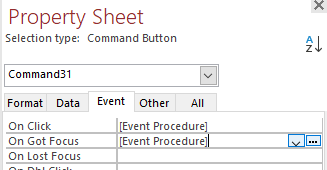
Lets just try the on got focus. Click on your button and go to the properties of the button. See image, Enter the code
ComboName.Requery replace ComboName with the name of your combobox (combo12 or whatever the name is)

What does the on close event say? Is there an error or anything?
Forms!FormName.Requery
Adam Schwanz  @Reply  
           
5 years ago

Adam Schwanz  @Reply  
           
5 years ago
Can confirm the on got focus works. Just tested it, just needs to be put inside the button that opens the form that you can add to the combobox.

ComboName.Requery
Mark Wright OP  @Reply  

5 years ago
Thanks Adam, but this doesn't work. My ComboBox is called WeddingShowCombo - so in the On Got Focus on the button properties I entered WeddingShowCombo.Requery - When I click the button it says 'Microsoft Access cannot find the object WeddingShowCombo.

If WeddingShowCombo is a new macro or macro group, make sure you have saved it and that you have typed its name correctly.

I've checked the ComboBox name and what I've entered and it still doesn't work.

The OnClose Requery does nothing, and does not deliver an error.
Mark Wright OP  @Reply  

5 years ago
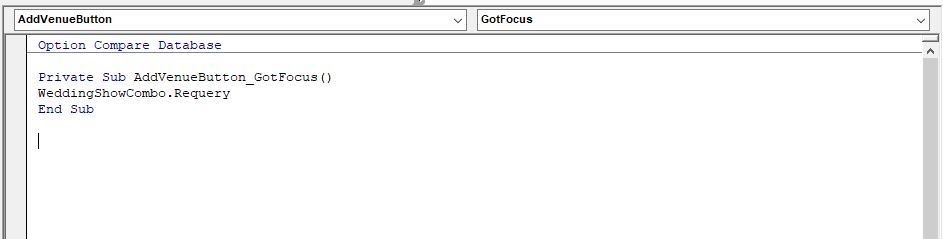
I just realised you might have meant to put it in the EventProcedure element, which obviously opens up the Macros window. I entered the same info in here, but it still doesn't work, although the error disappears.
Adam Schwanz  @Reply  
           
5 years ago
Can you upload an image of your form and code? Something is getting misunderstood here. You can use that upload images button at the top right of your original post.

Im assuming you have a form with a button on it that when pressed opens up a form to add a value to a table the combobox is using. When you close that form and go back to the original form, the focus returns to the button and fires the on got focus event. That requeries your combobox.
Adam Schwanz  @Reply  
           
5 years ago
Also you're putting the code in the code editor (vba) not the macro builder right?
Mark Wright OP  @Reply  

5 years ago
Yes. I tried to add a screenshot for you, but I appear to be unable to add it in the comment.
Mark Wright OP  @Reply  

5 years ago

Mark Wright OP  @Reply  

5 years ago
Sorry, just saw your full message re the image!
Mark Wright OP  @Reply  

5 years ago
Ah, so a little update - this may help! Using the code as above it still doesn't work - HOWEVER, once I've added the new item, closed the form and looked at the items in the ComboBox it still isn't there. If I think click the button again, do nothing except close the form, then the new item is showing.

Is there something I'm doing wrong... 100% yes, but I just can't seem to see what. Hopefully the above info will help you with what I'm doing/not doing. thank you, for your patience.
Adam Schwanz  @Reply  
           
5 years ago
Hey Mark, could you upload a picture of your form (the main form, and the form that you add to if you can, just to get as much information at once as we can) and the properties of the combo (Mainly Name).

I know you said the name was right but that really looks like a naming error, I just want to confirm it again. It's either that or the form layout is different then I'm expecting and you need to call the field using the Forms!FormName etc syntax.
Mark Wright OP  @Reply  

5 years ago

Mark Wright OP  @Reply  

5 years ago

Mark Wright OP  @Reply  

5 years ago

Mark Wright OP  @Reply  

5 years ago
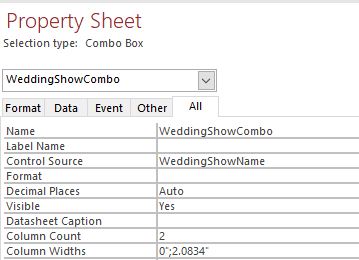
Thanks Adam. The images are (in order)

ComboBox name
WeddingShowsF - This is the when the button is located
WeddingShowListF - this is the form which opens when the button is clicked and the new items can be added.

Hope this is of some help. Thank you again!
Mark Wright OP  @Reply  

5 years ago
Hi Adam, just to ad a little more information. I have another form with a button for exactly the same reason, and in the Build Event I put the RefreshRecord (I made this button first) and it works perfectly. I have checked and there are no differences in the button etc. I have also tried to put the RefreshRecord in the Build Event again on the button I'm having issues with and it still doesn't work.

I really am perplexed as to why it's not working.

This thread is now CLOSED. If you wish to comment, start a NEW discussion in Access Forum.
 

Next Unseen

 
New Feature: Comment Live View


The following is a paid advertisement
Computer Learning Zone is not responsible for any content shown or offers made by these ads.
 

Learn
 
Access - index
Excel - index
Word - index
Windows - index
PowerPoint - index
Photoshop - index
Visual Basic - index
ASP - index
Seminars
More...
Customers
 
Login
My Account
My Courses
Lost Password
Memberships
Student Databases
Change Email
Info
 
Latest News
New Releases
User Forums
Topic Glossary
Tips & Tricks
Search The Site
Code Vault
Collapse Menus
Help
 
Customer Support
Web Site Tour
FAQs
TechHelp
Consulting Services
About
 
Background
Testimonials
Jobs
Affiliate Program
Richard Rost
Free Lessons
Mailing List
PCResale.NET
Order
 
Video Tutorials
Handbooks
Memberships
Learning Connection
Idiot's Guide to Excel
Volume Discounts
Payment Info
Shipping
Terms of Sale
Contact
 
Contact Info
Support Policy
Mailing Address
Phone Number
Fax Number
Course Survey
Email Richard
[email protected]
Blog RSS Feed    YouTube Channel

LinkedIn
Copyright 2026 by Computer Learning Zone, Amicron, and Richard Rost. All Rights Reserved. Current Time: 5/6/2026 9:14:08 PM. PLT: 1s