Free Lessons
Courses
Seminars
TechHelp
Fast Tips
Templates
Topic Index
Forum
ABCD
 
Home   Courses   TechHelp   Forums   Help   Contact   Merch   Join   Order   Logon  
 
Back to Access Forum    Comments List
Upload Images   @Reply   Bookmark    Link   Email   Next Unseen 
Multiple User Data Entry
Beau Tanner 
    
5 years ago
Is it possible for multiple users, on different machines, to use the same database at the same time to input data.

Each user would have different buildings that they would be inputting data, so there wouldn't be any overlap of the data they were entering.  We just have a lot -- A LOT -- of data to enter, and I was curious if multiple people can simultaneously use the same database.
Adam Schwanz  @Reply  
           
5 years ago
Yes, you will need to split the database. I would recommend these to start with:

Split Your Database - or the seminar would be even better
Access Online

You'll need to plan your online option if you're working on different networks/buildings. Access won't work by itself.
Beau Tanner OP  @Reply  
    
5 years ago
Awesome!  Thank you.
Beau Tanner OP  @Reply  
    
5 years ago
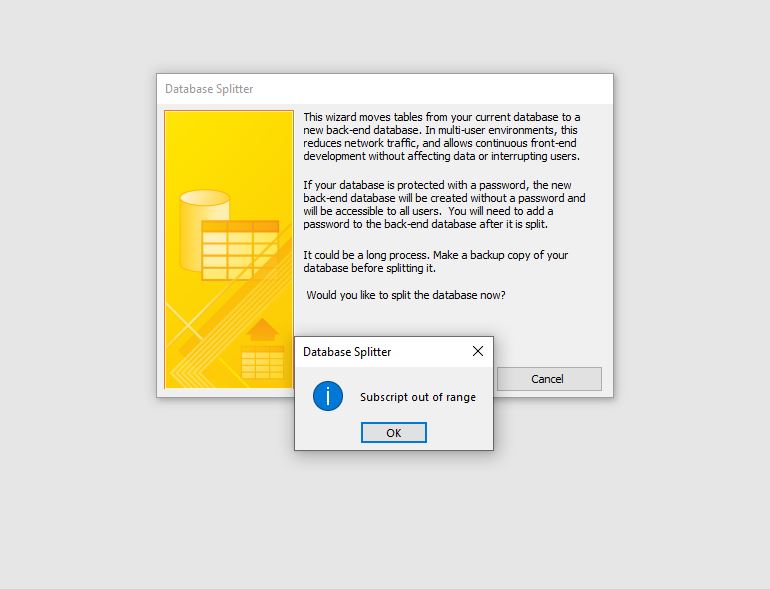
So, I tried to split the database, but it did not work.  What does the "Subscript out of range" error mean?
Beau Tanner OP  @Reply  
    
5 years ago

Richard Rost  @Reply  
          
5 years ago
Compile your VBA code.

In the VB editor window, go to Debug > Compile [Database Name]. You'd be surprised what bad code in one Module will do to another. Usually this just highlights syntax errors, but you'd be surprised sometimes.

Always check the Troubleshooter first when you get weird problems.
Beau Tanner OP  @Reply  
    
5 years ago
Oh, for the love!  I have tried everything I can think of, and gone through your troubleshooter, too.  I have even gone form by form in my database and debugged every form.  I still get the Subscript Out of Range Error.  The BE file is created with all of the tables (which seem to be correct), but there is no Front End file -- that is no file with linked tables to the BE.

I am at my wits end here.  At this point, do I just need to split my database manually?
Adam Schwanz  @Reply  
           
5 years ago
Have you tried splitting a new basically blank database and seeing if you get the error?
Beau Tanner OP  @Reply  
    
5 years ago
No, I have not tried that.  Guess I'll start there...
Beau Tanner OP  @Reply  
    
5 years ago
Well, that worked.  I tried a new database, a different database that I worked on earlier this year, and Rick's Beginner 1 database.  All split successfully.

I tried opening and splitting my college building database, and still get the same error: Subscript out of range.  Would my table relationships be causing the error?
Scott Axton  @Reply  
        
5 years ago
Beau your relationships may very well be the issue.
I googled and read that that could cause issues.  To test it out make a backup copy - Just in case. (You should have already done that by the by)

I the copy go into the Database Tools -> Relationships and delete them all.  Save then compact and repair your db.
After that try to split your db.

Hopefully that will solve it!
Beau Tanner OP  @Reply  
    
5 years ago
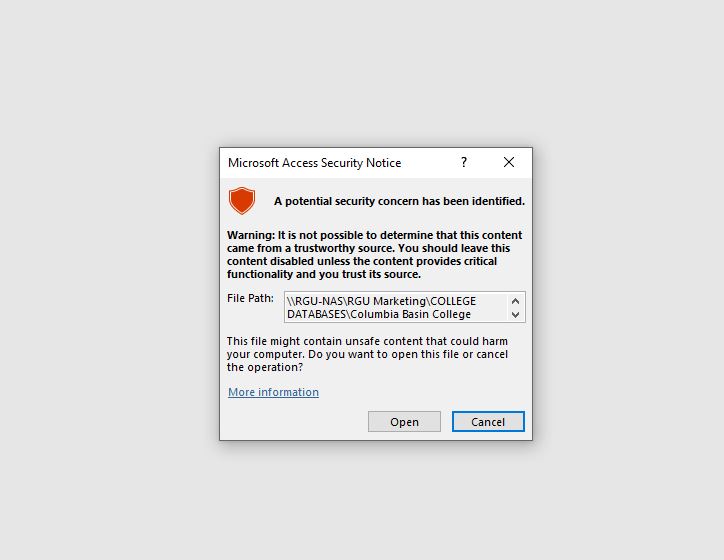
I successfully split the database manually; however, I ran into a new warning.  When I opened the accde file, I got a trust warning.  Is that normal?  The database (accd file) was a trusted document before; I don't have the option now to make this a trusted document, so how do I fix this?
Beau Tanner OP  @Reply  
    
5 years ago

Beau Tanner OP  @Reply  
    
5 years ago
Nevermind.  I figured it out.  I had to save the desktop location as a trusted path.
Richard Rost  @Reply  
          
5 years ago
Whew. I got tired just reading all that. LOL :)

This thread is now CLOSED. If you wish to comment, start a NEW discussion in Access Forum.
 

Next Unseen

 
New Feature: Comment Live View


The following is a paid advertisement
Computer Learning Zone is not responsible for any content shown or offers made by these ads.
 

Learn
 
Access - index
Excel - index
Word - index
Windows - index
PowerPoint - index
Photoshop - index
Visual Basic - index
ASP - index
Seminars
More...
Customers
 
Login
My Account
My Courses
Lost Password
Memberships
Student Databases
Change Email
Info
 
Latest News
New Releases
User Forums
Topic Glossary
Tips & Tricks
Search The Site
Code Vault
Collapse Menus
Help
 
Customer Support
Web Site Tour
FAQs
TechHelp
Consulting Services
About
 
Background
Testimonials
Jobs
Affiliate Program
Richard Rost
Free Lessons
Mailing List
PCResale.NET
Order
 
Video Tutorials
Handbooks
Memberships
Learning Connection
Idiot's Guide to Excel
Volume Discounts
Payment Info
Shipping
Terms of Sale
Contact
 
Contact Info
Support Policy
Mailing Address
Phone Number
Fax Number
Course Survey
Email Richard
[email protected]
Blog RSS Feed    YouTube Channel

LinkedIn
Copyright 2026 by Computer Learning Zone, Amicron, and Richard Rost. All Rights Reserved. Current Time: 5/6/2026 10:32:46 PM. PLT: 0s