Free Lessons
Courses
Seminars
TechHelp
Fast Tips
Templates
Topic Index
Forum
ABCD
 
Home   Courses   TechHelp   Forums   Help   Contact   Merch   Join   Order   Logon  
 
Back to Access Forum    Comments List
Upload Images   @Reply   Bookmark    Link   Email   Next Unseen 
Copy unbound value to bound TB
David Harnett 
    
5 years ago
Hi. On a form I have a value in an unbound text box, is there any way to simply copy that value into a bound text box?
Alex Hedley  @Reply  
           
5 years ago
TextboxA = TextboxB

What are the textbox/controls called?
How/when do you want to copy it - via a button click?
David Harnett OP  @Reply  
    
5 years ago

David Harnett OP  @Reply  
    
5 years ago
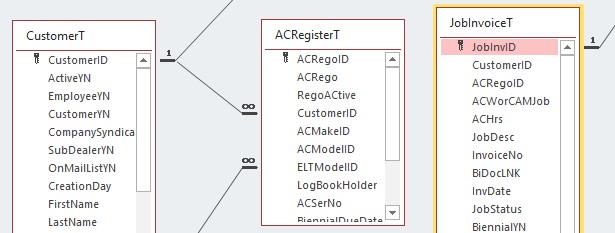
See table structure attached.
In a form based on the JobInvoiceT I am creating a new record, and I use a combobox to find the aircraft registration (ACRegoID from ACRegisterT) I want, then I use dlookup in an unbound text box (TBCustID) to find a the CustomerID for that aircraft registration.
=DLookUp("[CustomerID]","[CustomerT]","[ACRegoID]=" & Forms![JobInvADDJobbyRegoF]!ACRegoID)
I need to record that specific CustomerID on that day (from ACRegisterT) not the one in the CustomerT, onto the form JobInvADDJobbyRegoF so that it updates the JobInvoiceT CustomerID.
I then use the CustomeID in the form to Dlookup the customer name etc from the Customer Table.

I might not be doing this quite the correct way, but I need to do this because customers buy and sell aircraft, and I want to retain the original owners details against the work carried out on that particular day.
David Harnett OP  @Reply  
    
5 years ago
After update of combo box selection would be the best.
David Harnett OP  @Reply  
    
5 years ago
Just a thought,
In the ACRegister combobox Query CustomerID is the third and unused field of the combobox. Can we extrapolate that data out from the selected ACRego and put that into the Form JobInvADDJobbyRegoF CustomerID?
Alex Hedley  @Reply  
           
5 years ago
ACRegisterCombo.Column(#)
David Harnett OP  @Reply  
    
5 years ago
Hi Alex,
Can you give an example of how that would be used, is it [TextboxA]=ACRegisterCombo.Column (3), and how should I use it? do I use this as a macro in the after update field of the combobox?

Thanks
Dave
Richard Rost  @Reply  
          
5 years ago
Put that code in whatever event you want to trigger the copy: the AfterUpdate event of a field, the OnOpen event of the form, etc.

Watch Intro to VBA first.

This thread is now CLOSED. If you wish to comment, start a NEW discussion in Access Forum.
 

Next Unseen

 
New Feature: Comment Live View


The following is a paid advertisement
Computer Learning Zone is not responsible for any content shown or offers made by these ads.
 

Learn
 
Access - index
Excel - index
Word - index
Windows - index
PowerPoint - index
Photoshop - index
Visual Basic - index
ASP - index
Seminars
More...
Customers
 
Login
My Account
My Courses
Lost Password
Memberships
Student Databases
Change Email
Info
 
Latest News
New Releases
User Forums
Topic Glossary
Tips & Tricks
Search The Site
Code Vault
Collapse Menus
Help
 
Customer Support
Web Site Tour
FAQs
TechHelp
Consulting Services
About
 
Background
Testimonials
Jobs
Affiliate Program
Richard Rost
Free Lessons
Mailing List
PCResale.NET
Order
 
Video Tutorials
Handbooks
Memberships
Learning Connection
Idiot's Guide to Excel
Volume Discounts
Payment Info
Shipping
Terms of Sale
Contact
 
Contact Info
Support Policy
Mailing Address
Phone Number
Fax Number
Course Survey
Email Richard
[email protected]
Blog RSS Feed    YouTube Channel

LinkedIn
Copyright 2026 by Computer Learning Zone, Amicron, and Richard Rost. All Rights Reserved. Current Time: 6/17/2026 11:22:35 AM. PLT: 0s