Free Lessons
Courses
Seminars
TechHelp
Fast Tips
Templates
Topic Index
Forum
ABCD
 
Home   Courses   TechHelp   Forums   Help   Contact   Merch   Join   Order   Logon  
 
Back to Calendar Seminar Lessons    Comments List
Upload Images   @Reply   Bookmark    Link   Email   Next Unseen 
More Cool Calendar Stuff
Teeka Leone 
     
5 years ago
Hi Richard Still working on my calendar to make it more fabulous.  Hope you can help cause I think this would be cool to add to your seminar or tech help video. So remember when you helped me with picking the nth day of the week and the nth week of the month to calculate a date?  That works and is super cool.  But.... Is there a way to have that populate EVERY MONTH once selected? I can think of other use cases for this where someone wants a standing appointment.  Like a Landscaping business where the customer wants the 1st Tuesday of every month, or Salons, or Barber shops, nail salons, House cleaning, etc.  I'm so excited to see if/how  this can be done.
Teeka Leone OP  @Reply  
     
5 years ago

Adam Schwanz  @Reply  
           
5 years ago

Adam Schwanz  @Reply  
           
5 years ago
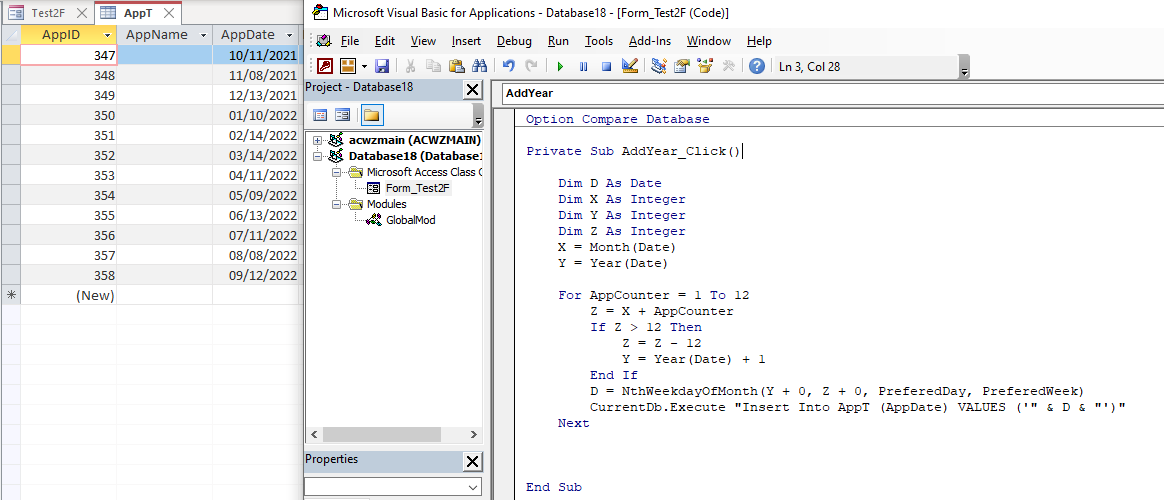
I would just use a for/next loop. That there would add a new record with the AppName and the Date for the next 12 months.
Adam Schwanz  @Reply  
           
5 years ago
Also you can just use AppDate (or whatever your field is called), don't need to call it like Forms!FormName!FieldName I was just messing around with it
Scott Axton  @Reply  
        
5 years ago
Teeka
Great news!  You don't even have to wait for a video because this was already asked.  (Plus Richard seems to be a mind reader at times - LOL)
He covered this in the Add Records Automatically video.  All that you have to do is determine how many you want to add - Press the button - and (in ALZ speak)   BOOM! the records are input for you.
Scott Axton  @Reply  
        
5 years ago
Here is another video that might make a good addition to your calendar.
On Click
Teeka Leone OP  @Reply  
     
5 years ago
Oh my gosh!  You guys ROCK!!!!
Richard Rost  @Reply  
          
5 years ago

Teeka Leone OP  @Reply  
     
5 years ago
Bugger!  I got all of the code in and it runs but doesn't meet the requirement. It  goes through the loop BUT using date add creates SAME date for each month on the calendar for 12 months:  jan4, feb4, mar4, apr4, etc. The requirement is to select which week of the month (1st-4th) and which day of the week (Mon-Fri) and calculate the date for a standing appointment. EX: The first Monday of every month.  That part of the code works for the first instance:  The end user picks the week, then picks the day, Access calculates the date for that month and puts it in the table.  What I need is one step further:  Put it in the calendar EVERY month 12 months out using the week and that day the user selected.  I know it's possible.  If Preferred Week and Preferred Day stay the same once selected then we need to loop through and add 1 to preferred Month 12 times BUT we also have to check for Jan. in the count and add one to the year if that occurs.  I have NO idea how to write it.  Please help
Scott Axton  @Reply  
        
5 years ago
Please copy and paste the code you have here. it would be easier for us to help you tweak it than guess what you have.
Adam Schwanz  @Reply  
           
5 years ago
I was just looking, it looks like Rick made this for you a few months back? First Monday Using that template with some slight changes we can make our loop. You're a platinum member so you can download the template, copy the GlobalMod into your database.


Adam Schwanz  @Reply  
           
5 years ago

Adam Schwanz  @Reply  
           
5 years ago
I have a field called PreferedDay and PreferedWeek on my form, I had a value of 2 in both of those, those are the results I got from it. The second day(monday) of the second week.
Adam Schwanz  @Reply  
           
5 years ago
Also you need those +0s or you get a type mismatch, I don't know why LOL
Adam Schwanz  @Reply  
           
5 years ago
Also I'm sure that's not the prettiest way to do that, I was trying to include Rick's find the day code he wrote for you ;).
Scott Axton  @Reply  
        
5 years ago
Sorry I didn't pick up that you were THAT Teeka.  haha.

Just to take Adams solution and Rick's solution one step farther...

To make this even more flexible, I would make another combo box called "MyHowMany" (following Rick's naming convention).  For that, the value list would simply be 1, 2, 3, ..., 10, 11, 12.  Default value to 12 (or what ever you want).  That way if your needs change in the future and booking out a full year isn't practical you can specify How Many Appointments you want to add.  Add 1, 4, or "Z" appointments with out changing your code.

You would have to modify Adams code.

      Z = MyHowMany

      For AppCounter = 1 to Z

This thread is now CLOSED. If you wish to comment, start a NEW discussion in Calendar Seminar Lessons.
 

Next Unseen

 
New Feature: Comment Live View


The following is a paid advertisement
Computer Learning Zone is not responsible for any content shown or offers made by these ads.
 

Learn
 
Access - index
Excel - index
Word - index
Windows - index
PowerPoint - index
Photoshop - index
Visual Basic - index
ASP - index
Seminars
More...
Customers
 
Login
My Account
My Courses
Lost Password
Memberships
Student Databases
Change Email
Info
 
Latest News
New Releases
User Forums
Topic Glossary
Tips & Tricks
Search The Site
Code Vault
Collapse Menus
Help
 
Customer Support
Web Site Tour
FAQs
TechHelp
Consulting Services
About
 
Background
Testimonials
Jobs
Affiliate Program
Richard Rost
Free Lessons
Mailing List
PCResale.NET
Order
 
Video Tutorials
Handbooks
Memberships
Learning Connection
Idiot's Guide to Excel
Volume Discounts
Payment Info
Shipping
Terms of Sale
Contact
 
Contact Info
Support Policy
Mailing Address
Phone Number
Fax Number
Course Survey
Email Richard
[email protected]
Blog RSS Feed    YouTube Channel

LinkedIn
Copyright 2026 by Computer Learning Zone, Amicron, and Richard Rost. All Rights Reserved. Current Time: 5/2/2026 9:53:33 AM. PLT: 1s