Free Lessons
Courses
Seminars
TechHelp
Fast Tips
Templates
Topic Index
Forum
ABCD
 
Home   Courses   TechHelp   Forums   Help   Contact   Merch   Join   Order   Logon  
 
Back to Access Forum    Comments List
Upload Images   @Reply   Bookmark    Link   Email   Next Unseen 
Download Blocked in Chrome
James Whitney 
   
5 years ago
I was working my way through the Expert videos, downloading each lesson's ZIP file, then unzipping so I could click on each video one at a time. All was well until I got to Expert Level 4. When I attempted to download that ZIP file, Chrome block it and reported that it was "dangerous". The only option Chrome gave me was to "discard". Anyone know why this would happen? Is there a setting I could change to bypass or is it possible Richard's file is in fact infected or somehow dangerous to my PC?
Richard Rost  @Reply  
          
5 years ago
James, I can assure you that every file you can possibly download from my site is 100% safe. I've uploaded them all myself, and nobody but me has access to add files to the download folders. That particular file has not been changed in probably 10 years. Every now and then some 3rd-party virus scanner seems to think one of my files is "infected." Nope. It's a simple ACCDB file inside a ZIP file. I just checked it myself. It downloaded fine, and Windows Defender had no problems with it.

I strongly recommend UNINSTALLING any third-party virus protection programs. You don't need them. They do nothing but slow your system down and cause issues like this. Defender is built into Windows and it's all you need.
Richard Rost  @Reply  
          
5 years ago
Oh, and I'm using Chrome too. Chrome didn't block it for me.
Brent Rinehart  @Reply  
        
5 years ago
I got that tonight as well when downloading the Project Management template with Chrome, I  have the latest version of chrome and I wonder if this was something that just recently was released with chrome I did hear there was some issues with past versions with Chrome? I have never seen this come up when downloading anything from this site except for today.
James Whitney OP  @Reply  
   
5 years ago
Richard, thanks for responding so quickly. I should not have even pondered the possibility of an infected file on your site. You are far too thorough and detailed to have allowed that to happen. Adjusting the security settings solved the problem. I am sure it is an issue with Chrome. I am glad to be able to get back to watching more lessons. Thanks again for your excellent videos!
Richard Rost  @Reply  
          
5 years ago
I'm not saying that I'm impervious to hackers. I've been hacked before. About 10 years ago I had the United States Air Force show up at my front door saying that my server was being used in a denial-of-service attack against the Pentagon. They knew that I wasn't to blame and they traced the hackers back to North Korea. They just wanted my permission to install monitoring equipment on my server which was hosted at a local company. Anyone can be hacked.

But if you have any third-party antivirus software on your system it's completely unnecessary. Windows Defender does a fine job of catching any malicious software. Just be careful where you download from. As far as Chrome saying that there was a problem with one of my downloads, that's really strange.
David Shackelford  @Reply  
     
5 years ago
I also had the same problem today with Chrome.  Chrome blocked downloads for Microsoft Access Expert 32 and its handbook, identifying the downloads as Dangerous, with the only option shown as Discard".   I tried downloading earlier versions that I had already downloaded.  Chrome blocked those as well.  This is a Chrome specific problem on both Mac and Windows after recent updates.

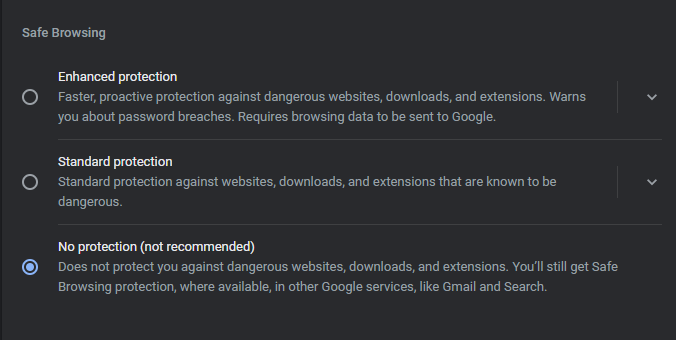
My Safe Browsing settings in Chrome are set to Standard Protection.  The other two options are Enhanced Protection and No Protection.  
After I switched Safe Browsing on the Chrome browser to No Protection, I could download with Chrome. When I set it back to Standard Protection, I could not download.
I have no problems downloading with other browsers (Firefox, Edge, or Safari).

Until Chrome fixes this problem, I will be switching to Firefox for downloads.
James Whitney OP  @Reply  
   
5 years ago
One other clue that might help identify the issue is that I was able to download all lessons up to the one where Richard states he is shifting to Access 2013 beginning with that video. Expert Level 3 and lower were all fine, Expert Level 4 and higher were all blocked.
Richard Rost  @Reply  
          
5 years ago
Interesting... but I don't see a difference in the files. They're still all ACCDB files. I could see if it was a switch from MDB to ACCDB.
Richard Rost  @Reply  
          
5 years ago
I wonder if this article is relevant: Malwarebytes Blocking SHELL Function
Scott Axton  @Reply  
        
5 years ago
I saw that article today also.  I use MWB at work in active mode but so far no issues.
It mentions Enterprise edition.  I don't recall what I have.
Brent Rinehart  @Reply  
        
5 years ago
Microsoft Edge does not have the problem, but only way I could get it to work with Chrome was to go into the settings--Privacy & Security--->Security  and change form Standard protection to no protection, now I don't know if this is something you want to do or maybe just do temporarily when you need to download from a trusted site, but it was the only was I figured so far, chrome definitely changed some settings.
Brent Rinehart  @Reply  
        
5 years ago

David Shackelford  @Reply  
     
5 years ago
Chrome seems to be working again with no problems downloading any of the  lessons from Computer Learning Zone.
I had sent the following support request to Chrome on Sep 21, 2021:
----------
I can no longer download files from 599cd.com (The Computer Learning Zone).  I receive warnings similar to 599CD_Access_201....ZIP is dangerous, so Chrome had blocked it. The only option given is to "Discard". I receive this same warning from Chrome both on my Mac and when using Windows. I and many others have been purchasing and downloading Microsoft Office courses from Richard Rost at this site for years.  My Safe Browsing settings in Chrome are set to Standard Protection. Firefox, Edge, and Safari all work.  Please fix this as soon as possible
----------
I did not receive a direct reply, but Chrome is now working OK with Safe Browsing set to Standard Protection. 🚀
Brent Rinehart  @Reply  
        
5 years ago
Good to know I will try the next time I need to download.
Richard Rost  @Reply  
          
5 years ago
They may have just changed a setting which made their logic too aggressive and later decided to change it after people complained. Sure, it's possible for Access VBA to do SOME harm with things like the Shell function... but not really. You can't read/write to Windows system protected folders without Administrative privileges so the amount of damage you could do is limited to user files.

This thread is now CLOSED. If you wish to comment, start a NEW discussion in Access Forum.
 

Next Unseen

 
New Feature: Comment Live View


The following is a paid advertisement
Computer Learning Zone is not responsible for any content shown or offers made by these ads.
 

Learn
 
Access - index
Excel - index
Word - index
Windows - index
PowerPoint - index
Photoshop - index
Visual Basic - index
ASP - index
Seminars
More...
Customers
 
Login
My Account
My Courses
Lost Password
Memberships
Student Databases
Change Email
Info
 
Latest News
New Releases
User Forums
Topic Glossary
Tips & Tricks
Search The Site
Code Vault
Collapse Menus
Help
 
Customer Support
Web Site Tour
FAQs
TechHelp
Consulting Services
About
 
Background
Testimonials
Jobs
Affiliate Program
Richard Rost
Free Lessons
Mailing List
PCResale.NET
Order
 
Video Tutorials
Handbooks
Memberships
Learning Connection
Idiot's Guide to Excel
Volume Discounts
Payment Info
Shipping
Terms of Sale
Contact
 
Contact Info
Support Policy
Mailing Address
Phone Number
Fax Number
Course Survey
Email Richard
[email protected]
Blog RSS Feed    YouTube Channel

LinkedIn
Copyright 2026 by Computer Learning Zone, Amicron, and Richard Rost. All Rights Reserved. Current Time: 5/31/2026 11:37:03 AM. PLT: 0s