Free Lessons
Courses
Seminars
TechHelp
Fast Tips
Templates
Topic Index
Forum
ABCD
 
Home   Courses   TechHelp   Help   Contact   Merch   Join   Order   Logon   Forums   
 
Back to Access Forum    Comments List
Upload Images   @Reply   Bookmark    Link   Email   Next Unseen 
Referencing a SubForm
Ashlyn M Talley 
    
5 years ago
Hello, I wanted to apply what I learned in one of Richards Tech Help videos How to Send Email from Microsoft Access using Microsoft Outlook Seems that each and all of his videos either broadens my knowledge and/or is readily applied to my ever-evolving database.
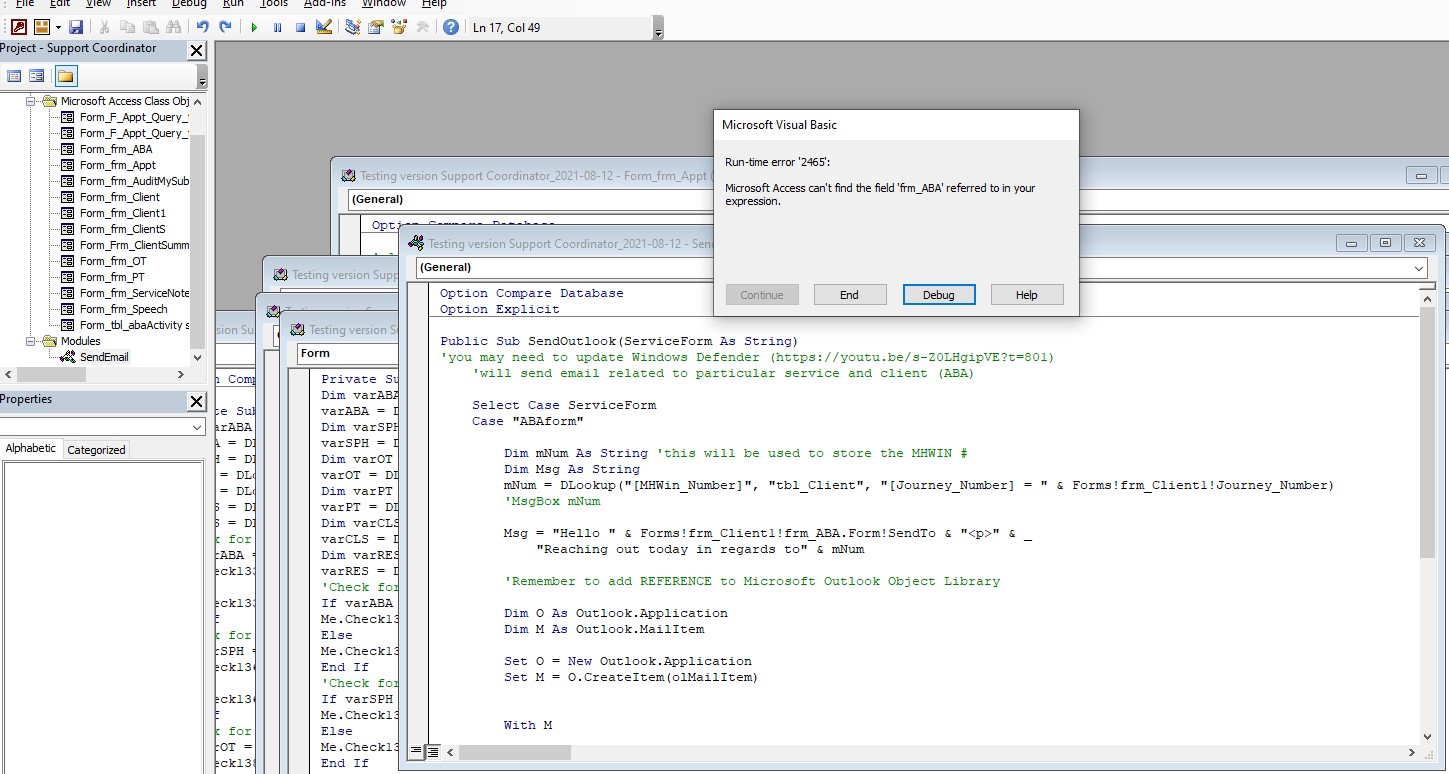
In this instance I need to call this subroutine in several other subforms so I placed it in its own Module. After watching yet another of Richards training video Bang v Dot, I applied what was learned. Before revising the code to then reference the subform it worked . Now when the form presents as a subform in the mainform frm_Client1. Access is thinking that the subform frm_ABA is a field. After scouring the internet, I did apply other methods to try to reference the subfom, all unsuccessful but with differing results.
I get the following error message:
"Runtime error '2465: MS Access can't find the field "frm_ABA" referred to in your expression"
Mainform: frm_Client1
Subform: frm_ABA
Control: SendTo

Public Sub SendOutlook(ServiceForm As String)
    
    Select Case ServiceForm
    Case "ABAform"
    
        Dim mNum As String 'this will be used to store the MHWIN #
        Dim Msg As String
        mNum = DLookup("[MHWin_Number]", "tbl_Client", "[Journey_Number] = " & Forms!frm_Client1!Journey_Number)
        'MsgBox mNum
        
        Msg = "Hello " & Forms!frm_Client1!frm_ABA.Form!SendTo & "<p>" & _
            "Reaching out today in regards to" & mNum
            
        'Remember to add REFERENCE to Microsoft Outlook Object Library
        
        Dim O As Outlook.Application
        Dim M As Outlook.MailItem
        
        Set O = New Outlook.Application
        Set M = O.CreateItem(olMailItem)        
        
        With M
            .BodyFormat = olFormatHTML
            .HTMLBody = Msg
            '.Body=Txt - if you use olFormatPlain
            .To = Forms!frm_ABA!eMail
            '.cc = "[email protected]"
            '.bc = "whomever@ myself.org "
            .Subject = mNum & " " & "ABA Therapy  " & Now()
            .Display
            '.Send '(if you don't want to see the email and just sent
            
        End With        
                  
        Set M = Nothing
        Set O = Nothing
        'SendOutlook "ABAform" 'placed in event'
     End Select
End Sub
Ashlyn M Talley OP  @Reply  
    
5 years ago

Scott Axton  @Reply  
      
5 years ago
Ashlyn -
I didn't dig real deep but it appears to me that you need to fully qualify your To: =
When you hit Debug in the error box is that the line that is highlighted in yellow? Or a different one?
Usually that tells you where your error is.

Syntax for Fields on a Subform: Forms!ParentFormName!SubFormName.Form!FieldName

So looks like you are on the right track.  Another good video:  Value From a Form
Ashlyn M Talley OP  @Reply  
    
5 years ago
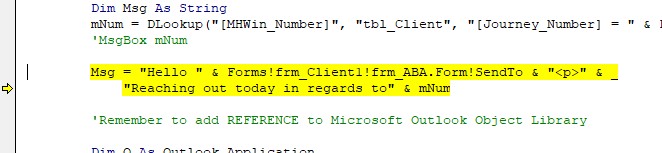
Hi Scott, thank for taking a peek at this... Yes, you are right further down the (.To:) = will also need to be referencing the subform but the error that is halting the subroutine is a bit further up at the:

Msg = "Hello " & Forms!frm_Client1!frm_ABA.Form!SendTo & "<p>" & _
            "Reaching out today in regards to" & mNum

"Runtime error '2465: MS Access can't find the field "frm_ABA" referred to in your expression"

Mainform: frm_Client1
Subform: frm_ABA
Control: SendTo

If I have frm_ABA open and the take the reference to the mainform out it works. For some reason when I try to reference the subform in the mainform using the code above I get halted with the 2465 error message
Ashlyn M Talley OP  @Reply  
    
5 years ago

Richard Rost  @Reply  
          
5 years ago
Check the name property of the subform object.
Ashlyn M Talley OP  @Reply  
    
5 years ago
Hi Richard, sorry just now thinking to circle back to this. You were correct with the suggestion of the name property for the subform. As you can see from the code, using your example to get Access to email from Outlook. This has been such a learning experience, more so since the ONLY name property in the tab control that didn't have the same name as the subform was of course the one that I was testing on. Nevertheless, I got my subroutine to work while even writing a Function in the process. Never would I have imagined developing Access to where I'm at today, you are one amazing instructor!
Richard Rost  @Reply  
          
5 years ago

This thread is now CLOSED. If you wish to comment, start a NEW discussion in Access Forum.
 

Next Unseen

 
New Feature: Comment Live View


The following is a paid advertisement
Computer Learning Zone is not responsible for any content shown or offers made by these ads.
 

Learn
 
Access - index
Excel - index
Word - index
Windows - index
PowerPoint - index
Photoshop - index
Visual Basic - index
ASP - index
Seminars
More...
Customers
 
Login
My Account
My Courses
Lost Password
Memberships
Student Databases
Change Email
Info
 
Latest News
New Releases
User Forums
Topic Glossary
Tips & Tricks
Search The Site
Code Vault
Collapse Menus
Help
 
Customer Support
Web Site Tour
FAQs
TechHelp
Consulting Services
About
 
Background
Testimonials
Jobs
Affiliate Program
Richard Rost
Free Lessons
Mailing List
PCResale.NET
Order
 
Video Tutorials
Handbooks
Memberships
Learning Connection
Idiot's Guide to Excel
Volume Discounts
Payment Info
Shipping
Terms of Sale
Contact
 
Contact Info
Support Policy
Mailing Address
Phone Number
Fax Number
Course Survey
Email Richard
[email protected]
Blog RSS Feed    YouTube Channel

LinkedIn
Copyright 2026 by Computer Learning Zone, Amicron, and Richard Rost. All Rights Reserved. Current Time: 8/7/2026 5:15:48 PM. PLT: 0s