Free Lessons
Courses
Seminars
TechHelp
Fast Tips
Templates
Topic Index
Forum
ABCD
 
Home   Courses   TechHelp   Forums   Help   Contact   Merch   Join   Order   Logon  
 
Back to Access Forum    Comments List
Upload Images   @Reply   Bookmark    Link   Email   Next Unseen 
OpenForm Nested Subforms
Elaine Heltman 
     
5 years ago
I want to create double-click event using docmd.openform to open a form with nested subforms. How do I construct docmd.openform with 2 conditions: LesseeID from the main form  (MatterDetail_F2), and the LeaseID from the subform (TestLease_SubF).

Im receiving a type mismatch error with these attempts:
DoCmd.OpenForm "MatterDetail_F2", , , "LesseeID=" & LesseeID And "LeaseID=" & LeaseID

DoCmd.OpenForm "MatterDetail_F2", , , "LesseeID=" & LesseeID And "TestLease_Sub.LeaseID=" & LeaseID

Thanks and let me know if screenshots of the forms would help.
Adam Schwanz  @Reply  
           
5 years ago
Are the forms not linked like a parent/child? You should be able to just open the main form and have the child (subform) fill in automatically. Otherwise if they are not linked, an image could help see what you're trying to do.
Elaine Heltman OP  @Reply  
     
5 years ago
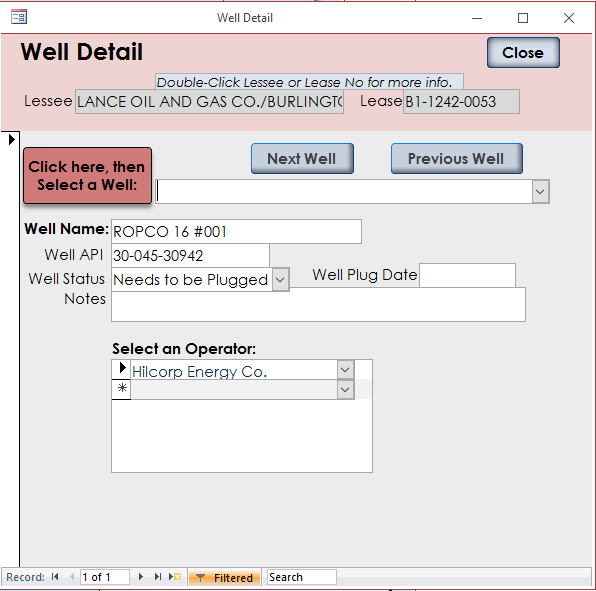
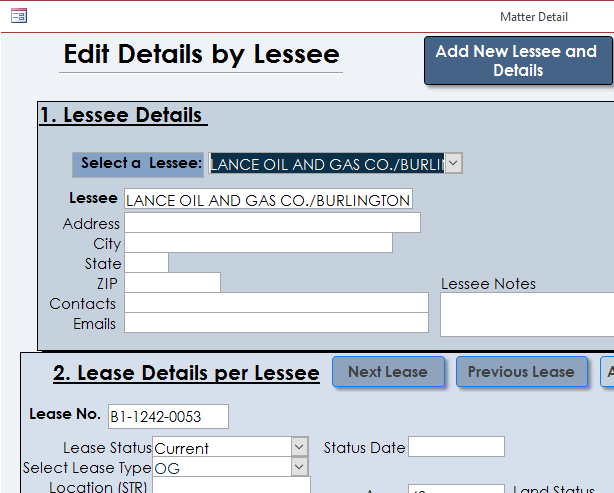
Yes, they're linked. Here's the whole process: Via a search form (thank you Search Seminar), double click on a "Well" result and the WellDetail form opens, showing the Well details (whose Record Source is a query that includes LesseeID and LeaseID) and also showing the user the related Lessee and the related Lease. Lessees and Leases have a 1 to M relationship, as do Leases and Wells. From this WellDetail form the user can doubleclick on the Lease and another form opens with more detail - easy. But, when the user doubleclicks on the Lessee, I want a different form to open (the nested form) that shows the Lessee (in the main form) and opens to the Lease (subform) as was shown in the the WellDetail form, not just the first Lease in the subform, which are in numerical order. I'll attach 2 snips that I hope will clarify. I appreciate your help.
Elaine Heltman OP  @Reply  
     
5 years ago

Elaine Heltman OP  @Reply  
     
5 years ago

Scott Axton  @Reply  
        
5 years ago
OK here we go......

First your Docmd.OpenForm is way outta whack (Well, Duh Scott, she just said it didn't work) because of incorrect concatenation.  I know, I know - bear with me.

The reason you get the type mismatch is because you are trying to put text into an id field.
If you just had:  DoCmd.OpenForm "MatterDetail_F2", , , "LesseeID=" & LesseeID
That would work.  
Now yours has:   DoCmd.OpenForm "MatterDetail_F2", , , "LesseeID=" & LesseeID AND ...
Access is trying to convert the where condition to  Lesseeid = LesseeID AND  instead of substituting the value of the variable - LesseeID = 9 for instance.  LesseeID AND is text and Access tries but says wait I can't do that. Text into a number field doesn't work.  So... type mismatch error.
Get it?

So to get that to work the proper concatenation you would have to do:
DoCmd.OpenForm "MatterDetail_F2", , , "LesseeID=" & LesseeID & " And LeaseID=" & LeaseID

Note the Space before the And   - " And

Scott Axton  @Reply  
        
5 years ago
Regarding your forms.  While some what helpful - a capture of your form in design view is more helpful to us for seeing what is happening behind the scenes.

Lessee and lease are awful close.  Double check spelling.  I misread those at first.

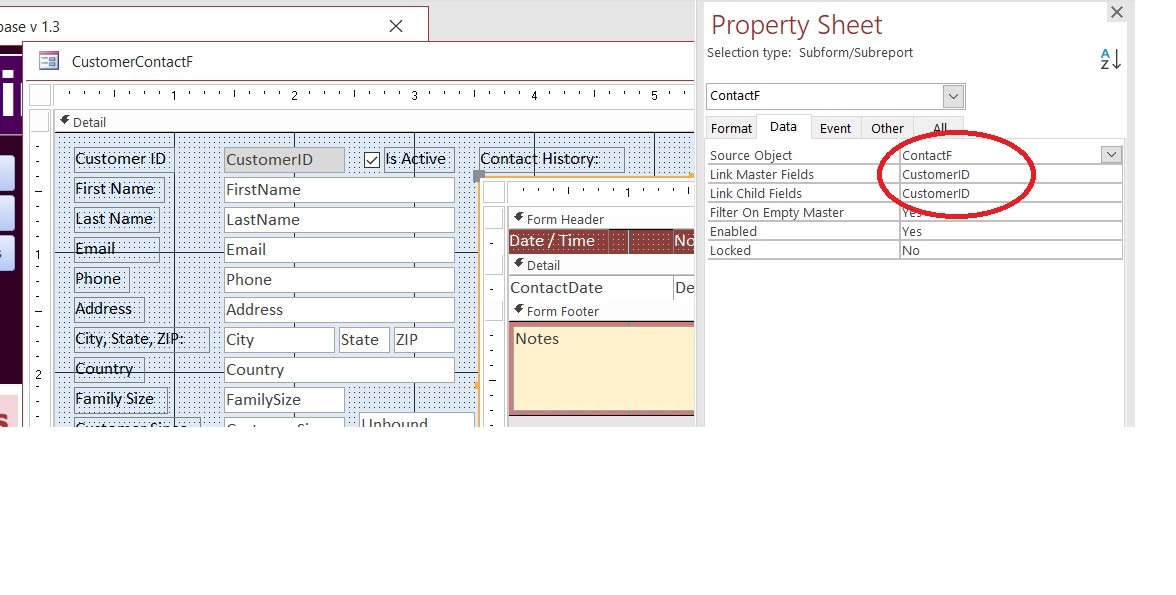
If you click on the subform once and go to properties - make sure the relationship is correct between parent form and the subform.
See the example capture from the Blank template below.  
Scott Axton  @Reply  
        
5 years ago

Richard Rost  @Reply  
          
5 years ago
Concatenation... I tell ya... those quotes and ANDs will get ya.
E Heltman OP  @Reply  
     
5 years ago
Thanks for your help, Scott, I'll be working on it this afternoon.
E Heltman OP  @Reply  
     
5 years ago
Still not working. Here are the results of 2 (of many) different attempts-

Scott's fix:
DoCmd.OpenForm "MatterDetail_F2", , , "LesseeID=" & LesseeID & " And LeaseID=" & LeaseID
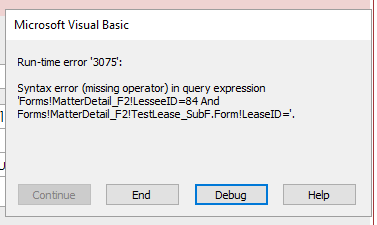
Generates an error message: Run-time error 3075  Syntax error (missing operator) in query expression LesseeID=84 And LeaseID=  I'm not sure how to express this, but is the code is not "finding" the LeaseID, because of the error?

My attempt:
DoCmd.OpenForm "MatterDetail_F2", , , "LesseeID=" & LesseeID & " And LeaseID=" & Lease_T_LeaseID
No error message, the MatterDetail form opens, but to blank records.
Richard Rost  @Reply  
          
5 years ago
Are you working with a form and a subform here? If so, you will need to use the FULL name of whichever field is NOT on the same form as your code. For example:

Forms!LesseeF!LesseeID

and

Forms!LesseeF!LeaseSubformF.Form!LeaseID

See FormName.
E Heltman OP  @Reply  
     
5 years ago
Not working, yet.
DoCmd.OpenForm "MatterDetail_F2", , , "Forms!MatterDetail_F2!LesseeID=" & LesseeID & " And Forms!MatterDetail_F2!TestLease_SubF.Form!LeaseID=" & LeaseID
attaching error message
E Heltman OP  @Reply  
     
5 years ago

E Heltman OP  @Reply  
     
5 years ago
Yes, subforms are present in each form - but the LesseID and LeaseID on the form with the code, are located on the main form, not on a subform.
Richard Rost  @Reply  
          
5 years ago
Since the end of the statement is saying it can't find LeaseID, check to make sure you spelled it right. The NAME property of the textbox that it's in has to be LeaseID, not just the control source.
E Heltman OP  @Reply  
     
5 years ago
Ah, right. The name property of the textbox and the control source are the same: Lease_T.LeaseID - made that change:

DoCmd.OpenForm "MatterDetail_F2", , , "Forms!MatterDetail_F2!LesseeID=" & LesseeID & " And Forms!MatterDetail_F2!TestLease_SubF.Form!LeaseID=" & Lease_T.LeaseID

But - Run-time error 424: Object required
Richard Rost  @Reply  
          
5 years ago
You can't open a form like that with criteria from another different form. If Lessee is the parent form, you can ONLY open that guy up.

DoCmd.OpenForm "MatterDetail_F2", , , "Forms!MatterDetail_F2!LesseeID=" & LesseeID

Make sure that works first. Now, if you have a subform for the leases, and you want to show a specific one, you can change the RecordSource for the subform:

Forms!MatterDetail_F2!TestLease_SubF.Form.RecordSource = "SELECT * FROM Lease_T WHERE LeaseID=" & LeaseID

Try that.
E Heltman OP  @Reply  
     
5 years ago
The first code has definitely worked, but opens MatterDetail_F2 to the first Lease linked to that Lessee. I'd like the Lessee to open with the related Lease (in the subform) as shown in the requesting form.  
I'm sure I'm missing something (in addition to a some brain cells), as I don't understand how changing the RecordSource for the subform would work any differently than it does now, since they're linked correctly and working? Thanks, and I'll test more tomorrow.
Richard Rost  @Reply  
          
5 years ago
You have to tell the subform WHICH lease to display. That's the LeaseID. That's why you're changing the recordsource for the subform. You're telling Access, "open this parent form, and then show this specific record in the subform."
Richard Rost  @Reply  
          
5 years ago
You know what... someone else asked me a question very similar to this a few weeks ago. Let me dig it up and I'll use this example for my next TechHelp video. Hang in there.
E Heltman OP  @Reply  
     
5 years ago
Will do and thank you!
Richard Rost  @Reply  
          
5 years ago
Here you go. Watch the Extended Cut: Open Form to a Specific Record
E Heltman OP  @Reply  
     
5 years ago
Awesome. I vote for Method One for it's flexibility to view other records and will try it! Thank you.
E Heltman OP  @Reply  
     
5 years ago
One and done. Very elegant solution.
Richard Rost  @Reply  
          
5 years ago
You're very welcome. Sometimes it's just easier to SHOW you. :)

This thread is now CLOSED. If you wish to comment, start a NEW discussion in Access Forum.
 

Next Unseen

 
New Feature: Comment Live View


The following is a paid advertisement
Computer Learning Zone is not responsible for any content shown or offers made by these ads.
 

Learn
 
Access - index
Excel - index
Word - index
Windows - index
PowerPoint - index
Photoshop - index
Visual Basic - index
ASP - index
Seminars
More...
Customers
 
Login
My Account
My Courses
Lost Password
Memberships
Student Databases
Change Email
Info
 
Latest News
New Releases
User Forums
Topic Glossary
Tips & Tricks
Search The Site
Code Vault
Collapse Menus
Help
 
Customer Support
Web Site Tour
FAQs
TechHelp
Consulting Services
About
 
Background
Testimonials
Jobs
Affiliate Program
Richard Rost
Free Lessons
Mailing List
PCResale.NET
Order
 
Video Tutorials
Handbooks
Memberships
Learning Connection
Idiot's Guide to Excel
Volume Discounts
Payment Info
Shipping
Terms of Sale
Contact
 
Contact Info
Support Policy
Mailing Address
Phone Number
Fax Number
Course Survey
Email Richard
[email protected]
Blog RSS Feed    YouTube Channel

LinkedIn
Copyright 2026 by Computer Learning Zone, Amicron, and Richard Rost. All Rights Reserved. Current Time: 6/16/2026 4:46:22 PM. PLT: 1s