Free Lessons
Courses
Seminars
TechHelp
Fast Tips
Templates
Topic Index
Forum
ABCD
 
Home   Courses   TechHelp   Forums   Help   Contact   Merch   Join   Order   Logon  
 
Back to Access Forum    Comments List
Upload Images   @Reply   Bookmark    Link   Email   Next Unseen 
Font Format BUG of Lesson File
Alexis Cao 

5 years ago
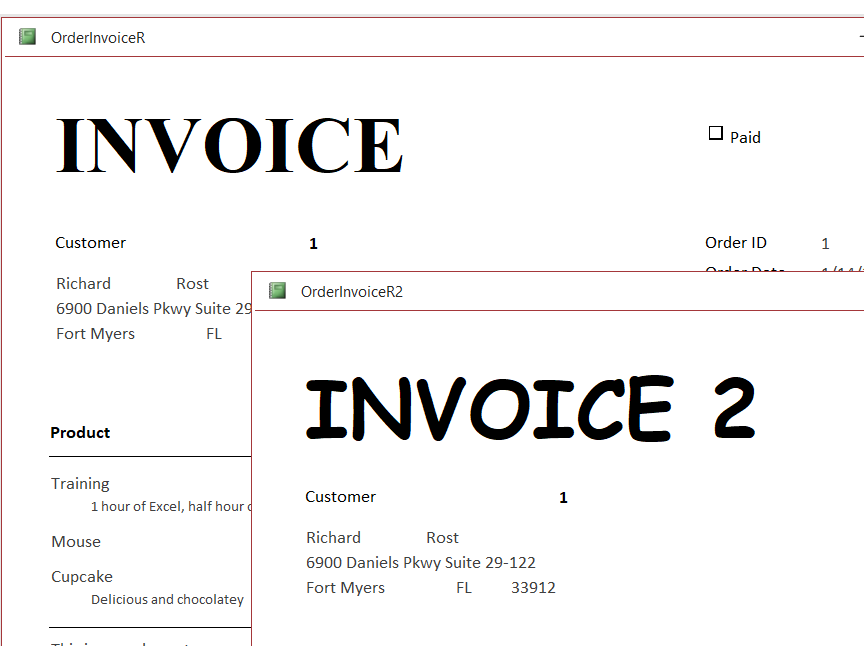
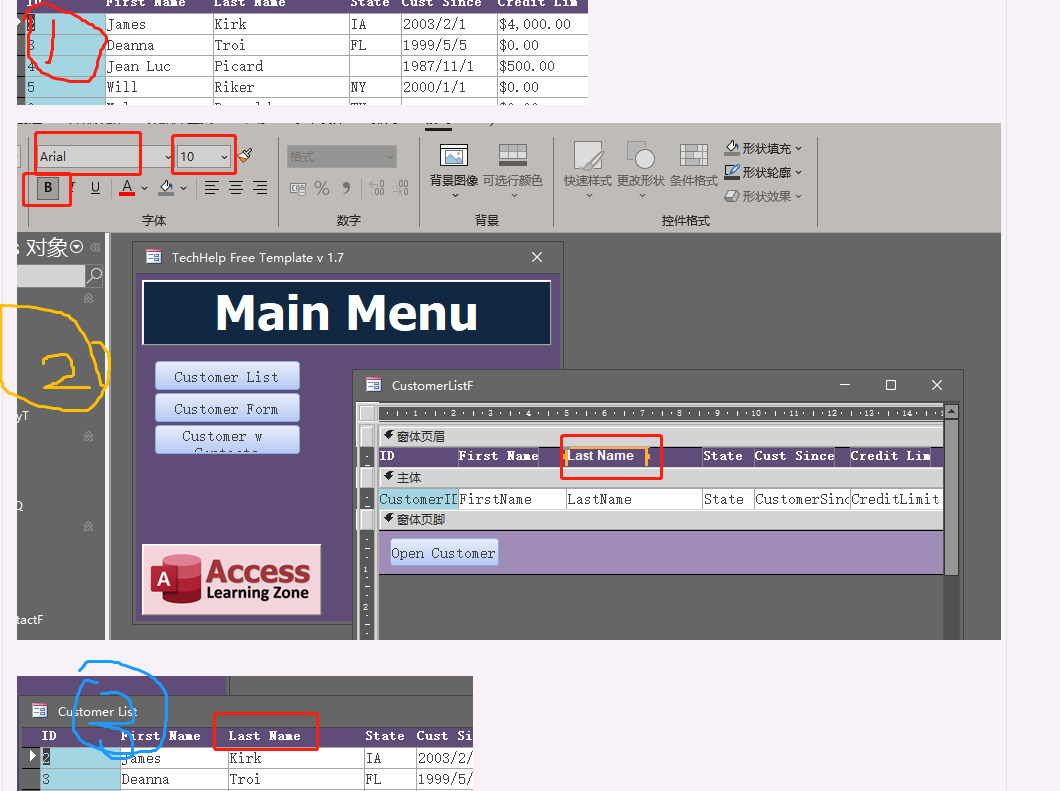
after downloading the ABCD or Tech member access files, i found that i can't change the form, report font format,when i change it by hand, after saving and go to Form view or report view, it revert like i never change it before.

i am using the office365, so i had tried to asked for help from Microsft team, but it's failed to fix the problem, also went to microsoft forum, also failed

you know it's important for changing the right and suitable font format for user and customers, nomatter about the form or report, but all files i download has the same problem, like the ABCD core, and tech part files, i also change another computer, the problem seems only to appears the files i downloaded from our website

So what should i do, i can provide the problem video, but i don't know where to uplaod

so help!!! and by the way, my computer is 64bits, office365 i used


Adam Schwanz  @Reply  
           
5 years ago
Odd, so when you open it, make some changes, save it and close. Then reopen, its back to original?

By chance are they saved as a template? ACCDT

Have you tried to save the file, Save As, Database, and give it a different name. Then open that and seeing what it does?
Scott Axton  @Reply  
        
5 years ago

Scott Axton  @Reply  
        
5 years ago
I just tried using the Moving  Averages video down load and I'm not seeing any issues.
I'm still using 32 bit however.

Can you make a new report and change fonts in a db that you create?  (Not just change one of Richards)

Are you using standard Windows fonts?

I don't see a country flag for your account, and others not from the US are using these files, and have not reported any issues.
Is this for non-english fonts?

Something else I just thought of.  You aren't running the Access db from within the Zip file are you?  You extracted the files to a folder on your computer?

If you try all the above and you're still having problems you may be having issues with your installation of Office.

Run through the   Troubleshooter step by step.
It's possible you may have to re-install Office.
Scott Axton  @Reply  
        
5 years ago
It is not possible to upload videos to this site.  You can upload images though.  In the upper right hand corner of your original post.
In this instance I don't believe images would help us.  You did a good job of describing the issue.
Alexis Cao OP  @Reply  

5 years ago

Alexis Cao OP  @Reply  

5 years ago
i zip file to a folder to open the template, my friend.  i am from China. the defalut font is Chinese, like the picture i upload just now
Alexis Cao OP  @Reply  

5 years ago
Dear Adam Schwanz,

like you said, back to original
i trid to save as a accdt, same problem, also save as another name, same!
Alexis Cao OP  @Reply  

5 years ago
Hello, anyone can help me? this problem is not still solved yet!!  0.0
Adam Schwanz  @Reply  
           
5 years ago
Did you go down the Troubleshooter?

If you are zipping it right like Scott said, there's not really many other options. Can you try to open it from another machine?
Scott Axton  @Reply  
        
5 years ago
Alexis

I have a very high suspicion that you are trying to work with the files directly from within the .ZIP file.
I just want to make sure that we are on the same level.

After you downloaded the course file to your computer, did you EXTRACT / UNZIP the file in to your folder?

From Google:
How do you unzip a file on a PC?
           Extract/Unzip Zipped Files

           Right-click the zipped folder saved to your computer.
           Choose "Extract All..." (an extraction wizard will begin).
           Click [Next >].
           Click [Browse...] and navigate to where you would like to save the files.
           Click [Next >].
           Click [Finish].
Alexis Cao OP  @Reply  

5 years ago
Dear Adam & Scott,

i am sure i zipped into the folder, that's the basic step, all we think that, right? haha!  and yeah, i tried on two diffirent computers, same situation, same problem,my friends. i am from China, usually use our mother languge, so i also tried set the english vision of the computer, also the english vision of the office.
i also copy the template detail table files, form report files to another access files, i don't know how big bug it is, yeah, the problem is still there, like the picture i sent above. wh...at should i do, my friends!!!!


Alexis Cao OP  @Reply  

5 years ago
i have sent a short problem video to Mr. Richard, but he is on the holidays this week, so i hope to ask help on the forum. HELP!! I REALLY DON'T THE DEFAULT FONT FORMAT, I ALSO FOUND THAT MY DOWNLOAD FILE FONT FORMAT IS DIFFIRENT WITH THE TEACHING VIDEO, IS IT WEIRD, TOO!!!!???
Adam Schwanz  @Reply  
           
5 years ago
I don't have any other ideas with the information here. You can email me the video at [email protected] and ill look when i get a chance, otherwise you'll have to wait for Richard.
Scott Axton  @Reply  
        
5 years ago
Alexis -
If you create a new blank database and add your own table and forms do you still have the same problem?


Alexis Cao OP  @Reply  

5 years ago
if i create a new blank files, like Form, or report by myselft in the downloaded access files, the problem disapprears, but the copy files has the problem.
Dear Scott, you know,  some times the downloaded original Form has lots of VBA CODE, i am not good at the access like Richard or you, so that's the key of my font format questions

at last thank you, thank you for your attention, Dear Scott
Alexis Cao OP  @Reply  

5 years ago
Dear Adam,  i have sent the short video by [email protected] to your email, please check your spam box when you are free, thank you, thank you my friend
Adam Schwanz  @Reply  
           
5 years ago
Right click that ACCDB file and go to properties, post a picture here of that please.
Alexis Cao OP  @Reply  

5 years ago
Thank you, thank you, Dear Adam. the problem is sovled after seeing your last massege.

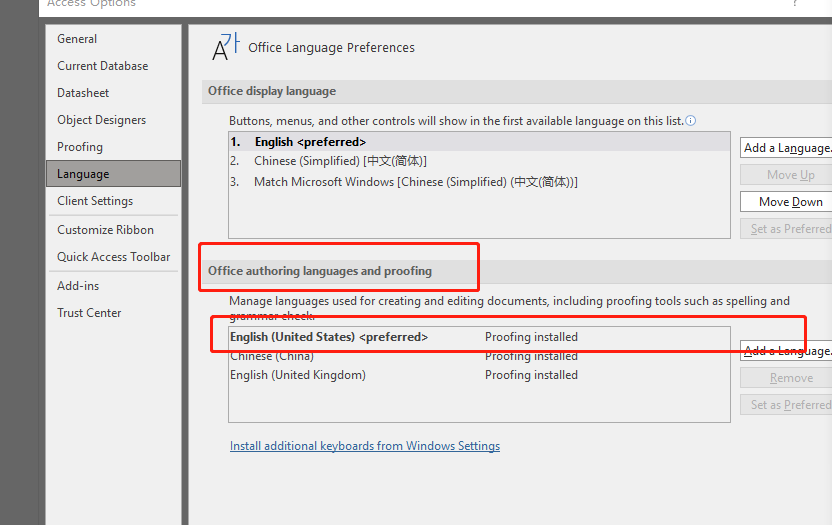
The problem is to set the " office authoring languages and proofing" and set the English as preferred. after that, the default font format is the same like the teaching video, also can be customized, like Arial font.

The sulotion inspiration if from you, Dear Adam. you need me the screenshot of the properties, so i feel that i need to give you the english version picture, otherwise you can't understand the Chinese. so i changed the "office display language" and "office autoring languages and proffing" these two options, and reopen it, and i found that the default font is changed, and then i tried to customize the Arial font, it's OK, can be changed, too. so the problem is solved

Thank you Dear Adam. and thank you Dear Scott Axton. i can't sovle the problem without your help

Alexis Cao OP  @Reply  

5 years ago

Scott Axton  @Reply  
        
5 years ago
Wow - What a journey.  So happy that you have discovered the solution.
I appreciate you letting us know what the solution was.  Maybe it will help another person in the future.
Regarding the VBA you mentioned - just keep learning a little each day and soon you will master the program.
Alexis Cao OP  @Reply  

5 years ago
yes, i will keep learning each day. i am doing that now, haha. thank you, thank you Dear Scott.
Richard Rost  @Reply  
          
5 years ago
Problems like this that I've never seen before are 99% of the time due to different language settings. I have ZERO experience using Access with other languages, so I probably wouldn't have gotten this one myself. Good work guys.
Alexis Cao OP  @Reply  

5 years ago
WOW, haha! Mr Richard, the Original author has reply to my questions, and also so modesty. i like it, yeah, i feel i am going to fall in love with this website. How lucky i am i think, how lucky to meet the Invoicing Tech Video with my serching word though Youtobe. so many years confussions will be solved, i am confidence with this website. by the way, Dear Richard, could you help me with the Chinese Flag logo, i never saw it in our webiste, doesn't your students come from China, if no, i think i will be the luckest one, haha. give me the Chinese Logo, please. so Proud, haha
Richard Rost  @Reply  
          
5 years ago
Alexis, I don't have many students from China, but I'll add the flag as soon as I get a free minute. :)

This thread is now CLOSED. If you wish to comment, start a NEW discussion in Access Forum.
 

Next Unseen

 
New Feature: Comment Live View


The following is a paid advertisement
Computer Learning Zone is not responsible for any content shown or offers made by these ads.
 

Learn
 
Access - index
Excel - index
Word - index
Windows - index
PowerPoint - index
Photoshop - index
Visual Basic - index
ASP - index
Seminars
More...
Customers
 
Login
My Account
My Courses
Lost Password
Memberships
Student Databases
Change Email
Info
 
Latest News
New Releases
User Forums
Topic Glossary
Tips & Tricks
Search The Site
Code Vault
Collapse Menus
Help
 
Customer Support
Web Site Tour
FAQs
TechHelp
Consulting Services
About
 
Background
Testimonials
Jobs
Affiliate Program
Richard Rost
Free Lessons
Mailing List
PCResale.NET
Order
 
Video Tutorials
Handbooks
Memberships
Learning Connection
Idiot's Guide to Excel
Volume Discounts
Payment Info
Shipping
Terms of Sale
Contact
 
Contact Info
Support Policy
Mailing Address
Phone Number
Fax Number
Course Survey
Email Richard
[email protected]
Blog RSS Feed    YouTube Channel

LinkedIn
Copyright 2026 by Computer Learning Zone, Amicron, and Richard Rost. All Rights Reserved. Current Time: 5/2/2026 10:07:07 AM. PLT: 0s