Free Lessons
Courses
Seminars
TechHelp
Fast Tips
Templates
Topic Index
Forum
ABCD
 
Home   Courses   TechHelp   Help   Contact   Merch   Join   Order   Logon   Forums   
 
Back to Access Forum    Comments List
Upload Images   @Reply   Bookmark    Link   Email   Next Unseen 
Engine Does Not Recognize
Larry Large 
     
5 years ago
I have developed a database for a local seniors club with about 400 members.  Memberships are for a calendar year.  I have created the Membership Application form as a report and for the renewal campaign I print the application forms from a query for all active members.  When the member renews, he notes any changes to the data on the membership form which I then use to update the database.  This works well.  
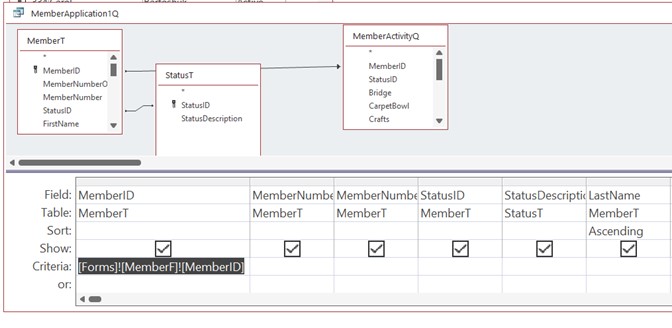
There are times when I want to print the Membership Application report for a member who I have open I the data entry form.  I made copies of the original query and the report.  The criteria for the new query is MemberT.MemberID = [Forms]![MemberF]![MemberID].  When I run the query with MemberF open to a member I get the following error message - The Microsoft Access database engine does not recognize '[Forms]![MemberF]![MemberID]' as a valid field name or expression.  
I do not know why I get this error. Any help is appreciated.
Adam Schwanz  @Reply  
           
5 years ago
Can you Upload an image of the query? Snip & Sketch

Checking off the obvious, but have you checked spelling and that there is a field on the form called MemberID?
Scott Axton  @Reply  
      
5 years ago
Did you bring in the * for your query?

That error message makes me think you are trying to put the above in your Field line.  Not the Criteria line.
This sounds to me to be just like printing a specific invoice.  Except you want a Renewal form.  Check out the Invoicing video at about 54 min.  Richard show how to set up the query.

Richard Rost  @Reply  
          
5 years ago
I guarantee something is spelled wrong or you have quotes in the wrong place. Let's see your design (screen shots). Also see Open Report to Specific Record
Larry Large OP  @Reply  
     
5 years ago

Adam Schwanz  @Reply  
           
5 years ago
Could you include some more photos like the design view of MemberF and the MemberID field?
Richard Rost  @Reply  
          
5 years ago
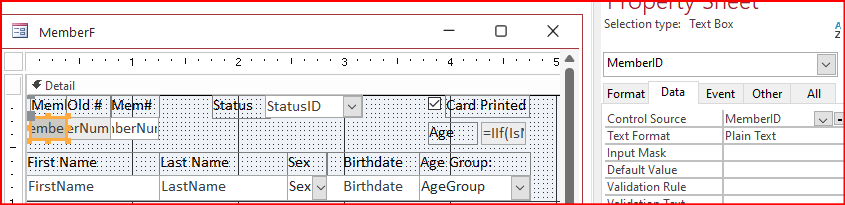
OK. Now let's see the name of the MemberID text box on the MemberF form.
Larry Large OP  @Reply  
     
5 years ago
Adam - Yes, I checked the obvious.  I uploaded an image of the query.  Not all the fields are shown - there are about 40 fields in the query.  The query is a copy of the query I use when generating the Membership Application form for all members, a process that works perfectly.  The only difference in the queries is the Criteria for the MemberID - there is no criteria in MemberID in the original query. I use an identical process to print Membership Cards for all members and individual Membership Cards when required.  The criteria for membership cards is identical and works perfectly.
Richard Rost  @Reply  
          
5 years ago
I would reduce it down to the bare minimum number of fields and see if it works then. And again, check the name of the text box. A lot of times, people add a text box manually to a form. They set the Control Source property to MemberID, so it's SHOWING the MemberID value, but the name of the box is still Command23. In which case, you'll get that error.
Larry Large OP  @Reply  
     
5 years ago

Richard Rost  @Reply  
          
5 years ago
OK... I see the Control Source. Go to the ALL tab and let's see the NAME property.
Larry Large OP  @Reply  
     
5 years ago
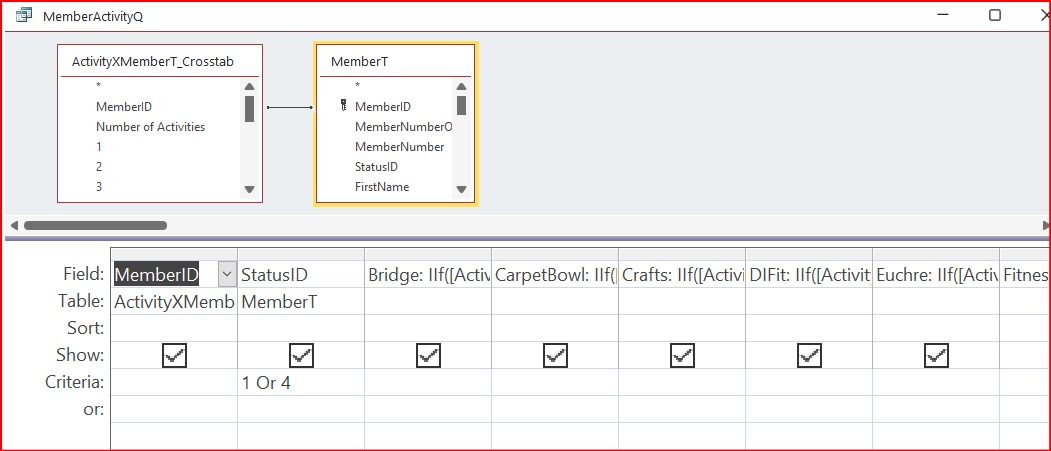
I reduced the number of fields in the Query and the problem persisted.  Then I deleted the MemberActivityQ query from my query and the error goes away.  So now I know that my problem lies somewhere with using MemberActivityQ in my query.  But why?
Larry Large OP  @Reply  
     
5 years ago
Both the Control Source and Name properties are MemberID.
Richard Rost  @Reply  
          
5 years ago
That was going to be my next question. Let's see that query's design.
Larry Large OP  @Reply  
     
5 years ago

Richard Rost  @Reply  
          
5 years ago
That's a pretty complex query. You will run into this sometimes. You've got Query1 dependent upon Query2 which is dependent upon a Crosstab query. You may just be running into the "too complex" problem when you have queries many levels deep. You may need to turn one of these into a MakeTable query and then work off of a temp table.
Larry Large OP  @Reply  
     
5 years ago
Thanks Richard.  I think I remember seeing something like that in one of my lessons, but I couldn't find it.  I'll give this a try and let you know how I make out.  I am learning a lot from your courses.
Richard Rost  @Reply  
          
5 years ago
You're very welcome. Also, when you get weird errors, you can always try running down the Troubleshooter too. This is probably caused by a query that's just too complex, but you never know. Sometimes a Compact/Repair will fix weird stuff too.
Larry Large OP  @Reply  
     
5 years ago
Update.  It works!  I took the original query that worked for creating application forms for all members and made it a Make Table query.  I edited the macro on the buttons that generate the membership form(s) for printing to delete and re-add the table to ensure that any changes to underlying tables are reflected.  Thank you again for all the help.
Richard Rost  @Reply  
          
5 years ago
Awesome. Glad to help.

This thread is now CLOSED. If you wish to comment, start a NEW discussion in Access Forum.
 

Next Unseen

 
New Feature: Comment Live View


The following is a paid advertisement
Computer Learning Zone is not responsible for any content shown or offers made by these ads.
 

Learn
 
Access - index
Excel - index
Word - index
Windows - index
PowerPoint - index
Photoshop - index
Visual Basic - index
ASP - index
Seminars
More...
Customers
 
Login
My Account
My Courses
Lost Password
Memberships
Student Databases
Change Email
Info
 
Latest News
New Releases
User Forums
Topic Glossary
Tips & Tricks
Search The Site
Code Vault
Collapse Menus
Help
 
Customer Support
Web Site Tour
FAQs
TechHelp
Consulting Services
About
 
Background
Testimonials
Jobs
Affiliate Program
Richard Rost
Free Lessons
Mailing List
PCResale.NET
Order
 
Video Tutorials
Handbooks
Memberships
Learning Connection
Idiot's Guide to Excel
Volume Discounts
Payment Info
Shipping
Terms of Sale
Contact
 
Contact Info
Support Policy
Mailing Address
Phone Number
Fax Number
Course Survey
Email Richard
[email protected]
Blog RSS Feed    YouTube Channel

LinkedIn
Copyright 2026 by Computer Learning Zone, Amicron, and Richard Rost. All Rights Reserved. Current Time: 8/1/2026 6:12:26 AM. PLT: 1s