Free Lessons
Courses
Seminars
TechHelp
Fast Tips
Templates
Topic Index
Forum
ABCD
 
Home   Courses   TechHelp   Forums   Help   Contact   Merch   Join   Order   Logon  
 
Back to Access Forum    Comments List
Upload Images   @Reply   Bookmark    Link   Email   Next Unseen 
Yearly List
Colin Smyth 
      
4 years ago
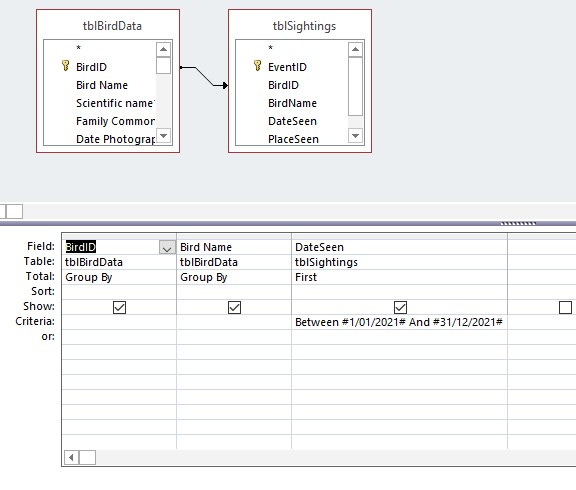
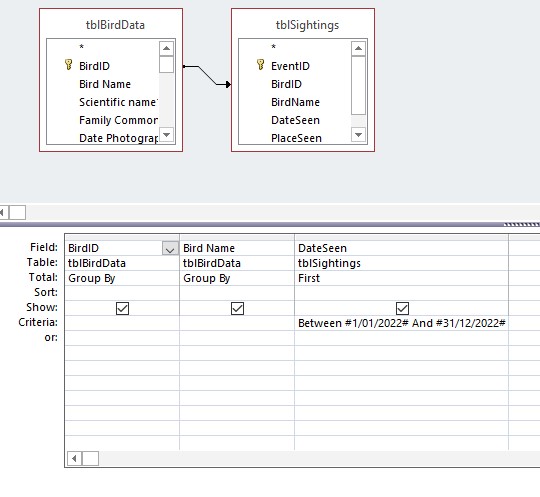
I have a database of birds that I have seen. I have a table with all the birds listed. I have another table as to when I have seen them. Some may be seen on multiple occasions. I set up a query, which lets me choose the birds seen for 2021 as per the attached query. However, when I go to set up a new list for 2022, it will not select birds that were seen in 2021 even if they have been seen in 2022. How do I change the query, so that the groupby command that has first, allows me to only select the birds seen in 2022.
Colin Smyth OP  @Reply  
      
4 years ago

Colin Smyth OP  @Reply  
      
4 years ago

Scott Axton  @Reply  
        
4 years ago
Colin

The query will work as you have it if the first time you EVER sighted a bird is in 2022.
To test it out put in a fake bird that you know isn't in your database.  Try dodo (Raphus cucullatus) for 2/01/2022

If you only want to see birds you have sighted in 2022 even though you have seen them in previous years you would need to change the grouping from First to Last.
---

Another way, if you truly want to display the First sighting of 2022 would be to first create a regular query with the criteria of this year - Example ThisYearQ.  Then create your Aggregate query using your ThisYearQ as the data source.
Colin Smyth OP  @Reply  
      
4 years ago
Hi Scott. Thanks for your reply. I actually did have a new bird for 2022 and it picked that up OK. So I changed the first to last and it then picked all the birds for this year.

So when I come to 2023, would last still work in the same way?

Could you please enlarge a little on your other suggestion using the ThisYearQ and aggregate query?

Thank you for your help
Scott Axton  @Reply  
        
4 years ago
Sure Colin.
For 2023 and beyond Last would work the same EXCEPT you would need to change the Between statement each year for DateSeen.  You might forget and end up wondering why you aren't getting the data you want.  

Check out the Birthdays video.  Also scroll down and watch the linked videos in the Links section.
Even though Richard is explaining how to use DateSerial regarding Birthdays the technique of how to use it in queries applies to what your trying to accomplish.  That goal being "Future Proofing" your queries.

Give those a go and then come back and ask more questions of me.
Alex Hedley  @Reply  
           
4 years ago
Could use YEAR(DateSeen) = INPUT
Could make a DISTINCT Query of DateSeen years to make a dropdown on a form and use that as the above criteria.
Colin Smyth OP  @Reply  
      
4 years ago
Thank you Scott. I did watch the birthday videos but found it hard to see how I would use it as I don't want months and years but Richard said that DateSerial needs three bit so data, whereas I only want the year. Using last seemed much simpler for me. Thank you for your help and advice
Colin Smyth OP  @Reply  
      
4 years ago
Hi Alex. Did you mean using Year (DateSeen) as a parameter in the query - I tried that but it brought up and error when I ran the query.
Wasn't sure what you meant by a Distinct query of DateSeen
Thanks for your advice
Scott Axton  @Reply  
        
4 years ago
Colin - I'm working up an example for you.  Work is getting in my way so please bear with me.
Scott Axton  @Reply  
        
4 years ago
Sorry Colin- I sure got bogged down at work,  I apologize for the delay.
So...
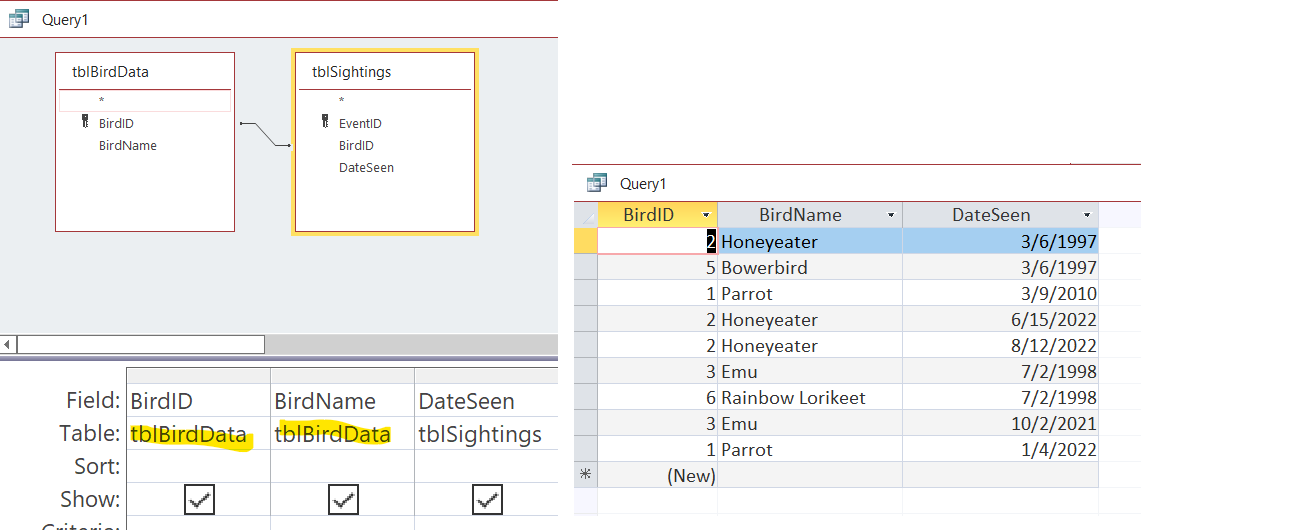
First thing I see is that you have spaces in your names in your tblBirdData.  Trust me when I say that will make you life more difficult as you grow in your database development. I don't know how extensive you have developed things so far but for me it would be worth making  the change now.
If you choose not to remember everywhere you use the names you need to enclose the field names in square brackets.  [Bird Name ]

Second thing I see in your tblSightings is you have BirdName stored in the second table.  A major purpose of  relational data bases is to reduce redundancy and duplication as much as possible.  Since you have linked the 2 tables via the BirdID field you can very easily display the name in any form, report etc.
Scott Axton  @Reply  
        
4 years ago

Scott Axton  @Reply  
        
4 years ago
The reason I had you watch the video I did was so you could see how to "Explode" a date or deconstruct it.  Then using Date Serial how to put it back together.
So if you do Year(date())  that tells Access to show me the year of today's date.  It would currently give you 2022.
Next year at this time it would return 2023 and so on.  So by combining that function with the DateSerial function you could make a dynamic date like this:  
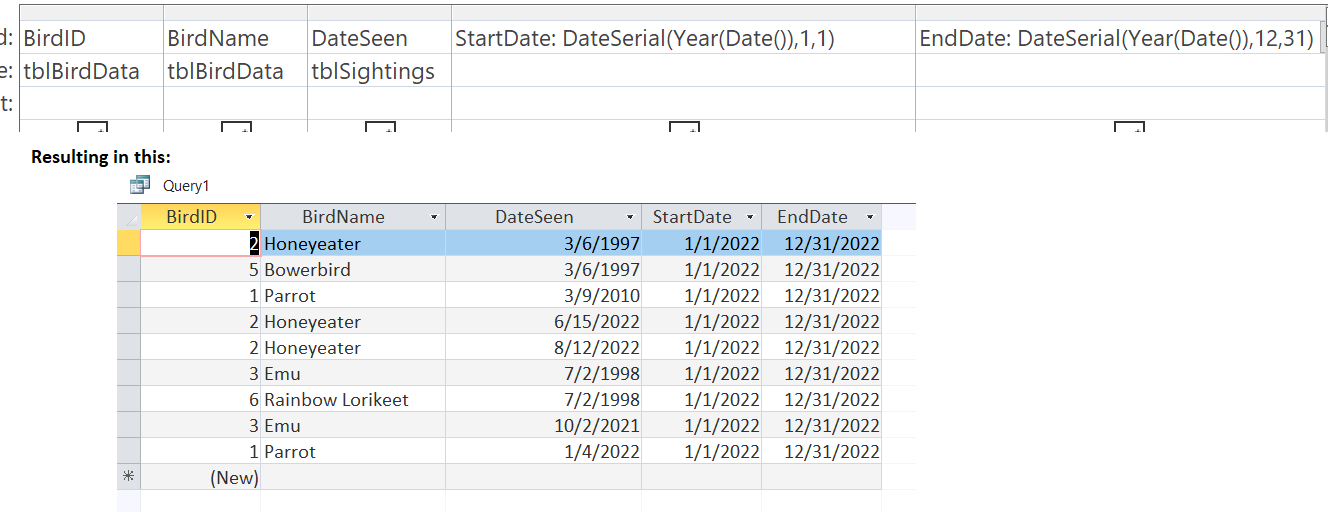
StartDate: DateSerial(Year(Date()),1,1)
and this:
EndDate: DateSerial(Year(Date()),12,31)

Access would evaluate the StartDate as 1/1/2022  (Sorry Microsoft evaluates it as American Dates mm/dd/yyyy)
EndDate would be evaluated as 12/31/2022
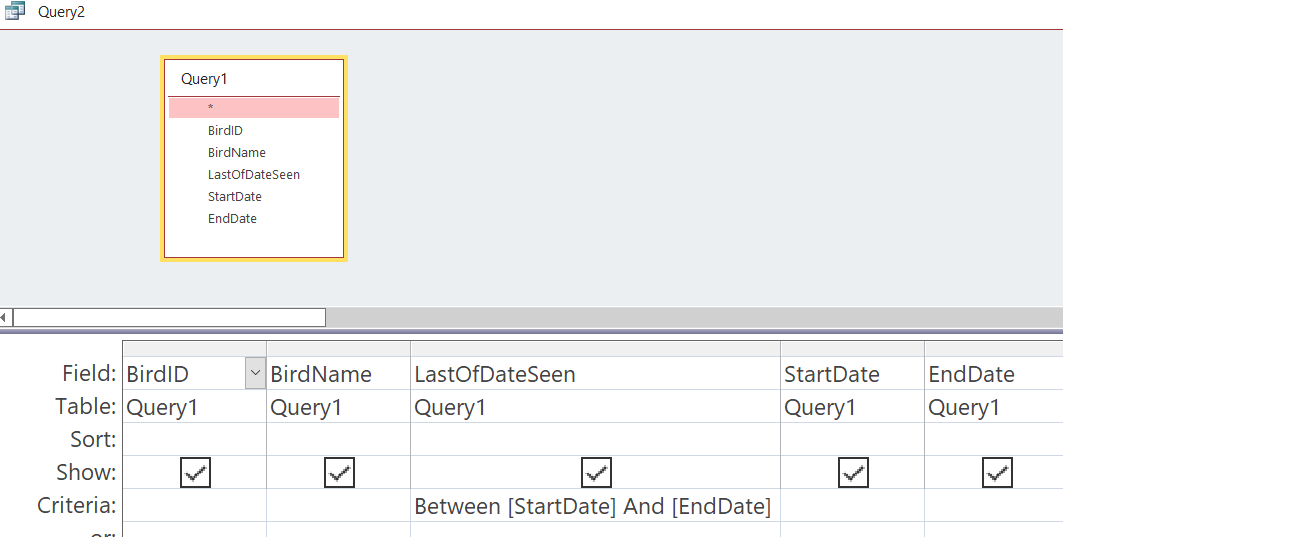
These calculations would go in your first query.  Like this:

Scott Axton  @Reply  
        
4 years ago

Scott Axton  @Reply  
        
4 years ago
Note that the StartDate and EndDate are not stored anywhere.  They are calculated when you run the query.
Now you would make a second query based on the first one you just made, Query1 in the picture, to produce your Aggregate Query.
Scott Axton  @Reply  
        
4 years ago

Scott Axton  @Reply  
        
4 years ago
Doing it this way your query to show this years sightings will work for this year, 2023, and each one in the future with out having to make updates.

I hope I didn't just confuse the heck out of you.  Hope it helps.
Colin Smyth OP  @Reply  
      
4 years ago
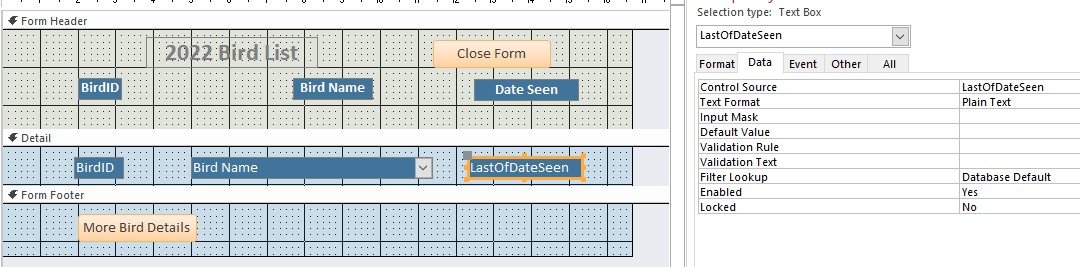
Hi Scott. That is great. Thank you - could very easily follow that. Can I ask one other question. I would like to be able to have a form in my programme that shows which birds were seen for each year. How can I set up the form so that it can show which birds are seen for each year and that be retained for the individual years. Do I do a validation rule that chooses the year for that form or how? Thank you
Colin Smyth OP  @Reply  
      
4 years ago

Scott Axton  @Reply  
        
4 years ago
Once you get the data in the fun is manipulating it so you can see it in a meaningful manner.
You might find the Value From a Form video will help answer your question.

Richard show a lot of different ways to pull out that information in the courses. Access Beginner 5 goes over a lot more detail.  Then the other courses progressively add on to your knowledge base.  You kind of have to follow along and build the knowledge base as you go.

There is a ton of great info in the TechHelp videos, the extended cuts as well as the free videos.  I'm glad to see you are a member.  Just like you didn't see the value in the Birthday video at first, when I showed you how you could apply that knowledge to what you were doing it made sense for you.  The courses are the next level up and give you even more detail.  I suggest you continue on with your journey in the courses.

If you haven't watched ALL of the videos in the TechHelp I would implore you to do so
Colin Smyth OP  @Reply  
      
4 years ago
Thank you very much Scott for all your assistance - really appreciate the time you took. Regards Colin

This thread is now CLOSED. If you wish to comment, start a NEW discussion in Access Forum.
 

Next Unseen

 
New Feature: Comment Live View


The following is a paid advertisement
Computer Learning Zone is not responsible for any content shown or offers made by these ads.
 

Learn
 
Access - index
Excel - index
Word - index
Windows - index
PowerPoint - index
Photoshop - index
Visual Basic - index
ASP - index
Seminars
More...
Customers
 
Login
My Account
My Courses
Lost Password
Memberships
Student Databases
Change Email
Info
 
Latest News
New Releases
User Forums
Topic Glossary
Tips & Tricks
Search The Site
Code Vault
Collapse Menus
Help
 
Customer Support
Web Site Tour
FAQs
TechHelp
Consulting Services
About
 
Background
Testimonials
Jobs
Affiliate Program
Richard Rost
Free Lessons
Mailing List
PCResale.NET
Order
 
Video Tutorials
Handbooks
Memberships
Learning Connection
Idiot's Guide to Excel
Volume Discounts
Payment Info
Shipping
Terms of Sale
Contact
 
Contact Info
Support Policy
Mailing Address
Phone Number
Fax Number
Course Survey
Email Richard
[email protected]
Blog RSS Feed    YouTube Channel

LinkedIn
Copyright 2026 by Computer Learning Zone, Amicron, and Richard Rost. All Rights Reserved. Current Time: 4/30/2026 8:11:29 AM. PLT: 1s