Free Lessons
Courses
Seminars
TechHelp
Fast Tips
Templates
Topic Index
Forum
ABCD
 
Home   Courses   TechHelp   Forums   Help   Contact   Merch   Join   Order   Logon  
 
Back to Access Forum    Comments List
Upload Images   @Reply   Bookmark    Link   Email   Next Unseen 
Forms as Subforms
David Cooke 
     
4 years ago
From Template DB I click on Customer Form --> Contacts, Contact Form opens(from first record) and I can add records to the contact no problem.  Im trying to duplicate this in my database design but the child to parent record will not automatically populate like the template.  If I manually add the parent record no problem.  Ive reviewed most of the videos to see how this was completed and Im sure Im missing something simple.
Thank you
Dave
Kevin Robertson  @Reply  
          
4 years ago
Have you stated the Default Value for the CustomerID field in the Contact Form?

=[Forms]![CustomerF]![CustomerID]
David Cooke OP  @Reply  
     
4 years ago
Hi Kevin,
From the template Richard uses  DoCmd.OpenForm "ContactF", , , "CustomerID=" & CustomerID

I too did this to my button and the form opens to the specific records, but when I add a new record on this opened form it does not link the new record to the parent unless I manually add it.

ChangeID, TaskID, ChangeDate...etc.  The TaskID (number, long int) doesn't update to the same as the other records.

Hope that makes sense.

Your suggestion where would I put the bang formula

Thank you
Dave
Kevin Robertson  @Reply  
          
4 years ago
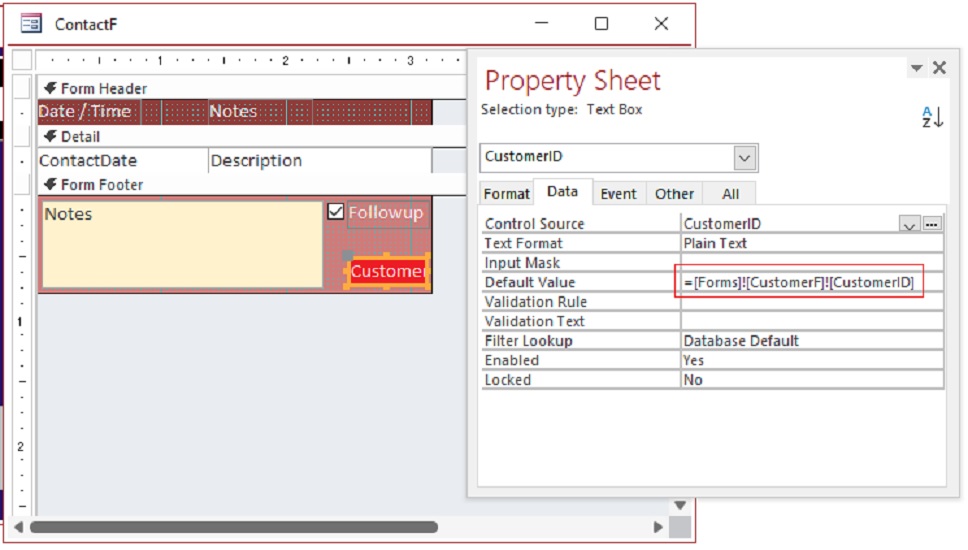
Using the template as a visual example, please see the screenshot below.
Just change the Table Name and Field Name as necessary.
Kevin Robertson  @Reply  
          
4 years ago

David Cooke OP  @Reply  
     
4 years ago
Hi Kevin,

I did try your suggestion in the default field for the record and it does work but in Richard's version he doesn't use bang formula and doesn't show the CustomerID in the ContactF textbox in the form.

Thank you
Dave
David Cooke OP  @Reply  
     
4 years ago
Hi Kevin,

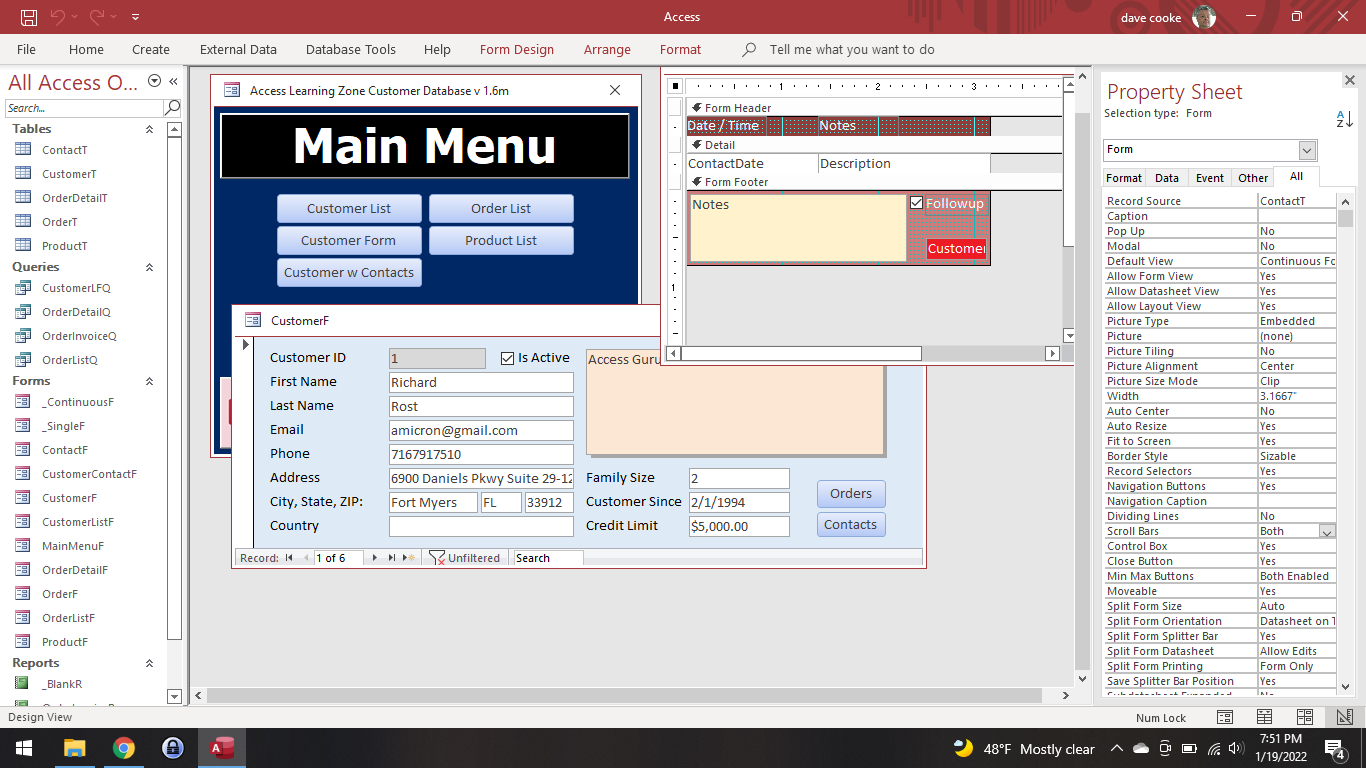
That is not the button that I'm using.  Main Menu --> Customer Form --> Contacts.  I wish I could post an image. :)

Thanks
Dave
Kevin Robertson  @Reply  
          
4 years ago
David,

To post an image click on the Upload Image link located on the top right of your original post.
David Cooke OP  @Reply  
     
4 years ago

Scott Axton  @Reply  
        
4 years ago
David -
Is the CustomerID the same name in both your ContactT and your CustomerT (What ever you name YOUR tables) ?
If they are you may have a typo.  If they aren't Access may not have picked up on the relationship between the form and the subform.

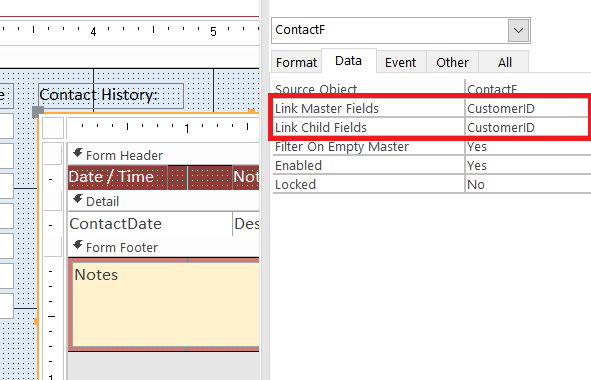
Open the form that you have the Contacts in and go to design.  Click once on the subform and look at the properties of the subform.  The link field should match if they are the same name.  They can be different if they are named differently but you will probably have to tell Access what that is.
Scott Axton  @Reply  
        
4 years ago

David Cooke OP  @Reply  
     
4 years ago
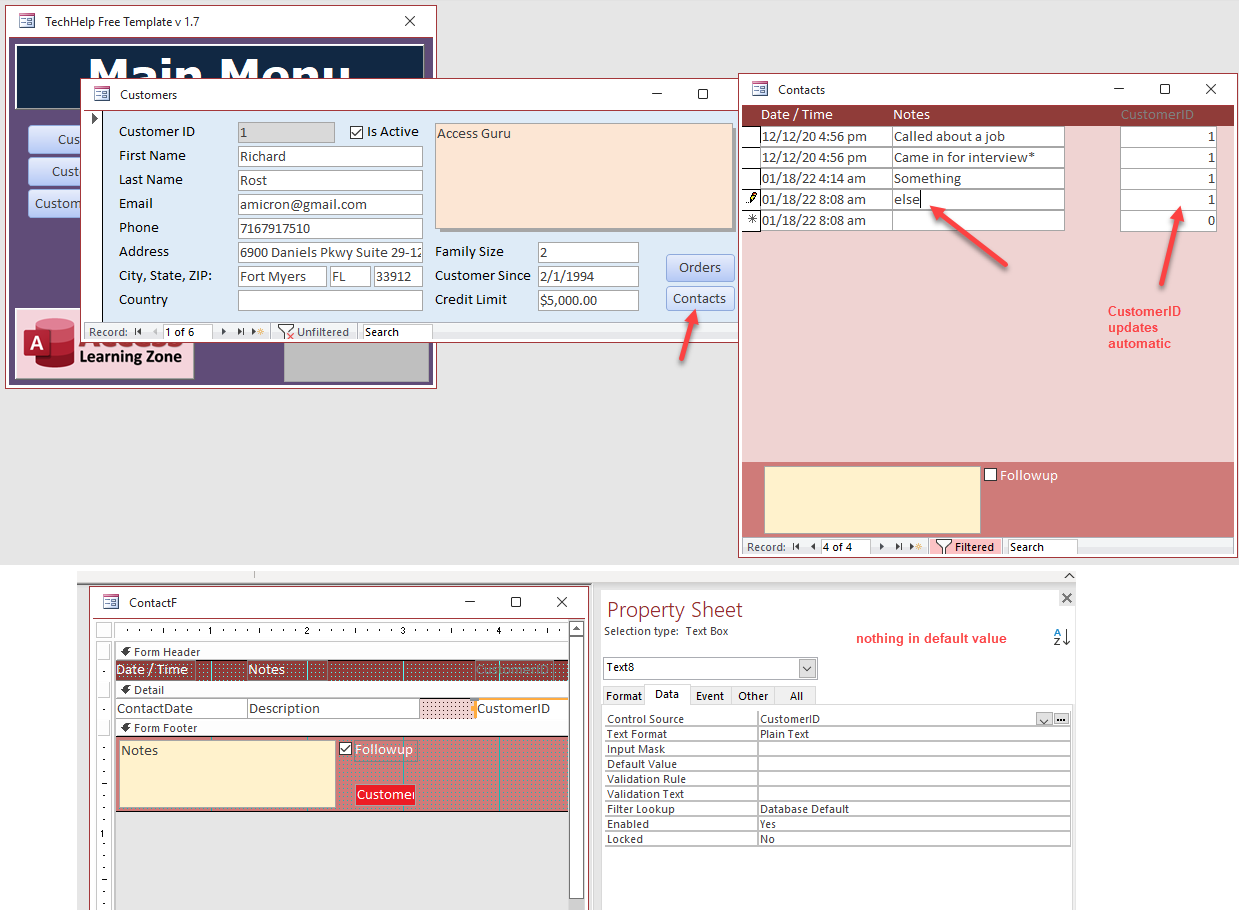
This is not a subform.  I can work with subforms.  But in this case and how Richard build his it is a form acting as a subform. from my screen shot is right from the template.  I just can figure out how after he opens the form goes to the record (working for me) but not how he is adding new records to the form and keeping the customerID.  I can do the same thing either by what Kevin has told me to use bang but Richard's DB is not using bang or manually typing it in.

Thanks
Dave
Richard Rost  @Reply  
          
4 years ago
David, you don't have anything in the Default Value for CustomerID. That's how you get the ID from the CustomerF, which is what Kevin originally said.
Richard Rost  @Reply  
          
4 years ago
And you duplicated the CustomerID box. My CustomerID is the hidden RED field in the form footer. You added it again to the detail section and it's Text8.
David Cooke OP  @Reply  
     
4 years ago
Hi Richard

Thank you for responding. In your template with the screen shot I provided, I don't see what Kevin and you are saying based on your template.  Do you have a video I can reference for "Contacts" button in side your customer form?

Thanks again
Dave
Scott Axton  @Reply  
        
4 years ago
David Cooke OP  @Reply  
     
4 years ago

David Cooke OP  @Reply  
     
4 years ago
Where does the default value go?  I can't find it in Richards form and he does show the customerID.

Thanks
Dave
Scott Axton  @Reply  
        
4 years ago
David go re-watch the video I just linked to above.  Beginning about 11:00 Richard explains how the link is made by Access.  Because the CustomerID (PK) in the CustomerT and the CustomerID (FK) in the ContactT are named the same the link is created automatically.  If you have a different field names you may have to link them manually.

The ContactF is NOT intended to run outside of the CustomerF independently.  It is designed to be a SubForm in the CustomerF.

Scott Axton  @Reply  
        
4 years ago
If you want the ContactF to open independently buy clicking a button as you created in your screenshot you have to use a different technique and give the ContactF the default value for CustomerID using the Forms!FormName notation.

The video how to do that is here:  Value From a Form
David Cooke OP  @Reply  
     
4 years ago
Scott I'm not trying to be difficult and I really appreciate the responses from everyone.  Maybe I'm not being clear.

I completely understand subforms and relationships no issues there.  But in Richard's template you hit Customer Form from main menu then contacts button that opens ContactsF form.  The ContactsF opens to the CostomerID based on the button event I understand this as well.  Then you add records via the ContactsF and it keeps the CustomerID. The default value is not filled in in fact the text box CustomID is not even part of the ContactsF.  The ContactsF is what I want to know how it retains the CustomerID.  I can do what Kevin using Bang and it works.  But just trying to understand how Richard did it with CustomerID not even in the form and not using the BANG default.

Thank you very much!
Dave
Scott Axton  @Reply  
        
4 years ago
Nope not being difficult,  I was talking Apples and you were talking Oranges.  LOL

So, if you design the CustomerF the click event for the Contacts button is
DoCmd.OpenForm "ContactF", , , "CustomerID=" & CustomerID
The "CustomerID=" & CustomerID filters ContactF initially.

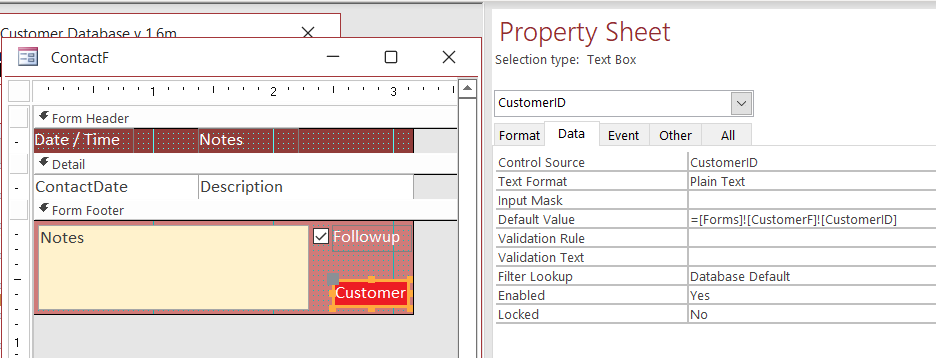
Then, if you design ContactF, you can see down in the bottom right hand corner Customer (IN RED).  Click on that.
Now look at the properties for that text box.  It is the CustomerID.  It's on the form but if you look at the Format tab the Visible property is set to "no".
Now in the picture I'll post below, the Data tab Default Value is set to
=[Forms]![CustomerF]![CustomerID]
Because the CustomerF is still open ContactF can pull the ID off of that form.

Make sense?

I can't remember which video this was all covered in I'm sorry to say.  Maybe one of the other guys or Richard can help us out.
Scott Axton  @Reply  
        
4 years ago

Scott Axton  @Reply  
        
4 years ago
So the short answer is CustomerID is on the form it is just hidden.

Hope that helps!
David Cooke OP  @Reply  
     
4 years ago
BINGO!  That was what I was missing.  In design view I thought it was a button not the hidden textbox linking the CustomerID.  When it was form view I didn't realize the "red" button was no longer there.  See I knew it was simple :)  

Thanks everyone for their responses.
Richard Rost  @Reply  
          
4 years ago
Gotta pay attention in class, children, and stop fooling around, or no recess for YOU! :)

This thread is now CLOSED. If you wish to comment, start a NEW discussion in Access Forum.
 

Next Unseen

 
New Feature: Comment Live View


The following is a paid advertisement
Computer Learning Zone is not responsible for any content shown or offers made by these ads.
 

Learn
 
Access - index
Excel - index
Word - index
Windows - index
PowerPoint - index
Photoshop - index
Visual Basic - index
ASP - index
Seminars
More...
Customers
 
Login
My Account
My Courses
Lost Password
Memberships
Student Databases
Change Email
Info
 
Latest News
New Releases
User Forums
Topic Glossary
Tips & Tricks
Search The Site
Code Vault
Collapse Menus
Help
 
Customer Support
Web Site Tour
FAQs
TechHelp
Consulting Services
About
 
Background
Testimonials
Jobs
Affiliate Program
Richard Rost
Free Lessons
Mailing List
PCResale.NET
Order
 
Video Tutorials
Handbooks
Memberships
Learning Connection
Idiot's Guide to Excel
Volume Discounts
Payment Info
Shipping
Terms of Sale
Contact
 
Contact Info
Support Policy
Mailing Address
Phone Number
Fax Number
Course Survey
Email Richard
[email protected]
Blog RSS Feed    YouTube Channel

LinkedIn
Copyright 2026 by Computer Learning Zone, Amicron, and Richard Rost. All Rights Reserved. Current Time: 5/7/2026 7:13:25 PM. PLT: 0s