Free Lessons
Courses
Seminars
TechHelp
Fast Tips
Templates
Topic Index
Forum
ABCD
 
Home   Courses   TechHelp   Forums   Help   Contact   Merch   Join   Order   Logon  
 
Back to Access Forum    Comments List
Upload Images   @Reply   Bookmark    Link   Email   Next Unseen 
Indexing
Taruna Matharu 

4 years ago
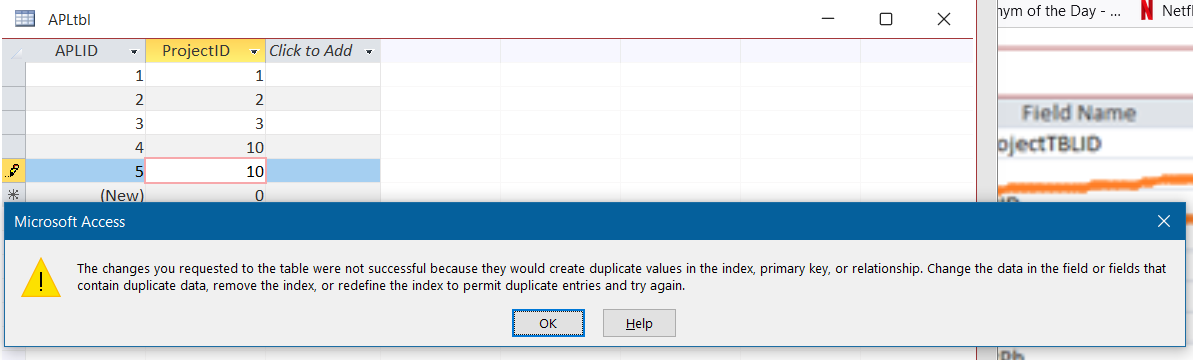
I am confused about the indexing. Pleases help. Table APL has Project ID New Project Table has Project Id set to Yes no duplicates still not working. The error while saving table. Is there a lesson you can share link. I need clarity on 2 tables that have relation how to understand the indexing.
Taruna Matharu OP  @Reply  

4 years ago

Scott Axton  @Reply  
        
4 years ago
First -In the future can you please crop your images to the visible part?  To hard to see even when you click the image to enlarge.

Second please explain still not working.  If you enter a ProjectID of say 10 in one record, you should get a message like below if you try to enter that ID again.
Scott Axton  @Reply  
        
4 years ago

Scott Axton  @Reply  
        
4 years ago

Continue on with the courses.  Indexing is covered in Beginner 4

Remember - Don't Skip Around
Go back and listen to what Richard teaches in Beginner 1.  Don't jump in to your own project right away. Set that aside for a bit and learn Access FIRST.
You need to learn to crawl before you can run.  It will save you a lot of unnecessary heartburn and headaches in the long run.
Richard Rost  @Reply  
          
4 years ago
The way you have it set now, your ProjectID cannot be duplicated in each of those tables. Like Scott said, watch Beginner 4 for a better understanding of Indexing and how it works.
Taruna Matharu OP  @Reply  

4 years ago
Apologies Scott on the image part just switched 2 days back to Windows 11 and  getting use to this new version. Noted for future.
Did not reach beginner 4 yet also have been assigned some tasks so was rushing. I understand what you are saying and I agree.
Scott Axton  @Reply  
        
4 years ago
No problem on the images.  It's just that I'm developing old man eyes and it's hard to see really small print.
I haven't used Windows 11 but I understand there is a tool that replaces the Snip & Sketch for Windows 10.
Just open start menu and look for Snipping Tool.

Can you explain better what you are trying to accomplish?  I'm not understanding the question very well.
Walk me through it like I'm a third grader if you would.

This thread is now CLOSED. If you wish to comment, start a NEW discussion in Access Forum.
 

Next Unseen

 
New Feature: Comment Live View


The following is a paid advertisement
Computer Learning Zone is not responsible for any content shown or offers made by these ads.
 

Learn
 
Access - index
Excel - index
Word - index
Windows - index
PowerPoint - index
Photoshop - index
Visual Basic - index
ASP - index
Seminars
More...
Customers
 
Login
My Account
My Courses
Lost Password
Memberships
Student Databases
Change Email
Info
 
Latest News
New Releases
User Forums
Topic Glossary
Tips & Tricks
Search The Site
Code Vault
Collapse Menus
Help
 
Customer Support
Web Site Tour
FAQs
TechHelp
Consulting Services
About
 
Background
Testimonials
Jobs
Affiliate Program
Richard Rost
Free Lessons
Mailing List
PCResale.NET
Order
 
Video Tutorials
Handbooks
Memberships
Learning Connection
Idiot's Guide to Excel
Volume Discounts
Payment Info
Shipping
Terms of Sale
Contact
 
Contact Info
Support Policy
Mailing Address
Phone Number
Fax Number
Course Survey
Email Richard
[email protected]
Blog RSS Feed    YouTube Channel

LinkedIn
Copyright 2026 by Computer Learning Zone, Amicron, and Richard Rost. All Rights Reserved. Current Time: 5/7/2026 5:02:52 AM. PLT: 0s