Free Lessons
Courses
Seminars
TechHelp
Fast Tips
Templates
Topic Index
Forum
ABCD
 
Home   Courses   TechHelp   Forums   Help   Contact   Merch   Join   Order   Logon  
 
Back to Access Forum    Comments List
Upload Images   @Reply   Bookmark    Link   Email   Next Unseen 
Auto Number ID
Julian Dyer 
     
4 years ago
Hi,

If I have an auto number ID/primary key with a field size of 3.

What happens when the number reaches and ticks over from 999 to 1000?

Thanks
Adam Schwanz  @Reply  
           
4 years ago
Armageddon ;). How are you limiting an autonumber field to only 3 numbers?
Kevin Robertson  @Reply  
          
4 years ago
AutoNumbers are Long Integers by default which can be up to 2,147,483,647.
Juan C Rivera  @Reply  
            
4 years ago
Adam will the database go BOOM  :)
Adam Schwanz  @Reply  
           
4 years ago
It won't be pretty Juan, I suggest getting the milk and bread and bunkering up, prepare for the worst ;).
Scott Axton  @Reply  
        
4 years ago
Julian
It may sound silly, but why not make a small little test db with one table and a couple fields and try it?

Sometimes the best way to see if a thing works, or what happens if,  is just try it.
Juan C Rivera  @Reply  
            
4 years ago
Scott check this out all jokes aside I did try it and I get a long and a Replication ID.  will not let limit the field to 3 at the table limit.  {1F1D1D77-A015-4EF7-96C9-6DF9698EAE1F} this is what a Replication  ID looks like not sure how to use this.. looks cool I will look it up later.  every new line has a diffrent number.  thanks for the sugestion now you saprked in me to go look at this.

LOL
V/r
Juan
LLNP
Scott Axton  @Reply  
        
4 years ago
Juan you and I are saying the same thing.  I agree.
My point in the reply was to experiment. Try things out if you don't know how something will work or react.

I can't find it at the moment but a recent video discussed using Replication ID.  I'll keep looking and post when I find it.
Alex Hedley  @Reply  
           
4 years ago
Glossary: ReplicationID
Scott Axton  @Reply  
        
4 years ago
Adam, Kevin, and Juan
I believe that Julian is using a custom ID field that Richard made a TechHelp for:  Automatic Record Numbering
If that is case Julian could have a circumstance where he could run out of numbers.

Julian - On the assumption that the above is true.  Running out of numbers would just cause an error. Because you have limited yourself to 3 you would just have to increase the width higher.
It isn't usually a problem increasing the allowable Field Size.  On the other hand reducing a Field Size can result in data loss or corruption if you already have data that exceeds the new value.  Changing data types can have an adverse affect as well.
Richard Rost  @Reply  
          
4 years ago
You can't have an AutoNumber with field size 3. The options are Long Integer and Replication ID. Please clarify what you mean.
Julian Dyer OP  @Reply  
     
4 years ago
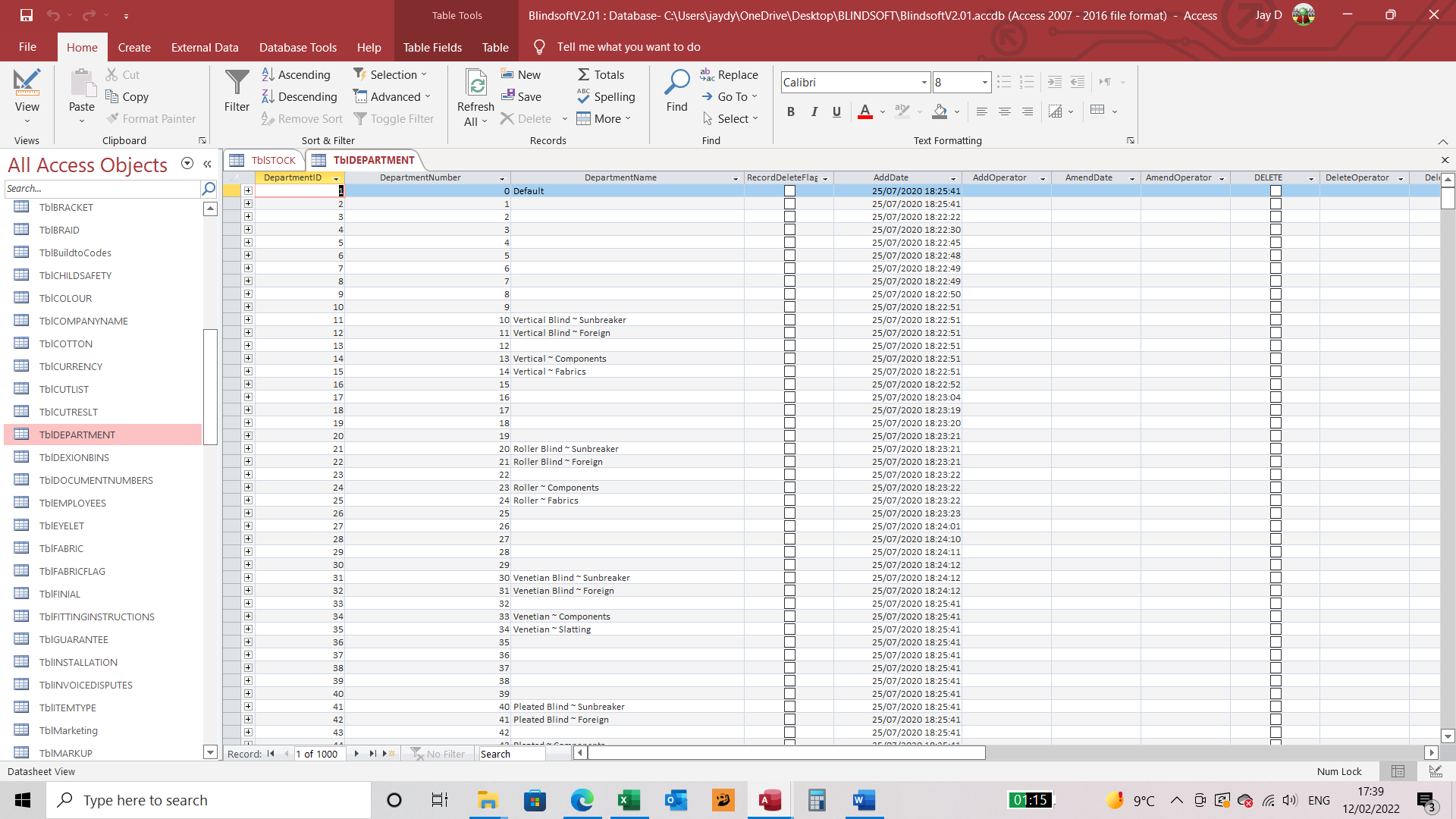
I have a department database which links via my accounts software as

dept code 3
dept name 60

department code is 0 to 999

in access the department autonumber goes 1 to 1000  not 0 to 999

when I go to import the detail back to the software package the import features fail due to 1000 being a 4 digit, however, I created another field Dept Number as the departments are now out by one digit.

Problem I have is now is I may be doing this wrong:

Access stock file displays depart field as 21 from the autonumber and in my accounts software the department number is displayed as 20.  Its all to do with the 0 being the first record number as 1.


Julian Dyer OP  @Reply  
     
4 years ago

Juan C Rivera  @Reply  
            
4 years ago
just a thought that code may not be a number but a string, take a look and see
Richard Rost  @Reply  
          
4 years ago
If you need 0 then you can't use an autonumber. Use a regular long.

This thread is now CLOSED. If you wish to comment, start a NEW discussion in Access Forum.
 

Next Unseen

 
New Feature: Comment Live View


The following is a paid advertisement
Computer Learning Zone is not responsible for any content shown or offers made by these ads.
 

Learn
 
Access - index
Excel - index
Word - index
Windows - index
PowerPoint - index
Photoshop - index
Visual Basic - index
ASP - index
Seminars
More...
Customers
 
Login
My Account
My Courses
Lost Password
Memberships
Student Databases
Change Email
Info
 
Latest News
New Releases
User Forums
Topic Glossary
Tips & Tricks
Search The Site
Code Vault
Collapse Menus
Help
 
Customer Support
Web Site Tour
FAQs
TechHelp
Consulting Services
About
 
Background
Testimonials
Jobs
Affiliate Program
Richard Rost
Free Lessons
Mailing List
PCResale.NET
Order
 
Video Tutorials
Handbooks
Memberships
Learning Connection
Idiot's Guide to Excel
Volume Discounts
Payment Info
Shipping
Terms of Sale
Contact
 
Contact Info
Support Policy
Mailing Address
Phone Number
Fax Number
Course Survey
Email Richard
[email protected]
Blog RSS Feed    YouTube Channel

LinkedIn
Copyright 2026 by Computer Learning Zone, Amicron, and Richard Rost. All Rights Reserved. Current Time: 6/16/2026 4:17:25 PM. PLT: 1s