Free Lessons
Courses
Seminars
TechHelp
Fast Tips
Templates
Topic Index
Forum
ABCD
 
Home   Courses   TechHelp   Forums   Help   Contact   Merch   Join   Order   Logon  
 
Back to Access Forum    Comments List
Upload Images   @Reply   Bookmark    Link   Email   Next Unseen 
Form Controls Cut Off
Leah Fjeldstad 
    
4 years ago
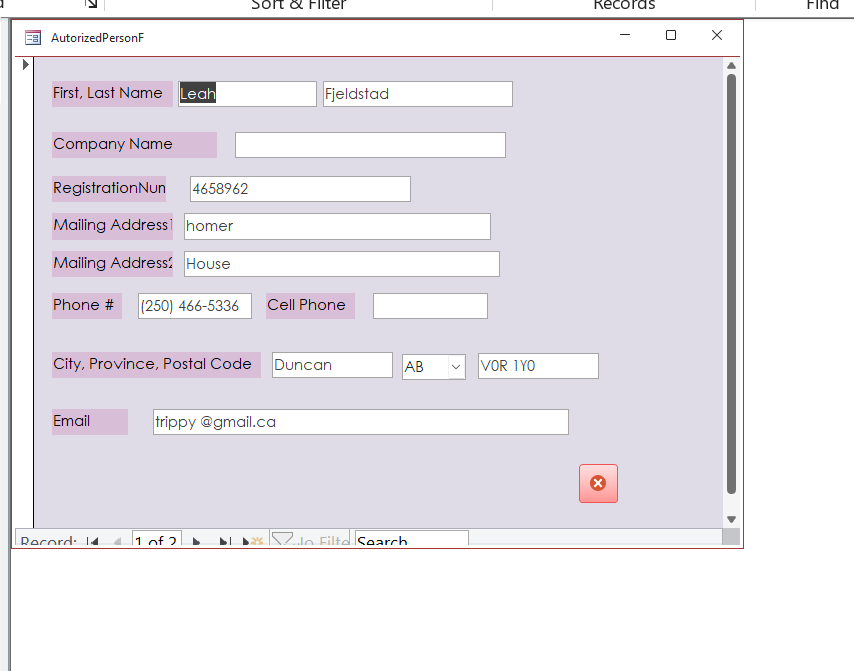
I took a screen shot hopefully this works. My forms all have the bottom controls have cut off?  I am sue it is a setting, but I cant seem to find it.  Any Ideas?
Leah Fjeldstad OP  @Reply  
    
4 years ago

Richard Rost  @Reply  
           
4 years ago
Do you mean the navigation buttons on the bottom of the form? That's weird. I've never seen that one before.
Richard Rost  @Reply  
           
4 years ago
Is it just that database? Do any of mine look like that? Try downloading my Blank Template.
Scott Axton  @Reply  
        
4 years ago
If you are speaking about the labels you just need to make them wider to fit your label text.

It also looks like the form can scroll down does that make the navigation buttons appear correctly?
You may just need to make your form slightly taller OR bring the bottom of the background up just a bit to fit the window.
Leah Fjeldstad OP  @Reply  
    
4 years ago
All databases dfo that, including the class supplied stuff from here.  I am using 365.
Leah Fjeldstad OP  @Reply  
    
4 years ago
I can not type today.  I am referring to the arrows and record scroll arrows at the bottom.
Scott Axton  @Reply  
        
4 years ago

Leah I don't know what to tell you.  I have tried and tried and can't make my db or even a new one do that.

If you create a brand new db with a little test table and form and it still does it, it may be something in your installation of Office / Access.
Try running down the Troubleshooter and see if any of those steps corrects your issue.

Leah Fjeldstad OP  @Reply  
    
4 years ago
I don't know.  I will keep trying to figure it out  All dbases and forms have this issue.  One I created and ones I get from class. I will try Bill Gates again, but he rarely answers my emails these days. Thanks Scott, Richard.
Scott Axton  @Reply  
        
4 years ago
Leah can you copy your file and try it on another computer?  Friend or co-worker that has Access?
That would tell you if it is the file or your computer.
Leah Fjeldstad OP  @Reply  
    
4 years ago
Thanks Scott.  I tried running a dbase on my laptop.  The cut off was still there but not as severe.  Just 3/4 of of the control showing vice 1/2   I don't know?
Richard Rost  @Reply  
           
4 years ago
It seems like a Theme issue. Either an Office or Windows theme.

This thread is now CLOSED. If you wish to comment, start a NEW discussion in Access Forum.
 

Next Unseen

 
New Feature: Comment Live View


The following is a paid advertisement
Computer Learning Zone is not responsible for any content shown or offers made by these ads.
 

Learn
 
Access - index
Excel - index
Word - index
Windows - index
PowerPoint - index
Photoshop - index
Visual Basic - index
ASP - index
Seminars
More...
Customers
 
Login
My Account
My Courses
Lost Password
Memberships
Student Databases
Change Email
Info
 
Latest News
New Releases
User Forums
Topic Glossary
Tips & Tricks
Search The Site
Code Vault
Collapse Menus
Help
 
Customer Support
Web Site Tour
FAQs
TechHelp
Consulting Services
About
 
Background
Testimonials
Jobs
Affiliate Program
Richard Rost
Free Lessons
Mailing List
PCResale.NET
Order
 
Video Tutorials
Handbooks
Memberships
Learning Connection
Idiot's Guide to Excel
Volume Discounts
Payment Info
Shipping
Terms of Sale
Contact
 
Contact Info
Support Policy
Mailing Address
Phone Number
Fax Number
Course Survey
Email Richard
[email protected]
Blog RSS Feed    YouTube Channel

LinkedIn
Copyright 2026 by Computer Learning Zone, Amicron, and Richard Rost. All Rights Reserved. Current Time: 5/9/2026 12:57:14 PM. PLT: 0s