Free Lessons
Courses
Seminars
TechHelp
Fast Tips
Templates
Topic Index
Forum
ABCD
 
Home   Courses   TechHelp   Help   Contact   Merch   Join   Order   Logon   Forums   
 
Back to Access Forum    Comments List
Upload Images   @Reply   Bookmark    Link   Email   Next Unseen 
Button to Mark ActiveInactive
Dan Jackson 
        
4 years ago
Hi All, Easy one here!

I have just created a continuous form listing our lead source and added an Active/Inactive field to the table.

I have a button which currently deletes the record next to each one but would rather have it set the active field to "Inactive" AND update the form so it disappears (essentially looks like its being deleted on the users end).

Please avoid code as i'm only up to Expert 2 atm! I believe i need 2 Macros on click:

Step 1 Add "Inactive" (Or Similar) to "active" field
Step 2 Update form to show refreshed query with the record no longer present.

Really appreciate the help. If theres a better way to do this or a video, i would welcome any links to further study.

Many Thanks
Petty Officer Dan
Dan Jackson OP  @Reply  
        
4 years ago
Oh! Just noticed i got a promotion! Yay! Need to get a celebratory notification of some kind when that happens *hint hint* ;)

Ensign Dan
Adam Schwanz  @Reply  
           
4 years ago
I don't remember macros so will have to advise with code, sorry. It's super simple though

Say your field name is called "Active" you just put code in to the code builder on the click event

Active = False
Me.Requery

If the requery doesn't work you can try Me.Refresh
Dan Jackson OP  @Reply  
        
4 years ago
Cheers for this Adam. Seems like a great idea but the Active = False didn't work.

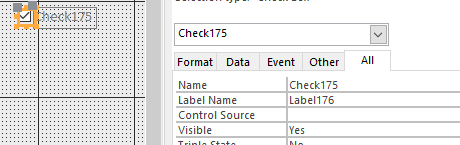
Field IS called Active. All records currently have "True" set

Put the code in the onclick event procedure (See Image) but it isn't updating the field from True to False. Tried enclosing False in "" but didn't help.

Thanks!
Dan Jackson OP  @Reply  
        
4 years ago

Alex Hedley  @Reply  
           
4 years ago
What's the name of the control on the Form?
Scott Axton  @Reply  
      
4 years ago
As Adam said - super simple to add that code. Baby steps.
That being said it will not hide the record.  You probably will need to change the underlying record source to only display the Active records.  Assuming that you field is a Yes/No field add it to your query and in the Criteria line type True (again assuming that Active is the default)
Adam Schwanz  @Reply  
           
4 years ago
Yea, just because the field in the TABLE is called active, doesn't necessarily mean the field on the FORM is called active, it might be called Check14. In which case you would do Check14=False (Or more meaningfully, rename the checkbox)
Scott Axton  @Reply  
      
4 years ago
Dan - Don't put  False in quotes.
It should just be   Active = False
Dan Jackson OP  @Reply  
        
4 years ago
Thanks Guys. I can confirm the following:

ALEX - The control is called Button_DeleteRecord

Scott 1st Reply - I've set a query up to only show records where the Active Field is set to True (I've done true/false but can be anything really). The query auto updates once the field has anything but True, and hides it. The form is based on this query.

Adam - Yep, i'm just starting in access so getting into good habits from the get go. Every so often i will go through the dropdown in the properties box and name Everything. Usually --WhatControlItIs_Subject-- for example - Text_FirstName.

Scott 2nd Reply - Yep, i did without first time and didn't work. I just wanted to try incase it was something silly. I can confirm that without the quotes, it still doesn't work.

Cheers
Adam Schwanz  @Reply  
           
4 years ago
Your BUTTON is called Button_DeleteRecord, we want the name of the Checkbox that you want the value changed on that you added. (Unless you called your checkbox Button_DeleteRecord?)
Adam Schwanz  @Reply  
           
4 years ago

Dan Jackson OP  @Reply  
        
4 years ago
There is no checkbox. The button is currently set to run a Macro on click to delete record
Kevin Robertson  @Reply  
           
4 years ago
What is the Data Type of the Active field? Is it Yes/No?
Dan Jackson OP  @Reply  
        
4 years ago
Short Text
Kevin Robertson  @Reply  
           
4 years ago
I would change the Data Type to Yes/No and if you need to display Active/Inactive on your form you can make a Calculated Query Field using an IIF Function.
Dan Jackson OP  @Reply  
        
4 years ago
I've used IF functions in Excel and understand the principal is the same but haven't gotten that far in the course yet so i'll put it on hold and revisit when i have, thanks Kevin!

This thread is now CLOSED. If you wish to comment, start a NEW discussion in Access Forum.
 

Next Unseen

 
New Feature: Comment Live View


The following is a paid advertisement
Computer Learning Zone is not responsible for any content shown or offers made by these ads.
 

Learn
 
Access - index
Excel - index
Word - index
Windows - index
PowerPoint - index
Photoshop - index
Visual Basic - index
ASP - index
Seminars
More...
Customers
 
Login
My Account
My Courses
Lost Password
Memberships
Student Databases
Change Email
Info
 
Latest News
New Releases
User Forums
Topic Glossary
Tips & Tricks
Search The Site
Code Vault
Collapse Menus
Help
 
Customer Support
Web Site Tour
FAQs
TechHelp
Consulting Services
About
 
Background
Testimonials
Jobs
Affiliate Program
Richard Rost
Free Lessons
Mailing List
PCResale.NET
Order
 
Video Tutorials
Handbooks
Memberships
Learning Connection
Idiot's Guide to Excel
Volume Discounts
Payment Info
Shipping
Terms of Sale
Contact
 
Contact Info
Support Policy
Mailing Address
Phone Number
Fax Number
Course Survey
Email Richard
[email protected]
Blog RSS Feed    YouTube Channel

LinkedIn
Copyright 2026 by Computer Learning Zone, Amicron, and Richard Rost. All Rights Reserved. Current Time: 8/11/2026 6:06:16 AM. PLT: 1s