Free Lessons
Courses
Seminars
TechHelp
Fast Tips
Templates
Topic Index
Forum
ABCD
 
Home   Courses   TechHelp   Forums   Help   Contact   Merch   Join   Order   Logon  
 
Back to Access Forum    Comments List
Upload Images   @Reply   Bookmark    Link   Email   Next Unseen 
Entry Form
Taruna Matharu 

4 years ago
Hello Richard,
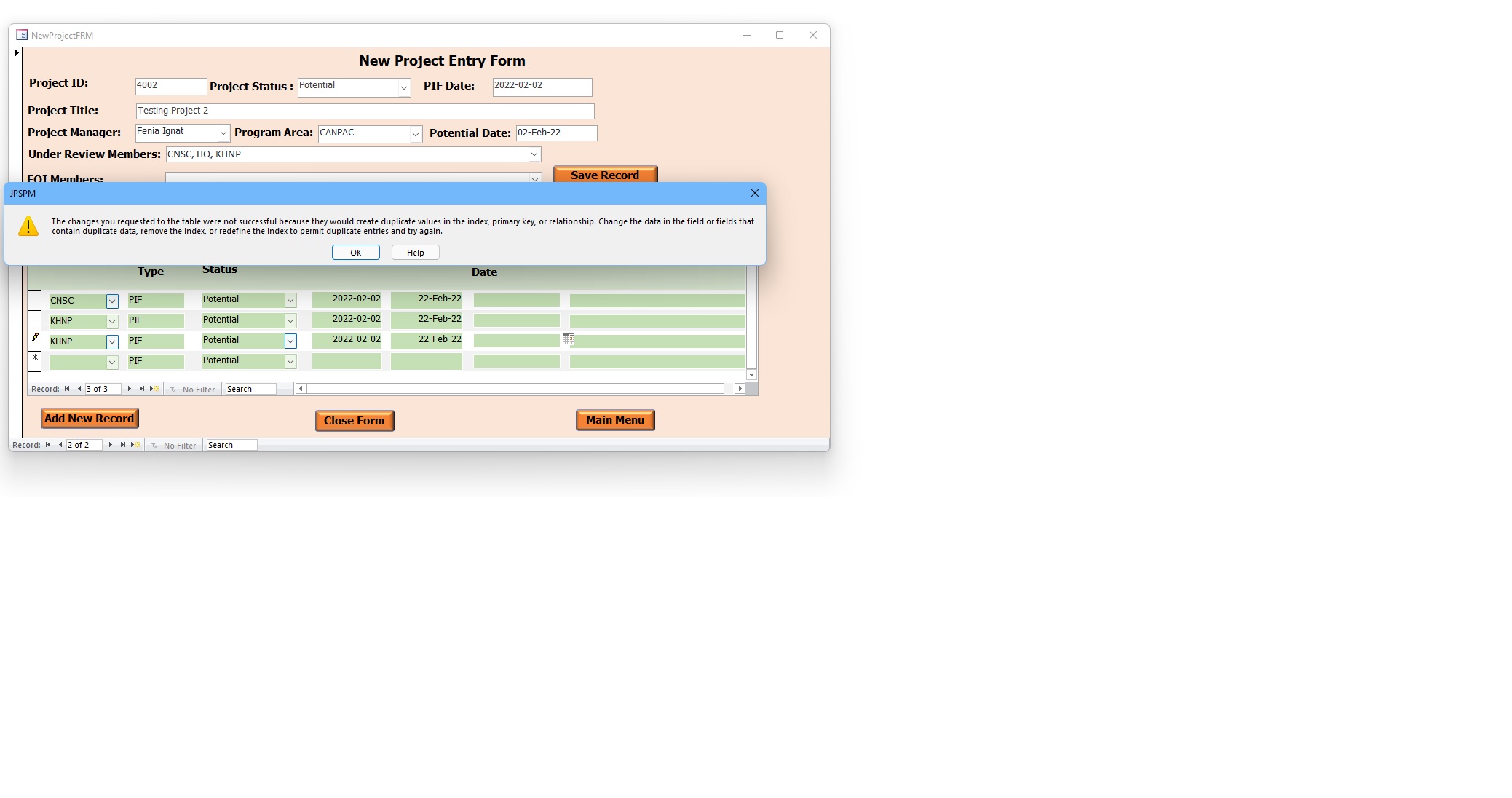
Please can you help me understand why this error occurred. I was able to enter the first record without any error message, second record the message was displayed however, the data was saved in the table.
Thanks
Taruna
Taruna Matharu OP  @Reply  

4 years ago

Dan Jackson  @Reply  
            
4 years ago
Hi Taruna,

It would seem that one of the fields in the underlying table has a property set to Indexed (No Duplicates).

Open up the table which contains your data in design view, select each field and check the properties at the bottom of the screen.
Look for a property called Indexed and check all your fields.

Any field that HAS to have unique values should be set to "Indexed (No Duplicates)" (Such as the ID Field)
Otherwise, set to "Indexed (Duplicates OK)" IF you plan to search, sort or filter the field later.
Otherwise set to "No Index". See pic. Richard has a video on this somewhere. If i find it, i'll post a link

Dan
Dan Jackson  @Reply  
            
4 years ago

Dan Jackson  @Reply  
            
4 years ago
Found it. Richard covers indexing in Beginner 4

https://599cd.com/blog/display-article.asp?ID=1841
Taruna Matharu OP  @Reply  

4 years ago
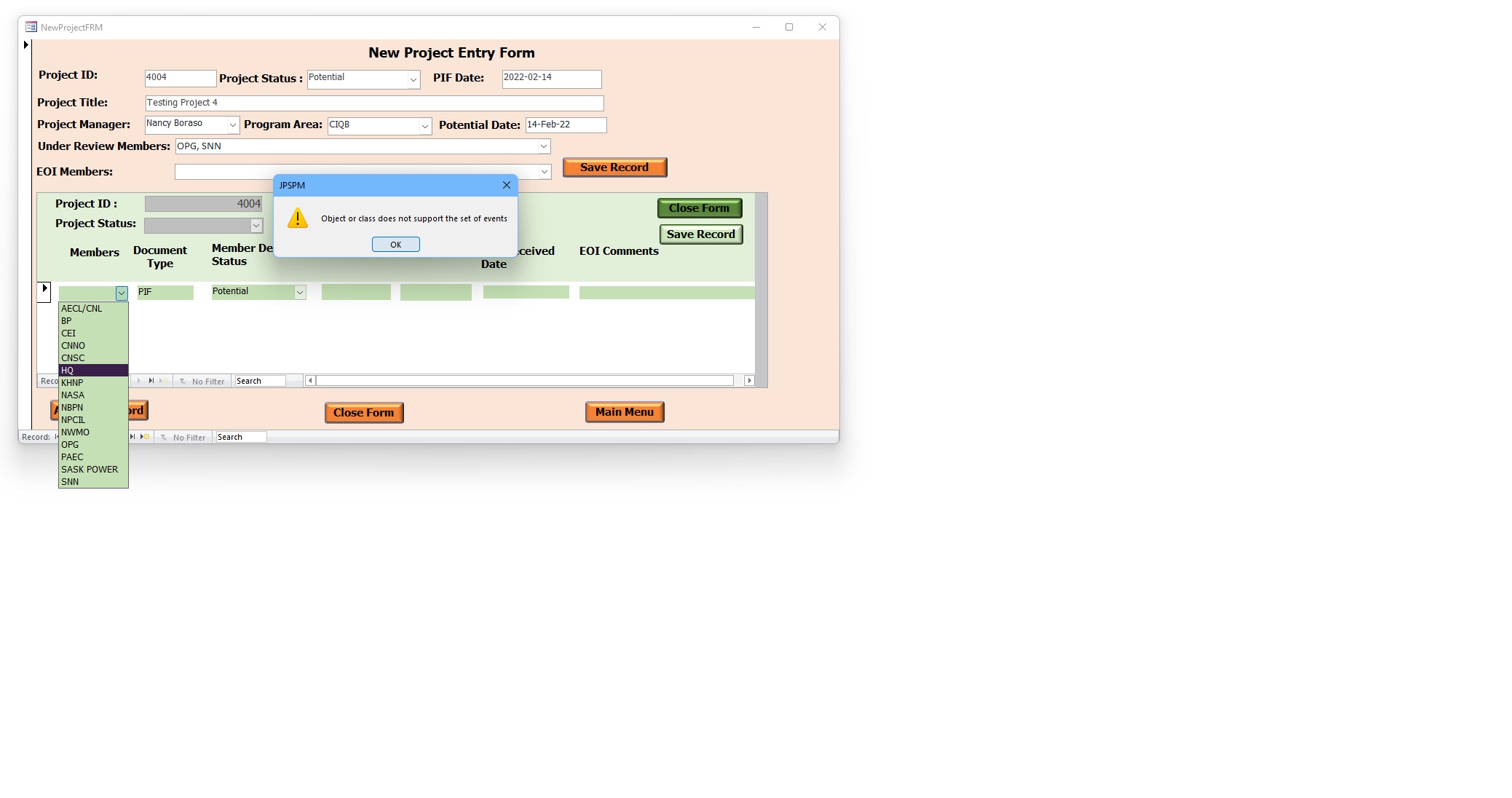
Thanks for you response Dan, I did fix the Field MemberID )Yes (Duplicates okay) The error I receive now is Object or class does not support the set of events.
Taruna Matharu OP  @Reply  

4 years ago

Scott Axton  @Reply  
        
4 years ago
Taruna unfortunately we are not clairvoyants here.  You need to provide us much more information.

What are you attempting to accomplish? What have you done so far? What code do you have?
Field types?  How is the combo box set up?  Etc, etc.
We need to see design views of your forms and queries etc.  Screen shots of you form don't help us diagnose problems.
It is much to hard to play 20 questions.
Taruna Matharu OP  @Reply  

4 years ago
Hi Scott,
Apologies for not providing complete information. I did update as mentioned by Dan and I guess the changes were not saved hence the error. I have fixed it. However, really I wish you experts were clairvoyants . On serious note seriously sorry again ! noted for next time. Thanks
Scott Axton  @Reply  
        
4 years ago
Hey no problem Taruna -
It is easy to loose sight of communication while writing when you are sitting there seeing and thinking about your issues and you know what you are speaking of.
Richard Rost  @Reply  
           
4 years ago
I didn't pay my fee this month to Clairvoyants-R-Us, so I lost my membership. :P

This thread is now CLOSED. If you wish to comment, start a NEW discussion in Access Forum.
 

Next Unseen

 
New Feature: Comment Live View


The following is a paid advertisement
Computer Learning Zone is not responsible for any content shown or offers made by these ads.
 

Learn
 
Access - index
Excel - index
Word - index
Windows - index
PowerPoint - index
Photoshop - index
Visual Basic - index
ASP - index
Seminars
More...
Customers
 
Login
My Account
My Courses
Lost Password
Memberships
Student Databases
Change Email
Info
 
Latest News
New Releases
User Forums
Topic Glossary
Tips & Tricks
Search The Site
Code Vault
Collapse Menus
Help
 
Customer Support
Web Site Tour
FAQs
TechHelp
Consulting Services
About
 
Background
Testimonials
Jobs
Affiliate Program
Richard Rost
Free Lessons
Mailing List
PCResale.NET
Order
 
Video Tutorials
Handbooks
Memberships
Learning Connection
Idiot's Guide to Excel
Volume Discounts
Payment Info
Shipping
Terms of Sale
Contact
 
Contact Info
Support Policy
Mailing Address
Phone Number
Fax Number
Course Survey
Email Richard
[email protected]
Blog RSS Feed    YouTube Channel

LinkedIn
Copyright 2026 by Computer Learning Zone, Amicron, and Richard Rost. All Rights Reserved. Current Time: 5/7/2026 1:24:45 PM. PLT: 0s