Free Lessons
Courses
Seminars
TechHelp
Fast Tips
Templates
Topic Index
Forum
ABCD
 
Home   Courses   TechHelp   Forums   Help   Contact   Merch   Join   Order   Logon  
 
Back to Access Forum    Comments List
Upload Images   @Reply   Bookmark    Link   Email   Next Unseen 
Invalid Use of Null
Katherine Bradshaw 
    
4 years ago
I ran a "CurrentMember" query off of another more complex query (MAXQ) that I've been troubleshooting for awhile now (where I had to use a "Cdate" function on a DLOOKUP function to squash a different error).

CurrentMemberQ seems to return the proper list of members' names, along with their member discounts and expiration dates.

However, when I try to sort the CurrentMemberQ results in any way, or try to run a report off the query that would alphabetize by last name, I get an error message "Invalid Use of Null".

I've tried messing around with some Nz() criteria on the CurrentMemberQ with no luck. (And managed to crash Access!)

At the bottom of my list is a blank row with an asterisk in the "select" column. I have a vague recollection from a lesson somewhere that there are instances in which using the star to pull data into a query can backfire. My MAXQ that serves as the underlying query does have a star, so I made a copy of that query and changed it by pulling in all the fields individually, and tried the query off of that copy, but I still got a null error.

Maybe the Cdate on a DLOOKUP in the underlying MAXQ is messing things up? If so, how can I fix it?

Or could another problem be the cause of the error?
Adam Schwanz  @Reply  
           
4 years ago
Have you wrapped your expressions in NZ Function?
Katherine Bradshaw OP  @Reply  
    
4 years ago
I tried this in CurrentMemberQ, as a criteria (didn't work) and as an alias (got a self-reference error, so clearly I didn't do that correctly).

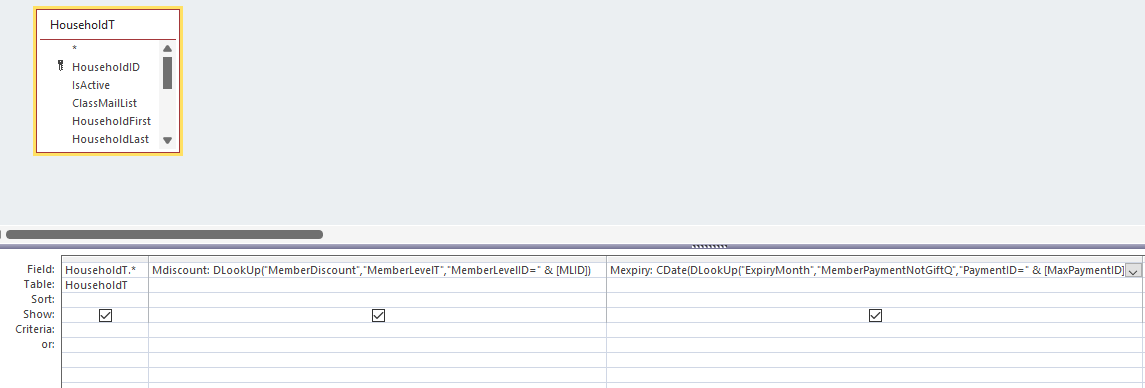
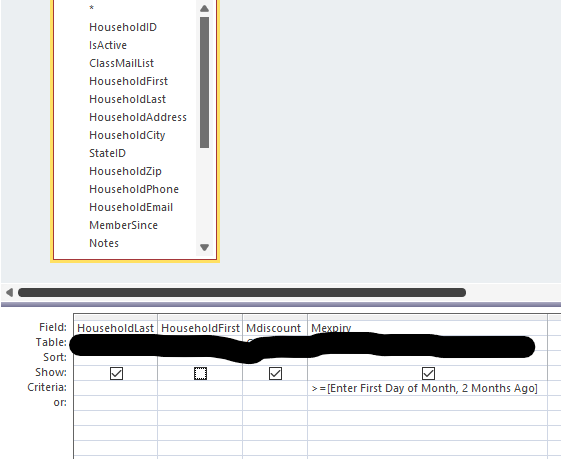
Would I need to do this in the underlying query? I'll include some screenshots of the queries. The underlying query is super complicated to be able to do what I'm trying to do with my current skill level.
Katherine Bradshaw OP  @Reply  
    
4 years ago

Katherine Bradshaw OP  @Reply  
    
4 years ago

Katherine Bradshaw OP  @Reply  
    
4 years ago
The first image is a portion of what I'm calling MAXQ for brevity (actual name MemberHouseholdMaxPaymentQ, which I blacked out in the second image to avoid confusion.)

In the MAXQ query,
MaxPaymentID is an alias established to Dlookup a specific PaymentID associated with the most recent (Dmax) payment date for each household, and
MLID is an alias established to be able to pull the membership level info for that specific payment.
Adam Schwanz  @Reply  
           
4 years ago
Put it in the actual expression like NZ(dlookup("id","table",criteria"),0) that should make 0s come in place of null values there.
Katherine Bradshaw OP  @Reply  
    
4 years ago
The odd thing is, there were no null values, apart from the blank * row at the bottom of the list.

I tried this:
Mdiscount: Nz(DLookUp("MemberDiscount","MemberLevelT","MemberLevelID=" & [MLID]),0)
Mexpiry: NZ(CDate(DLookUp("ExpiryMonth","MemberPaymentNotGiftQ","PaymentID=" & [MaxPaymentID])),0)

But it didn't work. Still getting the null value error, and I still have the blank row with the star at the bottom of the CurrentMemberQ, and there are no zeros in the Mdiscount or Mexpiry blank row. (There shouldn't be any null values at all anyway, since every single member in this list would have a discount and expiration date.)

I think there must be a serious problem with how I tried to tell Access to convert things to dates that messed up the whole query, because when I did a data check against the list of people who should have appeared on the list, there were 60 people missing.

I'm going to have to come back next weekend and try something different again.

Katherine Bradshaw OP  @Reply  
    
4 years ago
Back at it today. Still stuck on the null value error when I try to pull FirstName, LastName (sorted alphabetically), Mexpiry (with a user-prompt to get newer expiry dates), and Mdiscount from the query built in this thread, but with a "Cdate" function wrapped on the Mexpiry alias: https://www.599cd.com/blog/display-article.asp?ID=352&CommentID=45582#StartOfComments (not sure how to make that a hyperlink)

Unless I've written the NZ function improperly above and/or need to remove the * function and add NZ to the name fields (with "" instead of zero?), the Nz function idea didn't work.

When I get the error, I have to re-enter the prompt [Enter First Day of Month, 2 Months Ago]. When I didn't and just canceled, that's when I crashed Access.

I'm going to spend the morning trying to Google solutions and study a book I bought (Access 2010 Inside and Out), as well as try to trouble-shoot why the wrong people are showing up in the results.
Katherine Bradshaw OP  @Reply  
    
4 years ago

Katherine Bradshaw OP  @Reply  
    
4 years ago
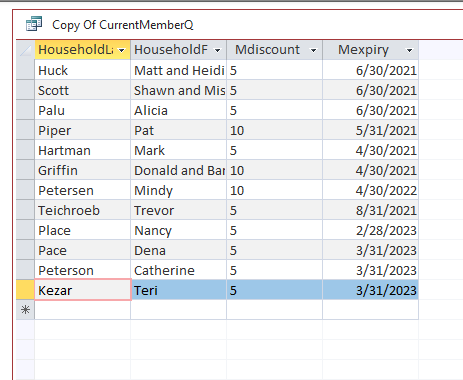
The above is a screenshot of my problematic query results. If I try to click on the header to sort, it gives me the null value error.
It is correctly treating Mexpiry as a date, since the sort option is "oldest to newest". The other three are alphabetical (doesn't matter to me for Mdiscount).

I don't understand why the prompt >=[Enter First Day of Month, 2 Months Ago] is not working for this query. (In the screenshot, there are memberships that expired in spring/summer 2021, and they should have been eliminated by the date I entered of 12/1/21).
Katherine Bradshaw OP  @Reply  
    
4 years ago
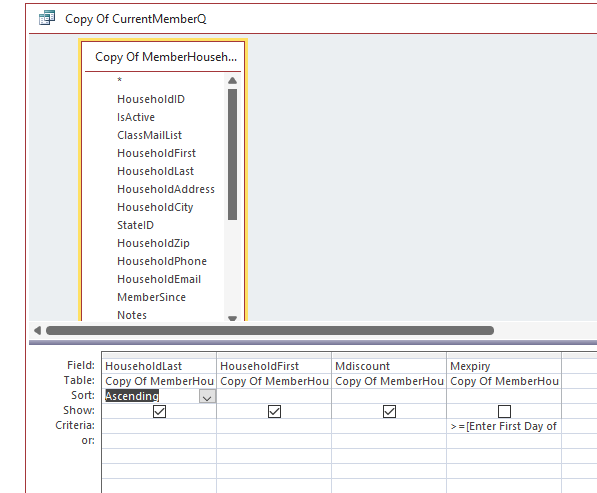
Instead of clicking on the header to sort, I tried sorting by name in the CurrentMemberQ itself.

I got an error that "the expression is not typed correctly, or it is too complex to be evaluated".
Katherine Bradshaw OP  @Reply  
    
4 years ago

Katherine Bradshaw OP  @Reply  
    
4 years ago
OK, if I try to sort anything in the original query that this query is based on, whether by header or as an "ascending sort" in the query, I get the null error problem. So the problem must be in the original query from the previous thread?
Richard Rost  @Reply  
          
4 years ago
Try your parameter without a comma in it. See if that helps.

This thread is now CLOSED. If you wish to comment, start a NEW discussion in Access Forum.
 

Next Unseen

 
New Feature: Comment Live View


The following is a paid advertisement
Computer Learning Zone is not responsible for any content shown or offers made by these ads.
 

Learn
 
Access - index
Excel - index
Word - index
Windows - index
PowerPoint - index
Photoshop - index
Visual Basic - index
ASP - index
Seminars
More...
Customers
 
Login
My Account
My Courses
Lost Password
Memberships
Student Databases
Change Email
Info
 
Latest News
New Releases
User Forums
Topic Glossary
Tips & Tricks
Search The Site
Code Vault
Collapse Menus
Help
 
Customer Support
Web Site Tour
FAQs
TechHelp
Consulting Services
About
 
Background
Testimonials
Jobs
Affiliate Program
Richard Rost
Free Lessons
Mailing List
PCResale.NET
Order
 
Video Tutorials
Handbooks
Memberships
Learning Connection
Idiot's Guide to Excel
Volume Discounts
Payment Info
Shipping
Terms of Sale
Contact
 
Contact Info
Support Policy
Mailing Address
Phone Number
Fax Number
Course Survey
Email Richard
[email protected]
Blog RSS Feed    YouTube Channel

LinkedIn
Copyright 2026 by Computer Learning Zone, Amicron, and Richard Rost. All Rights Reserved. Current Time: 4/30/2026 6:53:29 PM. PLT: 0s