Free Lessons
Courses
Seminars
TechHelp
Fast Tips
Templates
Topic Index
Forum
ABCD
 
Home   Courses   TechHelp   Forums   Help   Contact   Merch   Join   Order   Logon  
 
Back to Access Forum    Comments List
Upload Images   @Reply   Bookmark    Link   Email   Next Unseen 
Update Query
Taruna Matharu 

4 years ago
Hi Richard and Experts,

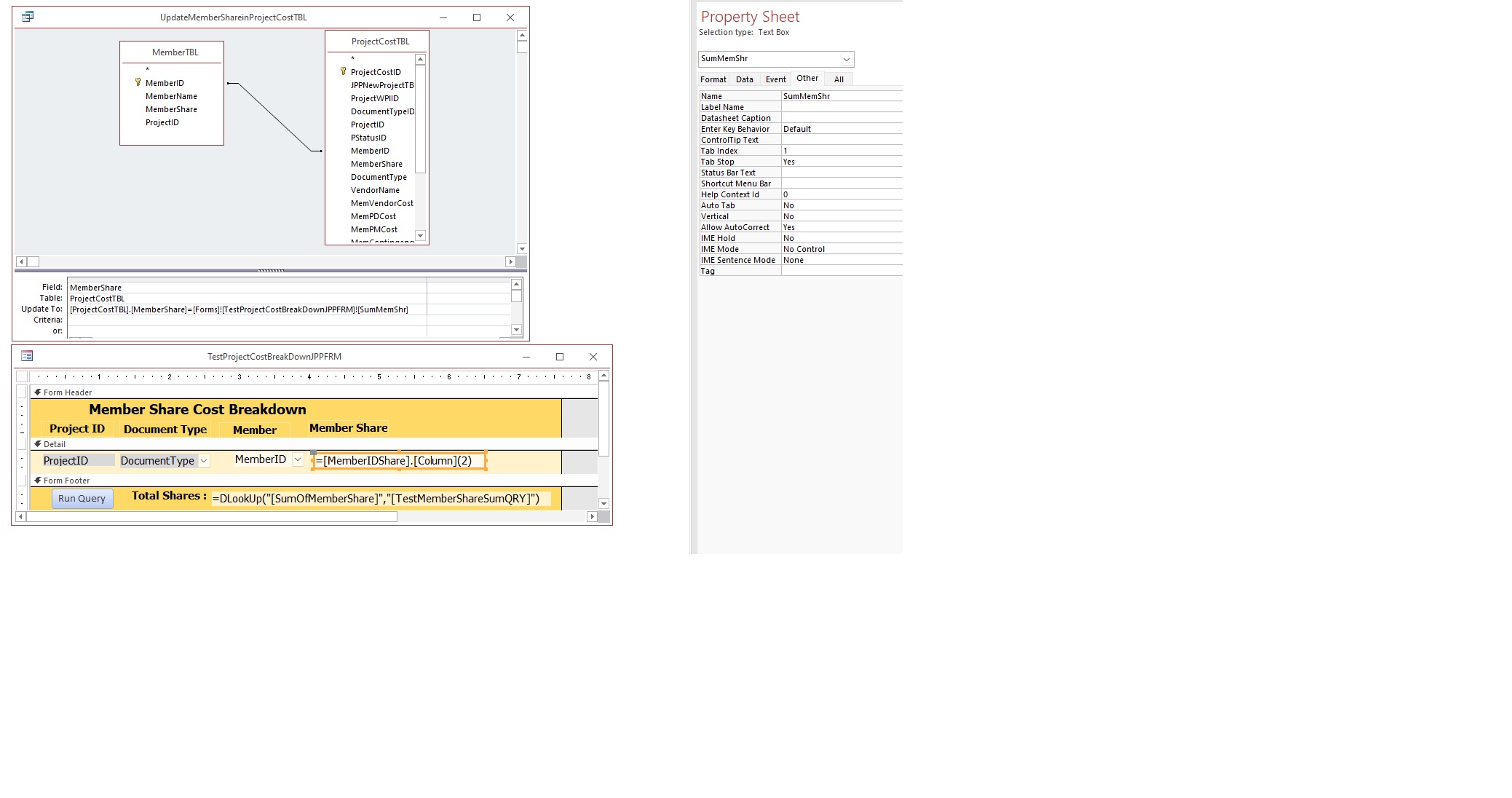
I have a Form, under combo box Member drop down I select the Member and beside that there is the Member Share Text field SumMemShr that auto-populates the share for that member. I need to use this value entered in the ProjectCostTBL table under the field MemberShare, as it is require for record purposes, so I created a query to populate this data. Once user enters the information he will run query. But when I do that, no data is transferred to the MemberShare Field in the Project cost Table.

Can you help me understand why?

Thanks
Taruna


Taruna Matharu OP  @Reply  

4 years ago

Adam Schwanz  @Reply  
           
4 years ago
A basic query does nothing but show you information, not change it. You need an update query or more preferably an insert SQL statement, but that may be beyond you currrently. Update Queries
Kevin Robertson  @Reply  
          
4 years ago
in the Update To row: Forms!FormName!FieldName
You will also need to enter criteria otherwise the field will be updated for EVERY record.

Remember to make a BACKUP copy of the table before running the Update Query.

Update Queries
Taruna Matharu OP  @Reply  

4 years ago
Thanks Adam and Kevin,

What is the other way I could do without  Update query or SQL  ( I am new to Access so SQL is far)
All I need is that user to select the Member and Member Share auto populate (to avoid errors) but at the same time need that data in the field, Is there a way ? Like a invisible field on form that updates the once  Member Share auto-populates, I don't know just thinking out loud.
Taruna Matharu OP  @Reply  

4 years ago

Taruna Matharu OP  @Reply  

4 years ago
Hi Kevin,
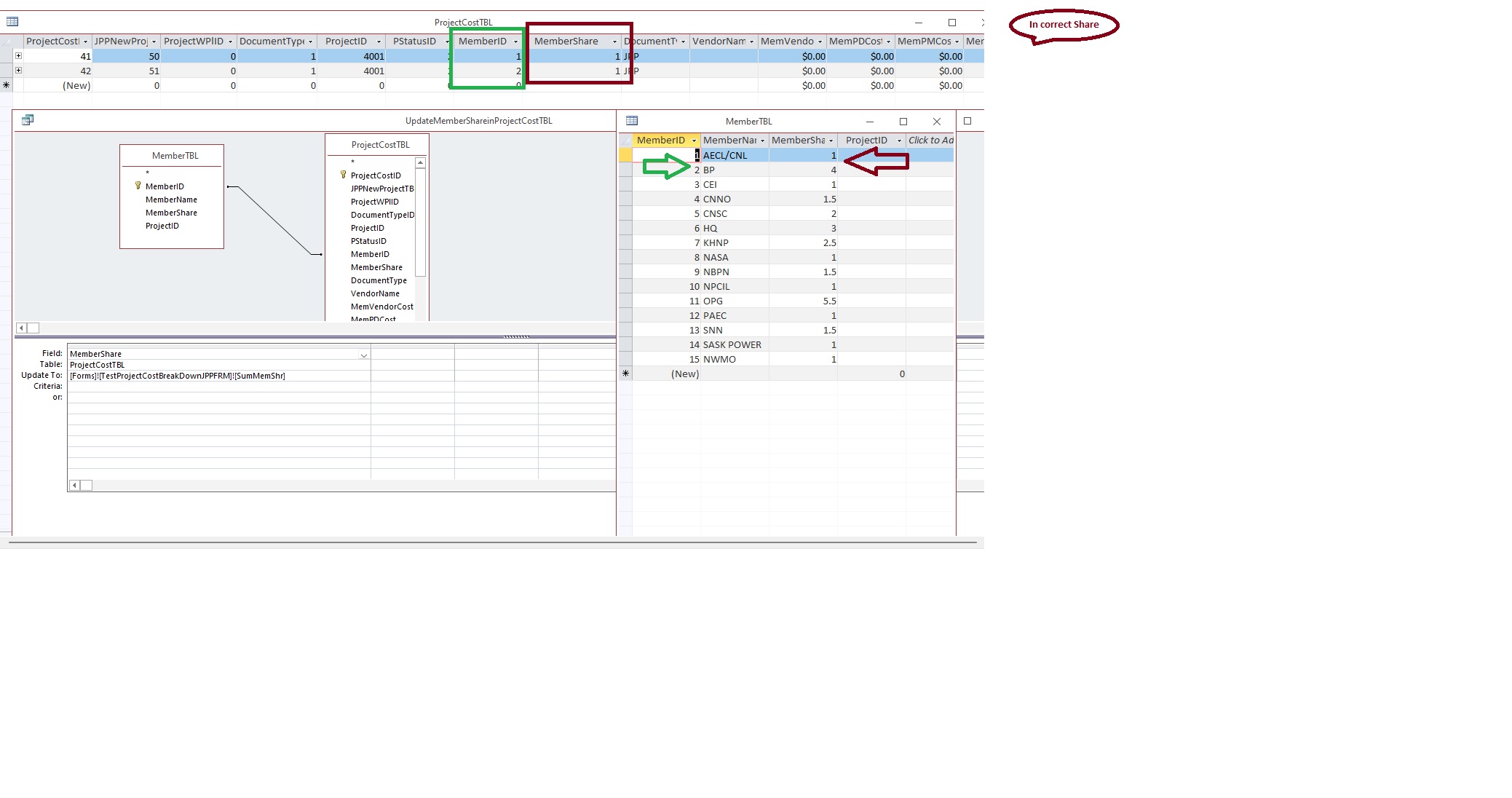
I did not add criteria as it is a part of the sub form. Once I run the query incorrect share is transferred. I have attached the image for the Member table that has the Member ID and Member Share and the query.
Kevin Robertson  @Reply  
          
4 years ago
I didn't realise the value was on a subform. The notation is slightly different.
Forms!ParentForm!Subform.Form!FieldName

Value From A Form
Taruna Matharu OP  @Reply  

4 years ago
Kevin,
Still, Once I run the query incorrect share is transferred. Kindly see the attached image for the Member table that has the Member ID and Member Share and the query. The share that get added is 1 for both members.
Richard Rost  @Reply  
          
4 years ago
Taruna, please read this: Context. It's very difficult for us to understand what you're trying to do unless you relate it to terms that everyone can understand. I have no clue what your fields are or what they represent. Try to ask the question generically... customers and orders always works for me. Also, I see you're a Gold member, but you haven't taken any of my courses, so I really don't know what your background with Access is. You said earlier that you're new to Access. I would strongly recommend taking my Beginner and at least the first few Expert classes, especially the ones on Action Queries (Access Expert 13) instead of just trying to figure out what you need at the moment.
Taruna Matharu OP  @Reply  

4 years ago

I did read the context and I added the screen shots of the Form, Query and query result with explanation of what is going wrong. I did finish the Beginner 1 and midway on 2 .

This thread is now CLOSED. If you wish to comment, start a NEW discussion in Access Forum.
 

Next Unseen

 
New Feature: Comment Live View


The following is a paid advertisement
Computer Learning Zone is not responsible for any content shown or offers made by these ads.
 

Learn
 
Access - index
Excel - index
Word - index
Windows - index
PowerPoint - index
Photoshop - index
Visual Basic - index
ASP - index
Seminars
More...
Customers
 
Login
My Account
My Courses
Lost Password
Memberships
Student Databases
Change Email
Info
 
Latest News
New Releases
User Forums
Topic Glossary
Tips & Tricks
Search The Site
Code Vault
Collapse Menus
Help
 
Customer Support
Web Site Tour
FAQs
TechHelp
Consulting Services
About
 
Background
Testimonials
Jobs
Affiliate Program
Richard Rost
Free Lessons
Mailing List
PCResale.NET
Order
 
Video Tutorials
Handbooks
Memberships
Learning Connection
Idiot's Guide to Excel
Volume Discounts
Payment Info
Shipping
Terms of Sale
Contact
 
Contact Info
Support Policy
Mailing Address
Phone Number
Fax Number
Course Survey
Email Richard
[email protected]
Blog RSS Feed    YouTube Channel

LinkedIn
Copyright 2026 by Computer Learning Zone, Amicron, and Richard Rost. All Rights Reserved. Current Time: 6/16/2026 7:30:03 PM. PLT: 1s