Free Lessons
Courses
Seminars
TechHelp
Fast Tips
Templates
Topic Index
Forum
ABCD
 
Home   Courses   TechHelp   Forums   Help   Contact   Merch   Join   Order   Logon  
 
Back to Access Forum    Comments List
Upload Images   @Reply   Bookmark    Link   Email   Next Unseen 
Path Change at Login
Dg Ewing 
     
4 years ago
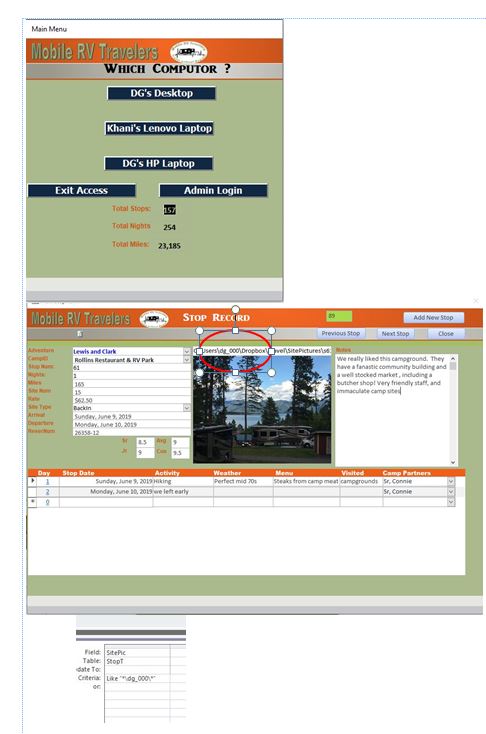
My wife and I share a RV Travel Journal db on 3 different computers.  The db uses pictures that are shared locally via a Dropbox account.

The path to the pics are stored as a txt field (RR's Images TechHelp 1616) and are slightly different depending on which computer is being used.  I have a "choose computer" login which I want to execute an update query using vba to modify the path.

mydesktop:
C:\Users\dg_000\Dropbox\Travel\SitePictures\stop1.jpeg
mywifeslaptop:
C:\Users\cashman\Dropbox\Travel\SitePictures\stop1.jpeg
mylaptop:
C:\Users\dgewi\Dropbox\Travel\SitePictures\stop1.jpeg

so if I login on my desktop I want \dg_000\ and if my wife's laptop \cashman\ and my laptop = \dgewi\

I know I will need to use: Like "*\dg_000\*", but I cant deduce the logic to change only that part of the string.

also, would a combo box be better than 3 different cmd buttons? and if so what would the code look like?

thanks for your help!!

Dg Ewing OP  @Reply  
     
4 years ago

Adam Schwanz  @Reply  
           
4 years ago
Can you just make a shared network folder on one of the machines?
Adam Schwanz  @Reply  
           
4 years ago
Or you could move the dropbox into your folder with the database, then use Application.CurrentProject.Path
Kevin Robertson  @Reply  
          
4 years ago
You could do something similar to this:

Dim UserName as String, myPath as String
Dim ImageFolder as String

UserName = Environ$("username")
ImageFolder = "\Dropbox\Travel\SitePictures\"
myPath = "C:\Users\" & UserName & ImageFolder & "Stop1.jpeg"


Dg Ewing OP  @Reply  
     
4 years ago
the db is in a dropbox folder C:\Users\dgewi\Dropbox\Travel or C:\Users\dg_000\Dropbox\Travel or C:\Users\cashman\Dropbox\Travel.

That is how dropbox organizes shared folders.  the pics are in a subfolder below the folder with the accdb.  
Cant use a shared network as we use it on the road more than here at home.  And I dont want to use my home computer as a "server".  

my current thinking is have two fields one with the "base" path \Dropbox\Travel\SitePictures\stop1.jpeg and then depending who signs in ( only one of us at a time--never will both of us be logged in) update the second field by concatenating user with base and putting that in the pic filed ??  I am pretty sure that would work but , I think RR would shake his head and label it as sloppy and amatureish
Dg Ewing OP  @Reply  
     
4 years ago
Kevin, I think that I am picking up what you are laying down, except , I dont know what Environ$ is , but I am guessing that when we would really login using a username equal to the "dg_000" or "cashman" or "dgewi"....

and that the Environ$ is a predefined function that would grab the username and concatenate with ImageFolder , but where am I putting the value:  in the form or in a table or in a query.   And I assume that I only permanently store the Stop1.jpeg....??
Scott Axton  @Reply  
        
4 years ago
Could you just make a little helper table?

ID
ComputerName
DropBoxPath

Put the full path in the DBPath field.
Then using your combo box id - DLookup the path and substitute it in for your path portion.

Dg Ewing OP  @Reply  
     
4 years ago
how can is set a global value and then use it on any form or query
Dg Ewing OP  @Reply  
     
4 years ago
Kevin, I just discovered that Eviron$ (username) returns the MS user name which is the folder name....you are a genius

but now that I am trying to establish a global value base on a cmd button, how do I do that?
Dg Ewing OP  @Reply  
     
4 years ago
let me better explain,  I use pictures on more than one form, so I dont want to repeat the code each time, how do I make a global function that can be called from any form or query.  Hopefully that makes sense.  I have watched "create your own function-1379" but it does not answer my question
Alex Hedley  @Reply  
            
4 years ago
Are you putting your function in a Form code or a global mod?
Scott Axton  @Reply  
        
4 years ago
Check out Access Developer 31 again.  Specifically the use of TempVars in Lesson 2.
TempVars is a way to set a value that survives during the session.  It can be used across forms.

Unfortunately Richard doesn't have a specific lesson on TempVars though he has it on his list.  Just not top priority,
Dg Ewing OP  @Reply  
     
4 years ago
Scott, I just purchased about an hour ago,  and lesson 2 it is spot on and covers exactly how to map pictures to a "picturefolder" using currentproject.path and Environ ( profile something or another....I have to watch again).

Wow, lesson 2 is exactly what I am trying to do and some.....Thanks alot Kevin for the tutorial that has prep'd me for the next level.  

Alex, I was trying to put in a global mod, but never figured out how, nor did figure out how to call it....Right now I am going with TempVars as it is exactly how RR does what I am trying to do with my pictures/images.

This thread is now CLOSED. If you wish to comment, start a NEW discussion in Access Forum.
 

Next Unseen

 
New Feature: Comment Live View


The following is a paid advertisement
Computer Learning Zone is not responsible for any content shown or offers made by these ads.
 

Learn
 
Access - index
Excel - index
Word - index
Windows - index
PowerPoint - index
Photoshop - index
Visual Basic - index
ASP - index
Seminars
More...
Customers
 
Login
My Account
My Courses
Lost Password
Memberships
Student Databases
Change Email
Info
 
Latest News
New Releases
User Forums
Topic Glossary
Tips & Tricks
Search The Site
Code Vault
Collapse Menus
Help
 
Customer Support
Web Site Tour
FAQs
TechHelp
Consulting Services
About
 
Background
Testimonials
Jobs
Affiliate Program
Richard Rost
Free Lessons
Mailing List
PCResale.NET
Order
 
Video Tutorials
Handbooks
Memberships
Learning Connection
Idiot's Guide to Excel
Volume Discounts
Payment Info
Shipping
Terms of Sale
Contact
 
Contact Info
Support Policy
Mailing Address
Phone Number
Fax Number
Course Survey
Email Richard
[email protected]
Blog RSS Feed    YouTube Channel

LinkedIn
Copyright 2026 by Computer Learning Zone, Amicron, and Richard Rost. All Rights Reserved. Current Time: 5/1/2026 7:20:40 PM. PLT: 0s