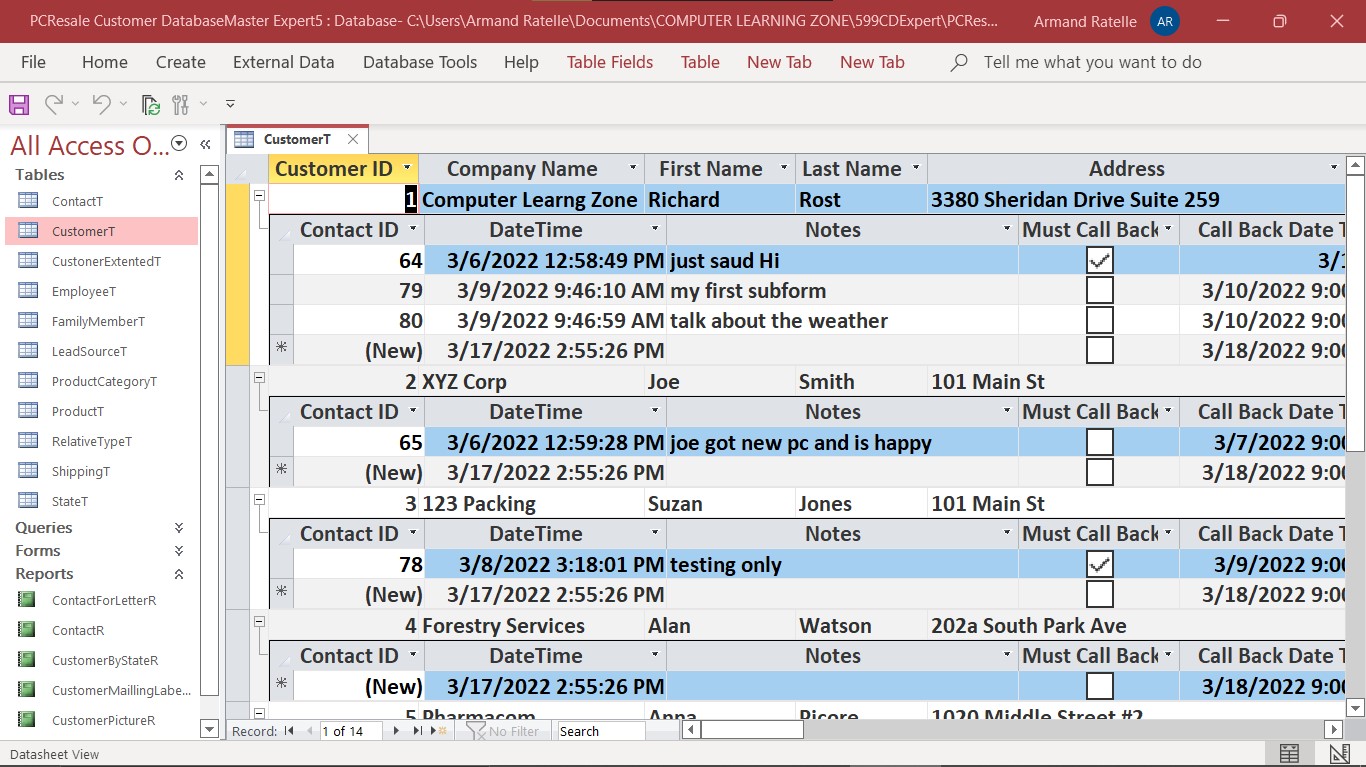
Every time I open the table the sub form stay on please advise how I can close and keep it close
Armand RatelleOP
@Reply 4 years ago
Scott Axton
@Reply 4 years ago
Armand the + symbol is created in you datasheet view of the table automatically when you create a relationship using the Database Tools.
This is called a Subdatasheet. Per the Microsoft website, they recommend (and us here too), that you do not use those to edit your data.
They also note that it can adversely affect the speed of your database on large tables.
In Datasheet view, open the table or query that contains the Subdatasheet that you want to modify.
On the Home tab in the Records menu, click More, point to Subdatasheet, and then click Remove, Collapse All, or Expand All.
You will learn as you progress in the courses that you DON'T want your users working directly in your tables.
You want them using the forms that you create to manipulate the data. You have much better control over how the user interacts with your database that way.
Armand RatelleOP
@Reply 4 years ago
Thank you you time have nice week end DONE
Armand RatelleOP
@Reply 4 years ago
Done Thank you
Sorry, only students may add comments.
Click here for more
information on how you can set up an account.
If you are a Visitor, go ahead and post your reply as a
new comment, and we'll move it here for you
once it's approved. Be sure to use the same name and email address.
This thread is now CLOSED. If you wish to comment, start a NEW discussion in
Access Expert 5.