Free Lessons
Courses
Seminars
TechHelp
Fast Tips
Templates
Topic Index
Forum
ABCD
 
Home   Courses   TechHelp   Help   Contact   Merch   Join   Order   Logon   Forums   
 
Back to Access Forum    Comments List
Upload Images | @Reply | Bookmark | Link | Email | Next Unseen |
Handle Null Values in Crosstab
Dan Jackson 
        
4 years ago
Hi,

Hopefully a quick one - I have a simple form, based on a Crosstab, based on a simple query.

The simple query gathers the data, sorts it and filters to MTD.

The CrossTab sets up the data for display.

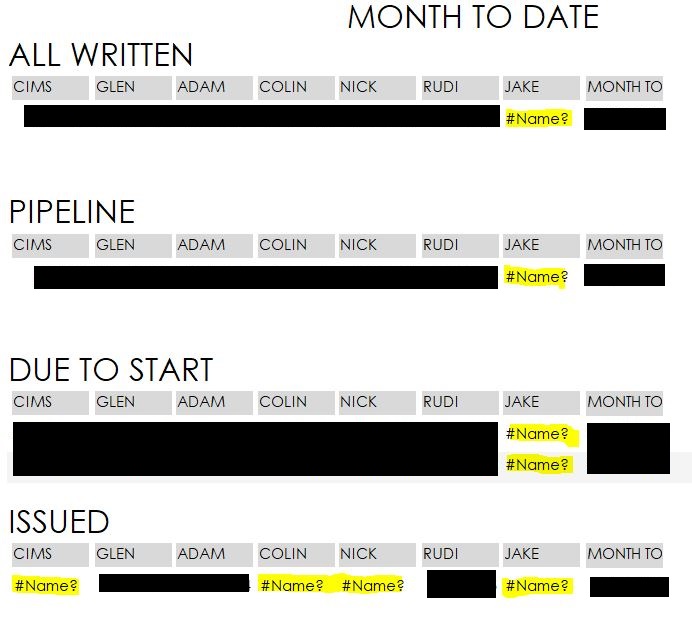
When there is not yet a value (I.E. Its MTD so its the beginning of the month), the CrossTab doesn't create a field and, as a result, the Form generates a #NAME? error.

How do i get the form to display 0 instead of the NAME error?

As always, many thanks
Scott Axton  @Reply  
      
4 years ago
The NZ function is usually what  you need.
Dan Jackson OP  @Reply  
        
4 years ago
Where best to apply? Cheers Scott
Dan Jackson OP  @Reply  
        
4 years ago
Just thought, an easier method would be to make the control in the form "NOT VISIBLE" if no control source. Is there a line of code i can add to each Text Control to do that?
Scott Axton  @Reply  
      
4 years ago
Dan my x-ray glasses got broken the other day.  If you can post what you have it would help out.
(Otherwise you might not like where we tell you to put it!  LOL)
Dan Jackson OP  @Reply  
        
4 years ago
Hopefully this'll help. Sorry, i'm doue off 2 weeks on holiday after today so been rushing to get this mini project finished. Got 90 mins left!!!!!!!
Dan Jackson OP  @Reply  
        
4 years ago

Dan Jackson OP  @Reply  
        
4 years ago

Dan Jackson OP  @Reply  
        
4 years ago

Dan Jackson OP  @Reply  
        
4 years ago
Sorry about the wrong order.

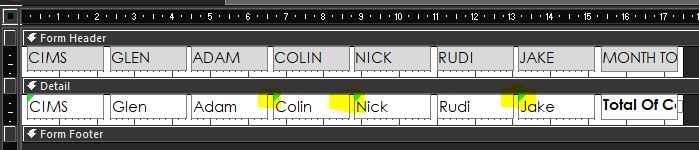
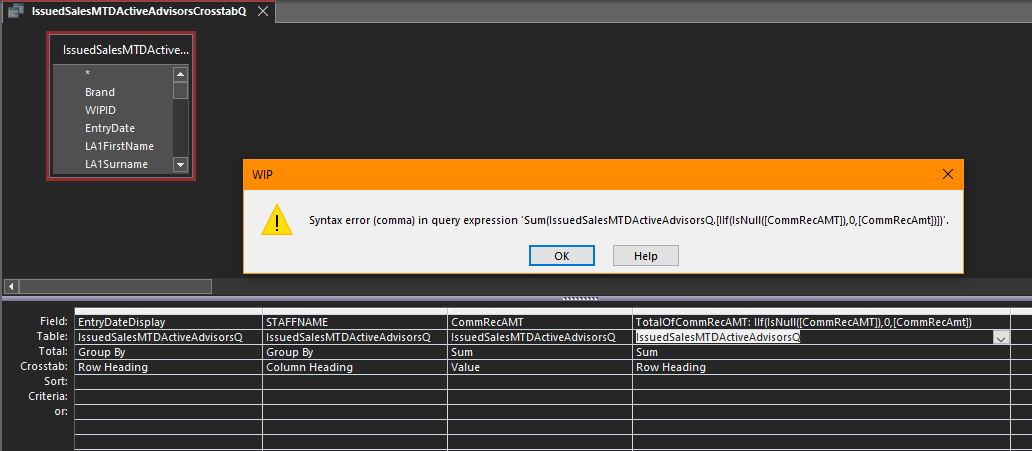
#2 is the Crosstab query. It'll dynamically add fields when they have a value
#1 is based on #2. Notice the fields having no control source (Once they have a figure, it'll be fine)
#3 is the result. Just need to hide the controls where #NAME? appears (Or better, 0 it)

Thanks
Adam Schwanz  @Reply  
           
4 years ago
Do you have NZ in your query?

NZName: NZ(NameField,0)
Dan Jackson OP  @Reply  
        
4 years ago
Just tried this in the Crosstab query (#2) but get syntax error

Total Of CommRecAMT: Nz([CommRecAMT],0)
Adam Schwanz  @Reply  
           
4 years ago
Keep it one word so we don't have to deal with other outside possible issues that are just access being weird.

TotalofCommRecAmt: NZ(CommrecAmt,0)
or
TotalofCommRecAmt: NZ(CommrecAmt,"")

Get anywhere with those?
Dan Jackson OP  @Reply  
        
4 years ago
Just tried applying to the original query (That feeds the Crosstab) and din't work either - Wizard didn't offer SUM when creating a new Crosstab
Dan Jackson OP  @Reply  
        
4 years ago

Adam Schwanz  @Reply  
           
4 years ago
You could also try IIF.
TotalofCommRecAmt: IIF(IsNull(CommRecAmt),0,CommRecAmt)

Can I get some pictures of the queries? Missing something. Design view
Adam Schwanz  @Reply  
           
4 years ago
Try NZ outside of that whole thing.

NZ(Sum.......),0)
Dan Jackson OP  @Reply  
        
4 years ago

Adam Schwanz  @Reply  
           
4 years ago
What are you trying to set? It looks to me like you're changing the row heading, you should be changing the value right? In the field next to it, if you're trying to put 0s in
Adam Schwanz  @Reply  
           
4 years ago
I don't play with crosstab queries much so kind of winging it off what I remember, but you should be able to do have your row and column heading stay the same, delete the extra row heading you've been working on, and change the value field to

NewCommRecAmt: NZ([CommRecAmt],0)
or
NewCommRecAmt: IIF(IsNull([CommRecAmt]),0,[CommRecAmt])
Dan Jackson OP  @Reply  
        
4 years ago
Really appreciate your time on this Scott, thank you. I'm off work now but will bookmark this and revisit soon. Cheers
Kevin Robertson  @Reply  
          
4 years ago
In the query that feeds your Crosstab, I would also make sure the Join Type is an Outer Join.

This thread is now CLOSED. If you wish to comment, start a NEW discussion in Access Forum.
 

Next Unseen


What's This?


The following is a paid advertisement
Computer Learning Zone is not responsible for any content shown or offers made by these ads.
 

Learn
 
Access - index
Excel - index
Word - index
Windows - index
PowerPoint - index
Photoshop - index
Visual Basic - index
ASP - index
Seminars
More...
Customers
 
Login
My Account
My Courses
Lost Password
Memberships
Student Databases
Change Email
Info
 
Latest News
New Releases
User Forums
Topic Glossary
Tips & Tricks
Search The Site
Code Vault
Collapse Menus
Help
 
Customer Support
Web Site Tour
FAQs
TechHelp
Consulting Services
About
 
Background
Testimonials
Jobs
Affiliate Program
Richard Rost
Free Lessons
Mailing List
PCResale.NET
Order
 
Video Tutorials
Handbooks
Memberships
Learning Connection
Idiot's Guide to Excel
Volume Discounts
Payment Info
Shipping
Terms of Sale
Contact
 
Contact Info
Support Policy
Mailing Address
Phone Number
Fax Number
Course Survey
Email Richard
[email protected]
Blog RSS Feed    YouTube Channel

LinkedIn
Copyright 2026 by Computer Learning Zone, Amicron, and Richard Rost. All Rights Reserved. Current Time: 10/1/2026 3:55:48 PM. PLT: 1s