Free Lessons
Courses
Seminars
TechHelp
Fast Tips
Templates
Topic Index
Forum
ABCD
 
Home   Courses   TechHelp   Forums   Help   Contact   Merch   Join   Order   Logon  
 
Back to Access Forum    Comments List
Upload Images   @Reply   Bookmark    Link   Email   Next Unseen 
Force Crosstab to Show Null
Dan Jackson 
            
4 years ago
This is on the back of a Previous post. Quite simple but not sure how to proceed.

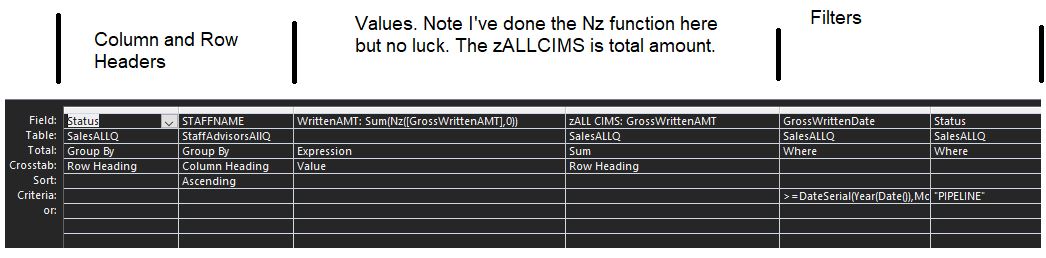
This Crosstab is showing totals for all the advisors but if an advisor hasn't make a particular sale, it doesn't show here. How can i get it to show, even if the value is 0?

============================

SQL Behind this crosstab (SalesAllQ is a Union Query combining my two tables)

TRANSFORM Sum(Nz([GrossWrittenAMT],0)) AS WrittenAMT
SELECT SalesALLQ.Status, Sum(SalesALLQ.GrossWrittenAMT) AS [zALL CIMS]
FROM SalesALLQ LEFT JOIN StaffAdvisorsAllQ ON SalesALLQ.AdvisorID = StaffAdvisorsAllQ.STAFFID
WHERE (((SalesALLQ.GrossWrittenDate)>=DateSerial(Year(Date()),Month(Date()),1) And (SalesALLQ.GrossWrittenDate)<=Now()) AND ((SalesALLQ.Status)="PIPELINE"))
GROUP BY SalesALLQ.Status
ORDER BY StaffAdvisorsAllQ.STAFFNAME
PIVOT StaffAdvisorsAllQ.STAFFNAME;
Dan Jackson OP  @Reply  
            
4 years ago

Dan Jackson OP  @Reply  
            
4 years ago

Dan Jackson OP  @Reply  
            
4 years ago
Forgot to mention. With the first picture, there is an advisor called Jake who isn't showing as his figure is 0. As always, many thanks
Scott Axton  @Reply  
        
4 years ago
The query to bring in all of the Advisors (Jake) needs to have the join changed to show #2 in the join type.
I don't see the a picture of the query that brings them together so can't tell you by name.

Please post the query you make before you do the cross tab.
Dan Jackson OP  @Reply  
            
4 years ago
Will do, I'm in My phone at the moment. The previous query is a very simple union query connecting the two tables, no extra frills.
If no response by the time I get back in the office, I'll slap a pic up. Cheers
Scott Axton  @Reply  
        
4 years ago
Watch the Outer Joins video to see what I was referring to above.

Being that this is a union query that might bring other issues into play.  Well have to see.
Dan Jackson OP  @Reply  
            
4 years ago
I don't think this is a joins issue. I'm somewhat familiar with outer and inner joins. The reason "Jake" isn't showing on the Crosstab is because he hasn't made any sales that fit that Criteria so his figure should be 0. Because i'm building reports and a salesboard on this crosstab, i need that 0 there or otherwise results in a #NAME? error. It doesn't appear in the crosstab because it is a null value

Here is the Union screen grab and a pic showing what i mean. Cheers Scott
Dan Jackson OP  @Reply  
            
4 years ago

Dan Jackson OP  @Reply  
            
4 years ago

Kevin Robertson  @Reply  
          
4 years ago
Does Jake have any records that meet the criteria specified in the Where condition of your Crosstab?
Dan Jackson OP  @Reply  
            
4 years ago
No. There are entries where there won't be any records in the crosstab. I'm looking to get a 0 in those cases
Kevin Robertson  @Reply  
          
4 years ago
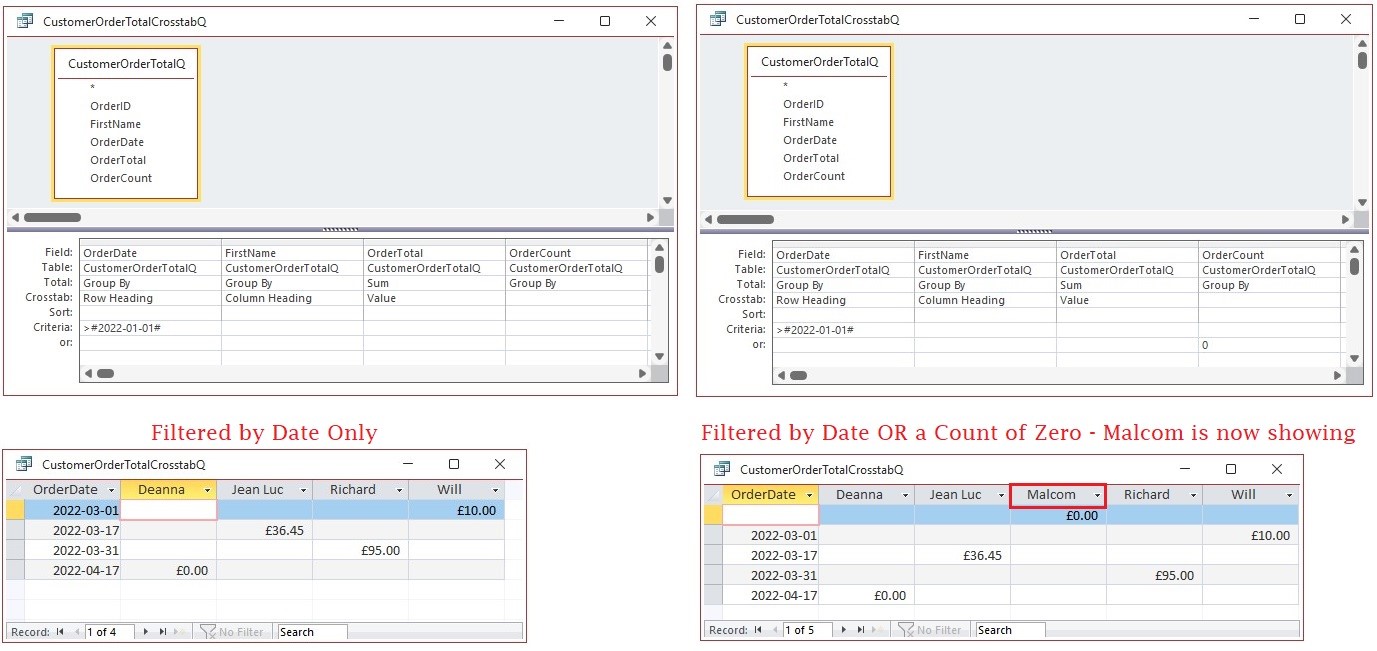
You will need a count of the records in a preceding query. And add the criteria as an OR condition (see screenshot).
Kevin Robertson  @Reply  
          
4 years ago

Dan Jackson OP  @Reply  
            
4 years ago
I'll give it a go Thanks!
Dan Jackson OP  @Reply  
            
4 years ago
My crosstab is based on a Union Query.
Are you saying i need to add another basic query in the middle or can i apply this count to with the crosstab or Union?

Really appreciate this mate, thanks
Kevin Robertson  @Reply  
          
4 years ago
You could have something like this in your Crosstab, which also works.
You may have to consolidate your criteria into one Where column using And/Or as appropriate.

myCriteria: [OrderDate]>#2022-01-01# Or Count([OrderID])=0

Scott Axton  @Reply  
        
4 years ago
Dan keep in mind that the Union is just "smashing together" two queries.   Also, if you have one side of the Union working it is easier to make the other side match.

You should be able to drop either side of Union's SQL back into the query designer and switch back to the design mode.
I'm pretty sure the Union video showed that, it's been a minute since I watched it though.
Dan Jackson OP  @Reply  
            
4 years ago
Appreciate it. I've actually stepped back and looked at the whole design and realised i've probably way over-complicated it. I'm trying to work with a Crosstab when, at my stage of understanding, i'm probably better off working with a proper query structure

2 tables containg the raw data
A Union Query to provide the additional combined option
A simple query containing the calculations and filters required for each output/form/report
Output

I realise there might be a more efficient way involving less queries but i feel i've probably way over stepped my knowledge boundary so time to shake it up!
Scott Axton  @Reply  
        
4 years ago

I think you are on the right path.  Just get the query working correctly for each table individually.  
Then put them together into your Union.

Re: "over stepped my knowledge".  Maybe, but that's how you learn - right?  
The first time you do something new is always the most difficult.  Next time will be a piece of cake compared to what your going through now.
Dan Jackson OP  @Reply  
            
4 years ago

This thread is now CLOSED. If you wish to comment, start a NEW discussion in Access Forum.
 

Next Unseen

 
New Feature: Comment Live View


The following is a paid advertisement
Computer Learning Zone is not responsible for any content shown or offers made by these ads.
 

Learn
 
Access - index
Excel - index
Word - index
Windows - index
PowerPoint - index
Photoshop - index
Visual Basic - index
ASP - index
Seminars
More...
Customers
 
Login
My Account
My Courses
Lost Password
Memberships
Student Databases
Change Email
Info
 
Latest News
New Releases
User Forums
Topic Glossary
Tips & Tricks
Search The Site
Code Vault
Collapse Menus
Help
 
Customer Support
Web Site Tour
FAQs
TechHelp
Consulting Services
About
 
Background
Testimonials
Jobs
Affiliate Program
Richard Rost
Free Lessons
Mailing List
PCResale.NET
Order
 
Video Tutorials
Handbooks
Memberships
Learning Connection
Idiot's Guide to Excel
Volume Discounts
Payment Info
Shipping
Terms of Sale
Contact
 
Contact Info
Support Policy
Mailing Address
Phone Number
Fax Number
Course Survey
Email Richard
[email protected]
Blog RSS Feed    YouTube Channel

LinkedIn
Copyright 2026 by Computer Learning Zone, Amicron, and Richard Rost. All Rights Reserved. Current Time: 6/14/2026 11:12:04 PM. PLT: 1s