Free Lessons
Courses
Seminars
TechHelp
Fast Tips
Templates
Topic Index
Forum
ABCD
 
Home   Courses   TechHelp   Forums   Help   Contact   Merch   Join   Order   Logon  
 
Back to Access Forum    Comments List
Upload Images   @Reply   Bookmark    Link   Email   Next Unseen 
Form VBA help
Jeff Bartuch 
     
4 years ago
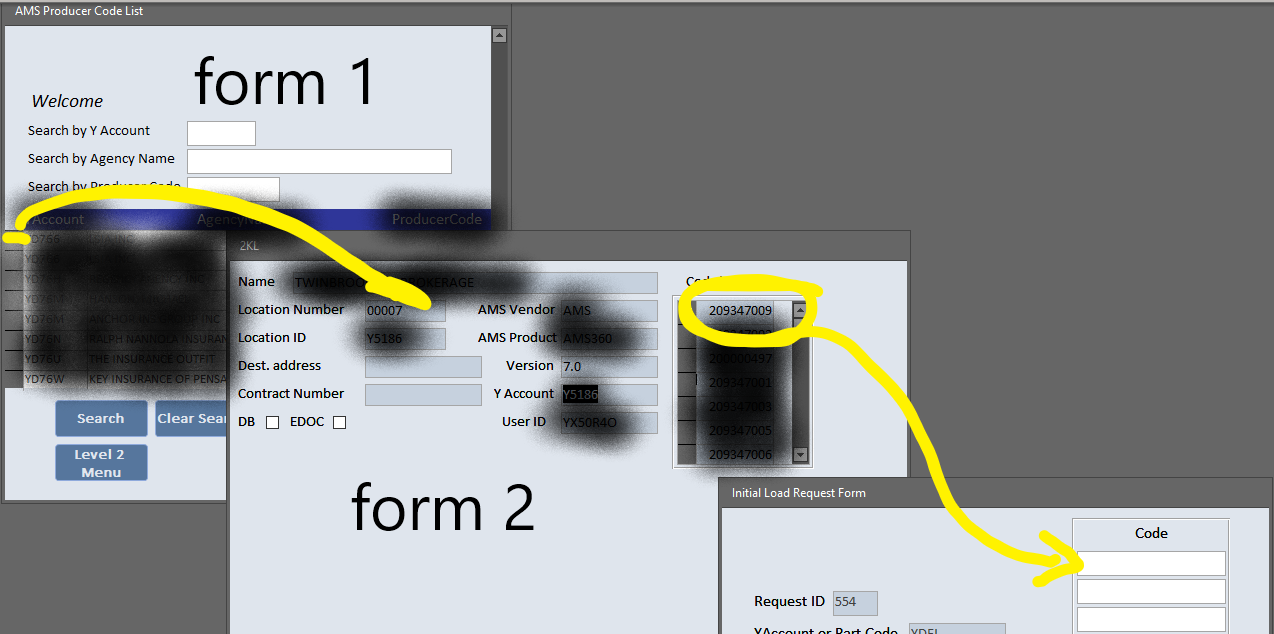
I will try to explain this in a way to make it the easiest to understand.
1.User will select record in form 1 and click button.
2.That will open form 2 to a detail form of that record.
3.User will then select one or multiple codes from Form 2 and click order button.
4.Form 3 will open with the info from Form 2, but I am having trouble getting the codes to fill in on Form 3. This is where I need help.


Form 1 CODE

Code
Option Compare Database
Option Explicit

Private Sub RequeryForm()
    Dim SQL As String, WhereStr As String
    
    WhereStr = ""
    If Search <> "" Then
        If WhereStr <> "" Then WhereStr = WhereStr & " AND "
        WhereStr = "LocationID Like ""*" & AccountSearch & "*"""
    End If
    If NameSearch <> "" Then
        If WhereStr <> "" Then WhereStr = WhereStr & " AND "
        WhereStr = "FirstNameLastName Like ""*" & NameSearch & "*"""
    End If
    If CodeSearch <> "" Then
        If WhereStr <> "" Then WhereStr = WhereStr & " AND "
        WhereStr = "Code Like ""*" & CodeSearch & "*"""
    End If
    
    SQL = "Select * From AMSQuery"
    
    If WhereStr <> "" Then
        SQL = SQL & " Where " & WhereStr
    End If
    
    
    Me.RecordSource = SQL
End Sub
Private Sub ClearSearchBtn_Click()
    SetDefaults
    RequeryForm
End Sub


Private Sub OpenDetailbtn_Click()
    DoCmd.OpenForm "Form2", , , "LocationID=" & Me.LocationID
End Sub

Private Sub SearchBtn_Click()
    RequeryForm
End Sub

Private Sub SetDefaults()

    AccountSearch = Null
    NameSearch = Null
    CodeSearch = Null

End Sub


Code For Form2
Private Sub ExitBTN_Click()
    DoCmd.Close acForm, "Form2"
End Sub

Private Sub OrderILbtn_Click()
    DoCmd.OpenForm "RequestForm", acNormal, , , acFormAdd
    
End Sub

Form 3 Code
Option Compare Database
Option Explicit

'Private Sub IncNumber_BeforeUpdate(Cancel As Integer)
    'If Not (Me!IncNumber = "IncNumber" Or (Me!IncNumber <> 11) Or IsNull(Me!IncNumber)) Then
    'MsgBox "The Incident Number entered is less than 11 characters."
    'Cancel = True
    'End If
'End Sub


Private Sub CloseFormBtn_Click()
    DoCmd.Close acForm, "Form3", acSaveYes
    DoCmd.SelectObject acForm, "Form1"


End Sub
Private Sub Form_Load()
    
    Forms!RequestForm!Account = Forms!Form2!LocationID
    
End Sub

Private Sub SaveBtn_Click()

    If IsNull([Account]) Then
        MsgBox "You forgot to add a Y account.", vbOKOnly, "Missing Y account Warning!"
        Else
    DoCmd.RunCommand acCmdSaveRecord
    DoCmd.GoToRecord , , acNewRec
    End If
    'ILRequestID = "IL" & Right(Year([DateAndTimeRequested]), 2) & Format(Month([DateAndTimeRequested]), "00") & Format(Day([DateAndTimeRequested]), "00") & [EntryID]
End Sub


Thank you,
Jeff Bartuch OP  @Reply  
     
4 years ago

Adam Schwanz  @Reply  
           
4 years ago
Hey Jeff, try not to double post, I seen 3 copies of this post in 3 different forums here. Took out the other two for you ;).

If Form 3 is a new record you just need to set default values, you don't need to set it in actual code.

It also looks like Form 2 has this on a subform. Which has different syntax if you're calling for a value from it. Value From a Form Try this

This thread is now CLOSED. If you wish to comment, start a NEW discussion in Access Forum.
 

Next Unseen

 
New Feature: Comment Live View


The following is a paid advertisement
Computer Learning Zone is not responsible for any content shown or offers made by these ads.
 

Learn
 
Access - index
Excel - index
Word - index
Windows - index
PowerPoint - index
Photoshop - index
Visual Basic - index
ASP - index
Seminars
More...
Customers
 
Login
My Account
My Courses
Lost Password
Memberships
Student Databases
Change Email
Info
 
Latest News
New Releases
User Forums
Topic Glossary
Tips & Tricks
Search The Site
Code Vault
Collapse Menus
Help
 
Customer Support
Web Site Tour
FAQs
TechHelp
Consulting Services
About
 
Background
Testimonials
Jobs
Affiliate Program
Richard Rost
Free Lessons
Mailing List
PCResale.NET
Order
 
Video Tutorials
Handbooks
Memberships
Learning Connection
Idiot's Guide to Excel
Volume Discounts
Payment Info
Shipping
Terms of Sale
Contact
 
Contact Info
Support Policy
Mailing Address
Phone Number
Fax Number
Course Survey
Email Richard
[email protected]
Blog RSS Feed    YouTube Channel

LinkedIn
Copyright 2026 by Computer Learning Zone, Amicron, and Richard Rost. All Rights Reserved. Current Time: 5/6/2026 1:20:17 PM. PLT: 0s