Free Lessons
Courses
Seminars
TechHelp
Fast Tips
Templates
Topic Index
Forum
ABCD
 
Home   Courses   TechHelp   Forums   Help   Contact   Merch   Join   Order   Logon  
 
Back to Access Forum    Comments List
Upload Images   @Reply   Bookmark    Link   Email   Next Unseen 
Pop up Message
Rajashree Natarajan 
      
4 years ago
Is there a way to have a message pop up if my patients have any balance due? I have it as a red box on the form but we get busy and it gets missed. We dont collect monies. Would be nice for it to pop up as soon as that record is open which usually happens when they check in. Will save us a lot of mailing and no monies paid. TIA.
Kevin Robertson  @Reply  
          
4 years ago
Here's a couple of videos that should help.

Reminder Popup
Reminder Popup Date
Scott Axton  @Reply  
        
4 years ago
Rajashree what is the code behind your little red box?
You could probably tie in an on load event to bring up a custom form instead or in addition.
Rajashree Natarajan OP  @Reply  
      
4 years ago
Scott that is a great idea. I can do that. I am just not sure how to write the code so the it pops up on when there is an amount greater than $0. I tried conditional formatting, but it brings up every time and it's a pain to click out of it each time we access any records. Can you help?
Scott Axton  @Reply  
        
4 years ago
Just create a little form - as complex or as simple as you want.

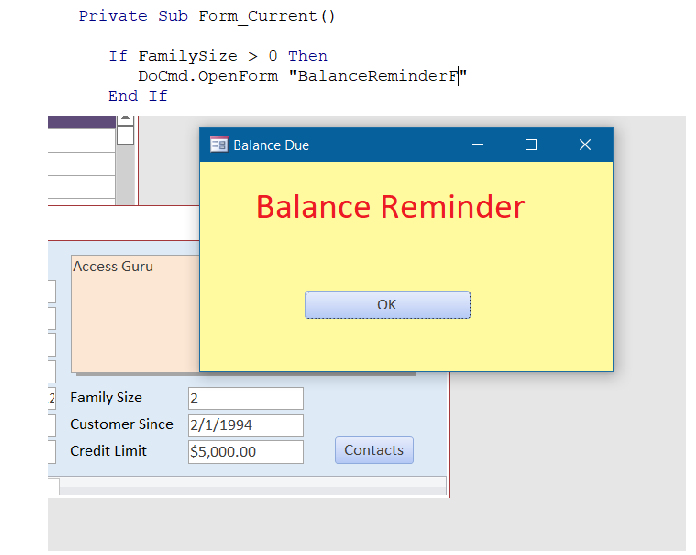
I did this in about 2 min using FamilySize in the Blank Template.
Set the forms properties as desired.  I chose no Record Selectors and no Navigation Buttons. I also made it Popup and Modal.

Play with it and show is what you come up with!
Scott Axton  @Reply  
        
4 years ago

Rajashree Natarajan OP  @Reply  
      
4 years ago
Omg omg omg'this is exactly what I am looking for. Thank you so much. I am going to do this weekend.
Scott Axton  @Reply  
        
4 years ago
There is tons of things I could think of to do with this.
Birthday is this month:  Wish them happy Birthday!
Guarantee about to expire:  Do they need service?
It's  been a year since your last hearing check.
How is your battery supply?

On and on.  The red "Balance Reminder" is just a label.  Depending on the message change the content of the label and the color of the background.

Check out the Universal Dialog Box in Developer 12

Rajashree Natarajan OP  @Reply  
      
4 years ago
Scott, can you please tell me the rest of the VBA. It works well but the problem is when I click ok, the whole form quits. I need to stay on the current form. The pop up is just a reminder and when I hit ok it alone needs to close and not the main form. For some reason, when I hit ok, the whole thing closes and comes back to main menu
Scott Axton  @Reply  
        
4 years ago

This is all that I have in the CustomerF:


Private Sub Form_Current()

      If FamilySize > 0 Then
         DoCmd.OpenForm "BalanceReminderF"
      End If

End Sub


-----------------

For the OK Button on the BalanceReminderF:

Private Sub OKBtn_Click()

   DoCmd.Close acForm, "BalanceReminderF", acSaveYes
   DoCmd.OpenForm "CustomerF"
  
End Sub


That's it.  Super simple stuff nothing complicated.

This thread is now CLOSED. If you wish to comment, start a NEW discussion in Access Forum.
 

Next Unseen

 
New Feature: Comment Live View


The following is a paid advertisement
Computer Learning Zone is not responsible for any content shown or offers made by these ads.
 

Learn
 
Access - index
Excel - index
Word - index
Windows - index
PowerPoint - index
Photoshop - index
Visual Basic - index
ASP - index
Seminars
More...
Customers
 
Login
My Account
My Courses
Lost Password
Memberships
Student Databases
Change Email
Info
 
Latest News
New Releases
User Forums
Topic Glossary
Tips & Tricks
Search The Site
Code Vault
Collapse Menus
Help
 
Customer Support
Web Site Tour
FAQs
TechHelp
Consulting Services
About
 
Background
Testimonials
Jobs
Affiliate Program
Richard Rost
Free Lessons
Mailing List
PCResale.NET
Order
 
Video Tutorials
Handbooks
Memberships
Learning Connection
Idiot's Guide to Excel
Volume Discounts
Payment Info
Shipping
Terms of Sale
Contact
 
Contact Info
Support Policy
Mailing Address
Phone Number
Fax Number
Course Survey
Email Richard
[email protected]
Blog RSS Feed    YouTube Channel

LinkedIn
Copyright 2026 by Computer Learning Zone, Amicron, and Richard Rost. All Rights Reserved. Current Time: 5/6/2026 6:26:03 PM. PLT: 0s