Free Lessons
Courses
Seminars
TechHelp
Fast Tips
Templates
Topic Index
Forum
ABCD
 
Home   Courses   TechHelp   Forums   Help   Contact   Merch   Join   Order   Logon  
 
Back to Access Forum    Comments List
Upload Images   @Reply   Bookmark    Link   Email   Next Unseen 
Adding Tables Relationships
Tom Kelly 
    
4 years ago
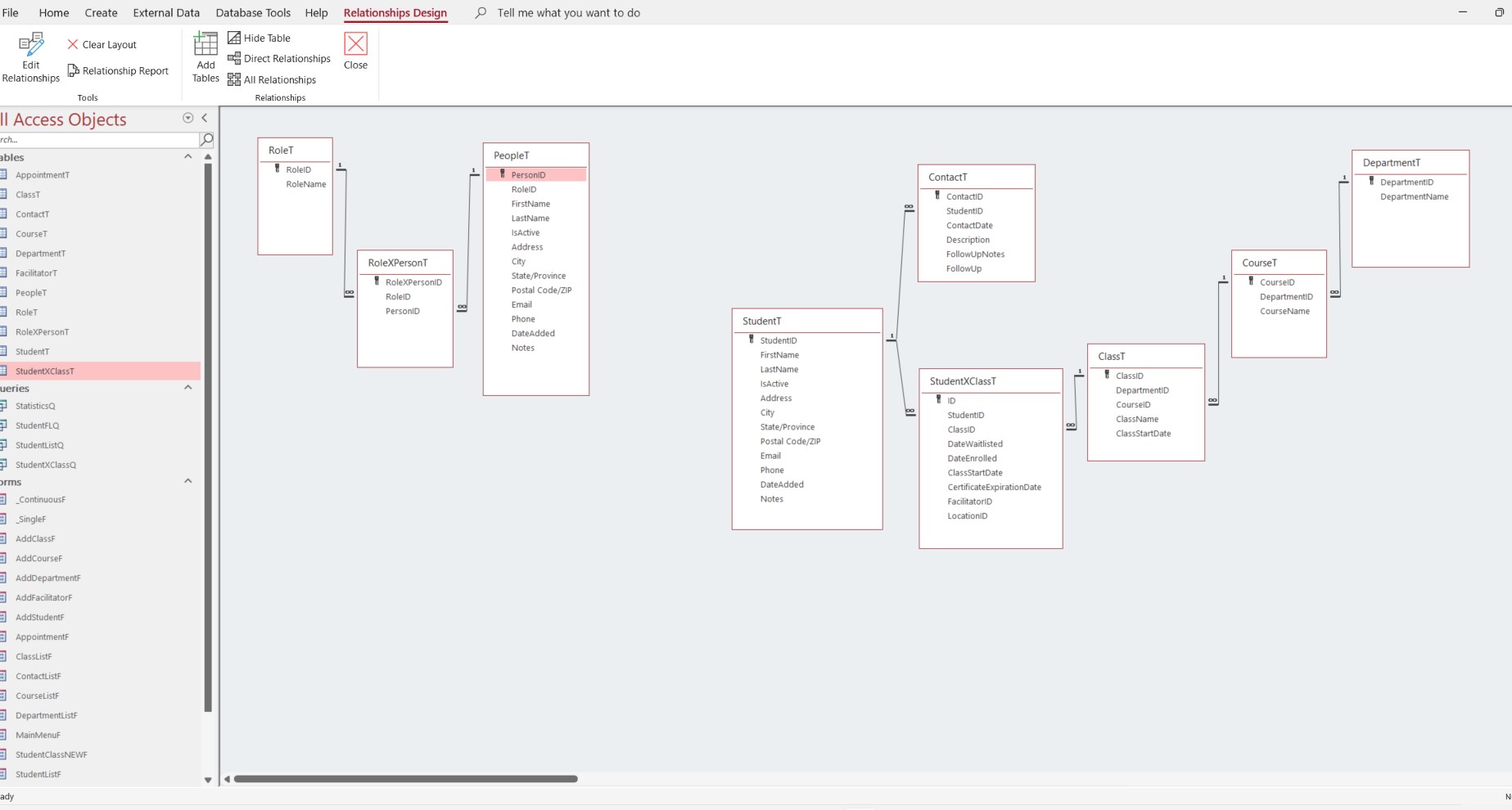
I am an absolute novice and working through the awesome Expert Classes.  I've borrowed from the Event Enrollment and a few other videos to develop a "Training Database".
I have a StudentT table, StudentXClassT table, ClassT table and the associated forms and queries and it's working relatively well :-)
I know I'm working backwards here --- however I'd like to add a "PersonT" table that will be everyone I come in to contact with.  From that PersonT table I want to create Roles. So a RoleT table (RoleID, RoleName). The Roles would be Instructor, Facilitator, Member, Employee, Volunteer, STUDENT!
So the PeopleT is the big parent table with everyone and then depending on the role people have they will make up the other tables.  

HELP :-)  Do I have to create a Person Table, Instructor Table, Facilitator Table, Student Table or can I create a Person Table and have it work with a Role Table.  

If I am "PersonID 1", in theory I can have all of those roles.  I could Instruct one class, Facilitate a group, and be a Student in someone else's class.

I know I have redundancy in PersonT and StudentT table because StudentT was the first one I created and have entered 293 students and connected them to the different courses they've taken.  I don't want to have to repeat that data entry but will if I have to :-(

How do I create the relationship that will allow me to enter "PersonT" people and if they are a "Student" then their information automatically goes into the "StudentT" fields and keep the database working for me :-)
Tom Kelly OP  @Reply  
    
4 years ago

Richard Rost  @Reply  
          
4 years ago
Yes, your person and student tables are redundant. You can put those together as one table, and then determine what kind of person it is in one of two ways:

If a person can have one AND ONLY ONE roll then you can use a RollID in the PersonT with a one-to-many relationship.

If a person can have MULTIPLE roles, then you need a junction table, just like you have it there, and it's a many-to-many relationship.

Person and Student basically hold the same kind of "thing" so I'd consolidate them. Just when it comes time to selecting a student for a class, only show people who have the student "roll" associate with them.
Richard Rost  @Reply  
          
4 years ago
Make sure to also see Groups. Very similar concept.
Tom Kelly OP  @Reply  
    
4 years ago
Thank you so much for your response Richard!  I'm learning lots of interesting things thanks to your awesome videos.  If I could just remember them all it would be great but I appreciate your style of sharing and teaching.  

One person can have multiple roles hence the junction table.

I'll keep my fingers crossed when it comes being able to show only People who have Student "role" associated with them.

Thank you!!
Richard Rost  @Reply  
          
4 years ago
Make a query. Join people with their roles, and set a criteria for whichever RoleID belongs to "Student." Use that as you list for students only.

This thread is now CLOSED. If you wish to comment, start a NEW discussion in Access Forum.
 

Next Unseen

 
New Feature: Comment Live View


The following is a paid advertisement
Computer Learning Zone is not responsible for any content shown or offers made by these ads.
 

Learn
 
Access - index
Excel - index
Word - index
Windows - index
PowerPoint - index
Photoshop - index
Visual Basic - index
ASP - index
Seminars
More...
Customers
 
Login
My Account
My Courses
Lost Password
Memberships
Student Databases
Change Email
Info
 
Latest News
New Releases
User Forums
Topic Glossary
Tips & Tricks
Search The Site
Code Vault
Collapse Menus
Help
 
Customer Support
Web Site Tour
FAQs
TechHelp
Consulting Services
About
 
Background
Testimonials
Jobs
Affiliate Program
Richard Rost
Free Lessons
Mailing List
PCResale.NET
Order
 
Video Tutorials
Handbooks
Memberships
Learning Connection
Idiot's Guide to Excel
Volume Discounts
Payment Info
Shipping
Terms of Sale
Contact
 
Contact Info
Support Policy
Mailing Address
Phone Number
Fax Number
Course Survey
Email Richard
[email protected]
Blog RSS Feed    YouTube Channel

LinkedIn
Copyright 2026 by Computer Learning Zone, Amicron, and Richard Rost. All Rights Reserved. Current Time: 5/6/2026 4:27:27 AM. PLT: 1s