Free Lessons
Courses
Seminars
TechHelp
Fast Tips
Templates
Topic Index
Forum
ABCD
 
Home   Courses   TechHelp   Help   Contact   Merch   Join   Order   Logon   Forums   
 
Back to Access Developers    Comments List
Pending Approval    Upload Images   @Reply   Bookmark    Link   Email   Next Unseen 

Anonymous 
 
Kevin Robertson  @Reply  
          
4 years ago
Is the Tab Stop property set to True?
Jeffery Adams  @Reply  
     
4 years ago
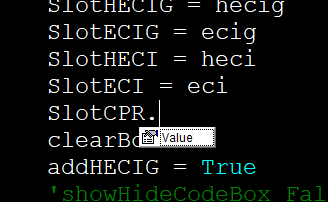
yes it is set to yes and I found that all my controls that have control source set will not let me do anything but set the .Value.
Adam Schwanz  @Reply  
           
4 years ago
Hey Jeffery, you can use the image uploads button at the top of your post

Image Uploads to share screenshots.
Jeffery Adams  @Reply  
     
4 years ago

Jeffery Adams  @Reply  
     
4 years ago

Adam Schwanz  @Reply  
           
4 years ago
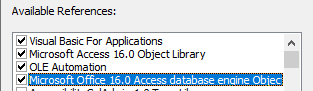
This is the only text box this is happening with? If not, check your references.

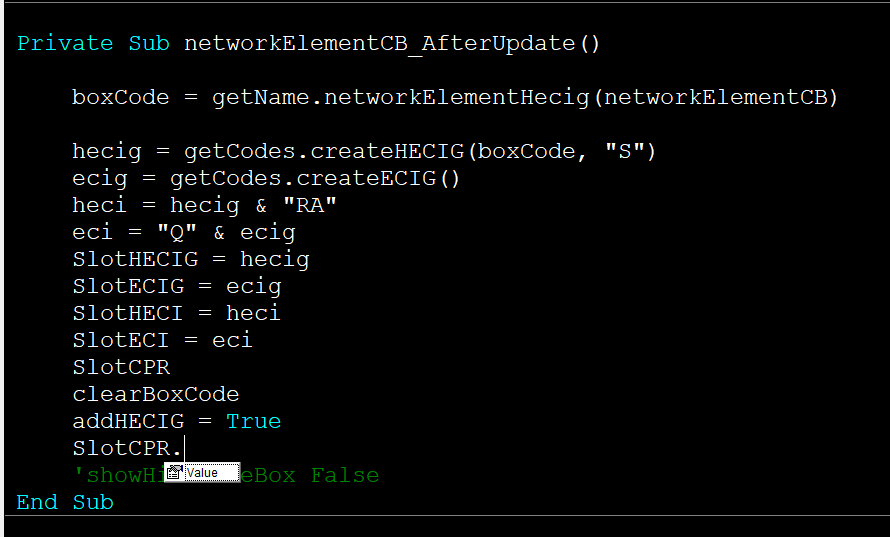
Can you show a little more of the code if there is more? Hard to tell if there's any variables or anything else that could effect it.

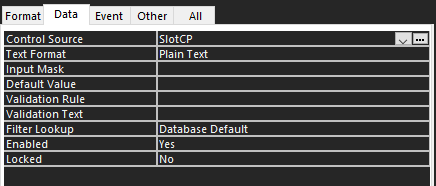
Can you upload an image of the field itself with the control source shown?
Jeffery Adams  @Reply  
     
4 years ago
It is actually happening on all the controls that have a control source.
Jeffery Adams  @Reply  
     
4 years ago

Jeffery Adams  @Reply  
     
4 years ago

Adam Schwanz  @Reply  
           
4 years ago
If it's happening to all of them, check your references.

Go into your code window, tools, references, check what you have there. I believe these 4 are the "standard" ones.
Adam Schwanz  @Reply  
           
4 years ago

Jeffery Adams  @Reply  
     
4 years ago
sorry let clear this up sorry this is my fault.  It is only happening on this form it works fine on all the other forms in this app just this one is not working.  All the controls on this form is not allowing it.  even when I type it  SlotCPR.setfocus it corrects it to SlotCPR.SetFocus but when  run the code it errors says that is available for this control.  But to be clear I have about 2 dozen forms and this is the only one its doing it on.  and I did check my reference is checked.  I think it is just a corrupted form or something.
Adam Schwanz  @Reply  
           
4 years ago
And they're text boxes your setting focus to (not labels or some other control)? I'm running low on ideas, suppose it would be worth trying to make a new form with the same record source/control source and see if you can do it before you move everything.
Jeffery Adams  @Reply  
     
4 years ago
yes all are text boxes I will create new form tomorrow thanks for the ideas though I was thinking i would have to do that but wanted to see if there something I might of missed..
Scott Axton  @Reply  
      
4 years ago
Double check spelling.  Specifically the name of your text box.
In the code you are doing SlotCPR.   In the next photo your Control Source says SlotCP
Jeffery Adams  @Reply  
     
4 years ago
Yes i actually caught that last night but it is still doing it.  I think from me going back and forth to see whats going on I accidently deleted the R.  but it was happening way before that and is still happening.  I tried coping the form and it still did on that one.  Its funny it works fine on all my other forms just not this one.  so looks like may have remake the form from scratch which is not good because there is a lot of stuff and code, but it has to be done you have to do it.  :)
Kevin Robertson  @Reply  
          
4 years ago
Jeffery,

If you have a lot going on in the form it may be worth creating a blank form and gradually copying everything over, testing as you do so. Might save you a lot of time.
Jeffery Adams  @Reply  
     
4 years ago
I actually think I found the corruption of the form.  In the VBA editor I clicked on the form to see the code and write what I need well this time instead of actually opening the actual form it created a temp form and it was a hidden one then it was associated with the actual form so it was stopping me from doing the setfocus and other stuff.  I found the temp form in my code and removed it and now it is working.   I don't even know if I could reproduce it LOL but once I removed the temp form the actual form started working correctly.
Richard Rost  @Reply  
          
4 years ago
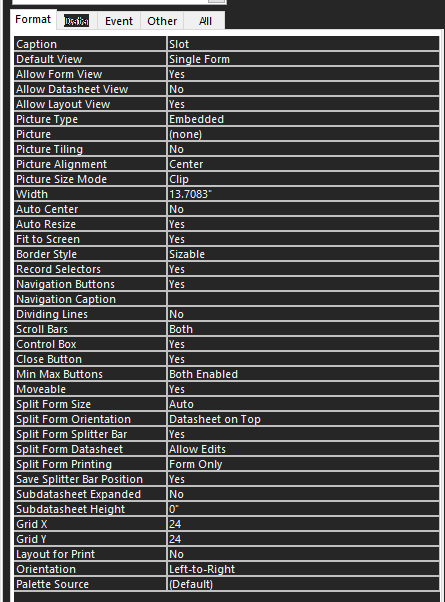
Locked? Enabled? Allow Edits?
Jeffery Adams  @Reply  
     
4 years ago
SOLVED - Locked - no, Enabled - yes, Allow Edits - yes'..but I found the issue when working in the vba editor some how it created a temp form once I saw that form I removed it and it started working correctly.  IDK how or why it created that temp form but it was there.  Even though the vba window showed I was working on my 'SlotF' form I started noticing every time I brought the 'SlotF' up in vba editor the tempform would appear in my Access window menu tree under forms.   Like I said it works now lol and have no idea what I did to make that happen but now I know what to look for.

This thread is now CLOSED. If you wish to comment, start a NEW discussion in Access Developers.
 

Next Unseen

 
New Feature: Comment Live View


The following is a paid advertisement
Computer Learning Zone is not responsible for any content shown or offers made by these ads.
 

Learn
 
Access - index
Excel - index
Word - index
Windows - index
PowerPoint - index
Photoshop - index
Visual Basic - index
ASP - index
Seminars
More...
Customers
 
Login
My Account
My Courses
Lost Password
Memberships
Student Databases
Change Email
Info
 
Latest News
New Releases
User Forums
Topic Glossary
Tips & Tricks
Search The Site
Code Vault
Collapse Menus
Help
 
Customer Support
Web Site Tour
FAQs
TechHelp
Consulting Services
About
 
Background
Testimonials
Jobs
Affiliate Program
Richard Rost
Free Lessons
Mailing List
PCResale.NET
Order
 
Video Tutorials
Handbooks
Memberships
Learning Connection
Idiot's Guide to Excel
Volume Discounts
Payment Info
Shipping
Terms of Sale
Contact
 
Contact Info
Support Policy
Mailing Address
Phone Number
Fax Number
Course Survey
Email Richard
[email protected]
Blog RSS Feed    YouTube Channel

LinkedIn
Copyright 2026 by Computer Learning Zone, Amicron, and Richard Rost. All Rights Reserved. Current Time: 7/15/2026 7:29:32 AM. PLT: 1s