Free Lessons
Courses
Seminars
TechHelp
Fast Tips
Templates
Topic Index
Forum
ABCD
 
Home   Courses   TechHelp   Forums   Help   Contact   Merch   Join   Order   Logon  
 
Back to Access Forum    Comments List
Upload Images   @Reply   Bookmark    Link   Email   Next Unseen 
Data Subform Disappears
Peter van Soest 
    
4 years ago
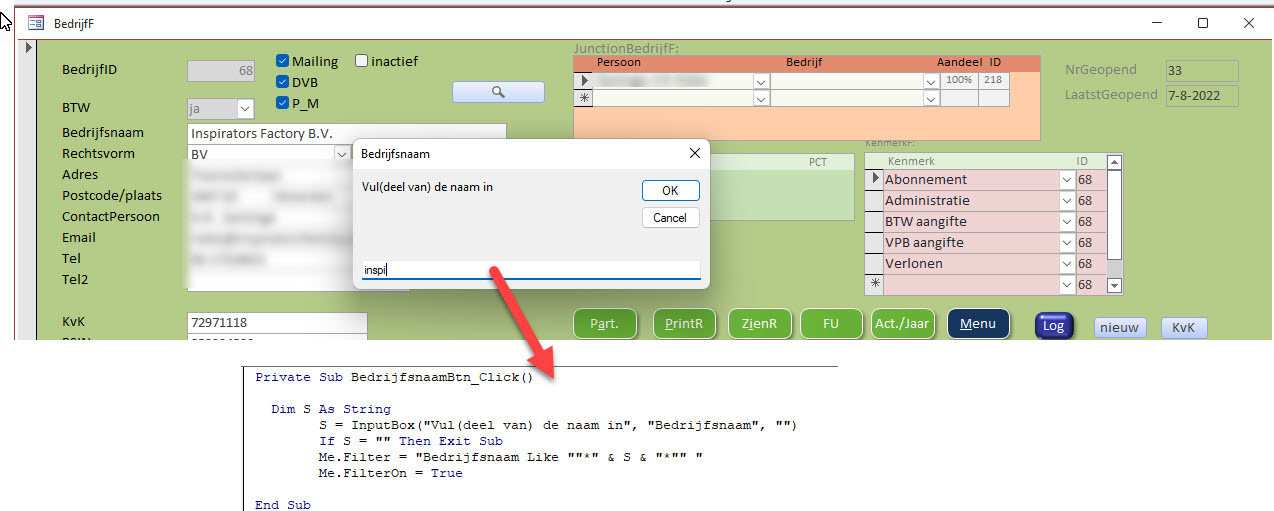
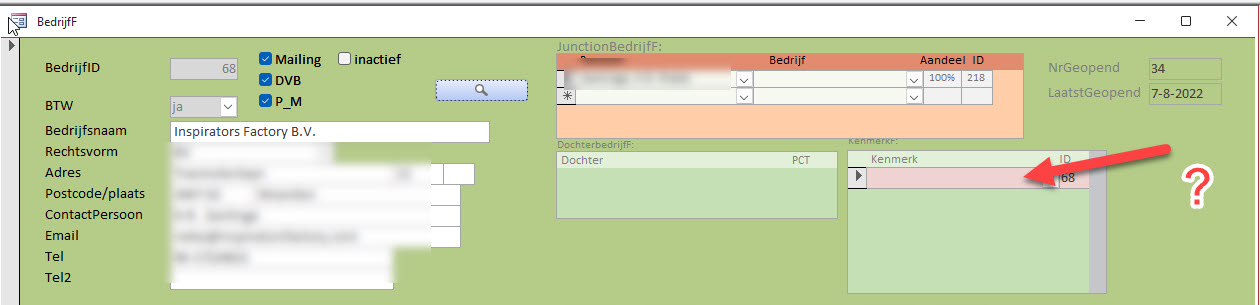
When I use a search routine on a form to find a specific customer, the data on a specific subform (junction table) is lost, or at least not shown anymore. It looks like the link is broken after the search, because the subform is also empty with other customers. I have to close and reopen the form to get the data back.
Peter van Soest OP  @Reply  
    
4 years ago

Peter van Soest OP  @Reply  
    
4 years ago

Helen Renaud  @Reply  
      
4 years ago
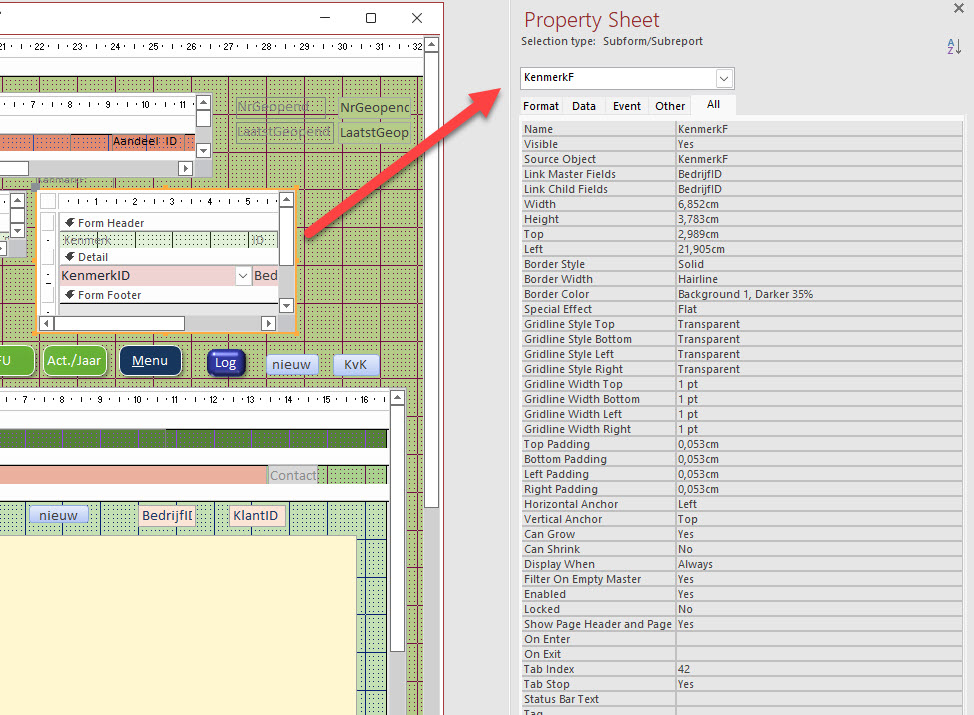
Hello Peter:  Do you have the child and master fields chosen on the property sheet of the subform?
Peter van Soest OP  @Reply  
    
4 years ago
Hi Helen,  Yes the master and child fields are selected, and it works fine until I start the search routine, then the data disappears
Helen Renaud  @Reply  
      
4 years ago
Hello Peter:  I think you have to requery the subform then.  On the form properties, put VBA code in the "On Current" event to refresh the subform.  For example:  
Private Sub Form_Current ()
  [subform name]. requery
End Sub

Kevin Robertson  @Reply  
          
4 years ago
Hi Peter,

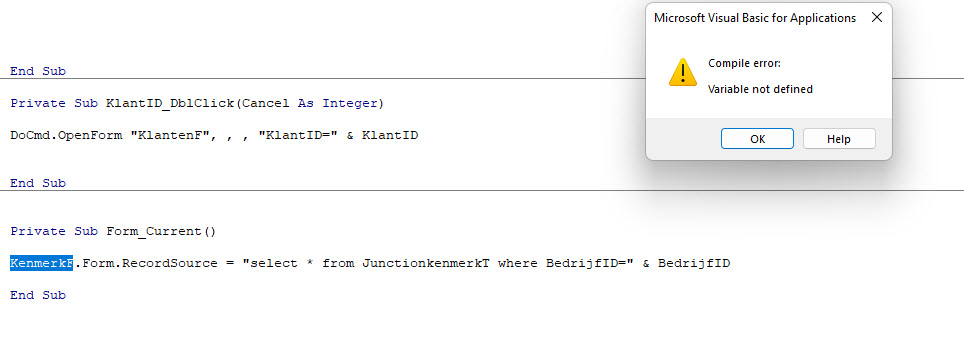
Reset the Record Source of your Subform in both the button and the OnCurrent event.

SubformName.Form.RecordSource = "SELECT * FROM TableName WHERE ID=" & ID

Replace SubformName, TableName and ID with the names of your objects/fields.
Peter van Soest OP  @Reply  
    
4 years ago
@Helen there's no query involved here.

@Kevin : I get compile error,   variable not defined, see screenshot
Peter van Soest OP  @Reply  
    
4 years ago

Richard Rost  @Reply  
          
4 years ago
What is the NAME of the subform control itself? I'll bet you have it spelled wrong or it's something else.
Peter van Soest OP  @Reply  
    
4 years ago
The name is KenmerkF, I did not misspell
Peter van Soest OP  @Reply  
    
4 years ago

Helen Renaud  @Reply  
      
4 years ago
To add to what Kevin suggested,, I have two suggestions:
1) change the Where part of his code to:
ID = '" & ID & "'"  (Since it is hard to see...it is as follows with no spaces ...ID  '  " & ID & "  '  ")

2) add "Form" to the beginning of the code that Kevin suggested.

How do you insert images in these posts?  I tried, but couldn't.  


Adam Schwanz  @Reply  
           
4 years ago
Richard Rost  @Reply  
          
4 years ago
Where exactly is that code? Make sure it's in the right form module.
Peter van Soest OP  @Reply  
    
4 years ago
Thats the one Richard! At first I put the (Kevins) code in the subform, but it should be in the main form!
It works fine now! And it looks like it's not necessary to also add the code to the search button.
Thanks all for the help!
Kevin Robertson  @Reply  
          
4 years ago
That's great Peter. One thing I should mention is you should wrap the code in an If block otherwise you will get an error on new records.

If Not IsNull(ID) Then
   ' code goes here
End if

Peter van Soest OP  @Reply  
    
4 years ago
Tnx Kevin, I added the extra code
Richard Rost  @Reply  
          
4 years ago
This is one of those things that you can solve in 2 seconds if you can see the whole database. LOL
Helen Renaud  @Reply  
      
4 years ago
This problem has always been an issue for me too.  I don't understand why there is a vba requery for a form, but it rarely works. I don't know if it is the queries / tables in the forms that is stopping it from being requeried? Also, why does Kevin's vba work for Peter, but not for me?    Something is not working somewhere.  Also based on Google searches it is a wide spread issue, that is not always fixed.   Would you please add this to your list of videos to make, Richard?

This thread is now CLOSED. If you wish to comment, start a NEW discussion in Access Forum.
 

Next Unseen

 
New Feature: Comment Live View


The following is a paid advertisement
Computer Learning Zone is not responsible for any content shown or offers made by these ads.
 

Learn
 
Access - index
Excel - index
Word - index
Windows - index
PowerPoint - index
Photoshop - index
Visual Basic - index
ASP - index
Seminars
More...
Customers
 
Login
My Account
My Courses
Lost Password
Memberships
Student Databases
Change Email
Info
 
Latest News
New Releases
User Forums
Topic Glossary
Tips & Tricks
Search The Site
Code Vault
Collapse Menus
Help
 
Customer Support
Web Site Tour
FAQs
TechHelp
Consulting Services
About
 
Background
Testimonials
Jobs
Affiliate Program
Richard Rost
Free Lessons
Mailing List
PCResale.NET
Order
 
Video Tutorials
Handbooks
Memberships
Learning Connection
Idiot's Guide to Excel
Volume Discounts
Payment Info
Shipping
Terms of Sale
Contact
 
Contact Info
Support Policy
Mailing Address
Phone Number
Fax Number
Course Survey
Email Richard
[email protected]
Blog RSS Feed    YouTube Channel

LinkedIn
Copyright 2026 by Computer Learning Zone, Amicron, and Richard Rost. All Rights Reserved. Current Time: 5/2/2026 5:50:13 AM. PLT: 0s