Free Lessons
Courses
Seminars
TechHelp
Fast Tips
Templates
Topic Index
Forum
ABCD
 
Home   Courses   TechHelp   Forums   Help   Contact   Merch   Join   Order   Logon  
 
Back to Helper Data    Comments List
Upload Images   @Reply   Bookmark    Link   Email   Next Unseen 
As Gordon would say
Thomas Gonder 
      
4 years ago
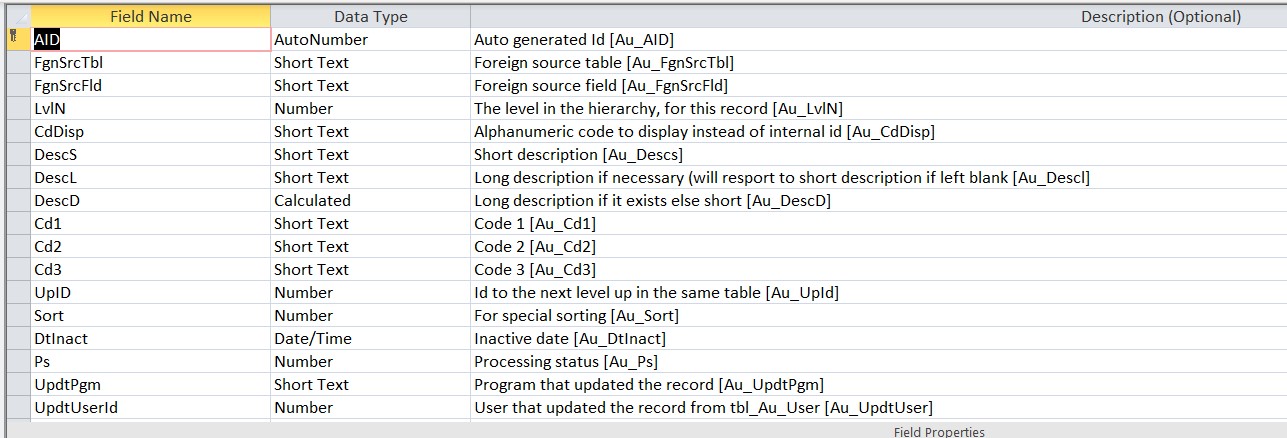
Let's take the helper table to the next level in design.
In the spirit of adding to the community (I used to keep this stuff close to the chest):
(With luck I can add the two images that are waiting)
Thomas Gonder OP  @Reply  
      
4 years ago

Thomas Gonder OP  @Reply  
      
4 years ago

Thomas Gonder OP  @Reply  
      
4 years ago
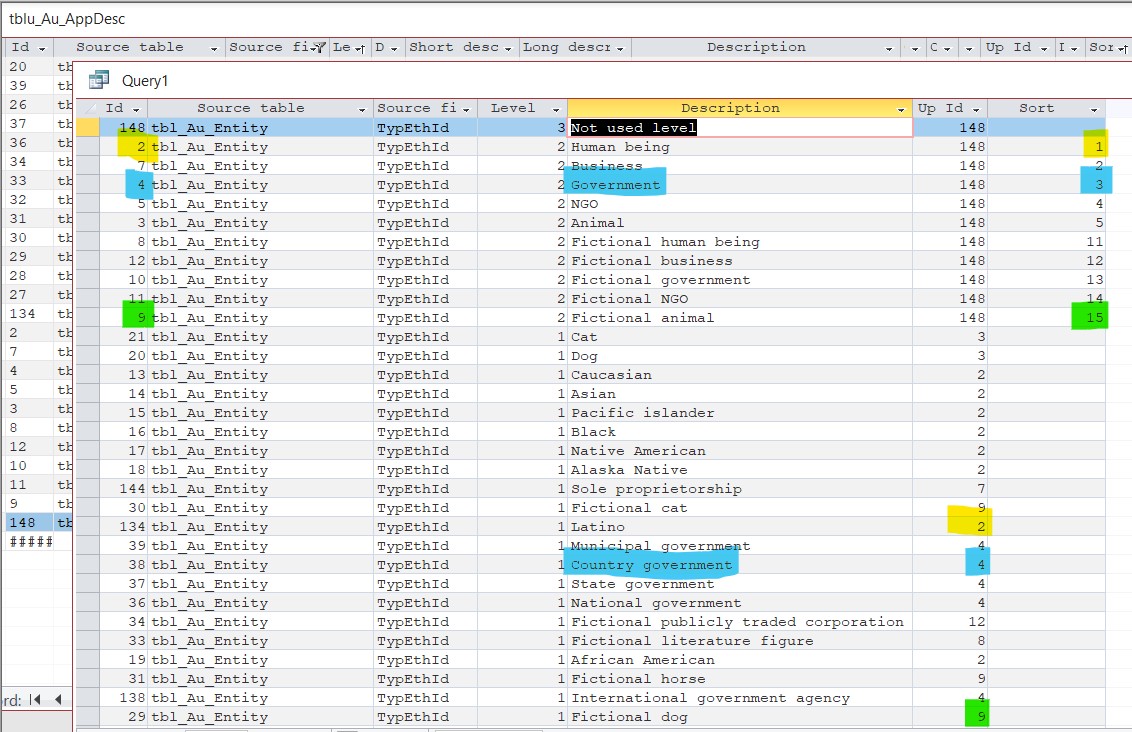
The business logic of this design can be used in many other tables/forms other than just Entity. For example, you have a veterinarian practice. You will only be adding visits and treatments for an animal type (UpId = 3) [unless you are treating bad humans like in the movies--and you probably wouldn't want to enter those visits into your database, cash only please] while the billing will never go to UpId = 3,8,9,10,11,12 (of course you specify the positive in a rule, this is just a conceptual example).
Richard Rost  @Reply  
          
4 years ago
Very cool. Thanks for sharing.
Thomas Gonder OP  @Reply  
      
4 years ago
Thanks for sharing? Hmmm, that in my circles isn't usually what one wants to hear (normally means please shut up). I don't go to four-step programs, so maybe it's okay with that in mind?
Now come on, that share of design should get me out of the rank of Petty Officer!
Thomas Gonder OP  @Reply  
      
4 years ago
And look, a little data adding and you can properly keep track of all your fictional characters in Star Trek (or Star Wars if you're simple minded) as well as your clients in the Entity table. You got Humans, can add Vulcans, Klingons, Ferengi (?) etc.,  all their races and animal classifications, etc.

I'm standing by to beam aboard your Entity file that I can query append.
Richard Rost  @Reply  
          
4 years ago
"Thanks for sharing" is what I write when I think something is legitimately cool, but I've got 300 emails and 900 forum posts to read through still. LOL. Many times I circle back around to comment more when I have time to breathe. And your rank has a lot to do with time aboard the starship... so, patience, Grasshopper. :)
Thomas Gonder OP  @Reply  
      
4 years ago
Yea, but sometimes we served on other starships. We may not be up to date on your particular propulsion system, and Geordi's tweaks, but we've survived our battles elsewhere.

And don't mix TV series metaphors. :-P
Thomas Gonder OP  @Reply  
      
4 years ago
To those developers that want to create applications that can compete with SAP and Oracle, above is the basis that is used for "business Intelligence". Things like the Helper Data table and then rules based on this kind of table help create intelligence. It's best not to hard code those rules, but rather create control tables and pseudo logic code to implement the ideas. The veterinarian example should provide an idea on how to implement hundreds of such rules for various applications.

Another example? If you have a contact from another country, does your call center know the correct way to address him for his culture? Do you say "Buenos d'as Se'or Garcia...", or has he given you a hint that "Good day Juan Pablo..." is more appropriate? Have you made it easy for the call center person to note this in your application? Good luck!
Thomas Gonder OP  @Reply  
      
4 years ago
Is this starship flying with a USA/English only crew? We need to get those international characters added for entry. At least for the Western languages. I better go test my Access application.
Thomas Gonder OP  @Reply  
      
4 years ago
A final note on the cycle of design. I started my "helper" table a few months ago. Some were mocking the idea of "one super" table as a "novice" idea. But it was an idea I started over 40 years ago, so I knew it would work and withstand the test of time. But the table grew and grew. Being a minimalist in tables, but not functionality, I was hell-bent on keeping it to one table.

Then I watched Richard's approach, and thought I don't need no stink'n Helper-Type-Table! My table and record fields serve that purpose. But, something gnawed at the back of my mind after posting the image above. Look at all those duplicated "tbl_Au_Entity" and "TypEthId" rows. Those duplicated rows grew so slowly and almost invisibly over time that I missed one of the fundamental rules of normalization!

So, Richard gets the last laugh. Now, I have I have modified my design to have two tables as Richard did. But wait! Could I shove the helper-data-type table (HelperTypeT) data back into the HelperT itself? I mean, it's "Helper Data" isn't it? The helper-table helping itself. Hmmmm. Back to the laboratory Igor.
Richard Rost  @Reply  
          
4 years ago
That's definitely a possibility... but there's always making things "too" perfect... trying to over-normalize or over-simplify databases can actually make them unnecessary complex. Whatever works for you.
Thomas Gonder OP  @Reply  
      
4 years ago
As Ford learned with the Pinto, it's good to pay attention to the engineering at the start of things.
Igor and I are still in the laboratory.
Thomas Gonder OP  @Reply  
      
4 years ago

Thomas Gonder OP  @Reply  
      
4 years ago
It's alive Igor! It's aliveeee, HA Ha ha ha ha ha...

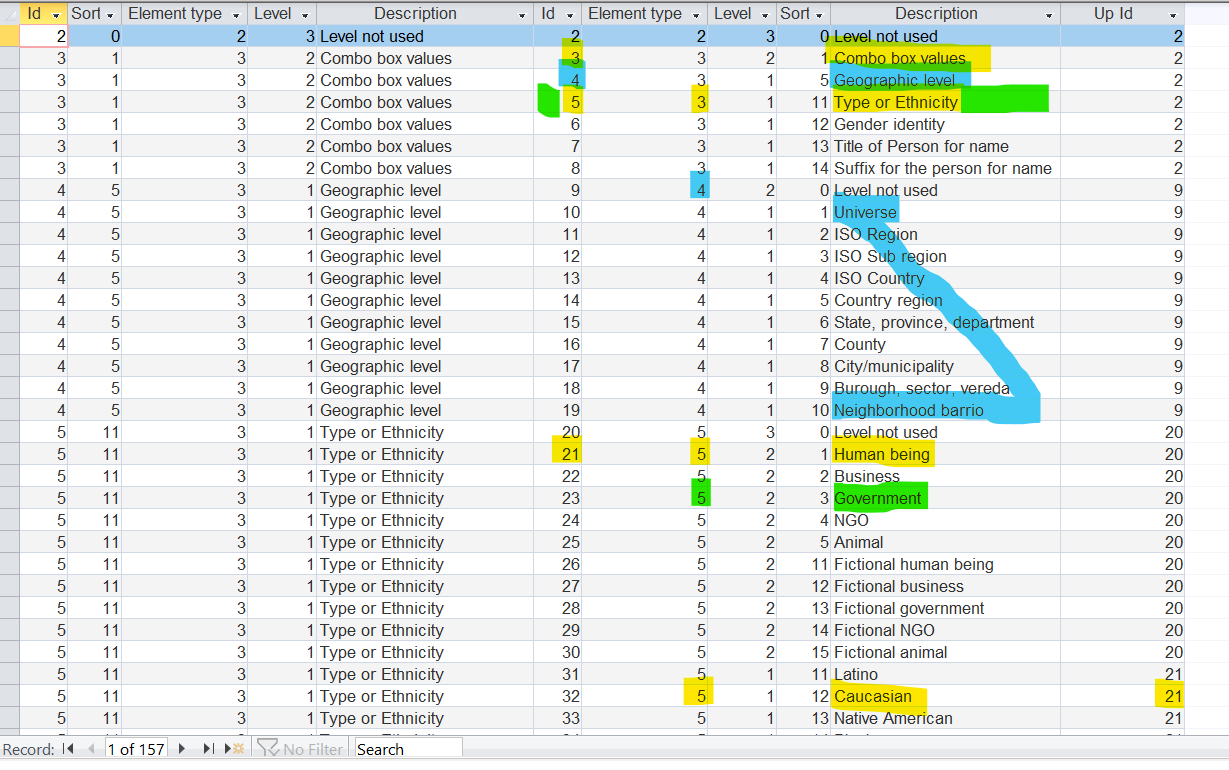
The colors help to understand the relationships between the records.

The second to last column (Description) is what you see in Combo boxes if the level is 1.

The columns on the left are a from an inner join: SELECT tblu_Au_Element_1.AID, tblu_Au_Element_1.Sort, tblu_Au_Element_1.ElemTypId, tblu_Au_Element_1.LvlN, tblu_Au_Element_1.DescD, tblu_Au_Element.AID, tblu_Au_Element.ElemTypId, tblu_Au_Element.LvlN, tblu_Au_Element.Sort, tblu_Au_Element.DescD, tblu_Au_Element.UpID
FROM tblu_Au_Element AS tblu_Au_Element_1 INNER JOIN tblu_Au_Element ON tblu_Au_Element_1.AID = tblu_Au_Element.ElemTypId
ORDER BY tblu_Au_Element_1.Sort, tblu_Au_Element_1.LvlN DESC , tblu_Au_Element.LvlN DESC , tblu_Au_Element.Sort, tblu_Au_Element.DescD;

This thread is now CLOSED. If you wish to comment, start a NEW discussion in Helper Data.
 

Next Unseen

 
New Feature: Comment Live View


The following is a paid advertisement
Computer Learning Zone is not responsible for any content shown or offers made by these ads.
 

Learn
 
Access - index
Excel - index
Word - index
Windows - index
PowerPoint - index
Photoshop - index
Visual Basic - index
ASP - index
Seminars
More...
Customers
 
Login
My Account
My Courses
Lost Password
Memberships
Student Databases
Change Email
Info
 
Latest News
New Releases
User Forums
Topic Glossary
Tips & Tricks
Search The Site
Code Vault
Collapse Menus
Help
 
Customer Support
Web Site Tour
FAQs
TechHelp
Consulting Services
About
 
Background
Testimonials
Jobs
Affiliate Program
Richard Rost
Free Lessons
Mailing List
PCResale.NET
Order
 
Video Tutorials
Handbooks
Memberships
Learning Connection
Idiot's Guide to Excel
Volume Discounts
Payment Info
Shipping
Terms of Sale
Contact
 
Contact Info
Support Policy
Mailing Address
Phone Number
Fax Number
Course Survey
Email Richard
[email protected]
Blog RSS Feed    YouTube Channel

LinkedIn
Copyright 2026 by Computer Learning Zone, Amicron, and Richard Rost. All Rights Reserved. Current Time: 5/6/2026 4:36:07 AM. PLT: 1s