Free Lessons
Courses
Seminars
TechHelp
Fast Tips
Templates
Topic Index
Forum
ABCD
 
Home   Courses   TechHelp   Forums   Help   Contact   Merch   Join   Order   Logon  
 
Back to Access Forum    Comments List
Upload Images   @Reply   Bookmark    Link   Email   Next Unseen 
Selecting both True False
Don Gregory 
      
4 years ago
I want to select records from a checkbox in my table based on the values on a form. But I can't select records with BOTH True and False.  Here are the IIf Statements:
IIf([Forms]![frm_Report_Selection]![ClientStatus]="InActive Clients",-1) OR
IIf([Forms]![frm_Report_Selection]![ClientStatus]="Active Clients",0) OR
(IIf([Forms]![frm_Report_Selection]![ClientStatus]="*All Clients*",([tbl_Client_Data].[ClientInactive])=-1 OR 0))

How can I get the last IIf to pick up both true and false??
Kevin Robertson  @Reply  
          
4 years ago
Don Gregory OP  @Reply  
      
4 years ago
Ok. Thank you for the suggestion about the triple state video. I watched it, but I think my problem is somewhat different. The user has to choose between active and inactive. There is no, "I don't know." All I'm trying to do is use the iif statement to see all of the records, whether true or false. Is there no way to do that?  I can type "True or False" (without quotes) in the criteria and that gives me all the records, but the iif statement does not. Why is that?
Jeffrey Eckert  @Reply  
     
4 years ago
Saying "If x = -1 OR 0" is not correct syntax...it would have to be "If x = -1 OR x = 0".  

If these IIF statements are the criteria for a search query, I would recommend removing the criteria altogether for the case "*All Clients*".  If all records are acceptable, just remove the WHERE condition for that case.  Something like:

"SELECT * FROM tblTableName" & IIF(....[ClientStatus]="Inactive Clients", " WHERE CheckboxField=False", IIF(...[ClientStatus]="Active Clients"," WHERE CheckboxField=True",""))

Scott Axton  @Reply  
        
4 years ago
Take a look at the Search Form 2.0 as well.  That will show you how to write the where statement Jeffrey is talking about.
Don Gregory OP  @Reply  
      
4 years ago
When I remove the condition for "*All Clients*", no records are returned. At first I thought that the problem was because I was dealing with a checkbox, but I switched from checkbox to Number and later to Short Text. What I found out was that it doesn't seem to matter what the data type is. IIf statements cannot handle a compound condition in the "true" argument-- like "-1 OR 0" or "A" OR "I".
Don Gregory OP  @Reply  
      
4 years ago
I guess I'm going to try the switch function and see if that makes any difference.
Don Gregory OP  @Reply  
      
4 years ago
The Switch function hasn't solved my problem. Will keep digging.
Alex Hedley  @Reply  
           
4 years ago
Can you share a simple example
What options are on the form and what the data looks like.
Scott Axton  @Reply  
        
4 years ago


Here is just one example of how you could accomplish what you are trying to do.
I used the latest copy of the Blank Template because Richard has added in more customers to play with.

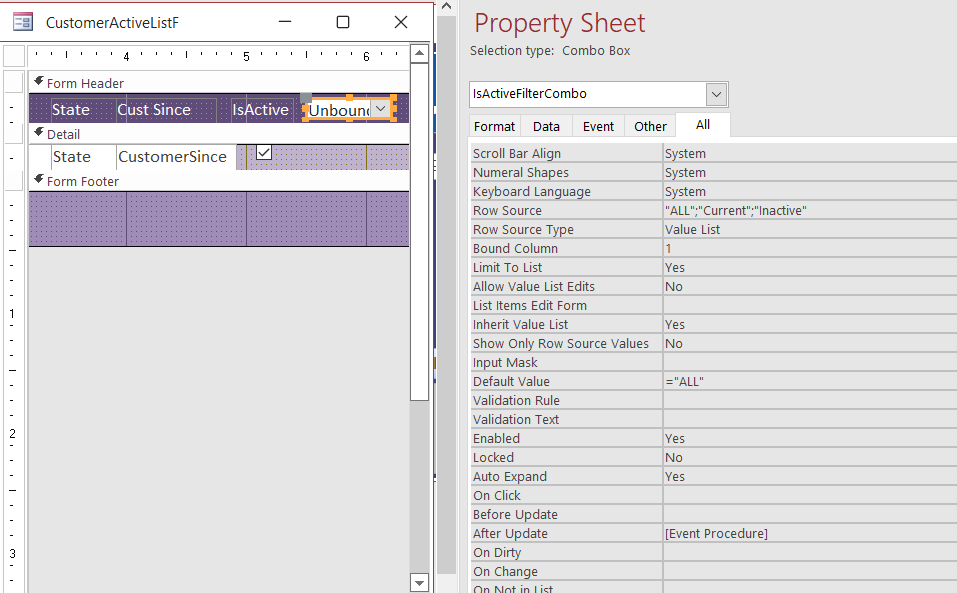
Make a copy the CustomerListF.  I named mine CustomerActiveListF.
Edit the form and add IsActive to the list.
While you are there create an unbound Combo Box.  You can use the wizard for this one.
Choose *I will type in the values I want -> Click Next

In the Column 1 type:
     All
     Current
     Inactive
Next

Choose *Remember the value for later use.
Don't worry about a label name - Delete it any way.
Click Finish.

Bring up the properties for the Combo Box you just made.
All Tab
Give it a good name.  I named mine IsActiveFilterCombo
Set:
Default Value:   ="All"
Limit to List:   Yes
Allow Value List Edits:    No

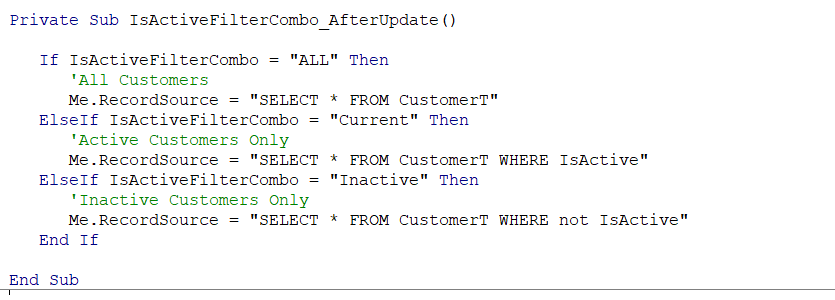
Event Tab choose After Update ->  Code Builder if you don't have it turned off.

See code below.
Scott Axton  @Reply  
        
4 years ago

Scott Axton  @Reply  
        
4 years ago

Scott Axton  @Reply  
        
4 years ago

Again watch the Search Form 2.0
Really consider the Access Search Seminar

This thread is now CLOSED. If you wish to comment, start a NEW discussion in Access Forum.
 

Next Unseen

 
New Feature: Comment Live View


The following is a paid advertisement
Computer Learning Zone is not responsible for any content shown or offers made by these ads.
 

Learn
 
Access - index
Excel - index
Word - index
Windows - index
PowerPoint - index
Photoshop - index
Visual Basic - index
ASP - index
Seminars
More...
Customers
 
Login
My Account
My Courses
Lost Password
Memberships
Student Databases
Change Email
Info
 
Latest News
New Releases
User Forums
Topic Glossary
Tips & Tricks
Search The Site
Code Vault
Collapse Menus
Help
 
Customer Support
Web Site Tour
FAQs
TechHelp
Consulting Services
About
 
Background
Testimonials
Jobs
Affiliate Program
Richard Rost
Free Lessons
Mailing List
PCResale.NET
Order
 
Video Tutorials
Handbooks
Memberships
Learning Connection
Idiot's Guide to Excel
Volume Discounts
Payment Info
Shipping
Terms of Sale
Contact
 
Contact Info
Support Policy
Mailing Address
Phone Number
Fax Number
Course Survey
Email Richard
[email protected]
Blog RSS Feed    YouTube Channel

LinkedIn
Copyright 2026 by Computer Learning Zone, Amicron, and Richard Rost. All Rights Reserved. Current Time: 5/6/2026 4:38:33 AM. PLT: 1s