Free Lessons
Courses
Seminars
TechHelp
Fast Tips
Templates
Topic Index
Forum
ABCD
 
Home   Courses   TechHelp   Forums   Help   Contact   Merch   Join   Order   Logon  
 
Back to Access Forum    Comments List
Upload Images   @Reply   Bookmark    Link   Email   Next Unseen 
What sort of database
Kris Luyckx 
    
4 years ago
Hi, I bought the complete beginners courses series and am now doubting what I need more.
A part of my business is providing specialiced compagnies in cleaning houses courses for their employees. These courses are validated by the Belgian state.
I want to make some kind of database where I can see all of my clients and all of my courses (ok, two simple tables) but i also want to keep track of when my clients contacted me, what we spoke of and if yes or no they orderd a course. If they orderd a course I also want to be able to see when that course will take place and what I have to do prepare for it (like handouts, registration forms etc)
I hope my question is a little bit clear and I can be helped with it
Dan Jackson  @Reply  
            
4 years ago
After studying the beginner courses and made a few practice databases, i would begin be going over the beginner videos again, but building the one you want. That's what i did.

From what you described, you'd hugely benefit from the expert series as well. Beginner is good as an introduction and gets you started but you won't really have all the skills you need until completing the expert series. I'm currently up to Expert 7 and am supporting an automated database which handles all the work for a small life insurance company.

Advanced and developer are only really if you want to take database design to a career level so no need to worry about them for now. I can highly recommend the Learning connection method as you'll get all the lessons at half price delivered once per week (You can change this to suit you, just ask Rick). Also, if you find after a few expert classes you are happy with what you know, you can cancel anytime.

Back to your question, it isn't so much about "type" as it is just building and going along. You'll start out with a basic form for entering and displaying data and your tables and queries to manage that data. From there it'll take on a life of its own and build as requirements set in. That's the beauty of database design.
Kris Luyckx OP  @Reply  
    
4 years ago
Hi Dan and thank you for the help. I am thinking about taking the expert class also but for that I need to have money, in order to have money I need my business to work smoothly, in order to make my bussiness run smoothly I need my database finished and working ;-)
I made a Main form ( with Ricks courses offcourse) when I click on the customers button it opens a form with two subforms called "past conversations" and "reservations" and that works fine for me.
I just struggle with one more thing ... When a course is finished I have a complete list of tasks I still have to do (administrations  etc) I wonder if it is possible to make a kind of tasks form that only opens when I mark my reservation as finished?
Dan Jackson  @Reply  
            
4 years ago
Completely understand where you're coming from. Strongly recommend going through the tech help and fast tips - they're free and packed with info (The only downside being, is at the beginning of the videos, there will be pre-requisit videos to watch since they aren't in any logical order).

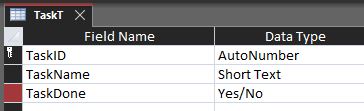
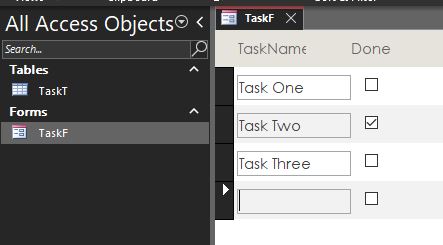
As for your list of tasks, to automate the opening of another form requires some simple understanding of VBA. At your current position, my recommendation would be to create a table (e.g. Called TasksT) with three fields:

TaskID - Autonumber
TaskName - Short Text
TaskDone - Yes/No

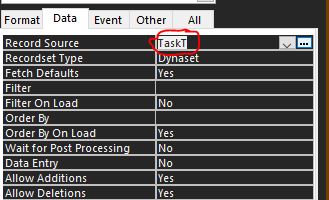
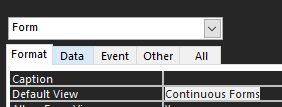
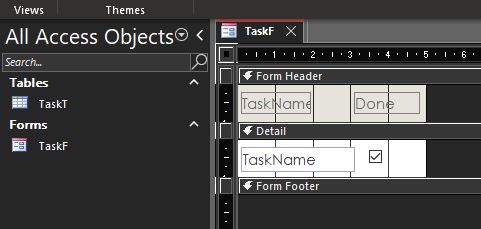
Then, do a continuous form and set the source to that table. No need to include the ID. See pictures.

Finally, you can optionally add a button to any other forms to open that one by using the command button control. No coding/macros required. Everything i did is covered in beginners.

If you get stuck, let us know
Dan Jackson  @Reply  
            
4 years ago

Dan Jackson  @Reply  
            
4 years ago

Dan Jackson  @Reply  
            
4 years ago

Dan Jackson  @Reply  
            
4 years ago

Dan Jackson  @Reply  
            
4 years ago

Dan Jackson  @Reply  
            
4 years ago

Kris Luyckx OP  @Reply  
    
4 years ago
Thanks for the help Dan, I do have a simple basic understanding of VBA so that is no problem. The automation i mensioned is because I don't want to be that task form ALWAYS open. there are times several reservations will be completed at the same time and I don't want 5 or 6 task forms open at the same time you see.
I tried to add a comand button in a subform but it doesn't work when I put it in the subform only when I put it in the mainform
Dan Jackson  @Reply  
            
4 years ago
My experience is quite limited with sub forms so will have to see if one of the other guys can help with that. i'm sure it's an easy solution. Best of luck
Adam Schwanz  @Reply  
           
4 years ago
So you just want to hide the subform unless it's marked as completed? If I'm understanding correctly?

Just set the subform to visible:no and do this in the on current event and the after-update event of the checkbox that marks it "complete"

subformname.visible = true

This thread is now CLOSED. If you wish to comment, start a NEW discussion in Access Forum.
 

Next Unseen

 
New Feature: Comment Live View


The following is a paid advertisement
Computer Learning Zone is not responsible for any content shown or offers made by these ads.
 

Learn
 
Access - index
Excel - index
Word - index
Windows - index
PowerPoint - index
Photoshop - index
Visual Basic - index
ASP - index
Seminars
More...
Customers
 
Login
My Account
My Courses
Lost Password
Memberships
Student Databases
Change Email
Info
 
Latest News
New Releases
User Forums
Topic Glossary
Tips & Tricks
Search The Site
Code Vault
Collapse Menus
Help
 
Customer Support
Web Site Tour
FAQs
TechHelp
Consulting Services
About
 
Background
Testimonials
Jobs
Affiliate Program
Richard Rost
Free Lessons
Mailing List
PCResale.NET
Order
 
Video Tutorials
Handbooks
Memberships
Learning Connection
Idiot's Guide to Excel
Volume Discounts
Payment Info
Shipping
Terms of Sale
Contact
 
Contact Info
Support Policy
Mailing Address
Phone Number
Fax Number
Course Survey
Email Richard
[email protected]
Blog RSS Feed    YouTube Channel

LinkedIn
Copyright 2026 by Computer Learning Zone, Amicron, and Richard Rost. All Rights Reserved. Current Time: 5/6/2026 1:31:04 PM. PLT: 0s