Free Lessons
Courses
Seminars
TechHelp
Fast Tips
Templates
Topic Index
Forum
ABCD
 
Home   Courses   TechHelp   Help   Contact   Merch   Join   Order   Logon   Forums   
 
Back to Access Forum    Comments List
Upload Images   @Reply   Bookmark    Link   Email   Next Unseen 
Sharepoint and MS Mail Merge
Trent Buckallew 
     
4 years ago
I experimented with splitting my database and then uploaded my tables (back end) to a Sharepoint location. It worked fine but when I tried to use the Word Mail Merge to create a document which pulls fields from my 'tblCases' and inserts them into the proper merge fields in MS Word I get errors and it cannot find the location of the data source to complete the merge? I tried telling MS Word to look at the online Sharpoint location but it is not supported? Any ideas on how to restore my MS Word Merge capability when the relevant table is uploaded into the cloud at Sharepoint?
Richard Rost  @Reply  
          
4 years ago
I've honestly never tried that before. I don't use SharePoint personally. It's Microsoft though... So there's gotta be an easy way to do it. Have you tried the Google Machine?
Alex Hedley  @Reply  
           
4 years ago
What are the exact errors?
Trent Buckallew OP  @Reply  
     
4 years ago

Trent Buckallew OP  @Reply  
     
4 years ago

Trent Buckallew OP  @Reply  
     
4 years ago

Trent Buckallew OP  @Reply  
     
4 years ago

Trent Buckallew OP  @Reply  
     
4 years ago

Trent Buckallew OP  @Reply  
     
4 years ago

Trent Buckallew OP  @Reply  
     
4 years ago

Trent Buckallew OP  @Reply  
     
4 years ago
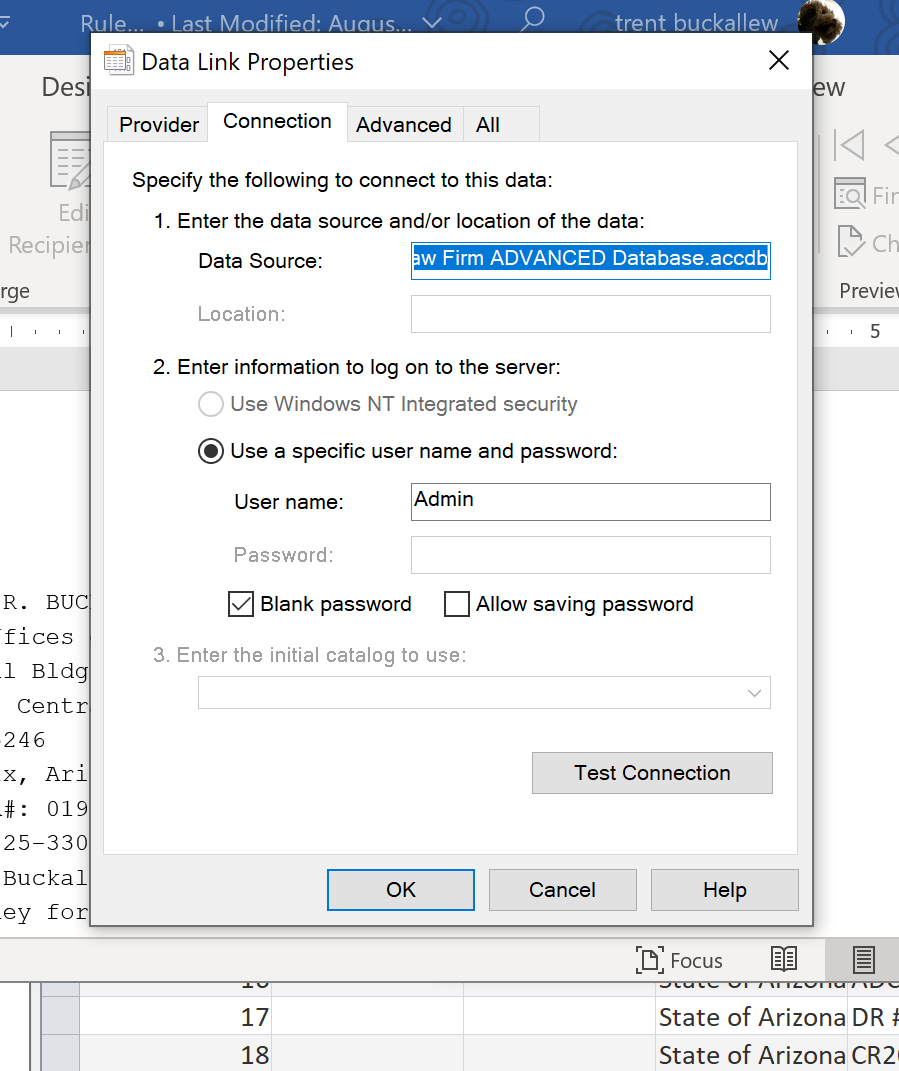
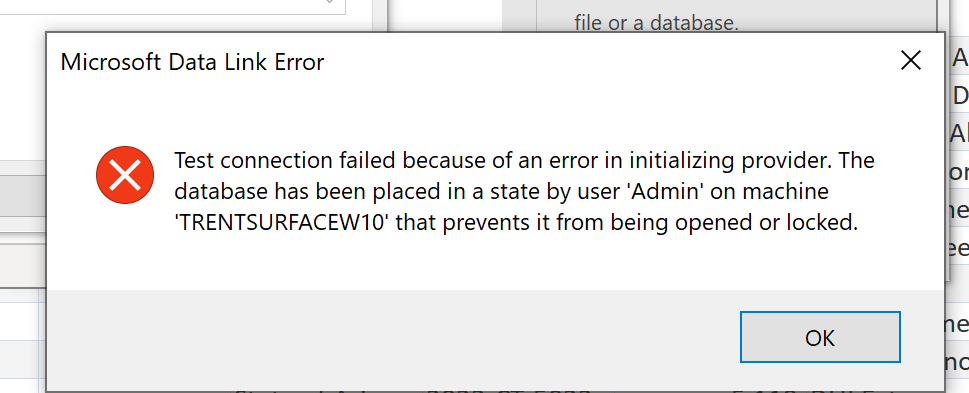
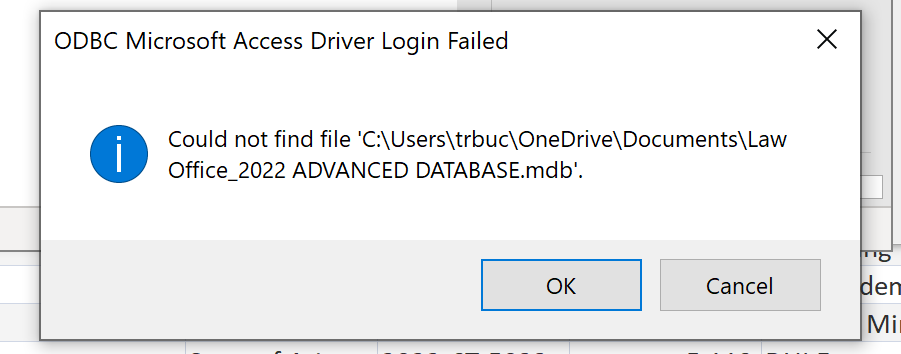
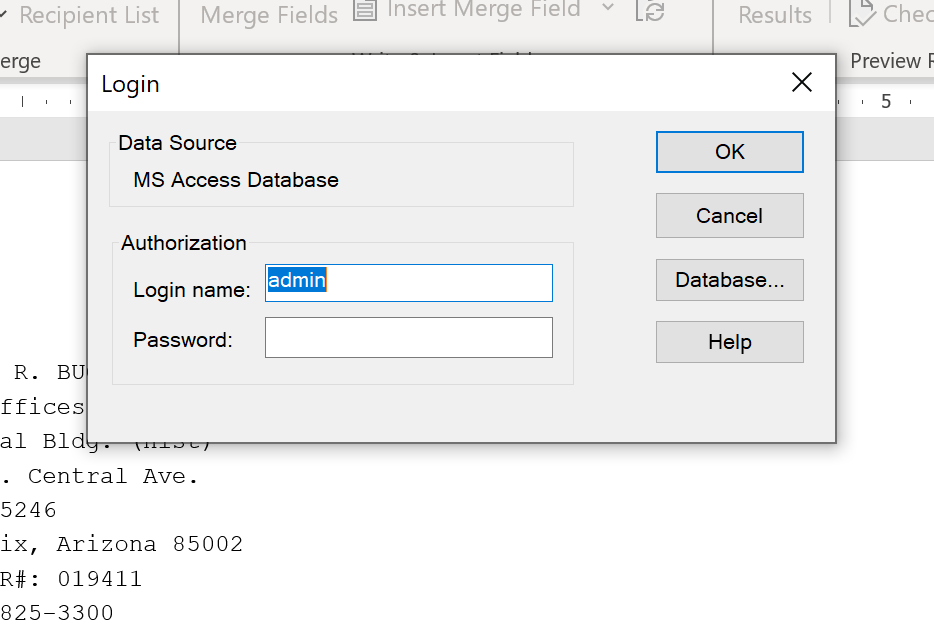
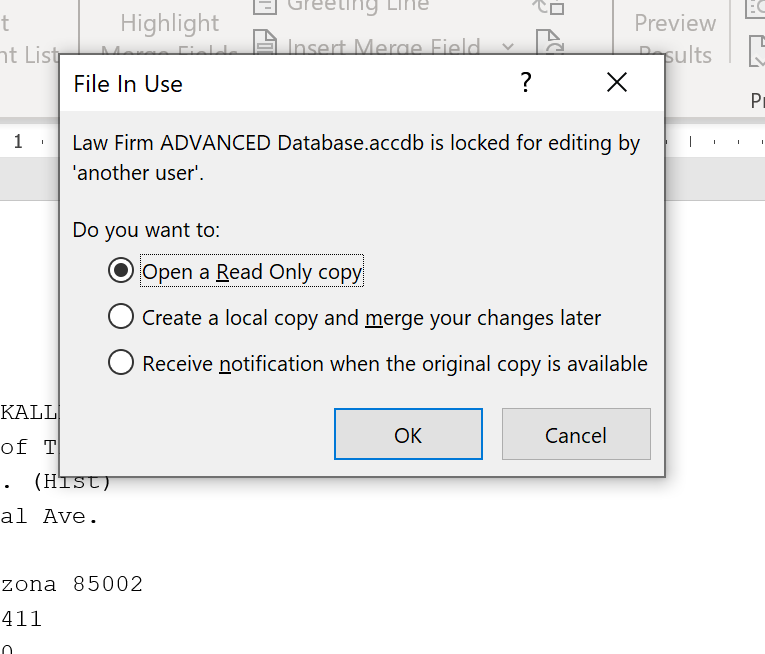
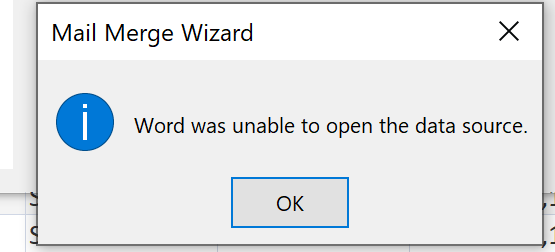
I posted the error messages that I received when I attempted to use the MS Word Mail Merge function on the External Data source menu. The table called "tblCases" has been uploaded to Sharepoint. The database is unable to find the table to pull the data and merge it into the document. Perhaps the error messages will assist.
Dan Jackson  @Reply  
        
4 years ago
It looks to me more like a locking issue with sharepoint. We use sharepoint in a very minor capacity here in the office for collaboration on some office documents. I have known in the past for it to say "Locked by another user" or "Locked by Dan", even though i'm clearly not in it. I found that by enabling then disabling the checking in/out of documents, that freed up the locks but there was no real workaround.

Sorry i cant be of more help but i think this might be better answered on a sharepoint forum rather than an access one - your database seems to be ok, it's the sharepoint connection where the weak link is
Richard Rost  @Reply  
          
4 years ago
So this isn't a Sharepoint LIST? This is an Access database on a Sharepoint file share? That's probably the problem right there.
Trent Buckallew OP  @Reply  
     
4 years ago
This is my Microsoft Access database that I built after following along on Access Level 1, 2, 3 and some Expert courses. I have a large collection of Templates (Microsoft Word Documents) which contain "merge fields" the merge fields pulls its data from an MS Access table called 'tblCases'.  It works great on my local drive. However, I wanted to put my tables up on SharePoint so that way I can use the MS Access database at my office and my paralegal can use the MS Access on her computer at her home. However, after I split the database and uploaded the 'back end' tables to SharePoint then the MS Access 'tblCases' was no longer locatable by MS Word when it tries to do the Word Merge and pull data from "tblCase" which is now located on SharePoint. I get the following errors as screen shot and posted.
Alex Hedley  @Reply  
           
4 years ago
Have you followed the Access SharePoint Seminar?
Richard Rost  @Reply  
          
4 years ago
OK, so did you upload the tables to SharePoint as lists? Or are you still working from an ACCDB file?
Trent Buckallew OP  @Reply  
     
4 years ago
I uploaded the tables to Sharepoint
Scott Axton  @Reply  
      
4 years ago
I'm seeing different extensions in the file name.   Both .mdb and .accdb in the photos above.  That may be an indicator of problems as well.

Something else that is concerning to me is that the photo 4 down says \trbuc\OneDrive\Documents

This thread is now CLOSED. If you wish to comment, start a NEW discussion in Access Forum.
 

Next Unseen

 
New Feature: Comment Live View


The following is a paid advertisement
Computer Learning Zone is not responsible for any content shown or offers made by these ads.
 

Learn
 
Access - index
Excel - index
Word - index
Windows - index
PowerPoint - index
Photoshop - index
Visual Basic - index
ASP - index
Seminars
More...
Customers
 
Login
My Account
My Courses
Lost Password
Memberships
Student Databases
Change Email
Info
 
Latest News
New Releases
User Forums
Topic Glossary
Tips & Tricks
Search The Site
Code Vault
Collapse Menus
Help
 
Customer Support
Web Site Tour
FAQs
TechHelp
Consulting Services
About
 
Background
Testimonials
Jobs
Affiliate Program
Richard Rost
Free Lessons
Mailing List
PCResale.NET
Order
 
Video Tutorials
Handbooks
Memberships
Learning Connection
Idiot's Guide to Excel
Volume Discounts
Payment Info
Shipping
Terms of Sale
Contact
 
Contact Info
Support Policy
Mailing Address
Phone Number
Fax Number
Course Survey
Email Richard
[email protected]
Blog RSS Feed    YouTube Channel

LinkedIn
Copyright 2026 by Computer Learning Zone, Amicron, and Richard Rost. All Rights Reserved. Current Time: 8/1/2026 4:07:05 AM. PLT: 1s