Free Lessons
Courses
Seminars
TechHelp
Fast Tips
Templates
Topic Index
Forum
ABCD
 
Home   Courses   TechHelp   Help   Contact   Merch   Join   Order   Logon   Forums   
 
Back to Access Forum    Comments List
Upload Images | @Reply | Bookmark | Link | Email | Next Unseen |
centering field and field name
Harold Laski 
    
4 years ago
I have a field with the name of the field in font 8 and the field itself as font 12.  Since I cannot center text in a field vertically and only horizontally, I am having a hard time making reports and even forms look correct. Is there any solution in Access to do this.
Scott Axton  @Reply  
      
4 years ago
Working with controls in forms is covered in Access Beginner 2  You might want to go back and review those lessons.

Ont hing I'v found helpful is to make them bigger than you need after changing a font size then click once to select the control.  With the control selected double click one of the sizing handles to size the control to fit.  It really is just a matter of working with lots of forms and reports before it becomes second nature.   Having a good looking form or report and fitting everything in really is king of an art and it just takes doing it. Lots.

Play around in design mode with the mouse right click options as well as the options on the ribbon under arrange and format.

I wish there was a magic bullet or wizard wand I could give you but some of it is just experience in working with the objects.
Harold Laski OP  @Reply  
    
4 years ago
Being able to center text within a field, not only orizontally but vertically would make this all way easier as can be done in excel. After having used Apha Five database and Excel spreadsheet I was surprised that access, after all of these years did not make this a basic thing in access. Hopefully they listen to us the users of access.
Scott Axton  @Reply  
      
4 years ago
Agreed.  But I don't see that happening in the near future.  Why they didn't institute that is above my pay grade.

I use A5 years ago as well - you get used to doing things a certain way and then have to change it's tough I know.
But what are you going to do?
Kevin Yip  @Reply  
     
4 years ago
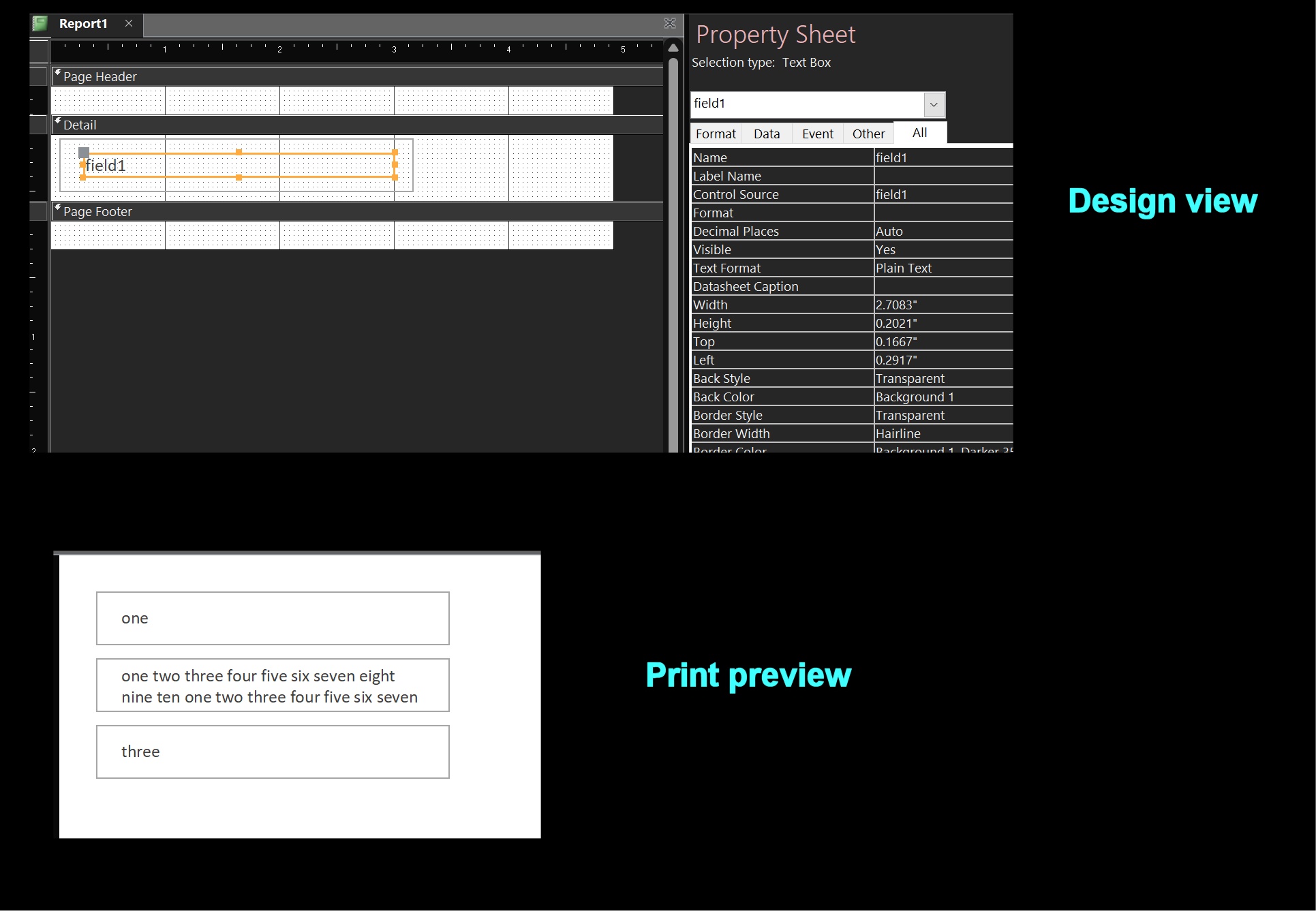
Access cannot align text vertically inside text boxes, which is a big oversight.  If you really must have vertical alignment, make your text box borderless and put it inside a rectangle.  In the Format event of the report's Detail section, adjust the .Top and .Height properties on the text box based on the length of the text in it.  See VBA code and picture below.

Private Sub Detail_Format(Cancel As Integer, FormatCount As Integer)
    Dim b As Boolean
    
    ' Check if text length is greater than, say, 30 characters.
    b = (Len(Me!field1 & "") > 30)
    
    ' Set values of .Top and .Height properties of text box based on whether text is 30 chars long or not.
    ' .Top and .Height are in "twips."  One inch equals 1440 twips.
    Me!field1.Top = IIf(b, 0.08, 0.16) * 1440
    Me!field1.Height = IIf(b, 0.4, 0.2) * 1440
End Sub
Kevin Yip  @Reply  
     
4 years ago

This thread is now CLOSED. If you wish to comment, start a NEW discussion in Access Forum.
 

Next Unseen


What's This?


The following is a paid advertisement
Computer Learning Zone is not responsible for any content shown or offers made by these ads.
 

Learn
 
Access - index
Excel - index
Word - index
Windows - index
PowerPoint - index
Photoshop - index
Visual Basic - index
ASP - index
Seminars
More...
Customers
 
Login
My Account
My Courses
Lost Password
Memberships
Student Databases
Change Email
Info
 
Latest News
New Releases
User Forums
Topic Glossary
Tips & Tricks
Search The Site
Code Vault
Collapse Menus
Help
 
Customer Support
Web Site Tour
FAQs
TechHelp
Consulting Services
About
 
Background
Testimonials
Jobs
Affiliate Program
Richard Rost
Free Lessons
Mailing List
PCResale.NET
Order
 
Video Tutorials
Handbooks
Memberships
Learning Connection
Idiot's Guide to Excel
Volume Discounts
Payment Info
Shipping
Terms of Sale
Contact
 
Contact Info
Support Policy
Mailing Address
Phone Number
Fax Number
Course Survey
Email Richard
[email protected]
Blog RSS Feed    YouTube Channel

LinkedIn
Copyright 2026 by Computer Learning Zone, Amicron, and Richard Rost. All Rights Reserved. Current Time: 10/31/2026 12:36:15 PM. PLT: 0s