Free Lessons
Courses
Seminars
TechHelp
Fast Tips
Templates
Topic Index
Forum
ABCD
 
Home   Courses   TechHelp   Forums   Help   Contact   Merch   Join   Order   Logon  
 
Back to Access Forum    Comments List
Upload Images   @Reply   Bookmark    Link   Email   Next Unseen 
Calculate a job position
Jon Capps 
       
4 years ago
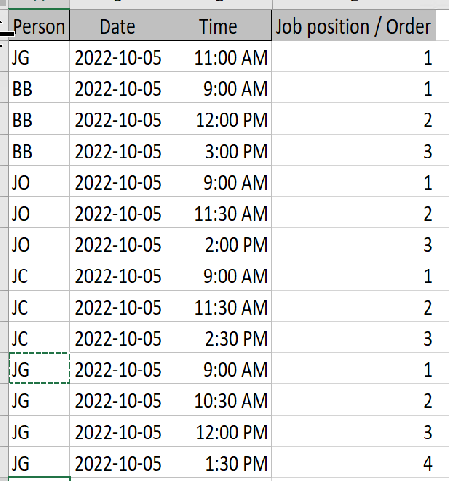
Each day there is list of jobs that are assigned to a person. The jobs are organized by date, then time. I am sure there is a formula in a query to figure out the job position for each person by time. I may not be explaining it right, and my search so far is not generating the right results. See my spread sheet below. Any suggestions?
Jon Capps OP  @Reply  
       
4 years ago

Kevin Robertson  @Reply  
          
4 years ago
Looks like all you need to do is add sorts to your Query. Your fields will be sorted from left to right.
Dan Jackson  @Reply  
            
4 years ago
I interpret it as you wanting to see what jobs are showing based on a time (E.G. put in 2022-10-05 11.30 to show two records - JO and JC). If this is the case, it'll be a DLookup with, as Kevin says, a sort in the query on Priority.

If you want to view jobs going on at this very moment, you will first need to set a job length (From your spreadsheet, Access can't know how long a job takes and therefore can only assume it's for the minute started). Once you have a job length i.e 1 hour, you could use the Now function with a between keyword criteria.

If you are wanting to count the number of jobs people have Aggregate Query
Jon Capps OP  @Reply  
       
4 years ago
I know I am having a hard time explaining this. I have to send a Teams Message each day based off the work scheduled per each person, example JO has 10/5 job at 9, 11:30, and 2:00, so the first job position would be the one at 9 am, the 2nd would be 1130 and 3rd would be 2pm, I am wanting this to be calculated so that when I sent the message it will say #1 Smith at 9am - Alanta GA, #2 Jones at 11:30 am Greenville, SC, #3 Kirk at 2:00 PM Charlston, SC. Is there a formula that could figure this. I have it sorted in the query by Person, Date, and Time, that is what is above in the example, now I am trying to get the Job number text to show up as explained.
Adam Schwanz  @Reply  
           
4 years ago
So you have the name, date, time, and the order of the times already added it looks like. You just want a line that gives you the pretty wording? Like making a new expression in that query
Wording: "#" & [Job position / order] & " " & [Name field you don't have shown, where is this value coming from?] & " at " & [Time] & " - " & [City field you also don't have shown?]
That would create a field with a value of #1 Smith At 9am - Atlanta GA

Now if you want to add them all into one line, you're gonna have to use a loop. I'm not even 100% sure that's what you want to do.
Jon Capps OP  @Reply  
       
4 years ago

Jon Capps OP  @Reply  
       
4 years ago

Jon Capps OP  @Reply  
       
4 years ago
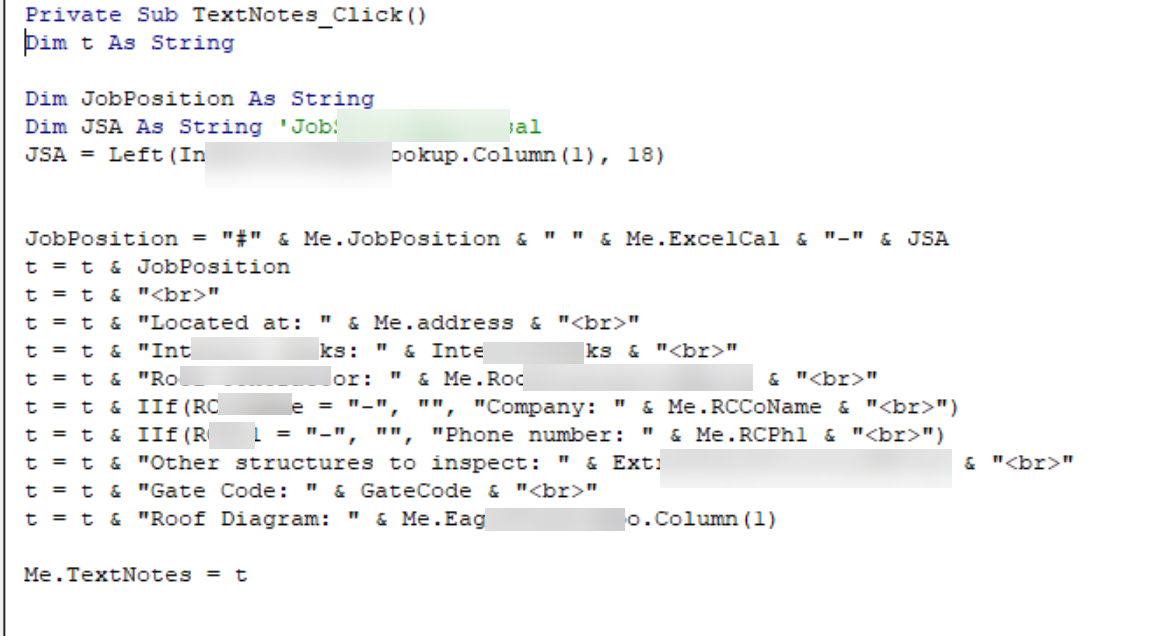
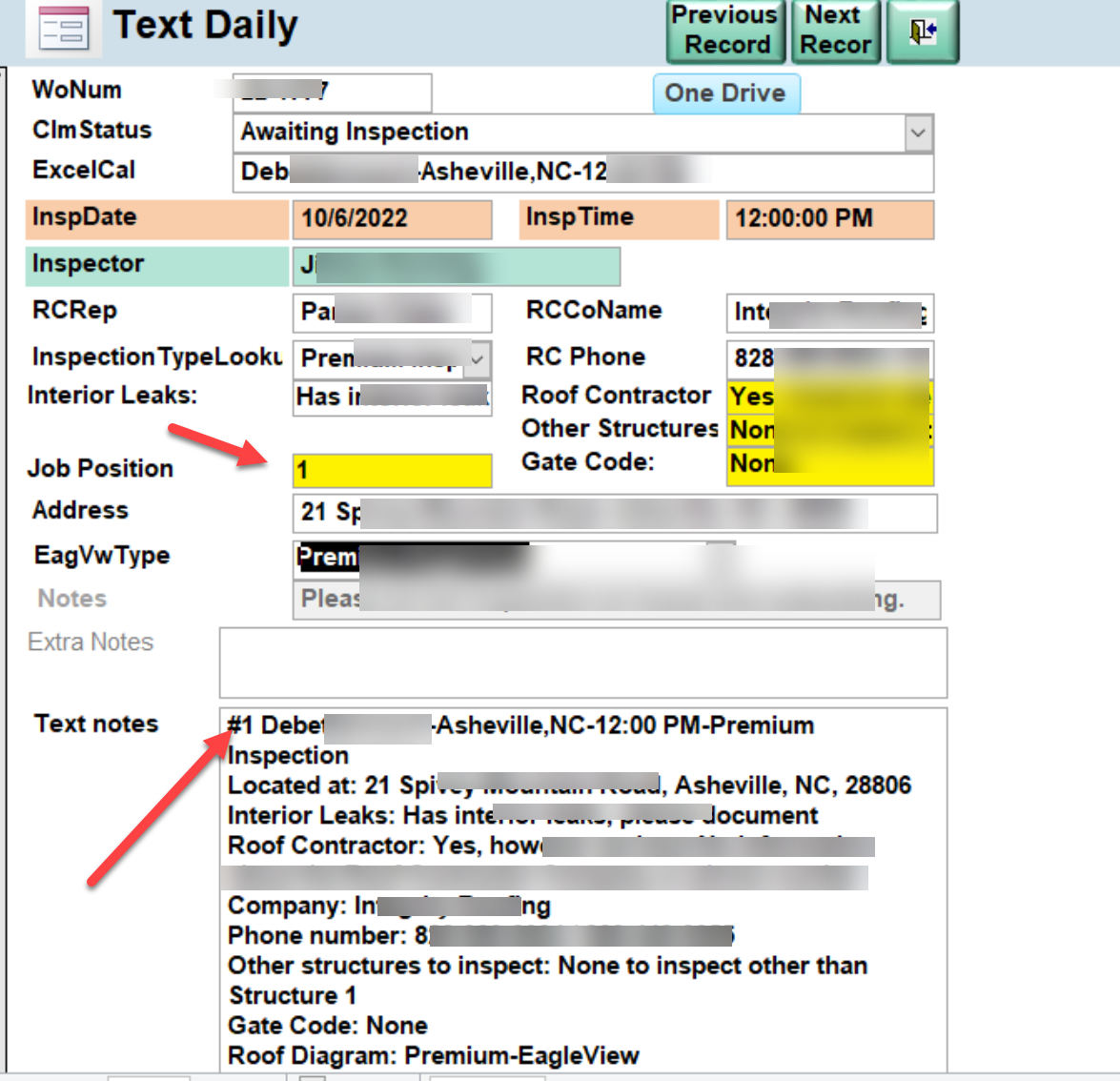
Above is my form, that I use daily to build the text notes unbound field, and  the vba code I have made to build the text, based off the answers I have for various information. The Jobposition field is a manual entry since I not sure how to make a formula to calculate that number.
Adam Schwanz  @Reply  
           
4 years ago
If You're trying to get the numbers to the job position, use sorting to get the names sorted first to the left, then sorting on the times to get in order. Then use a dcount or dmax or dlookup formula to get the number and add to it, I'll use DCount.

Query Expression something like this
Position: NZ(DCOUNT("*","Table","DateField=#" & DateField & "# and TimeField<=#" & TimeField & "#"),0)
Adam Schwanz  @Reply  
           
4 years ago
I don't have a good example to test with to be sure, I haven't done these in a little while. So you may need to use an IIF Function there as well.
Jon Capps OP  @Reply  
       
4 years ago
I am sure this is the path of an answer, maybe, this is what I have now
Dim NJP As String

'NJP = Nz(DCount("*", "TextDaily", "InspDate=#" & InspDate & "# and InspTime<=#" & InspTime & "#"), 0)
' results random order in the JobPosition Field
NJP = Nz(DCount("*", "TextDailyCountJobsQ", "InspDate=#" & InspDate & "#"), 0)
'Results is all jobs for one day in the JobPosition Field
'NJP = Nz(DCount("*", "TextDailyCountJobsQ", "Inspector=" & "Inspector"), 0)
'Results all jobs in table in the Jobpostion Field
Me.JobPosition = NJP
fillintextnotes
Adam Schwanz  @Reply  
           
4 years ago

Adam Schwanz  @Reply  
           
4 years ago
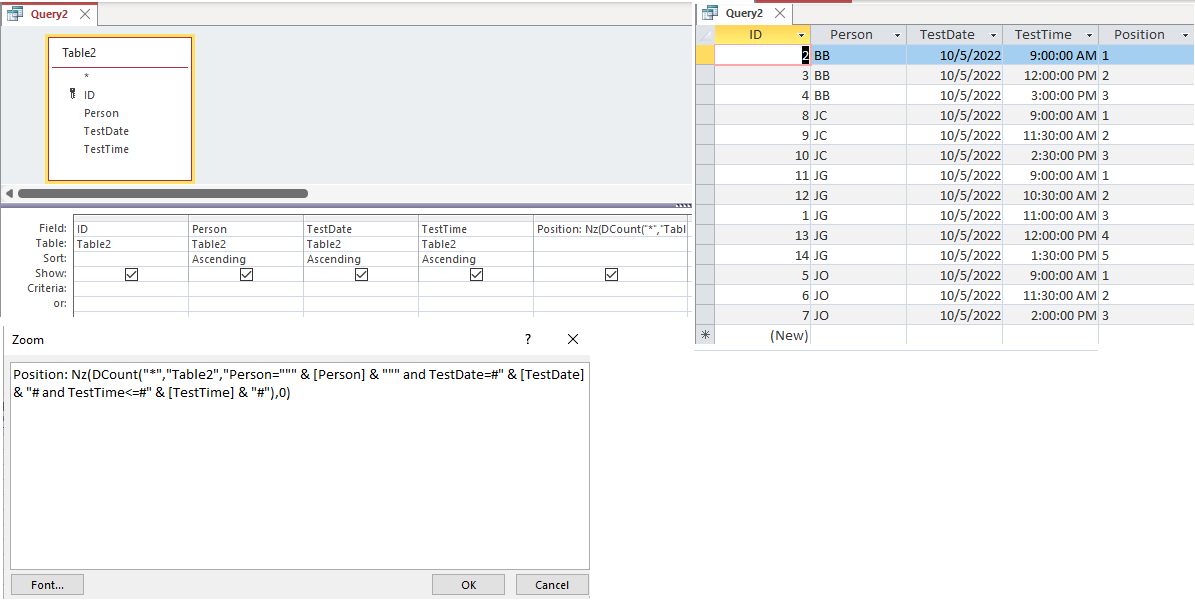
Here you go, just made a test database with the fields you had. That's the query and those are the results it gives.
Jon Capps OP  @Reply  
       
4 years ago
NJP2: Nz(DCount("*","TextDailyCountJobsQ","Inspector=" & [Inspector] And InspDate=#" & [InspDate] & "# and insptime<=#" & [insptime] & "#"),0)

Gives me an error before I can close out the expression builder.

I have tired this as well:

NJP: Nz(DCount("*","TextDailyCountJobsQ","Inspector=""" & [Inspector] & """ and InspDate=#" & [InspDate] & "# and InspTime<=#" & [InspTime] & "#"),0)

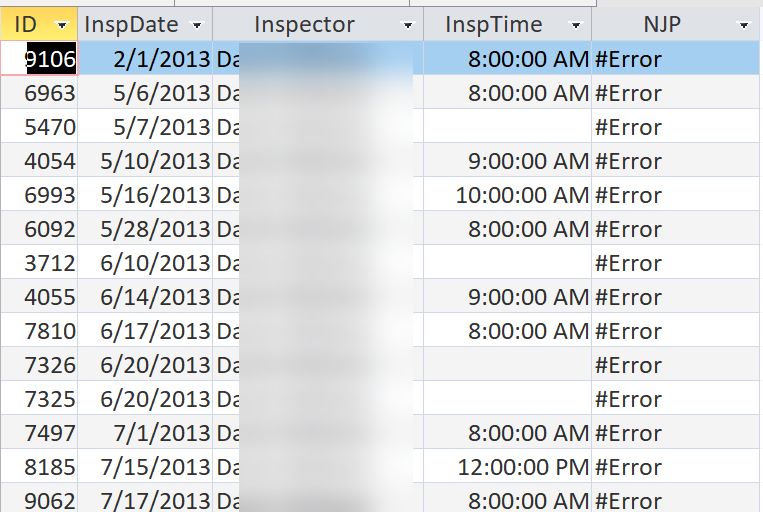
The query will run and I get an error on every record for that field in the query table

I apologize for being so dumb
Jon Capps OP  @Reply  
       
4 years ago

Adam Schwanz  @Reply  
           
4 years ago
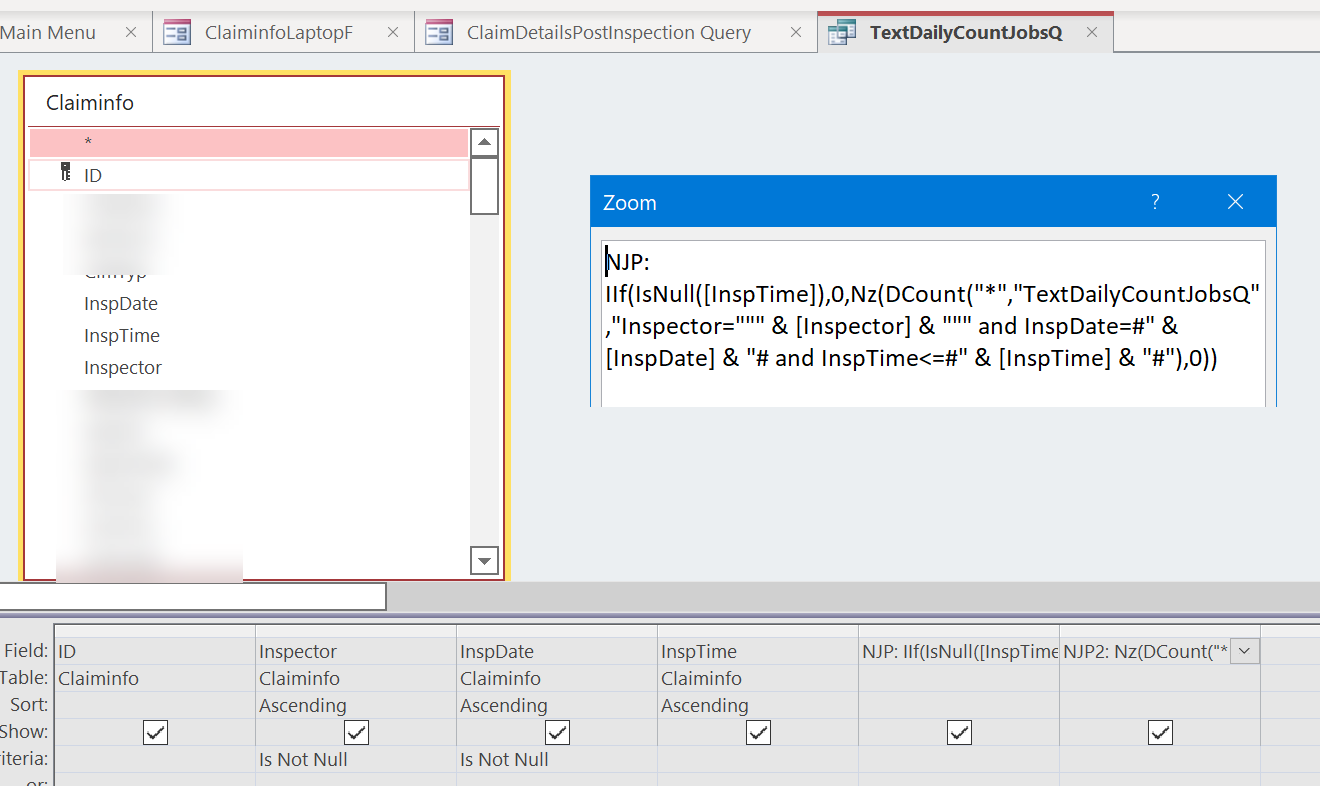
What is the name of the query you are making now? Just curious if you are dcounting the query you are making or if that is a different query, the TextDailyCountJobsQ. I would suggest dcounting the table if you can?


It should be this one, your syntax looks good too. If it's not the TextDailyCountJobsQ, it might be related to the null fields as well.
NJP: Nz(DCount("*","TextDailyCountJobsQ","Inspector=""" & [Inspector] & """ and InspDate=#" & [InspDate] & "# and InspTime<=#" & [InspTime] & "#"),0)
Adam Schwanz  @Reply  
           
4 years ago
In Which case, we might need to do something like

NJP: IIF(IsNull(InspTime),0,Nz(DCount("*","TextDailyCountJobsQ","Inspector=""" & [Inspector] & """ and InspDate=#" & [InspDate] & "# and InspTime<=#" & [InspTime] & "#"),0))
Jon Capps OP  @Reply  
       
4 years ago

Adam Schwanz  @Reply  
           
4 years ago
Do you have a table those fields are in instead? I wonder if part of the problem is trying to count inside of itself.
Adam Schwanz  @Reply  
           
4 years ago
NJP: Nz(DCount("*","OriginalTableName","Inspector=""" & [Inspector] & """ and InspDate=#" & [InspDate] & "# and InspTime<=#" & [InspTime] & "#"),0)

Can you try this one with the original table name?
Adam Schwanz  @Reply  
           
4 years ago
Looks like that would be that ClaimInfo.

NJP: Nz(DCount("*","ClaimInfo","Inspector=""" & [Inspector] & """ and InspDate=#" & [InspDate] & "# and InspTime<=#" & [InspTime] & "#"),0)
Jon Capps OP  @Reply  
       
4 years ago

Jon Capps OP  @Reply  
       
4 years ago
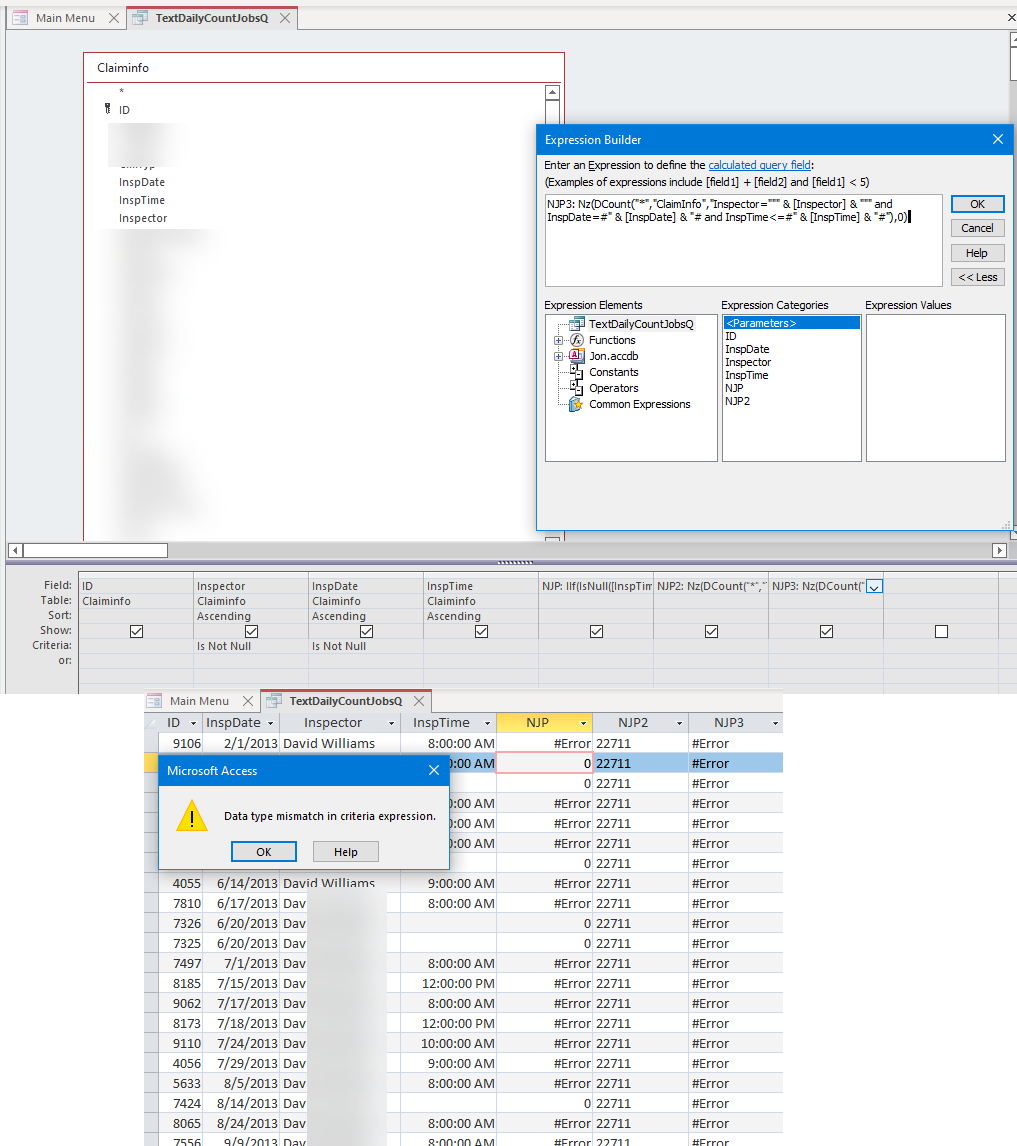
I tired that option, when I was in the query view, I accidently clicked on the error cell in the field and got this message
Adam Schwanz  @Reply  
           
4 years ago
So to verify, Inspector is short text, InspDate and InspTime are both Date/Time right? They're not short text or something.
Jon Capps OP  @Reply  
       
4 years ago
Adam, after some digging, the claiminfo table  inspdate and insptime is date/time data type, however Inspector is Number, this is from a mess setting up the Lookup wizard. I have tried numerous times to undo, however I am finding that my work arounds in forms, and other access objects is messy. What do I need to do to correct this  topic?
Adam Schwanz  @Reply  
           
4 years ago
It's OK if it's a number, as long as it's setup with a proper relationship to another table that stores the text value. It's not so good if it's a lookup field inside of the table. See Evil Access Stuff on lookup fields in tables. Which is the case here?

If it's a number, you just need "Inspector=" & [Inspector] & " and
But we might need to change more using .column if it's a number in the table and a text on the form.
Jon Capps OP  @Reply  
       
4 years ago
It's evil, very evil, I used the wizard, which was built into Access and created several lookup fields back in 2014. . I know this is a problem and I have not figured out how to fix this mess.  I have about six lookup fields on this table.  I know I used in the forms the .column making work arounds over the years. Sigh. Such a big ol mess.  I want to undo my mess, I keep getting lost in the weeds with the objects (forms, queries, VBA programing that I created to resolve the initial problem).
Thank you for your help and Patience.
You should have received something from the tip jar.
Adam Schwanz  @Reply  
           
4 years ago
Backup before doing either of these for safety
Writing this on the phone so hopefully not too many typos

Thanks John, so to fix a simple lookup field that is just a number and a text, we just need to decide which way we Want the data to be and fix it with an Update Queries. If you want to store the text, i would make a new field in the table, like inspectortemp as short text, and then make an update query, update inspectortemp to =inspector.column(1) the column number may be different depending on the order of your lookup field and how many columns are in it. After you run the query see what results you got and we can adjust it. If you got the expected short text results, you can delete inspector and change inspectortemp to inspector.

now if you have relationships setup with the number field already your going to have to go the other way. Make a new table inspectorT to store the nunber and name, if we are only dealing with a few inspectors i would probably just manually add them to the table with the matchingnumber and name. If there are many we would want to use an append query. Once thats done it should just be deleting the lookup from the field if the bound field has been a number. Then fix your forms to get the text value from the inspectort table.

If you have questions or need help go ahead and reply.
Adam Schwanz  @Reply  
           
4 years ago
Ofc either way you'll have to probably do some adjusting to how the forms have been working with work arounds to be working the right way, which may be a project all in itself, but the sooner the better, it only gets worse the longer you put it off ;p
Jon Capps OP  @Reply  
       
4 years ago
Thanks Adam. I tried to work on it this morning at about 3 am once you had asked the questions about text or number field.
I made a backup and tried again and got lost in the weeds again.
I will use your instructions and try this again.

This thread is now CLOSED. If you wish to comment, start a NEW discussion in Access Forum.
 

Next Unseen

 
New Feature: Comment Live View


The following is a paid advertisement
Computer Learning Zone is not responsible for any content shown or offers made by these ads.
 

Learn
 
Access - index
Excel - index
Word - index
Windows - index
PowerPoint - index
Photoshop - index
Visual Basic - index
ASP - index
Seminars
More...
Customers
 
Login
My Account
My Courses
Lost Password
Memberships
Student Databases
Change Email
Info
 
Latest News
New Releases
User Forums
Topic Glossary
Tips & Tricks
Search The Site
Code Vault
Collapse Menus
Help
 
Customer Support
Web Site Tour
FAQs
TechHelp
Consulting Services
About
 
Background
Testimonials
Jobs
Affiliate Program
Richard Rost
Free Lessons
Mailing List
PCResale.NET
Order
 
Video Tutorials
Handbooks
Memberships
Learning Connection
Idiot's Guide to Excel
Volume Discounts
Payment Info
Shipping
Terms of Sale
Contact
 
Contact Info
Support Policy
Mailing Address
Phone Number
Fax Number
Course Survey
Email Richard
[email protected]
Blog RSS Feed    YouTube Channel

LinkedIn
Copyright 2026 by Computer Learning Zone, Amicron, and Richard Rost. All Rights Reserved. Current Time: 6/17/2026 11:52:16 AM. PLT: 1s