Free Lessons
Courses
Seminars
TechHelp
Fast Tips
Templates
Topic Index
Forum
ABCD
 
Home   Courses   TechHelp   Forums   Help   Contact   Merch   Join   Order   Logon  
 
Back to Access Forum    Comments List
Upload Images   @Reply   Bookmark    Link   Email   Next Unseen 
Form fields based on queries
Maarten Brusselers 
   
4 years ago
I have a continuous form with a field based on a query result. This works for the first record but when I enter the second record the query does not run again but returns the same value it gave for the first record. Why does the query only runs the for the first record and not after?
Richard Rost  @Reply  
          
4 years ago
Too vague. Need more information. Screen shots?
Maarten Brusselers OP  @Reply  
   
4 years ago

Maarten Brusselers OP  @Reply  
   
4 years ago

Maarten Brusselers OP  @Reply  
   
4 years ago

Maarten Brusselers OP  @Reply  
   
4 years ago

Maarten Brusselers OP  @Reply  
   
4 years ago
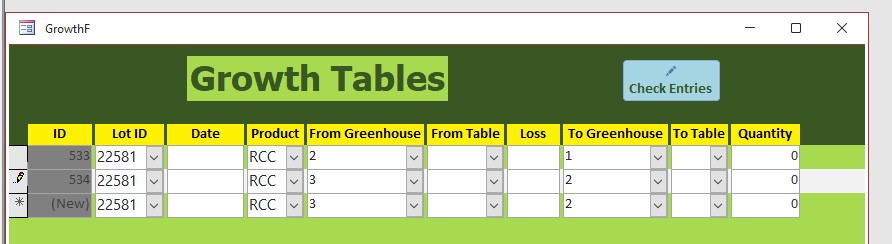
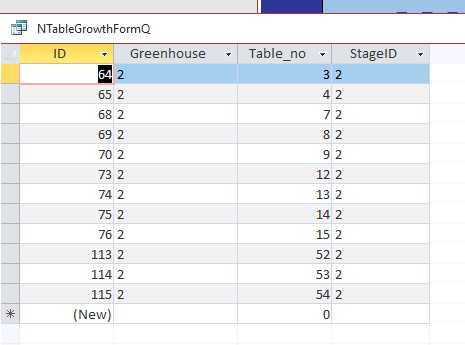
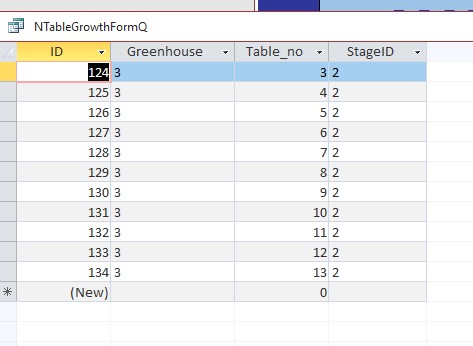
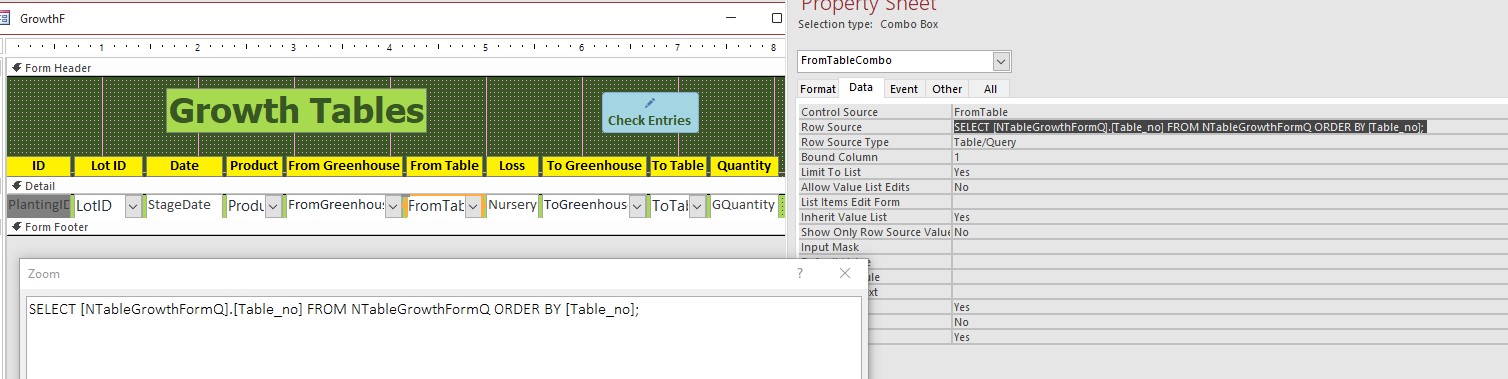
I choose the greenhouse and based on that the query puts the correct nursery tables in the table combo box.  Every greenhouse has different nursery table numbers as you can see in the query result of greenhouse 2 and greenhouse 3. The problem now is that when I put  greenhouse 2 in the first record it is shown correctly but if in the next record I choose greenhouse 3 the table combobox will still show the records for greenhouse 2 which seems ti indicate the query is not updated.
Maarten Brusselers OP  @Reply  
   
4 years ago

Kevin Robertson  @Reply  
          
4 years ago
Maarten Brusselers OP  @Reply  
   
4 years ago
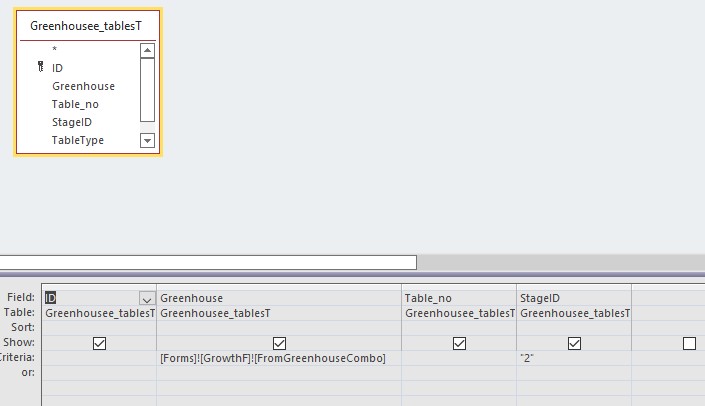
In the query I have the default for StageID set to 2 as that is the value for the nursery tables.  In other queries I set to default to 3 for the growth tables. The problem is that the query only runs once. Do you mean that in the Table combo form I set the default value to NTableGrowthformQ and the query will run every time? I'll try that.
Maarten Brusselers OP  @Reply  
   
4 years ago
Doesn't work
Maarten Brusselers OP  @Reply  
   
4 years ago
I meant Table combobox default value
Maarten Brusselers OP  @Reply  
   
4 years ago
I use this string to set the default values for the next record: Me.FromTableCombo.DefaultValue = """" & Me.FromTableCombo.Value & """". When I go to the next record I can leave it or change it.  I got this string from the internet. I don't quite understand it yet but it works.
Kevin Robertson  @Reply  
          
4 years ago
So, you're trying to set a field value based on a selection in a Combo Box? Correct?
I would use a If Then in the After Update event for the Combo Box.

For example:

If ComboBoxName = YourValue Then
   YourField = SomeValue
elseIf ComboBoxName = YourOtherValue Then
   YourField = SomeOtherValue
end if
Maarten Brusselers OP  @Reply  
   
4 years ago
Not possible.  It needs to run the query to get the correct answer.  I have over 250 tables in my greenhouses, most of them growth tables (Stage 3), less nursery tables (stage 2) and 2 seeding tables Stage 1) per greenhouse.  To get the combobox to display the right choice of tables it needs to run the query every time I select it.
Maarten Brusselers OP  @Reply  
   
4 years ago

Maarten Brusselers OP  @Reply  
   
4 years ago
As you can see in the picture, the nursery tables have 900 holes. When the plants get bigger they are moved to the growth tables that have only 240 holes. Seeding, nursery and growth stage each take 15 days so there is a lot of moving
Maarten Brusselers OP  @Reply  
   
4 years ago

Maarten Brusselers OP  @Reply  
   
4 years ago
Usually all the plants from one lot are in the nursery tables in one greenhouse and there is no problem.  However, sometimes one lot is divided over several greenhouses and that is when the choice of tables has to change with the choice of greenhouse.
Kevin Yip  @Reply  
     
4 years ago
Do you requery the combo boxes in your code?  You have several combo boxes in your form GrowthF, so you have to make sure they are requeried accordingly.  If they are inter-related, you have to requery them every time the user enters a new value in ANY one of the combo boxes.  For instance, if combo box A affects B, B affects C, and C affects D, then if the user changes A, then B, C, and D all have to be requeried, not just B.
Maarten Brusselers OP  @Reply  
   
4 years ago
I use comboboxes to limit the input choices for my staff and limit mistakes.  I have now added a refresh button in the form footer which they have to use when they change greenhouse.  This is not ideal but it works.
Maarten Brusselers OP  @Reply  
   
4 years ago
A affects B and C affects D. A will change rarely, C more often.
Kevin Yip  @Reply  
     
4 years ago
In the greenhouse's AfterUpdate event (or Change event), you can requery the necessary combo box(es).  This is done automatically whenever the user changes the greenhouse.  That's better than having the user manually refresh the form.  Also, refreshing the whole form is slower than refreshing just one or two combo boxes in one row.
Maarten Brusselers OP  @Reply  
   
4 years ago
Hi Kevin,
That doesn't seem to work.  I have put an Afterupdate macro  event in to requery. When I now fill in the form, as soon as I choose a value in the greenhouse combobox the value disappears.
Kevin Yip  @Reply  
     
4 years ago
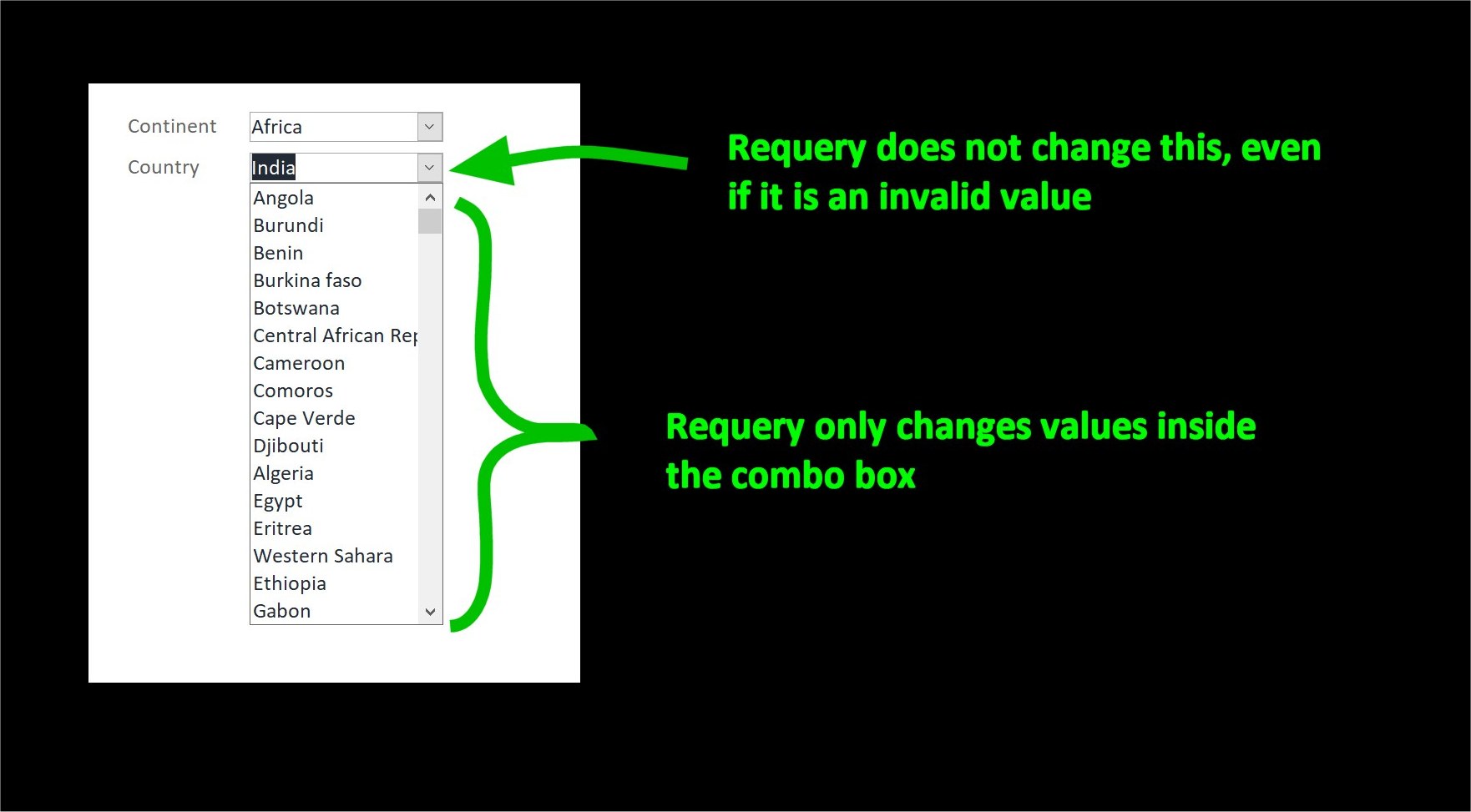
Requery only changes the values inside a combo box; it does not change the value of the control itself, even if it is an invalid choice for the combo box.  See my picture below for an example.  I select "Asia" as the continent, and the country combo box requeries and shows a list of Asian countries.  I select "India" as the country.  Then I select "Africa" as the continent.  The country combo box requeries again and shows a list of African country.  But it still shows "India" as its country value.  It does not disappear.  It would only disappear if something else made it do so.

If the value itself disappears, then the problem lies elsewhere.  Something else is affecting the combo box's value, and it could be any number of things.  I would suggest you do a VBA debug.  Set a break point in the VBA editor, such as in the form's Open event.  When the form opens, it will go right to debug mode.  Press F8 to see the code executes line by line until the combo box value disappears.
Kevin Yip  @Reply  
     
4 years ago

Maarten Brusselers OP  @Reply  
   
4 years ago
How do I access the VBA code for a macro? All I did was create a requery macro in the AfterUpdate property so I don't know how that could have a bug.
Kevin Yip  @Reply  
     
4 years ago
Do you have any VBA code at all in your form? Macro certainly could have bugs if not written properly.  But as I said, the problem likely lies elsewhere of the requery action, because requery doesn't blank out data; something else probably does.  Since you don't get any run-time errors (bugs don't always generate errors), the only way is to see your VBA code run line by line.  Also, you could try using Requery in VBA (remove the macro first).  To me, this looks like a simple mystery whose answer couldn't be hidden in plain sight.
Kevin Yip  @Reply  
     
4 years ago
The answer *could* be hidden in plain sight.

This thread is now CLOSED. If you wish to comment, start a NEW discussion in Access Forum.
 

Next Unseen

 
New Feature: Comment Live View


The following is a paid advertisement
Computer Learning Zone is not responsible for any content shown or offers made by these ads.
 

Learn
 
Access - index
Excel - index
Word - index
Windows - index
PowerPoint - index
Photoshop - index
Visual Basic - index
ASP - index
Seminars
More...
Customers
 
Login
My Account
My Courses
Lost Password
Memberships
Student Databases
Change Email
Info
 
Latest News
New Releases
User Forums
Topic Glossary
Tips & Tricks
Search The Site
Code Vault
Collapse Menus
Help
 
Customer Support
Web Site Tour
FAQs
TechHelp
Consulting Services
About
 
Background
Testimonials
Jobs
Affiliate Program
Richard Rost
Free Lessons
Mailing List
PCResale.NET
Order
 
Video Tutorials
Handbooks
Memberships
Learning Connection
Idiot's Guide to Excel
Volume Discounts
Payment Info
Shipping
Terms of Sale
Contact
 
Contact Info
Support Policy
Mailing Address
Phone Number
Fax Number
Course Survey
Email Richard
[email protected]
Blog RSS Feed    YouTube Channel

LinkedIn
Copyright 2026 by Computer Learning Zone, Amicron, and Richard Rost. All Rights Reserved. Current Time: 5/6/2026 5:35:06 AM. PLT: 0s