Free Lessons
Courses
Seminars
TechHelp
Fast Tips
Templates
Topic Index
Forum
ABCD
 
Home   Courses   TechHelp   Forums   Help   Contact   Merch   Join   Order   Logon  
 
Back to Access Forum    Comments List
Upload Images   @Reply   Bookmark    Link   Email   Next Unseen 
AfterUpdate event not firing
Richard Pitassy 
       
4 years ago
Once in a while, a customer will bring an item to our sales desk that is missing a price label. To help this situation I have a command button on the POS Transaction form that opens a Product Search list form. After locating the desired product, the user clicks on the stock number and the underlying code enters that number into the Stock Number field on the Transaction form.

The problem is that this method of entering the stock number does not fire the AfterUpdate event of the Stock Number field on the Transaction form. The AfterUpdate event will only fire if I manually type in the number or scan it off a barcode.

I've had this same issue elsewhere in my db. It seems that the method I am using to get data from one form to another does not "update" the target field for purposes of the AfterUpdate event.

The method I am using is:
Forms![transaction form].Form![Barcode] = [Barcode].

I need some help on the correct way to handle this?  Many thanks!
Adam Schwanz  @Reply  
           
4 years ago
Call the after update event. Set the after update event on your transaction form to Public Sub instead of Private, and then do Forms![Transaction Form]!Barcode.After_Update
Adam Schwanz  @Reply  
           
4 years ago
Syntax is wrong there, Think it would be
Forms![Transaction Form].BarCode_AfterUpdate

Richard Pitassy OP  @Reply  
       
4 years ago
Let me try.  Thank!
Richard Pitassy OP  @Reply  
       
4 years ago
I'm stuck because I don't know exactly where to put the code you sent me.  Here is the exact code from my Product Search form that populates the Transaction form.

   If CurrentProject.AllForms("frmTransaction").IsLoaded Then
        Forms![frmTransaction]![frmTransDetail subform].Form![Barcode] = Me.Barcode
        Forms![frmTransaction]![frmTransDetail subform].Form![QtySold] = 1
        Forms![frmTransaction]![frmTransDetail subform].Form!TransPrice = Forms![frmTransaction]![frmTransDetail subform].Form!Price
        Forms![frmTransaction]![frmTransDetail subform].Form!DirectedPrice = Forms![frmTransaction]![frmTransDetail subform].Form!TransPrice
        Forms![frmTransaction]![frmTransDetail subform].Form!ExtendedPrice = _
        Forms![frmTransaction]![frmTransDetail subform].Form!DirectedPrice * Forms![frmTransaction]![frmTransDetail subform].Form!QtySold
        Forms![frmTransaction]![frmTransDetail subform].Form!FinalPrice = Forms![frmTransaction]![frmTransDetail subform].Form!ExtendedPrice
        DoCmd.Close acForm, "frmProductsLookup"
        Exit Sub
    End If

Adam Schwanz  @Reply  
           
4 years ago
Oh it's a subform? it needs more then.

Id just put it at the end (before exit sub), I think it would be this
Forms!frmTransaction![frmTransDetail subform].Barcode_AfterUpdate
Richard Pitassy OP  @Reply  
       
4 years ago
Thanks Adam.  Will try again tonight.
Richard Pitassy OP  @Reply  
       
4 years ago

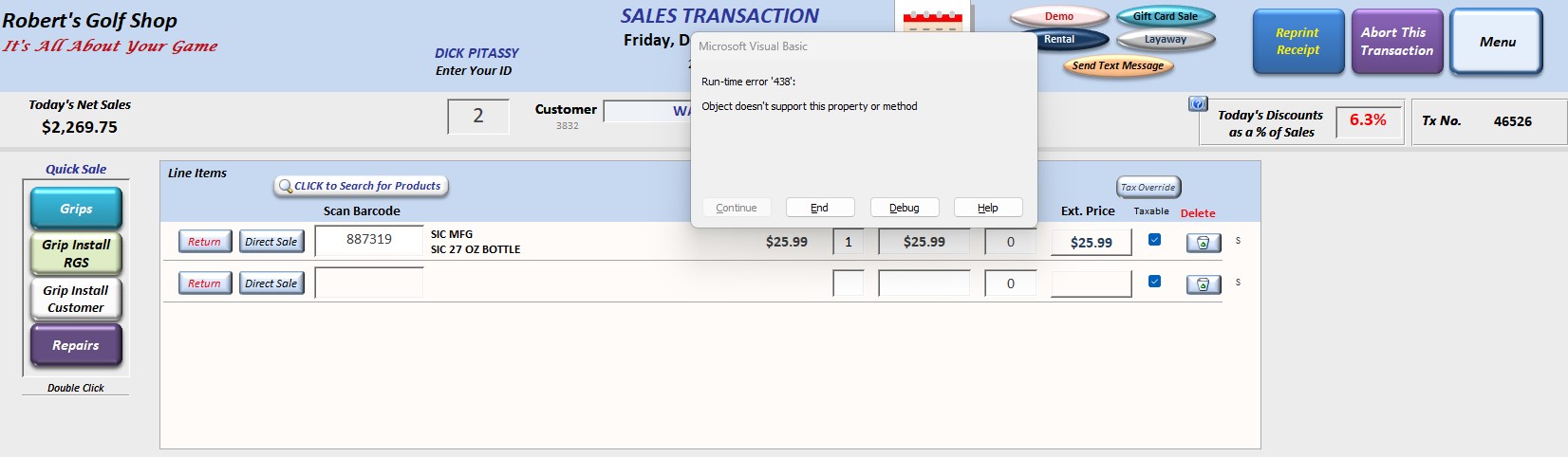
Richard Pitassy OP  @Reply  
       
4 years ago
After adding that line of code in the recommended spot, I get the above.  Getting warmer I think.
Adam Schwanz  @Reply  
           
4 years ago
Forms!frmTransaction![frmTransDetail subform].Form.Barcode_AfterUpdate
Adam Schwanz  @Reply  
           
4 years ago
Didn't think you needed the form there but looks like you do, then as long as you've made the after update event a public sub, that should work.
Richard Pitassy OP  @Reply  
       
4 years ago
Well, there is good news and bad news. The bad news:  I just can't make calling the Barcode_AfterUpdate sub work BUT, I want to figure out how to do it so I'll be in the bat cave over the weekend.  The good news is that I came up with a workaround by moving the AfterUpdate code to the OnGotFocus event of the QtySold field.  That will keep us going while I'm figuring out how to do it properly.  Adam, thank you for taking the time to look into this and for your advice.  I'll keep working on it.
Kevin Yip  @Reply  
     
4 years ago
You can create a separate procedure that performs the task, then call that procedure wherever you need to, in your AfterUpdate event or elsewhere:  

Private Sub Barcode_AfterUpdate()
     SomeProcedure()
end Sub

Private Sub SomewhereElse()
     SomeProcedure()
End Sub
Richard Pitassy OP  @Reply  
       
4 years ago
Thanks Kevin.  Will try!

This thread is now CLOSED. If you wish to comment, start a NEW discussion in Access Forum.
 

Next Unseen

 
New Feature: Comment Live View


The following is a paid advertisement
Computer Learning Zone is not responsible for any content shown or offers made by these ads.
 

Learn
 
Access - index
Excel - index
Word - index
Windows - index
PowerPoint - index
Photoshop - index
Visual Basic - index
ASP - index
Seminars
More...
Customers
 
Login
My Account
My Courses
Lost Password
Memberships
Student Databases
Change Email
Info
 
Latest News
New Releases
User Forums
Topic Glossary
Tips & Tricks
Search The Site
Code Vault
Collapse Menus
Help
 
Customer Support
Web Site Tour
FAQs
TechHelp
Consulting Services
About
 
Background
Testimonials
Jobs
Affiliate Program
Richard Rost
Free Lessons
Mailing List
PCResale.NET
Order
 
Video Tutorials
Handbooks
Memberships
Learning Connection
Idiot's Guide to Excel
Volume Discounts
Payment Info
Shipping
Terms of Sale
Contact
 
Contact Info
Support Policy
Mailing Address
Phone Number
Fax Number
Course Survey
Email Richard
[email protected]
Blog RSS Feed    YouTube Channel

LinkedIn
Copyright 2026 by Computer Learning Zone, Amicron, and Richard Rost. All Rights Reserved. Current Time: 5/2/2026 5:48:56 AM. PLT: 0s