Free Lessons
Courses
Seminars
TechHelp
Fast Tips
Templates
Topic Index
Forum
ABCD
 
Home   Courses   TechHelp   Forums   Help   Contact   Merch   Join   Order   Logon  
 
Back to Access Developer Forum    Comments List
Upload Images   @Reply   Bookmark    Link   Email   Next Unseen 
Multi Many to Many Relations
Eric Hild 
    
4 years ago
I've been going through both the "Many-to-Many" relationships and "Inventory" videos recently. Both have been very helpful, but I have a question. How do you go about setting up a Many-to-Many-to-Many relationship? If that is possible.

For example, I work in a brewery. For our malt, we have many different malt producers that we procure from. Each Malt Producer has many different varieties of malt. Within our own building we have different "Warehouses" in which we store these different malts. For simplicity sake lets just call them Silo1, Silo2, and Silo3.

My end goal is to track inventory depletion/additions of the different malt brands in each Warehouse.

Is there another video I could watch that can help me w/ my situation?
Cheers
John Davy  @Reply  
         
4 years ago
Hi Eric
Take a look at Richard's Video https://www.599cd.com/blog/display-article.asp?ID=1585

You will see  how to create an intermediate table. If you need more help, let me know
John
John Davy  @Reply  
         
4 years ago
Hi Eric
If you had a StudentT and a CourseT you would need a 3rd table such as StudentXCourse as the intermediate table. That table would have a numeric field for the StudentId and numeric a field for the CourseID as well as it's own Autonumber field. HTH John
Eric Hild OP  @Reply  
    
4 years ago
Thank you for the response John. That's one of the videos I mentioned in my OP that I've been watching. My question is how should I go about setting up a relationship with multiple connected many-to-many (m2m) relationships, or many-to-many-to-many if you will. Is it possible to create a "3 way" m2m relationship, or do I set up the relationships as such (using my example in my OP):

I have a ManufacturerT and a VarietyT, so I have the ManufacturerXVarietyT intermediate table, but in our inventory we have different warehouses (WarehouseT) that we pull our inventory from. So to connect the WarehouseT Would I create another intermediate table between the WarehouseT & VarietyT or WarehouseT & the intermediate table ManufacturerXVarietyT or is there a more ideal way about going about it?

Thanks again for your help.
Kevin Yip  @Reply  
     
4 years ago
Hi Eric, a more ideal way is when a junction table is an ACTUAL table in your database, and not some extra table you have to make just to make a junction.  For instance, your stock table for the malt can serve as a junction table for connecting your malt and your warehouses:

MaltStockT: MaltID (Primary Key), WarehouseID (PK), StockQty, OnOrderQty.  
(Note: Stock is actual on-hand stock, and "on order" quantity is the ordered quantity that hasn't arrived the warehouse.  I once worked in retail and manufacturing too, and sometimes we ordered items weeks/months in advance, so we had to keep track of what was "on order."  And this number should be put here, right next to the stock.)

You can create an order table for storing your orders you place to manufacturers, and that will serve as a "junction" for connecting malt and manufacturers.  An "order header" contains info for an entire order, and "order detail" contains multiple items for that order.  E.g. you order multiple malt items from one manufacturer in one order:

OrderHeaderT: OrderID (Primary Key), OrderDate, ManufacturerID, ArrivalDate.
OrderDetailT: OrderID (PK), LineNum (PK), MaltID, Quantity, UnitPrice.
Eric Hild OP  @Reply  
    
4 years ago
Thanks Kevin.

With your explanation and also talking through it with one of my collogues at work, I think I have a better understating of how to set up my relationships now. I was definitely making it hard for myself, with having certain fields in the wrong tables and just having too many unnecessary tables.
Eric Hild OP  @Reply  
    
4 years ago

Eric Hild OP  @Reply  
    
4 years ago
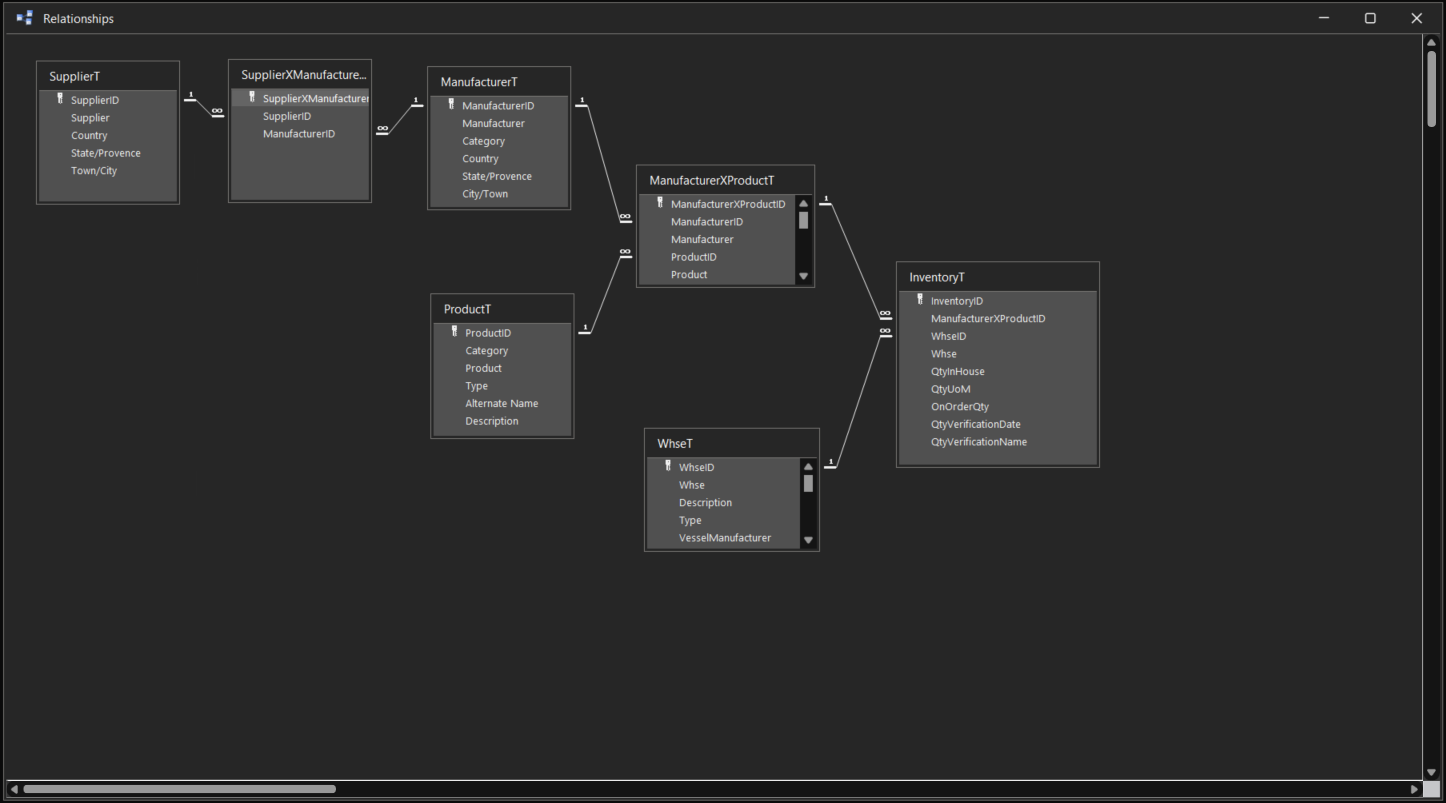
One more question Kevin. This is how I currently have my relations set up. Would this the ideal way to set it up?

You can ignore some of the duplicate fields, It helps me visualize were the ID data is related instead of just looking at ID numbers.
Kevin Yip  @Reply  
     
4 years ago
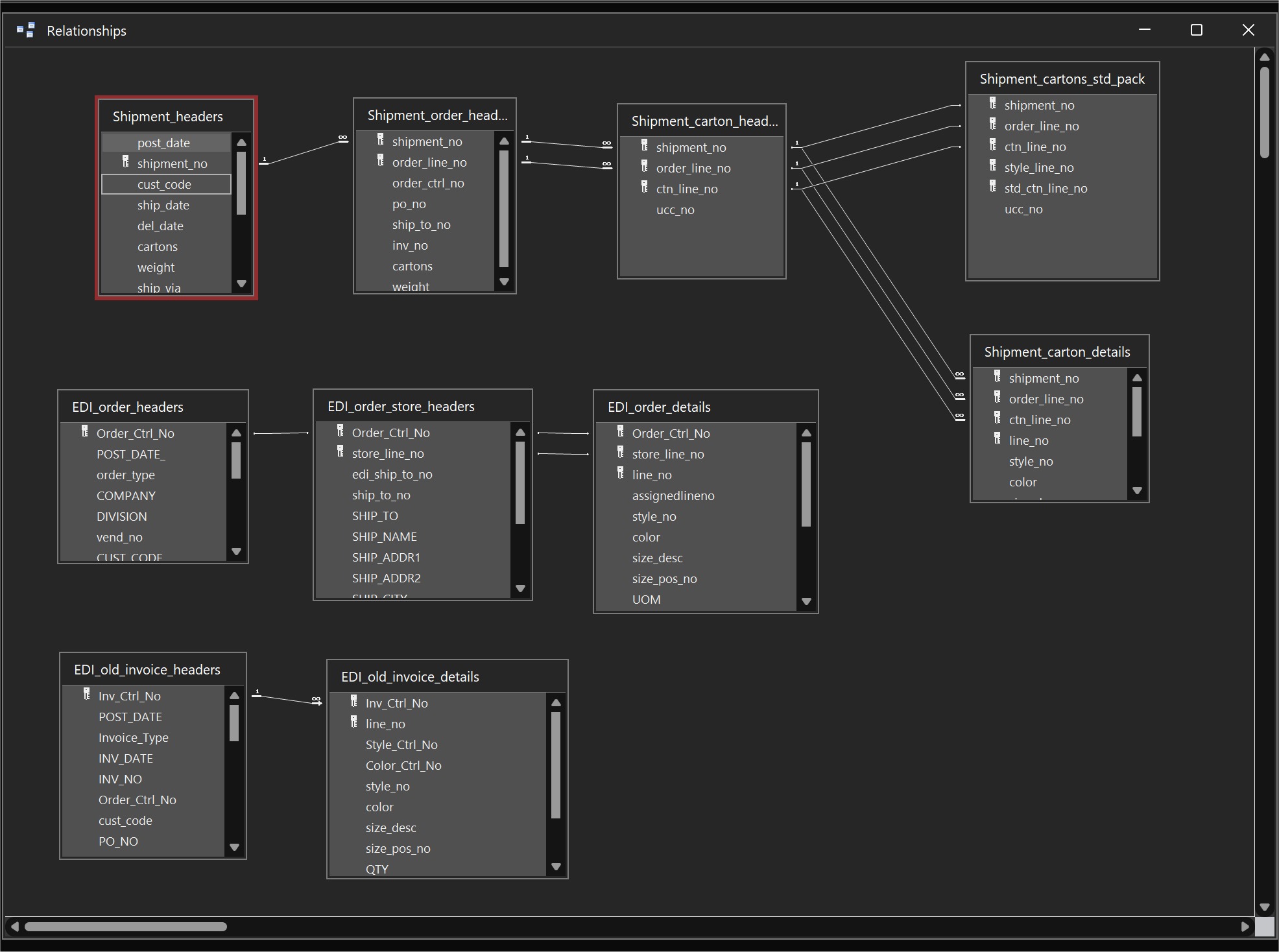
Hi Eric, what if you order the same item from two different manufacturers?  Then you'll have two different values for ManufacturerXProductID in the InventoryT table for the same item, two different stocks for the same item, two different everything for the same item, etc.  Is that what you want?  That depends on your business.  I would have to know more about your business to know if this setup is useful or not.  Also, you don't necessarily need to join all tables together.  Only do it when you need to.  The picture below is how I did it in my old job.  Normally, you use the relationship diagram only if there are relationships you want to "enforce."  But not all need to be.
Kevin Yip  @Reply  
     
4 years ago

This thread is now CLOSED. If you wish to comment, start a NEW discussion in Access Developer Forum.
 

Next Unseen

 
New Feature: Comment Live View


The following is a paid advertisement
Computer Learning Zone is not responsible for any content shown or offers made by these ads.
 

Learn
 
Access - index
Excel - index
Word - index
Windows - index
PowerPoint - index
Photoshop - index
Visual Basic - index
ASP - index
Seminars
More...
Customers
 
Login
My Account
My Courses
Lost Password
Memberships
Student Databases
Change Email
Info
 
Latest News
New Releases
User Forums
Topic Glossary
Tips & Tricks
Search The Site
Code Vault
Collapse Menus
Help
 
Customer Support
Web Site Tour
FAQs
TechHelp
Consulting Services
About
 
Background
Testimonials
Jobs
Affiliate Program
Richard Rost
Free Lessons
Mailing List
PCResale.NET
Order
 
Video Tutorials
Handbooks
Memberships
Learning Connection
Idiot's Guide to Excel
Volume Discounts
Payment Info
Shipping
Terms of Sale
Contact
 
Contact Info
Support Policy
Mailing Address
Phone Number
Fax Number
Course Survey
Email Richard
[email protected]
Blog RSS Feed    YouTube Channel

LinkedIn
Copyright 2026 by Computer Learning Zone, Amicron, and Richard Rost. All Rights Reserved. Current Time: 6/14/2026 7:29:30 AM. PLT: 1s