Free Lessons
Courses
Seminars
TechHelp
Fast Tips
Templates
Topic Index
Forum
ABCD
 
Home   Courses   TechHelp   Forums   Help   Contact   Merch   Join   Order   Logon  
 
Back to Access Forum    Comments List
Upload Images   @Reply   Bookmark    Link   Email   Next Unseen 
VBA that got messed up
Andrea Buckridge 
     
4 years ago
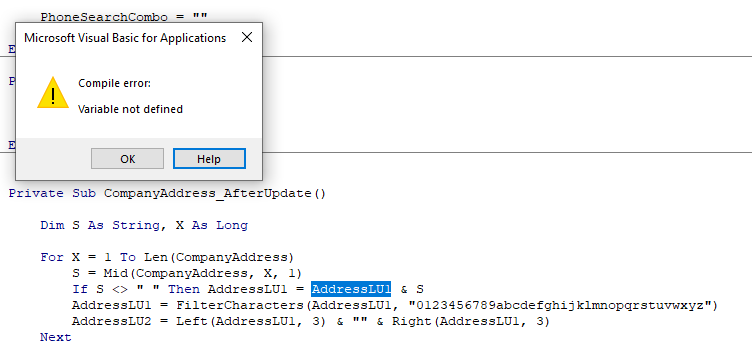
Earlier, I asked about how to filter characters and select the ones that I want to include in a unique identifier for my customer table.  The code Kevin gave me on that conversation has been working well.  The only problem I had was that I couldn't get the code to save into the company table.  I only had the codes available through a query and combo box.  I want to end with being able to search for the company with it's code, however, so I finally decided to add a field for the code in the table and use a Dlookup from the query to fill in the field with an after update event.  Doing this, however made the for refuse to update and let me move to another record, even though it saved the entire record to the table. I'm not sure why, except it keeps saying I have an undeclared variable.  The part that confuses me is that it is claiming a field name as the undeclared variable... I will upload a picture of the error below. and it won't let the record refresh now. It didn't do this before I decided to use a dlookup to update the companycode field.  I'm at a loss as to how to make it work right again. Can someone please help me?

Thank you so much to Richard, Kevin, and everyone else that is sooooo helpful on here!
Andrea Buckridge OP  @Reply  
     
4 years ago

Andrea Buckridge OP  @Reply  
     
4 years ago
I did get it to work again, by deleting the Option Explicit at the top of the vba screen.  I would like to get this fixed though because Richard says we should be using Option Explicit.
Kevin Robertson  @Reply  
          
4 years ago
Is it spelt correctly? The number 1 (one) and the lowercase l (L) look very similar in the VB Editor.
Andrea Buckridge OP  @Reply  
     
4 years ago
Yes, and it does what it is supposed to do. the filed name AddressLU1 copies everything in the address field, then filters out all the unwanted characters, then AdressLU2 selects the first 3 and last 3 of the resulting AddressLU1 field and returns it as a 6 character string.  But if I do a compile check on my vba it says AddressLU1 is an undeclared variable.  I'm so confused.
Andrea Buckridge OP  @Reply  
     
4 years ago
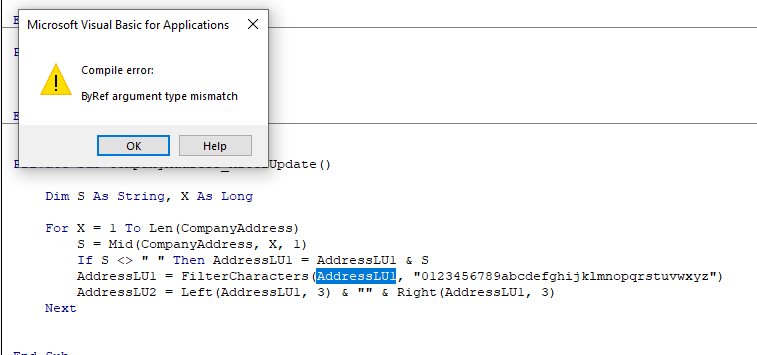
Hmmm My CompanyNameF is doing something similar, even though that code too does what it is supposed to do. I'll upload a picture of that.  Both of these errors happen when I do a compile on my vba.
Andrea Buckridge OP  @Reply  
     
4 years ago

Kevin Robertson  @Reply  
          
4 years ago
That is strange. Try this: Me!AddressLU1.
This will tell the editor to use the field on your form.
Kevin Robertson  @Reply  
          
4 years ago
Shouldn't you be checking for an empty string not a space.
If S <> "" Then
Andrea Buckridge OP  @Reply  
     
4 years ago
I'll try both, Thank you so much.
Andrea Buckridge OP  @Reply  
     
4 years ago
It worked!  Thank you so much!
Kevin Robertson  @Reply  
          
4 years ago
You're welcome.
Andrea Buckridge OP  @Reply  
     
4 years ago
I'm laughing at myself here!  I just realized that the code that was coming up with an error was mistakenly attached to the after update event in a different form than the one I thought it was attached to.  The code in the CompanyF is working fine without any errors!  LOL  that particular code was somehow in my TCF (trucking company form)  rofl, which uses phone numbers for their look ups instead and thus, doesn't have the two AddressLU fields!  Thank you and I'm sorry I wasted your time.
Kevin Robertson  @Reply  
          
4 years ago
LOL. We all make mistakes. At least you figured it out.

This thread is now CLOSED. If you wish to comment, start a NEW discussion in Access Forum.
 

Next Unseen

 
New Feature: Comment Live View


The following is a paid advertisement
Computer Learning Zone is not responsible for any content shown or offers made by these ads.
 

Learn
 
Access - index
Excel - index
Word - index
Windows - index
PowerPoint - index
Photoshop - index
Visual Basic - index
ASP - index
Seminars
More...
Customers
 
Login
My Account
My Courses
Lost Password
Memberships
Student Databases
Change Email
Info
 
Latest News
New Releases
User Forums
Topic Glossary
Tips & Tricks
Search The Site
Code Vault
Collapse Menus
Help
 
Customer Support
Web Site Tour
FAQs
TechHelp
Consulting Services
About
 
Background
Testimonials
Jobs
Affiliate Program
Richard Rost
Free Lessons
Mailing List
PCResale.NET
Order
 
Video Tutorials
Handbooks
Memberships
Learning Connection
Idiot's Guide to Excel
Volume Discounts
Payment Info
Shipping
Terms of Sale
Contact
 
Contact Info
Support Policy
Mailing Address
Phone Number
Fax Number
Course Survey
Email Richard
[email protected]
Blog RSS Feed    YouTube Channel

LinkedIn
Copyright 2026 by Computer Learning Zone, Amicron, and Richard Rost. All Rights Reserved. Current Time: 5/2/2026 8:51:07 AM. PLT: 0s