Free Lessons
Courses
Seminars
TechHelp
Fast Tips
Templates
Topic Index
Forum
ABCD
 
Home   Courses   TechHelp   Forums   Help   Contact   Merch   Join   Order   Logon  
 
Back to Access Forum    Comments List
Upload Images   @Reply   Bookmark    Link   Email   Next Unseen 
Dlookup and IIF question
Sean Sweeney 
     
4 years ago
I'm trying to create a report with job titles, venues, and departments. Not all departments or positions have specific venues. Our Food and Beverage Department is the main department out of 13 other departments with various "Venues".

I was wondering if there was an IIF statement I could put in the control source in order to omit any entries with "N/A" to indicate no venue.

The current control source is

=DLookUp("DeptName","EmployeeDepartmentNameT","DeptID=" & [TLDeptID]) & " " & DLookUp("VenueName","EmployeeDeptVenueNameT","VenueID=" & [TLVenueID])

I previously managed to replace "N/A" in a query by making a concatenated column with department and venue (which I labeled as "D1") and then made a column with:

"Department: Replace([D1],'N/A','')"

I was wondering if this is possible without having to utilize this query or make another query. It would be great if this was possible so I could delete that query.

Thanks!
Adam Schwanz  @Reply  
           
4 years ago
Kind of confused what you're wanting. If you just want to replace a null value then just do this
IIF(IsNull(DLookUp("VenueName","EmployeeDeptVenueNameT","VenueID=" & [TLVenueID])),"N/A",Enter What To Do If False Here)

If you want to replace N/A then
IIF(DLOOKUP("VenueName","EmployeeDeptVenueNameT","VenueID=" & [TLVenueID])="N/A",True Part, False Part)
Sean Sweeney OP  @Reply  
     
4 years ago
Thanks for gettting back to me.

No I'm not trying to replace a Null value. I usually use the Nz Function for that, but I'm finding the IFF isnull seems to be a better route with my database.

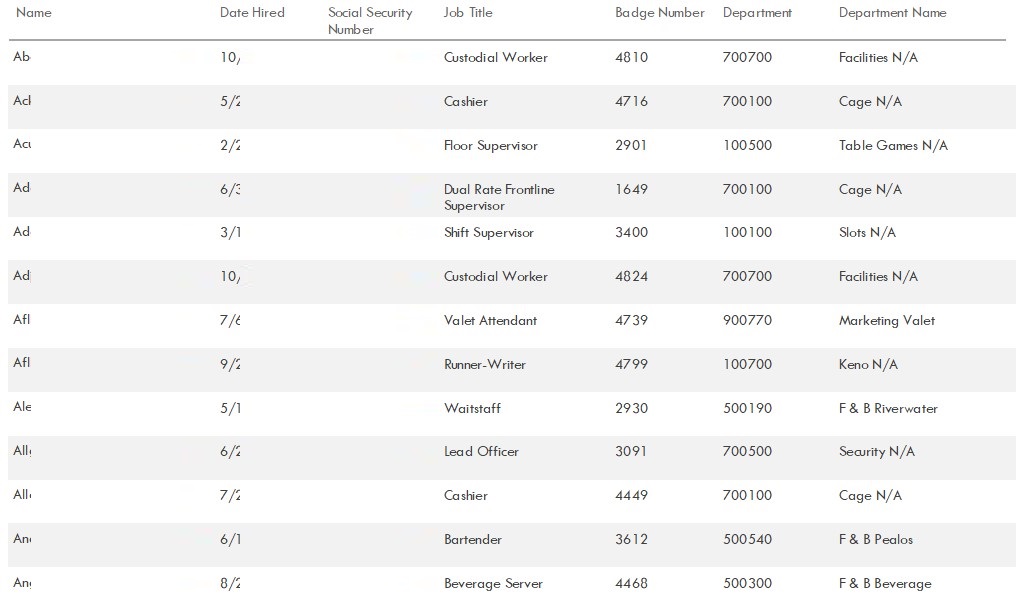
For example with our departments we have F&B Grill, F&B Deli, F&B Admin. Other departments like security do not have multiple venues so those associated IDs, the venue name is just "N/A". So I'm only wanting to replace/omit "N/A". That way the entries for Security Officer, the department will come up as "Security" rather than "Security N/A".

I know it sounds kind of confusing how I have it set up, but I have venues in all of the departments with "N/A" so the cascading dropdown boxes work. We also have "STEP" employees (strengthen tribal employment program) for each department, so each department at least has "N/A" and "STEP" as venues. I'm just trying to replace/omit any entries that would have "N/A" so it doesn't list "Gift Shop N/A".

Hopefully that makes sense.
Sean Sweeney OP  @Reply  
     
4 years ago
I don't think the replace function would work with that code because the "N/A" exists in the "VenueName" field, not the TLVenueID. TLVenueIDs are strictly numbers.
Sean Sweeney OP  @Reply  
     
4 years ago

Sean Sweeney OP  @Reply  
     
4 years ago
I included a screenshot of the report, so you can get a visual of what I'm referring to. I personally wouldn't organize this information in this format, but I'm trying to mirror an already existing report from a different system.
Adam Schwanz  @Reply  
           
4 years ago
Oh OK so you just want to take that N/A off if it's set to the field.

So you can just do this for the control source

=DLookUp("DeptName","EmployeeDepartmentNameT","DeptID=" & [TLDeptID]) & IIF(DLookUp("VenueName","EmployeeDeptVenueNameT","VenueID=" & [TLVenueID])="N/A",""," " & DLookUp("VenueName","EmployeeDeptVenueNameT","VenueID=" & [TLVenueID])
Sean Sweeney OP  @Reply  
     
4 years ago
Hey Adam! Had to throw in one more parenthesis to close the IFF statement, otherwise, it works like a charm. Thank you very much! As said above, this is extremely helpful because I can get away from one of the queries I previously used for a replace function. I figured it could be accomplished with an IIF statement, I just didn't know how. So thank you very much!!!!

Adam Schwanz  @Reply  
           
4 years ago
Woops, yea I missed that good catch :P. No problem

This thread is now CLOSED. If you wish to comment, start a NEW discussion in Access Forum.
 

Next Unseen

 
New Feature: Comment Live View


The following is a paid advertisement
Computer Learning Zone is not responsible for any content shown or offers made by these ads.
 

Learn
 
Access - index
Excel - index
Word - index
Windows - index
PowerPoint - index
Photoshop - index
Visual Basic - index
ASP - index
Seminars
More...
Customers
 
Login
My Account
My Courses
Lost Password
Memberships
Student Databases
Change Email
Info
 
Latest News
New Releases
User Forums
Topic Glossary
Tips & Tricks
Search The Site
Code Vault
Collapse Menus
Help
 
Customer Support
Web Site Tour
FAQs
TechHelp
Consulting Services
About
 
Background
Testimonials
Jobs
Affiliate Program
Richard Rost
Free Lessons
Mailing List
PCResale.NET
Order
 
Video Tutorials
Handbooks
Memberships
Learning Connection
Idiot's Guide to Excel
Volume Discounts
Payment Info
Shipping
Terms of Sale
Contact
 
Contact Info
Support Policy
Mailing Address
Phone Number
Fax Number
Course Survey
Email Richard
[email protected]
Blog RSS Feed    YouTube Channel

LinkedIn
Copyright 2026 by Computer Learning Zone, Amicron, and Richard Rost. All Rights Reserved. Current Time: 5/2/2026 7:11:21 AM. PLT: 1s