Free Lessons
Courses
Seminars
TechHelp
Fast Tips
Templates
Topic Index
Forum
ABCD
 
Home   Courses   TechHelp   Help   Contact   Merch   Join   Order   Logon   Forums   
 
Back to Access Forum    Comments List
Upload Images   @Reply   Bookmark    Link   Email   Next Unseen 
Timeline Issue
Monica Jones 
       
4 years ago
Hi all,

I have a database for the shows I watch to keep up with where I am (in case they drop off of whatever service). I recently noticed that my query that pulls the most recent episode number isn't working. For things where I'm on the current season it's fine. For things where I have air dates beyond the season I'm on, it only shows episode 1. Despite my criteria that it can't have a status of Watched. I've been banging my head on a wall for a week. Here's the sql:
SELECT tblAirDates.Title, tblAirDates.EpStatus, Min(tblAirDates.Season) AS MinOfSeason, Min(tblAirDates.Episode) AS MinOfEpisode
FROM tblTitle INNER JOIN tblAirDates ON tblTitle.Title = tblAirDates.Title
GROUP BY tblAirDates.Title, tblAirDates.EpStatus
HAVING (((tblAirDates.EpStatus)<>"Watched"));

Let me know if you need more info. TIA
Juan C Rivera  @Reply  
            
4 years ago
Hello and good day to you
try this before we move on and see if this triggers your mind to come up with an answer.
DateSerial
Numbers As Text
Double Double Quotes

Not sure for now but hope to drill down and fine an answer with you.  Did you do a sort?
Custom Sort Order for your Forms and Reports

I do something like this but with comic books and the double quote finaly got me I was lost but richard did this video and I find my self going back to it over and over.  hope this helps if not let me know we can drill in deeper to find a solution.

V/r
Juan
Monica Jones OP  @Reply  
       
4 years ago
This wasn't helpful. I have no dates in this query, but in the source table it is a date/time field. My season and episode numbers are number fields, specifically so I don't have to deal with alphanumeric sorting. I could store the data as text, but if I'm just going to turn around and convert it to number, I don't see a reason. And thirdly there isn't any concatenation in my query. I do have concatenation in other queries, but they all have this one as part of what they rely on, it's my alpha query if you will.

The query did function just fine back in August (before my current shows came back with new episodes). I am unaware of making any changes that could have impacted this.

What confuses me most is that for example I'm watching season 3 of The Librarians (there were a total of 4 seasons so tblAirDates has more than just season 3). When I open tblAirDates and go to season 3 of The Librarians it has episode 1 EpStatus Watched, something specifically excluded in this query. Yet when I run the query it lists The Librarians season 3 episode 1 as EpStatus Upcoming. EpStatus is not a field in the other table.
Kevin Yip  @Reply  
     
4 years ago
Hi Monica, the Min() function cannot be used for your purpose because it returns the minimum value of the *entire column*.  For instance, if your episode list looks like:

Season   Episode   Watched
3        1         True
3        2         True
3        3         True
3        4         True
3        5         False
4        1         False
4        2         False
4        3         False

Then Min(Season), Min(Episode) will not return season 3 episode 5.  It will return season 3 episode 1 instead.  That is because 3 is minimum season# among ANY unwatched episodes, and 1 is the minimum episode# among ANY unwatched episodes.  That's how Min() works.  It does not necessarily return the minimum values that belong to the same record.

My suggestion is combine season and episode into one number: e.g. 301, 302, 303, etc., and name it SeasonEp, or something.  That way, Min(SeasonEp) will yield the right result.
Monica Jones OP  @Reply  
       
4 years ago
Ah! Because Episode 1 of season 4 is false it returns 1 instead of 5. Thank you, I know how to make it work now.
Monica Jones OP  @Reply  
       
4 years ago
So while I now only have a list of unwatched episodes, that particular query was meant to be a list of the next episode for each show. That is to say only one record per Title. Do you have any suggestions on that?
Juan C Rivera  @Reply  
            
4 years ago
I like Kevins idea 301, 302... you can preload it and have a check box for watched yes/no.  With a list box of the TV shows you are following. list box will open a form based on a query to show you only that show,  with the right sort you will have the unwatch on top or just show what have not been watched.  

List Box to Filter Records
What do you think ?

Kevin Yip  @Reply  
     
4 years ago
Hi Monica, having a list of only unwatched episodes is not enough, because there could be unwatched episodes from multiple seasons, and Min() would still pick the lowest episode# from ANY of those multiple seasons.

Your original goal basically involve two operations:

(a) Find the lowest season# with unwatched episodes.
(b) *Within* the above season, find the lowest episode#.

And (b) is what Min() isn't able to do.  (b) involves *filtering* out only that one particular season, but Min() doesn't do filtering on its own.  It only takes all the data available.

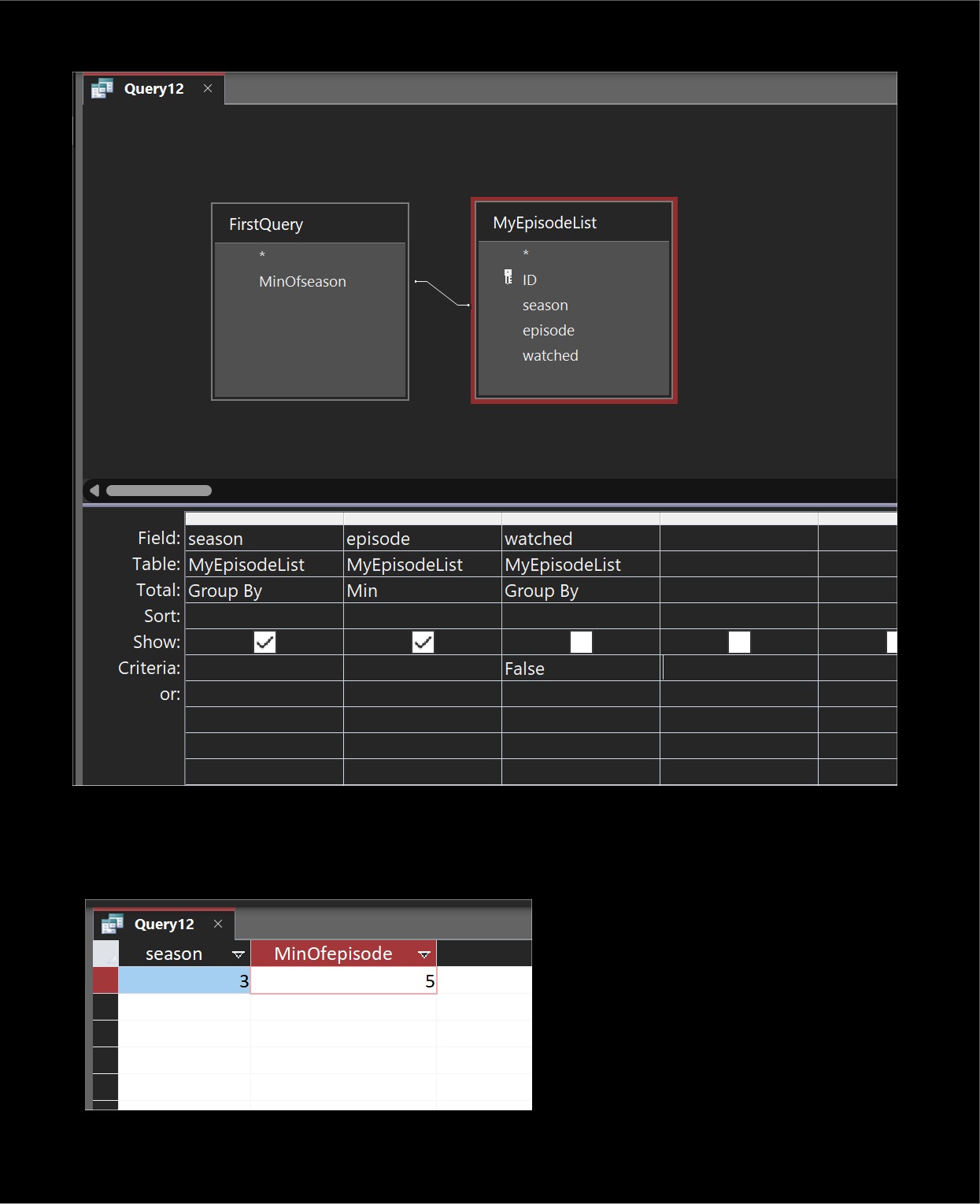
To perform the two operations, naturally you need *two queries*.  The first query performs (a):  E.g.:

   SELECT Min(Season) AS MinOfseason FROM MyEpisodeList HAVING Watched = False;

Then you need another query to take the value given by the first query and *filter* out the season in question.  If you do this in VBA, you can simply retrieve this value with a Recordset operation and store the value in a variable.  If you do it only in a query, it's more complicated.  You have to join the first query with your episode table, as shown in the picture below.  A "inner join" like this is like a filter: it returns only the rows that have matching field values on both sides.  The first query returns the season you need for (a).  And the second query contains only rows with that season.

The alternative method I mentioned -- creating season-episode numbers like 301, 302, 303, etc. --  would make the queries easier, so you may want to consider it.  Actually, you would only need one query.  Create a calculated field for season-episode that can be sorted and filtered, and the whole thing can be done with a relatively simple query below.  If you have a list like 301, 302, 303, etc., then all you need is to find the minimum value in the list:

   SELECT Min(Format([Season], "00") & Format([Episode], "00")) AS NextSeasonEpisode
   FROM MyEpisodeList
   HAVING Watched = False;
Kevin Yip  @Reply  
     
4 years ago

This thread is now CLOSED. If you wish to comment, start a NEW discussion in Access Forum.
 

Next Unseen

 
New Feature: Comment Live View


The following is a paid advertisement
Computer Learning Zone is not responsible for any content shown or offers made by these ads.
 

Learn
 
Access - index
Excel - index
Word - index
Windows - index
PowerPoint - index
Photoshop - index
Visual Basic - index
ASP - index
Seminars
More...
Customers
 
Login
My Account
My Courses
Lost Password
Memberships
Student Databases
Change Email
Info
 
Latest News
New Releases
User Forums
Topic Glossary
Tips & Tricks
Search The Site
Code Vault
Collapse Menus
Help
 
Customer Support
Web Site Tour
FAQs
TechHelp
Consulting Services
About
 
Background
Testimonials
Jobs
Affiliate Program
Richard Rost
Free Lessons
Mailing List
PCResale.NET
Order
 
Video Tutorials
Handbooks
Memberships
Learning Connection
Idiot's Guide to Excel
Volume Discounts
Payment Info
Shipping
Terms of Sale
Contact
 
Contact Info
Support Policy
Mailing Address
Phone Number
Fax Number
Course Survey
Email Richard
[email protected]
Blog RSS Feed    YouTube Channel

LinkedIn
Copyright 2026 by Computer Learning Zone, Amicron, and Richard Rost. All Rights Reserved. Current Time: 8/7/2026 8:31:44 PM. PLT: 1s