Free Lessons
Courses
Seminars
TechHelp
Fast Tips
Templates
Topic Index
Forum
ABCD
 
Home   Courses   TechHelp   Help   Contact   Merch   Join   Order   Logon   Forums   
 
Back to Access Forum    Comments List
Upload Images | @Reply | Bookmark | Link | Email | Next Unseen |
Query field not editable
Peter van Soest 
    
4 years ago
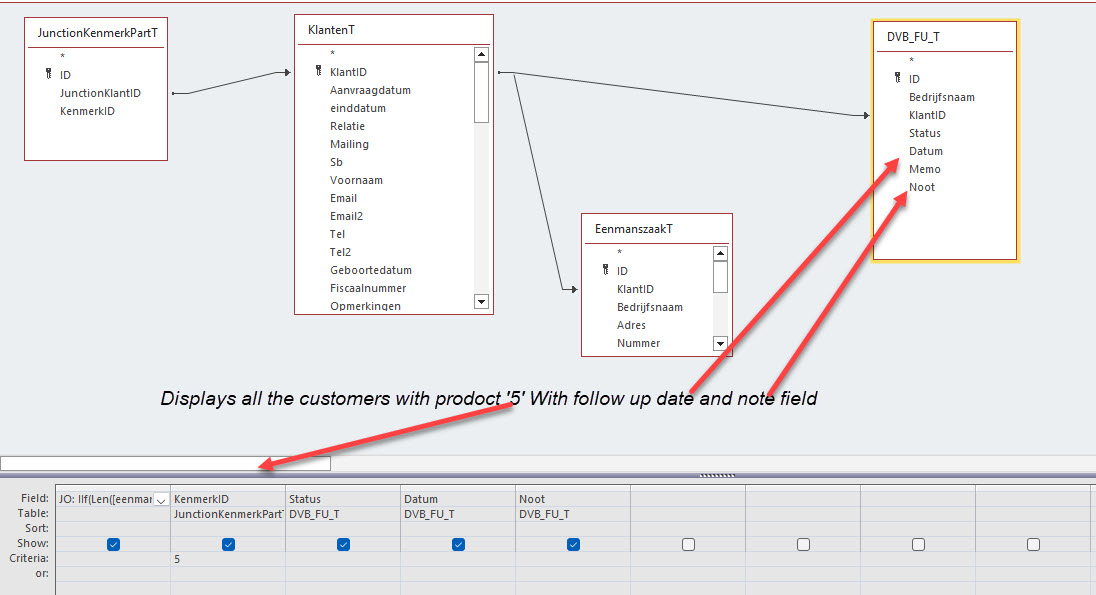
I made a product/services query with a follow_up table, so I can schedule/fill in update notes and date. The products/services are connected with the customers through a junction table. The query works fine in displaying all the data, but I cannot enter data in the follow up fields ('Datum' and 'Noot'). As I understand -after doing some research- this has to do with the number of tables in a query and/or the way the tables are 'joined' in that query. I found some possible solutions on a Microsoft page like setting the "unique value" in the query properties to no and adding the "join" field to the output field by double clicking it in the "many side" of the relation ship but nothing works. Is there a way to fix this?

tnx Peter
Peter van Soest OP  @Reply  
    
4 years ago

Scott Axton  @Reply  
      
4 years ago
See the Not Updateable video.

Most likely your query is to complex for access to understand.
Kevin Yip  @Reply  
     
4 years ago
Hi Peter, your KlantenT table is joining to two foreign key fields: KlantID in one able, and KlantID in another.  Neither KlantID field is a primary key (no key symbol next to the field name).  When one table joins to two foreign keys like that, it's an automatic non-updateable query, mainly because those foreign keys are on the "many" side.  Let me illustrate this with an example.

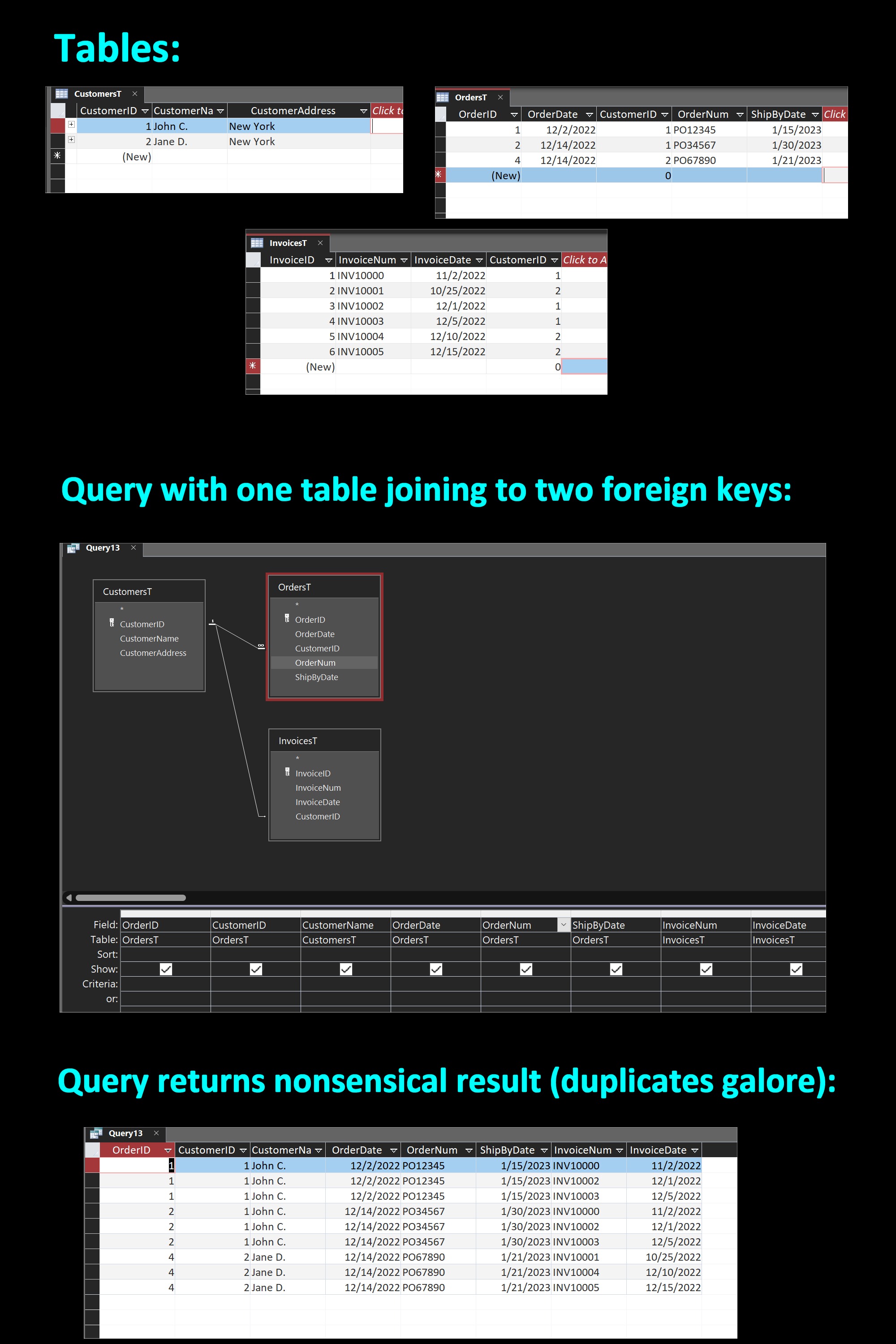
See my picture below.  I have a customer table, order table, and invoice table, all normalized with proper primary keys.  But in the order table, the CustomerID field is not a PK.  It is a foreign key that would end up on the "many" side of a query.  Same is true in the invoice table.  CustomerID is not a PK, but a "many" field in a query.

I create a query similar to yours, by joining the customer table to the two CustomerID fields in the other tables.  The result of the query contains duplicate data everywhere.  This is what happens if you join to multiple "many" fields in that manner.  The query becomes non-updateable because Access wouldn't know what to do.  The invoice number "INV10000" is on the first and fourth row, even though it exists as just one row in the invoice table.  More importantly, this query returns nonsensical data that you can't use in any meaningful way.
Kevin Yip  @Reply  
     
4 years ago

Peter van Soest OP  @Reply  
    
4 years ago
Hi Kevin, I now realise that the structure itself is not correct. I do not have 'nonsensical' data, but I am missing records in the update (DVB_FU_T) table!
The purpose of the query is to show the customers with 'product X" who need to be serviced/checked regularly. But a new customer doesn't automatically gets a 'service record' in this way, so there isn't even a field I could update!

For now I have made a 'workaround' by adding some (update) fields to the KlantenT tabel itself and a checkbox to 'check' when the customer needs to be serviced or not.
So the selection and data input is all on one table now. This means partly double data input , but ok.

This thread is now CLOSED. If you wish to comment, start a NEW discussion in Access Forum.
 

Next Unseen


What's This?


The following is a paid advertisement
Computer Learning Zone is not responsible for any content shown or offers made by these ads.
 

Learn
 
Access - index
Excel - index
Word - index
Windows - index
PowerPoint - index
Photoshop - index
Visual Basic - index
ASP - index
Seminars
More...
Customers
 
Login
My Account
My Courses
Lost Password
Memberships
Student Databases
Change Email
Info
 
Latest News
New Releases
User Forums
Topic Glossary
Tips & Tricks
Search The Site
Code Vault
Collapse Menus
Help
 
Customer Support
Web Site Tour
FAQs
TechHelp
Consulting Services
About
 
Background
Testimonials
Jobs
Affiliate Program
Richard Rost
Free Lessons
Mailing List
PCResale.NET
Order
 
Video Tutorials
Handbooks
Memberships
Learning Connection
Idiot's Guide to Excel
Volume Discounts
Payment Info
Shipping
Terms of Sale
Contact
 
Contact Info
Support Policy
Mailing Address
Phone Number
Fax Number
Course Survey
Email Richard
[email protected]
Blog RSS Feed    YouTube Channel

LinkedIn
Copyright 2026 by Computer Learning Zone, Amicron, and Richard Rost. All Rights Reserved. Current Time: 10/31/2026 10:06:37 PM. PLT: 0s