Free Lessons
Courses
Seminars
TechHelp
Fast Tips
Templates
Topic Index
Forum
ABCD
 
Home   Courses   TechHelp   Forums   Help   Contact   Merch   Join   Order   Logon  
 
Back to Access Forum    Comments List
Upload Images   @Reply   Bookmark    Link   Email   Next Unseen 
Open form to new record
Brent Davis 
     
3 years ago
OK, I have a subform that I enter call information into. I have a followup date field where I select a date and time to followup. I have it set up in the after update event when the date and time is entered and tabbed off, it opens my call back form. However, it does not include the record I have just listed. If I close the call information form and then open the call back form , the new record is listed. I want the new record to be listed when I tab off of the call back date field in the call information form and the new record added to the call back form. I have tried me.refresh in both forms but still have not been successful. Any assistance is appreciated. Thanks. Brent
Juan C Rivera  @Reply  
            
3 years ago
try this and let me know Open New Record
Brent Davis OP  @Reply  
     
3 years ago
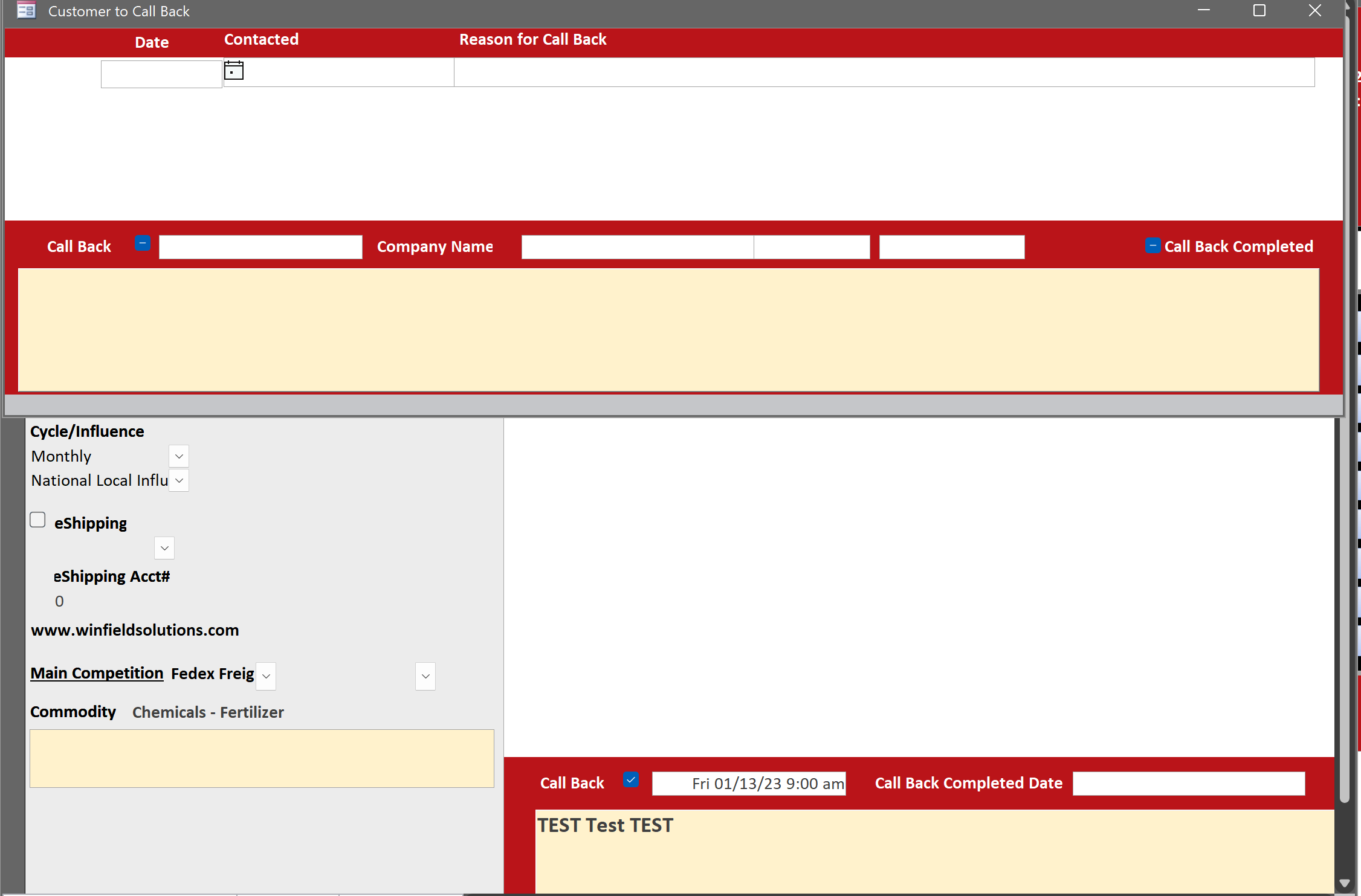
I still cannot get it to work.  I don't think I explained it very well the first time.  I have a form called customerprofileF, main form. It has a subform, callinformationform on it.  When I enter a call for a customer in the callinformationform, i have a field called callbackdate.  I have an after update event in the callbackdate field and when tabbed off opens the callbackform.  When the callbackform opens, I want the record I just entered in the callinformationform to display on the callbackform.  Currently the callbackform opens but the record I just left is not listed on the callbackform.
Kevin Robertson  @Reply  
          
3 years ago
Try using DMax to get the ID for the last record you entered then use that ID in your criteria when you open the form.
Richard Rost  @Reply  
          
3 years ago
Make sure you Refresh the record that you just entered before opening the next form otherwise that record doesn't exist in the table yet.
Brent Davis OP  @Reply  
     
3 years ago
Thanks everyone. Richard I did put me.refresh in the after update event in the callbackdare on the callinformationform and in the on current event in the callbackform but it still does not load. What am I doing wrong?
Richard Rost  @Reply  
          
3 years ago
Impossible to tell without seeing your code.
Brent Davis OP  @Reply  
     
3 years ago
Disclaimer:  I am not a developer. My full time job is an Account Manager(Sales Rep). So my code is very basic.

Code for callinformationform

Private Sub CallBackDate_AfterUpdate()

    If CallBack = True Then
        DoCmd.OpenForm "callbackform", , , "accountid=" & AccountID
        
    End If

        Me.Refresh
    
    
End Sub

Code for callbackform

Private Sub Form_Current()

    Me.Refresh
    
End Sub

I will attach a picture of what the forms look like after I enter a callbackdate and tab off the field. The small form is the callbackform and the underneath form is the callinformationform.  the data in the callbackinformation form needs to populate the callbackform fields. The TEST Test Test should be in the notes of the callbackform. The company name, contact, phone number and account number should also populate.  All this information transfers great if you close the record on the callinformationform and reopen the callbackform.  I want to be able to provide a short despription of the callback in the reason for call back field.
Brent Davis OP  @Reply  
     
3 years ago

Kevin Robertson  @Reply  
          
3 years ago
Move the Me.Refresh to BEFORE the DoCmd.OpenForm.
Richard Rost  @Reply  
          
3 years ago
Bingo... And you don't need it in the 2nd form
Brent Davis OP  @Reply  
     
3 years ago
You guys are awesome! Works perfectly!
Richard Rost  @Reply  
          
3 years ago
Make sure you understand WHY you need to do that... you have edited the parent form, but the record is dirty (pencil). That means it hasn't been committed to the table yet. So you need to issue the Refresh command to save that record. NOW you can open the related form. Otherwise, you're opening a form that's trying to access a record that doesn't exist.
Brent Davis OP  @Reply  
     
3 years ago
Understood. I knew I had to refresh I just wasn't thinking through it logically. Since i dont do this full time, I am still hesitate with code because I think I will mess something up. As I learn, I am becoming more confident to try things. Your videos are outstanding and have given me the confidence to branch out and try more difficult concepts.  Plus, I have taken to heart what you always say, "BACKUP YOUR DATABASE"!
Richard Rost  @Reply  
          
3 years ago
Every mistake you make will be a learning experience. I didn't learn this stuff by osmosis... many nights pulling my hair out wondering WHY stuff doesn't work. :)
Brent Davis OP  @Reply  
     
3 years ago
Yes sir, that is the only way to learn and grow!  Thanks for sharing your knowledge!

This thread is now CLOSED. If you wish to comment, start a NEW discussion in Access Forum.
 

Next Unseen

 
New Feature: Comment Live View


The following is a paid advertisement
Computer Learning Zone is not responsible for any content shown or offers made by these ads.
 

Learn
 
Access - index
Excel - index
Word - index
Windows - index
PowerPoint - index
Photoshop - index
Visual Basic - index
ASP - index
Seminars
More...
Customers
 
Login
My Account
My Courses
Lost Password
Memberships
Student Databases
Change Email
Info
 
Latest News
New Releases
User Forums
Topic Glossary
Tips & Tricks
Search The Site
Code Vault
Collapse Menus
Help
 
Customer Support
Web Site Tour
FAQs
TechHelp
Consulting Services
About
 
Background
Testimonials
Jobs
Affiliate Program
Richard Rost
Free Lessons
Mailing List
PCResale.NET
Order
 
Video Tutorials
Handbooks
Memberships
Learning Connection
Idiot's Guide to Excel
Volume Discounts
Payment Info
Shipping
Terms of Sale
Contact
 
Contact Info
Support Policy
Mailing Address
Phone Number
Fax Number
Course Survey
Email Richard
[email protected]
Blog RSS Feed    YouTube Channel

LinkedIn
Copyright 2026 by Computer Learning Zone, Amicron, and Richard Rost. All Rights Reserved. Current Time: 5/6/2026 6:24:50 AM. PLT: 1s