Free Lessons
Courses
Seminars
TechHelp
Fast Tips
Templates
Topic Index
Forum
ABCD
 
Home   Courses   TechHelp   Forums   Help   Contact   Merch   Join   Order   Logon  
 
Back to Access Forum    Comments List
Upload Images   @Reply   Bookmark    Link   Email   Next Unseen 
CF Change From Previous
Eric Hermes 
    
3 years ago
I have a field called "Sales Order" (it's always a number).
I don't have a way to predict what that sales number might be, so telling Access to conditionally format based on a specific Sales Order doesn't really work.

What i would like to have a Form (or Report) do is this - color code the Sales Orders if they are different.
What i mean is this:  i might have Sales Order #1 appear several times on a list, but interspersed might be Sales Order #2, and #5.
is there a way highlight #2 and #5  in different color than #1 ?  Keep in mind that it's not always going to be 1, 2, and 5.  New #s are always generated as time progresses, and new sales are made at this business.
The sales order # could be 10, 25, and 50....or 5,201 and 6,105, and 10,224.....  i just never know what the report will list...i just want the colors to be different for different sales orders.
is this possible to use something like conditional formatting,
but the condition is unknown?
Richard Rost  @Reply  
          
3 years ago
The condition is not unknown. The value is unknown. You could probably do this with an expression by comparing the value to the previous value. I'll play with it. In the mean time, see: Expression Is
Richard Rost  @Reply  
          
3 years ago
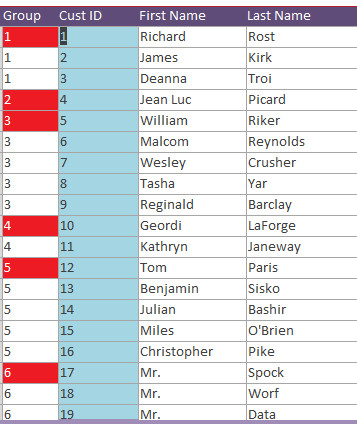
Is this what you're looking for? I called my field GroupNumber. Any time the Group is different from the previous record, it's colored red. It's too complex to explain here, but I'll cover it in a video. You'll need to know DMax, DLookup, Conditional Formatting. My release schedule is back to Feb 9th, so if you want to see it as soon as it's ready, you'll need to be at least a Silver Member.
Richard Rost  @Reply  
          
3 years ago

Eric Hermes OP  @Reply  
    
3 years ago
Thanks for quick response.  (btw, you're right - i did mean 'value' is unknown - whoops :) )

anyway, your list - It's certainly closer to the goal than what I've managed to achieve,
although i was hoping for different colors, not just 1 color.

it's got me thinking, tho'  - what about the use of a temporary table or query?
usually, my report or form has no more than about 5 or 6 different/separate values for the Sales Order on the report.

what if the database, before displaying the final resulting form or report,
created a temporary table, which would add an additional field, with sequential values,
basically giving each unique Sales Order a unique number?  

for example, sales order 123456 would be 1
and sales order 2048219 would be 2
sales order 20482348 would be 3,  etc etc

then the next week, when i run the report again,
with a different/new set of Sales Order numbers,
those would be assigned 1, 2, and 3, etc.

than the report could use 1, 2, and 3 for the actual conditional formatting of the Sales Order numbers?

hope that makes sense?
Richard Rost  @Reply  
          
3 years ago
Sure you could use a Recordset to loop through the values, assigning them unique numbers from 1 to say 10, and then setup conditional formatting for each of those values. I also cover setting up unique conditional formatting with VBA in Access Developer 40

I'll show you how to do it this way where the value changes, and then perhaps in a future video when I have more time, I'll show you the other way. I'm in the middle of moving right now and today I have time for one short video.
Eric Hermes OP  @Reply  
    
3 years ago
Thanks for the help....  now i have a project for today  :)

and here's hoping your move goes smoothly!!
Richard Rost  @Reply  
          
3 years ago
Thanks. Video uploading now.
Richard Rost  @Reply  
          
3 years ago
Video is on the website here: Change From Previous. Again, you'll need to be at least a Silver Member to view it today. It will go public Feb 9th. Enjoy. Hope this helps.

This thread is now CLOSED. If you wish to comment, start a NEW discussion in Access Forum.
 

Next Unseen

 
New Feature: Comment Live View


The following is a paid advertisement
Computer Learning Zone is not responsible for any content shown or offers made by these ads.
 

Learn
 
Access - index
Excel - index
Word - index
Windows - index
PowerPoint - index
Photoshop - index
Visual Basic - index
ASP - index
Seminars
More...
Customers
 
Login
My Account
My Courses
Lost Password
Memberships
Student Databases
Change Email
Info
 
Latest News
New Releases
User Forums
Topic Glossary
Tips & Tricks
Search The Site
Code Vault
Collapse Menus
Help
 
Customer Support
Web Site Tour
FAQs
TechHelp
Consulting Services
About
 
Background
Testimonials
Jobs
Affiliate Program
Richard Rost
Free Lessons
Mailing List
PCResale.NET
Order
 
Video Tutorials
Handbooks
Memberships
Learning Connection
Idiot's Guide to Excel
Volume Discounts
Payment Info
Shipping
Terms of Sale
Contact
 
Contact Info
Support Policy
Mailing Address
Phone Number
Fax Number
Course Survey
Email Richard
[email protected]
Blog RSS Feed    YouTube Channel

LinkedIn
Copyright 2026 by Computer Learning Zone, Amicron, and Richard Rost. All Rights Reserved. Current Time: 6/22/2026 10:22:01 AM. PLT: 1s