Free Lessons
Courses
Seminars
TechHelp
Fast Tips
Templates
Topic Index
Forum
ABCD
 
Home   Courses   TechHelp   Forums   Help   Contact   Merch   Join   Order   Logon  
 
Back to Access Developer Network    Comments List
Upload Images   @Reply   Bookmark    Link   Email   Next Unseen 
Matching field data
Warren Lovegrove 
     
3 years ago
I've imported external data provided by a bank into table.  I'm then trying to transfer the imported records into other tables. i.e. CompanyExpenseT, BankExpenseT, PropertyExpenseT.

Using a SupplierT (ie. SupplierName), i'm trying to identify which records within the ImportT go into which expense table.

However, the Fieldname within ImportT only partially matches the fieldnames within the expense tables.  i.e. same or simliar words and in same or different orders.

is there a way in which to compare the two sets of field names to enable selection of the import record?

I've looked at a number of methods however without manually manipulating the import data I can't get fields to match.

thanks
Richard Rost  @Reply  
           
3 years ago
Can you show some sample data?
Warren Lovegrove OP  @Reply  
     
3 years ago

Warren Lovegrove OP  @Reply  
     
3 years ago

Warren Lovegrove OP  @Reply  
     
3 years ago
Hi Richard,

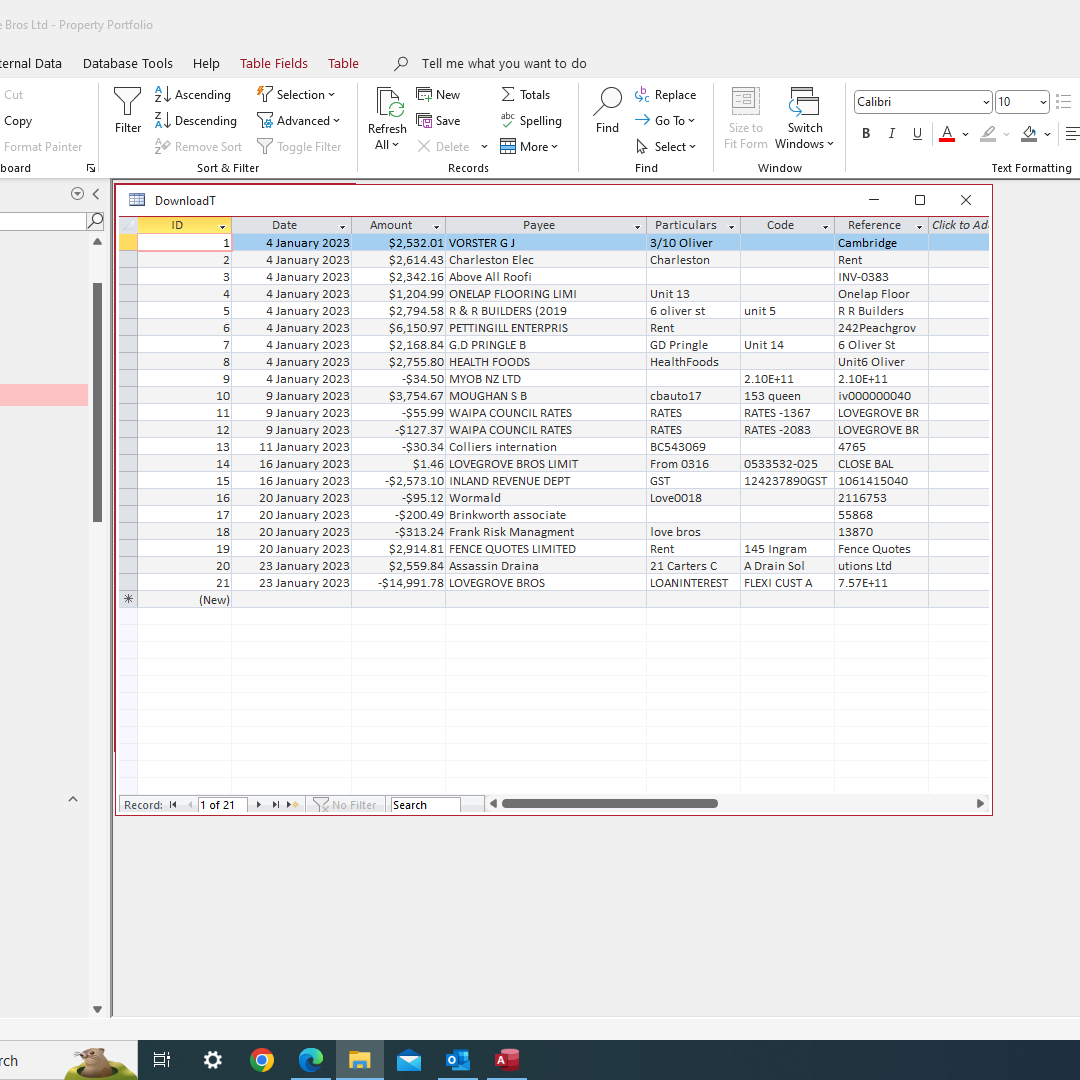
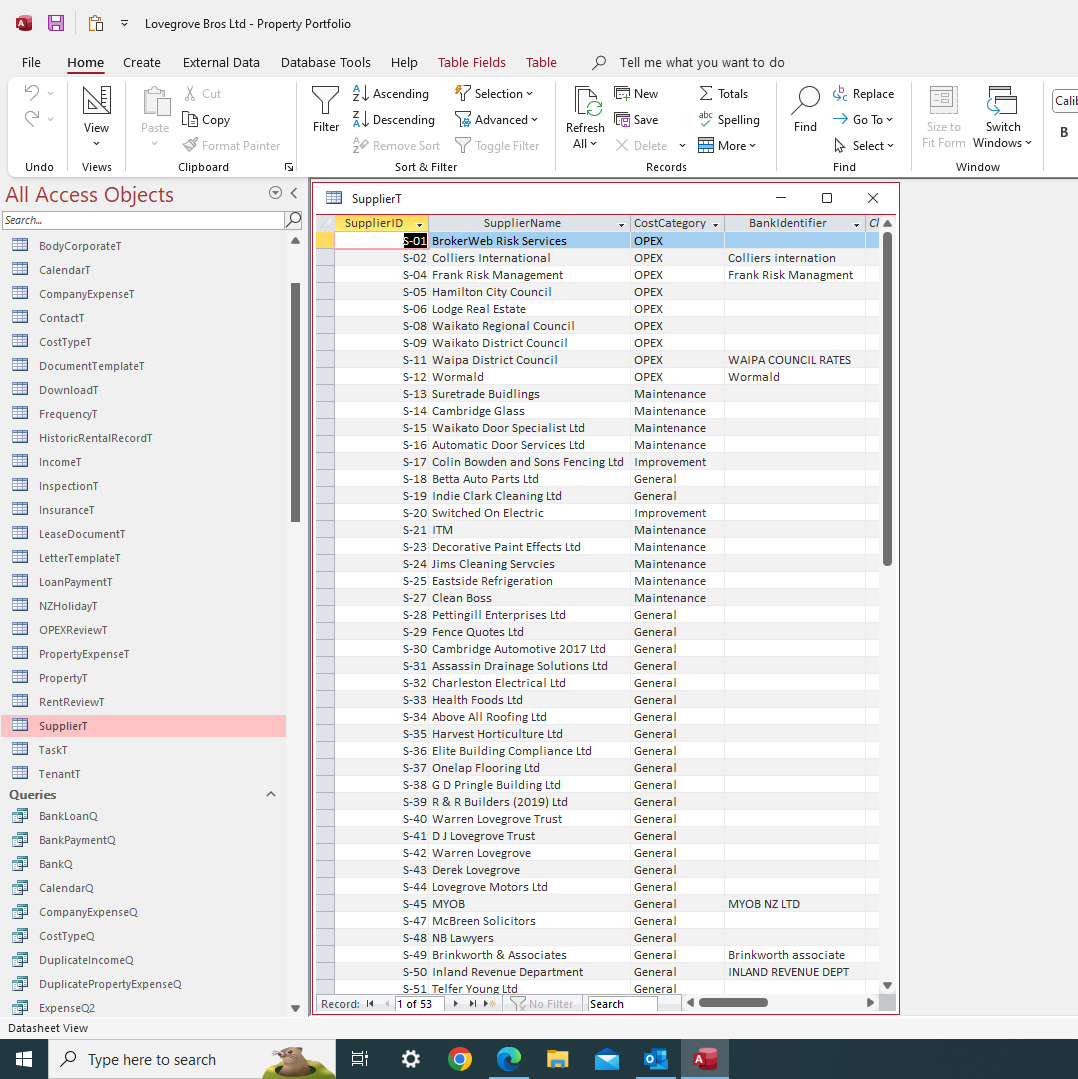
The first screen shot is BankT which shows the raw data imported from the bank, the second (SupplierT) contains the relevant entities I'm trying to match with.  As you can see, I've looked at adding a BankIdentifier field to help with match, however given that the bank data is likely to vary this is unlikely to help.
I'm using Payee as the main match, however need to use the other fields to further refine selection and hence which table to transfer data.

Thanks
Richard Rost  @Reply  
           
3 years ago
I wouldn't put this stuff in three separate tables. Your data already has categories assigned to each payee that should be good enough to tell what category it goes into. There's no need to separate these in the three tables. Remember if it's the same kind of data, the same type of data you don't need to make separate tables out of it. Just like you wouldn't necessarily have to have separate tables for employees, supervisors, managers, customers. They're all people. Just like you wouldn't put deposits and withdrawals in two separate tables for bank transactions. You would just indicate which one was a deposit and which one was the withdrawal. You have that data already in your import table. Just use it.
Warren Lovegrove OP  @Reply  
     
3 years ago
Thanks Richard,
Funnily enough I had it all in a single table originally, but for some reason which now escapes me i decided to separate them.  If i can't remember it can't have been a very good reason, hence I'll go back to combining them again.
However, i still need to identify the supplier and some other data within import table to enable me to assign those costs to a certain property, or to the company as overheads, and establish which supplier it is.
As a side note, I'm really enjoying the various courses, seminars, techHelp etc you provide on your website, so thank you.  I was new to Access six months ago but have learnt a huge amount since then.  It's all become rather addictive, not sure if that's a good thing or not haha.

This thread is now CLOSED. If you wish to comment, start a NEW discussion in Access Developer Network.
 

Next Unseen

 
New Feature: Comment Live View


The following is a paid advertisement
Computer Learning Zone is not responsible for any content shown or offers made by these ads.
 

Learn
 
Access - index
Excel - index
Word - index
Windows - index
PowerPoint - index
Photoshop - index
Visual Basic - index
ASP - index
Seminars
More...
Customers
 
Login
My Account
My Courses
Lost Password
Memberships
Student Databases
Change Email
Info
 
Latest News
New Releases
User Forums
Topic Glossary
Tips & Tricks
Search The Site
Code Vault
Collapse Menus
Help
 
Customer Support
Web Site Tour
FAQs
TechHelp
Consulting Services
About
 
Background
Testimonials
Jobs
Affiliate Program
Richard Rost
Free Lessons
Mailing List
PCResale.NET
Order
 
Video Tutorials
Handbooks
Memberships
Learning Connection
Idiot's Guide to Excel
Volume Discounts
Payment Info
Shipping
Terms of Sale
Contact
 
Contact Info
Support Policy
Mailing Address
Phone Number
Fax Number
Course Survey
Email Richard
[email protected]
Blog RSS Feed    YouTube Channel

LinkedIn
Copyright 2026 by Computer Learning Zone, Amicron, and Richard Rost. All Rights Reserved. Current Time: 5/9/2026 6:52:50 PM. PLT: 0s