Free Lessons
Courses
Seminars
TechHelp
Fast Tips
Templates
Topic Index
Forum
ABCD
 
Home   Courses   TechHelp   Help   Contact   Merch   Join   Order   Logon   Forums   
 
Back to Access Forum    Comments List
Upload Images | @Reply | Bookmark | Link | Email | Next Unseen |
a difficult question
John Yeung 
     
3 years ago
let's say I am selling customers drugs...

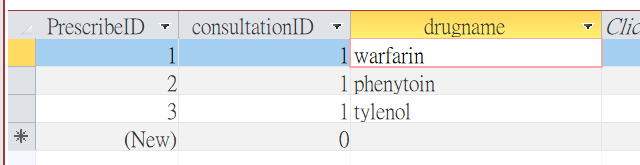
In my access, I enter "drug1(warfarin)" , then "drug2(phenytoin)".  In fact, drug1 and drug2 should not come together, they have bad interaction.

Is there a way to remind me , when I enter the drug2 (After update code) , a msgbox pop out and say " Hey, these 2 drugs have bad interaction "

I have tried to set up an interaction table with field 1 = interactionID; field 2 = drugnameID; field 3 = drugnameID, but you know field name cannot be the same .....

how to approach then ?
John Yeung OP  @Reply  
     
3 years ago

Alex Hedley  @Reply  
           
3 years ago
I'd create another table (junction) and relate them together.
Then you could just do a DCOUNT to see if there are any.
Kevin Robertson  @Reply  
           
3 years ago
I would put the code in the Before Update event, not the After Update event.
John Yeung OP  @Reply  
     
3 years ago
Dear Alex

I know Dcount in preventing duplicate from Richard's extended cut video, it prevents duplicate from 2 fields. However, the drug items are from one field (they are not duplicate, just do not want item 1 and 2 appear in a single purchase)

Do you have any link for me to learn what you meant by "create another table (junction) and relate them together" ?
thanks
Alex Hedley  @Reply  
           
3 years ago
Kevin Yip  @Reply  
      
3 years ago
Hi John, this is admittedly not an easy task, but it's not terribly difficult, just a little trickery in query design.

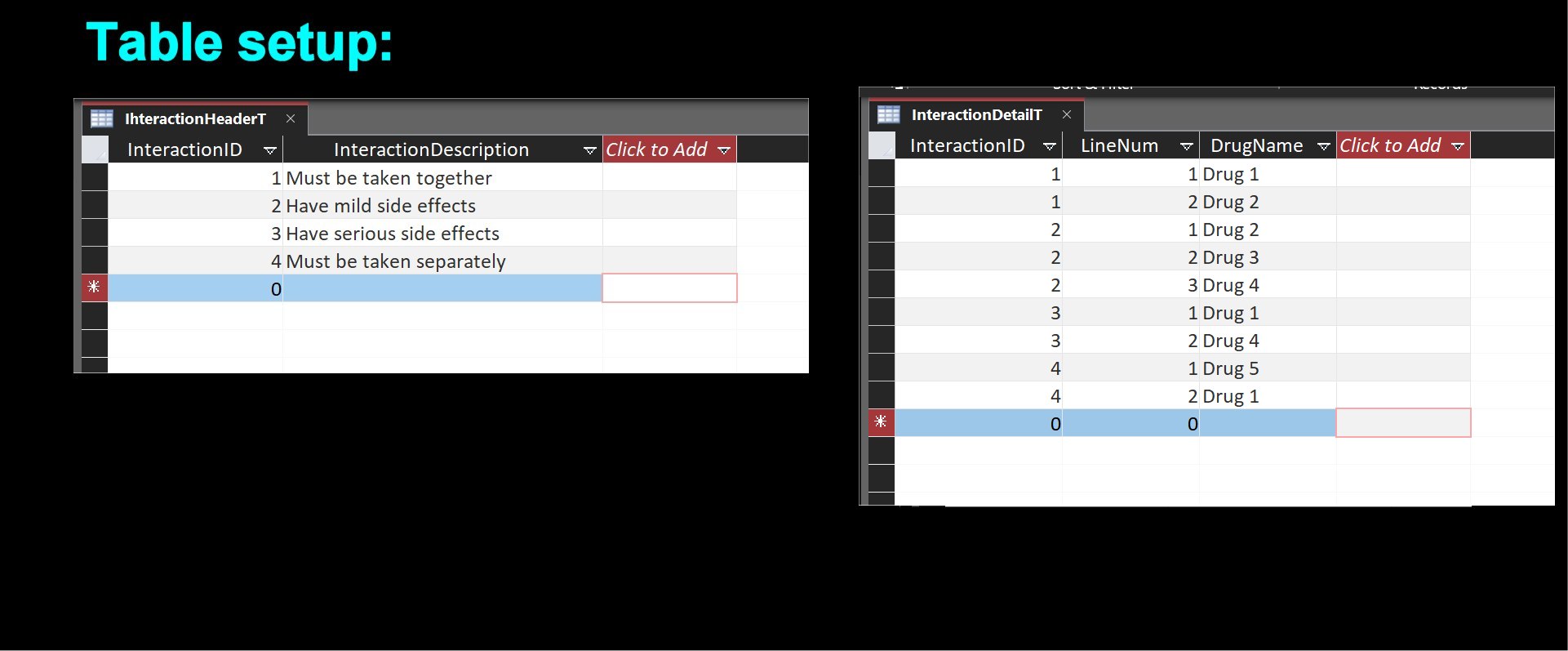
First, you design tables for the various drug interactions.  See my table setup diagram below.  It's pretty straightforward here.  You enter an InteractiveID for each interaction and its description.  Then, create a detail table that stores all the drugs involved in each interaction.  For instance, in my diagram, Drug 1 and 2 both have the same InteractionID of 1, and so on.  I'm no pharmaceutical expert, so this is just what I think it may look like in real life.

Note that each drug may involve in multiple different interactions.  In my example, Interaction ID 1 involves Drug 1 and 2; ID 3 involves Drug 1 and 4; and ID 4 has Drug 1 and 5.  But one thing is for certain (I think): When you look up Drug 5, you want Drug 1 to be flagged as having an interaction with Drug 1; and when you look up Drug 1, you also want Drug 5 to be among the flagged drugs.  In short, you want some kind of "two-way" lookups.  Whatever you look up, you want to see all related interactions.  But DLookup() only works one-way.  If you need two-way lookups, you likely need two separate DLookup().  So how do we do this?

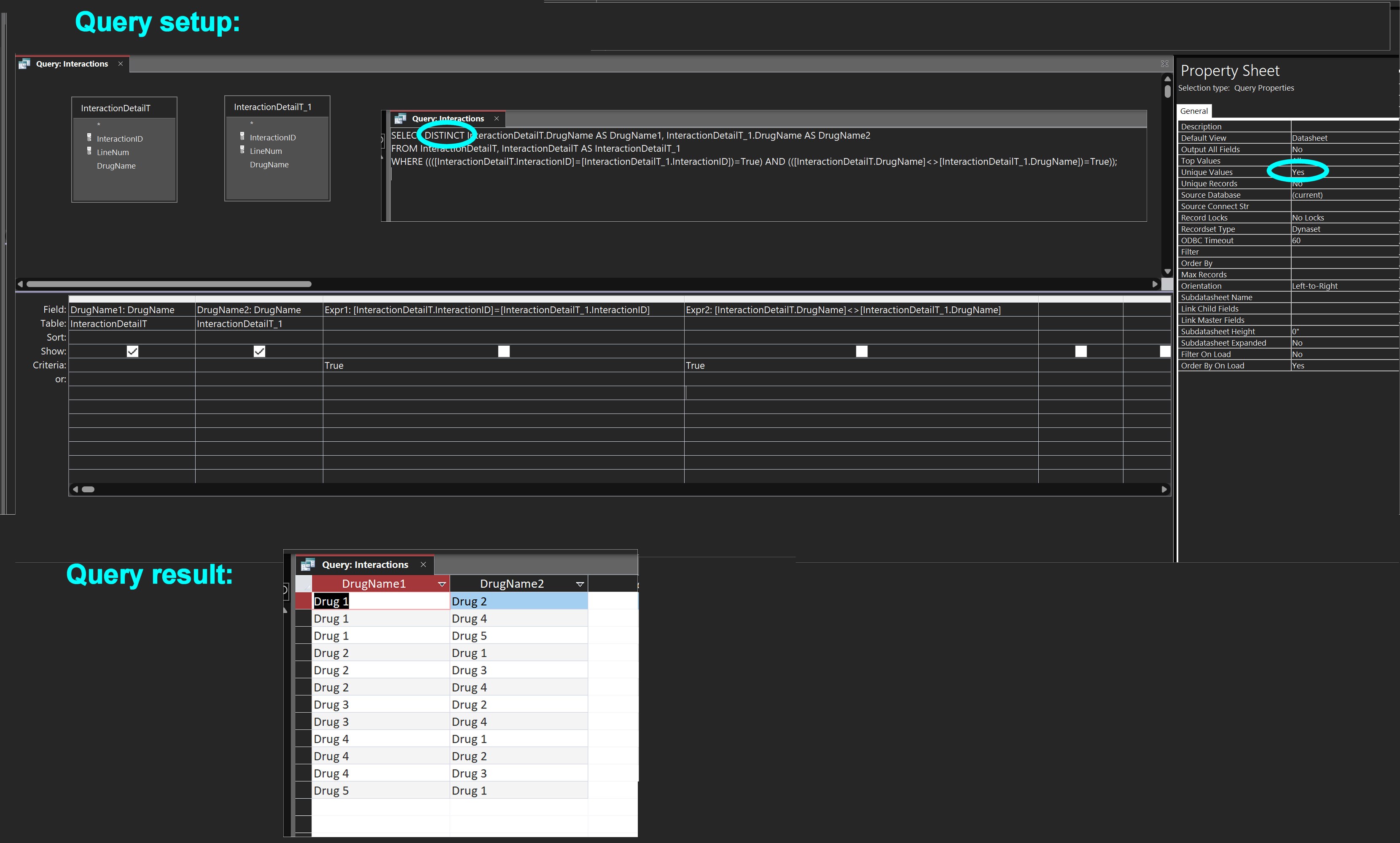
See the query setup diagram below for my suggestion.  You create a query by adding *the same table twice* with *no relation*.  You essentially want the table to do lookups "on itself."  That is how "two-way" lookups are possible.  The two tables can't have the same name in the query.  So, when you drag in the InteractionDetail twice, Access automatically renames the second one by adding "_1" at the end, as shown in my diagram.

When two tables have no relationship, then every record in one table "is related" to every record of the second table.  And that is how we compare every record against each other.

Then you have the query check two conditions:
(1) The InteractiveID in one table is equal to the InteractiveID of the other table.  This is because drugs that are involved in the same interaction share the same InterativeID.
(2) The drug name in one table is NOT equal to the drug name of the other table.  This is needed because you don't want repeated drug names to be shown (since each record is related to all records, as I said).

The final step is to use "SELECT DISTINCT", because, again, you don't want repeated data.  In the query's property sheet, setting "Unique Value" to Yes does the same thing.

The final query result is as shown.  As you see, it allows two-way lookups.  If you look up Drug 1, you will find Drug 5, and vice versa.  Every drug you look up, you'll find the other drugs that share an interaction with it.
Kevin Yip  @Reply  
      
3 years ago

Kevin Yip  @Reply  
      
3 years ago

Kevin Yip  @Reply  
      
3 years ago
Just to be complete, as a final step, you set up a query that does the actual lookup.  See my picture below.  You link the tricky query in my last post to the InteractionHeader table.  This time you do need a relationship.  Set a condition to look up, say, Drug 4.  The query will return all the drugs that have an interaction with Drug 4.  

And since two-way lookups are possible, you can have:

     WHERE DrugName1 = "Drug 1" AND DrugName2 = Drug 4"

or

     WHERE DrugName1 = "Drug 4" AND DrugName2 = Drug 1"

and you will get the same info: interaction shared by Drug 1 and 4.
Kevin Yip  @Reply  
      
3 years ago

Kevin Robertson  @Reply  
           
3 years ago
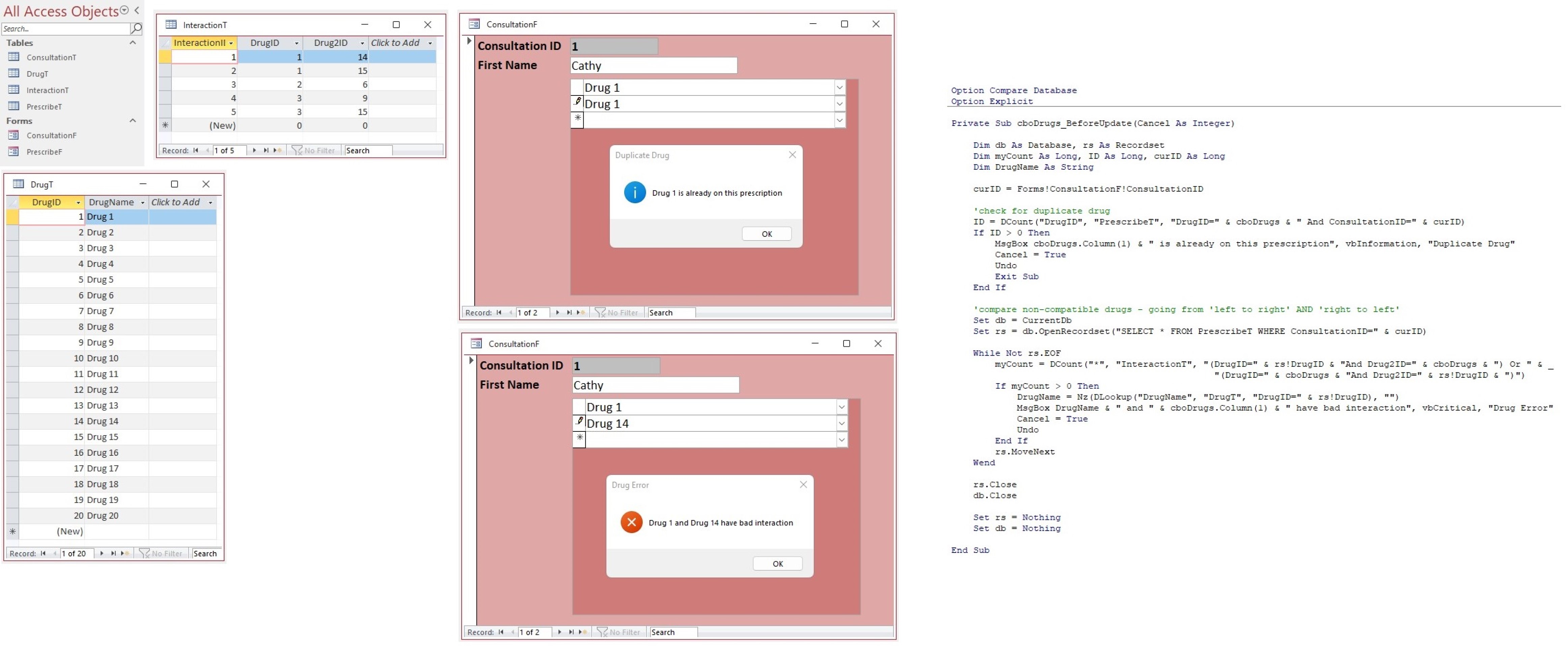
Here's how I accomplished this task (see screenshot).
Kevin Robertson  @Reply  
           
3 years ago

John Yeung OP  @Reply  
     
3 years ago
Thank you all you guys, special thanks to Teachers Kevin Yip and Kevin Robertson. Both methods works well in solving my "difficult question". Finally I adopt the approach of Teacher Robertson as it suits lazy guy like me.

This thread is now CLOSED. If you wish to comment, start a NEW discussion in Access Forum.
 

Next Unseen


What's This?


The following is a paid advertisement
Computer Learning Zone is not responsible for any content shown or offers made by these ads.
 

Learn
 
Access - index
Excel - index
Word - index
Windows - index
PowerPoint - index
Photoshop - index
Visual Basic - index
ASP - index
Seminars
More...
Customers
 
Login
My Account
My Courses
Lost Password
Memberships
Student Databases
Change Email
Info
 
Latest News
New Releases
User Forums
Topic Glossary
Tips & Tricks
Search The Site
Code Vault
Collapse Menus
Help
 
Customer Support
Web Site Tour
FAQs
TechHelp
Consulting Services
About
 
Background
Testimonials
Jobs
Affiliate Program
Richard Rost
Free Lessons
Mailing List
PCResale.NET
Order
 
Video Tutorials
Handbooks
Memberships
Learning Connection
Idiot's Guide to Excel
Volume Discounts
Payment Info
Shipping
Terms of Sale
Contact
 
Contact Info
Support Policy
Mailing Address
Phone Number
Fax Number
Course Survey
Email Richard
[email protected]
Blog RSS Feed    YouTube Channel

LinkedIn
Copyright 2026 by Computer Learning Zone, Amicron, and Richard Rost. All Rights Reserved. Current Time: 9/25/2026 3:12:09 PM. PLT: 1s