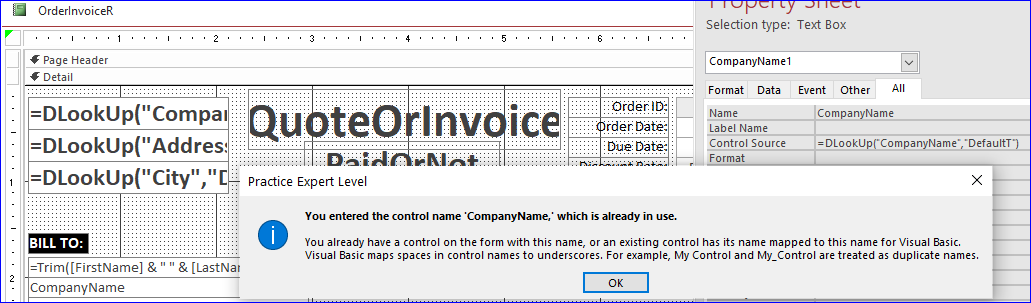
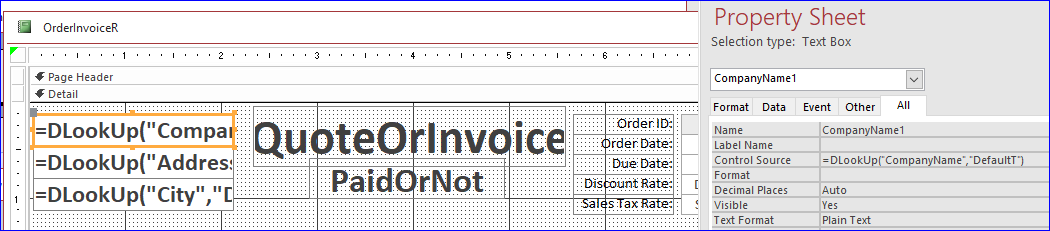
In Expert 10 Lesson 2 starting at about 9:50 the default values are changed with DLOOKUP for CompanyName, Address, and CSZ.
Did I miss something? When I try to change the name of the controls containing the DLOOKUPS I get a duplicate control name error. I notice in the lesson the DLOOKUP controls are being modified in the Data Tab, not the All tab, but I can still see that the control names are just text 20, text 21, etc.
Even though the DLOOKUP is grabbing the values from DefaultT, does that mean I can't use the same control name as the one below (under Bill To:0, which is sourced from OrderInvoiceQ?
Thanks - Mike M
Michael MunitzOP
@Reply 3 years ago
Michael MunitzOP
@Reply 3 years ago
Kevin Robertson
@Reply 3 years ago
You can't have duplicate names on the same Form or Report.
You also can't put a calculated value (such as DLookup) in the Control Source if the name of the field is the same as the name in the underlying Record Source. You must give it a different name.
Sorry, only students may add comments.
Click here for more
information on how you can set up an account.
If you are a Visitor, go ahead and post your reply as a
new comment, and we'll move it here for you
once it's approved. Be sure to use the same name and email address.
This thread is now CLOSED. If you wish to comment, start a NEW discussion in
Access Expert 10.