Free Lessons
Courses
Seminars
TechHelp
Fast Tips
Templates
Topic Index
Forum
ABCD
 
Home   Courses   TechHelp   Forums   Help   Contact   Merch   Join   Order   Logon  
 
Back to Access Forum    Comments List
Upload Images   @Reply   Bookmark    Link   Email   Next Unseen 
Access Update Layout Labels
Ashlyn Talley 
    
3 years ago
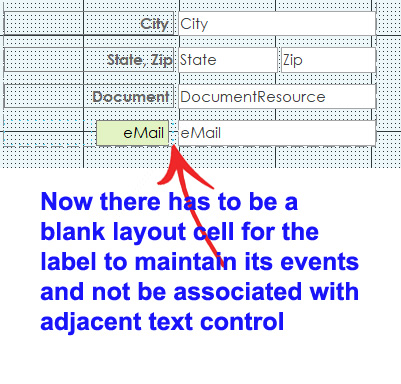
Hello, Ive run into a major concern using the layout feature in Form Design View with Access. Was there a recent update that seemingly every unassociated label next to a text box control now gets associated? I ask this because I had labels created independent from text boxes with events that all of a sudden no longer work.

When I open the form in Form Design, I now see in the text box properties the label listed and when I bring up the properties of the label it now has no options for an event. If I delete the label name from the text box properties and then remove the label from the layout the events and the functionality of the label then returns.

As soon as I place it back next to the text box everything again get disabled as I then find the label name associated with the text box once more. It didnt used to do that.
Ashlyn Talley OP  @Reply  
    
3 years ago

Scott Axton  @Reply  
        
3 years ago
Ashlyn I can't tell you if this is new behavior or not.  Quite honestly I don't use Layout View to position fields any more.  I just prefer the additional control of independently moving things around as I see fit.

Richard has told me before and stated the same feeling - that Layout tends to do things to your forms and can goof up things.  I only use Layout for one purpose - to quickly set up a NEW Continuous Form.  

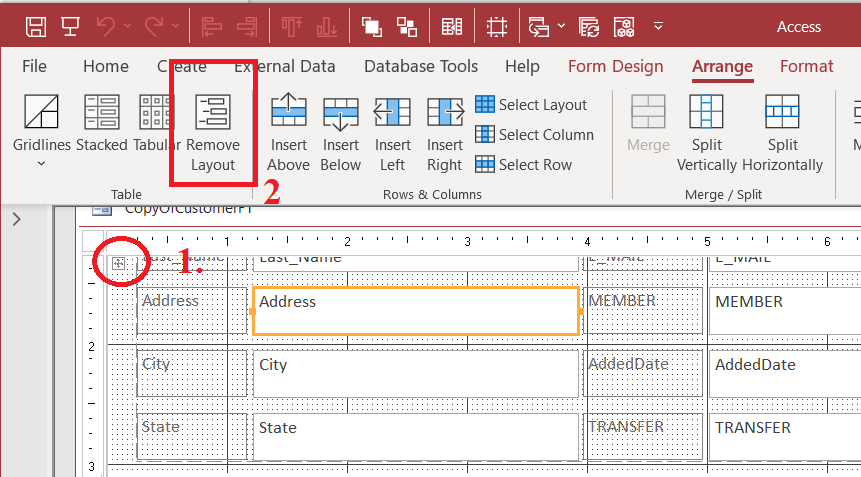
To fix this go into Design Mode:  To select all your fields - up at the top left click the little + button to select the layout.
On the ribbon under the Arrange menu, click the Remove Layout.  
See the Arrange Tabular video if you need more info.
Scott Axton  @Reply  
        
3 years ago

Ashlyn Talley OP  @Reply  
    
3 years ago
Hi Scott, thanks for the response. Microsoft seemed to have recently done something, my Office theme once set to Dark is now at default. I have heard of Richard's mention not being a fan of using the Layout feature. It took quite a while for it to grow on me, I had been on the fence until I viewed this YouTube video https://youtu.be/qEO0-P8tKwA. Now I use very little if anything else, going back to forms that were created not using the layout feature seem burdensome to add or adjust any control. My real concern is that I have built forms for a client enabling labels with functionality, I'd bet she's waking up to her forms not working. Had hoped there was a preference that could be turned off or on. Thanks again....
Kevin Yip  @Reply  
     
3 years ago
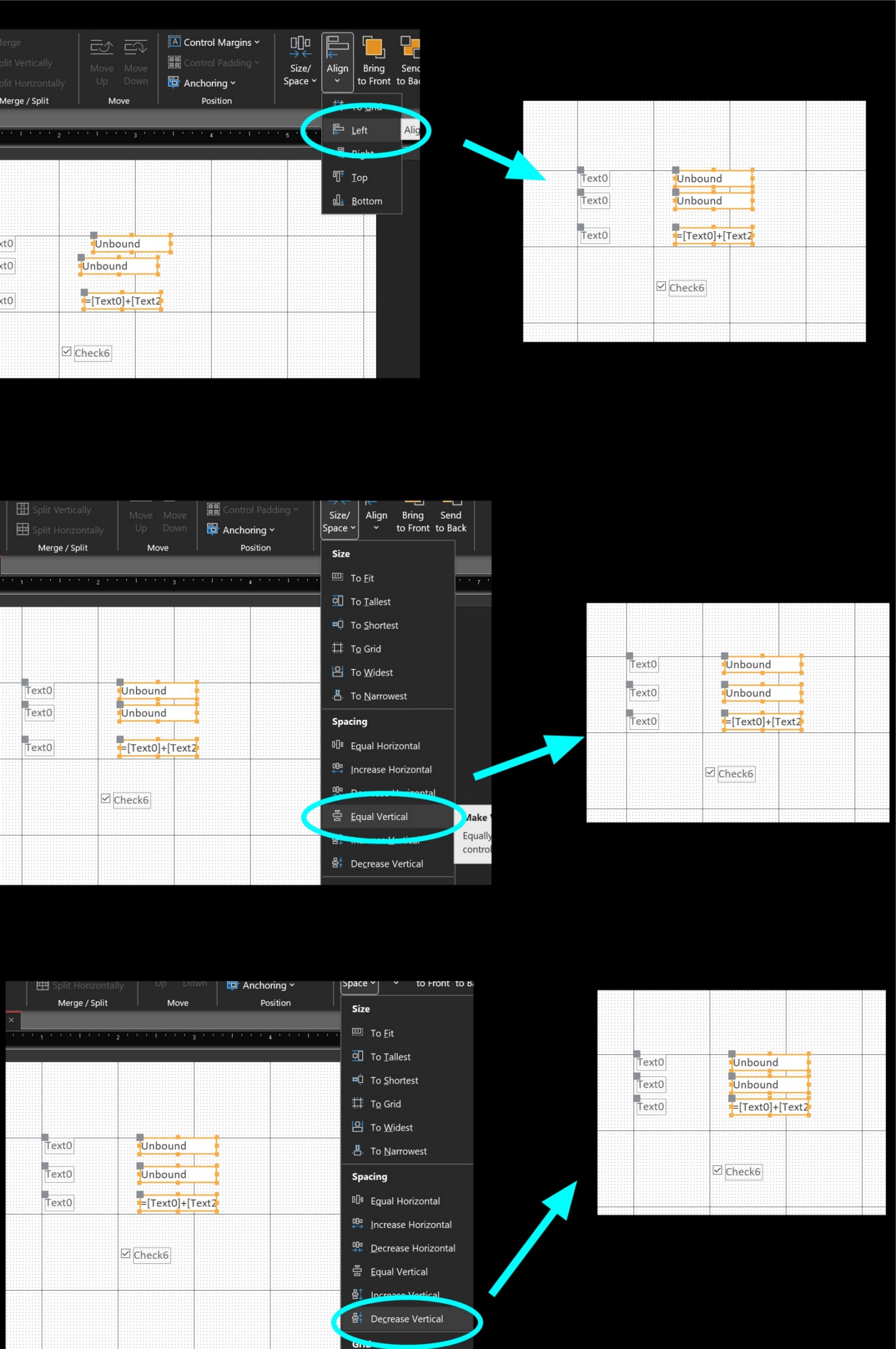
Hi Ashlyn, you can auto-align controls without having to using layout.  See picture below.  You drop textboxes randomly on the form, select them all, and you need just three steps (three mouse clicks) to align and space them neatly.

To unassociate all labels without doing it one by one, it's little tricky.  Select all the textboxes, and go to the property sheet.  The "Label Name" property will be blank, because there are different values involved.  Put your cursor in the "Label Name" property, press space, then backspace to remove the space.  That will blank out ALL the Label Name properties of the three textboxes, hence unassociating all the labels.
Kevin Yip  @Reply  
     
3 years ago

Ashlyn Talley OP  @Reply  
    
3 years ago
Hi Kevin, thanks so much for weighing in. Awesome tip, thanks again!

This thread is now CLOSED. If you wish to comment, start a NEW discussion in Access Forum.
 

Next Unseen

 
New Feature: Comment Live View


The following is a paid advertisement
Computer Learning Zone is not responsible for any content shown or offers made by these ads.
 

Learn
 
Access - index
Excel - index
Word - index
Windows - index
PowerPoint - index
Photoshop - index
Visual Basic - index
ASP - index
Seminars
More...
Customers
 
Login
My Account
My Courses
Lost Password
Memberships
Student Databases
Change Email
Info
 
Latest News
New Releases
User Forums
Topic Glossary
Tips & Tricks
Search The Site
Code Vault
Collapse Menus
Help
 
Customer Support
Web Site Tour
FAQs
TechHelp
Consulting Services
About
 
Background
Testimonials
Jobs
Affiliate Program
Richard Rost
Free Lessons
Mailing List
PCResale.NET
Order
 
Video Tutorials
Handbooks
Memberships
Learning Connection
Idiot's Guide to Excel
Volume Discounts
Payment Info
Shipping
Terms of Sale
Contact
 
Contact Info
Support Policy
Mailing Address
Phone Number
Fax Number
Course Survey
Email Richard
[email protected]
Blog RSS Feed    YouTube Channel

LinkedIn
Copyright 2026 by Computer Learning Zone, Amicron, and Richard Rost. All Rights Reserved. Current Time: 5/7/2026 12:33:23 AM. PLT: 1s