I've stored all my tables on the WinHost SQL Server. I've been able to create new records and they are storing correctly into the Tables. However, my queries are not reading the new information placed into the Tables. I am not able to see any new information on my forms. When I create a Pass Through Query I can pull the records needed from the server, but my existing queries are not updating. Any help is much appreciated.
Joshua RiveraOP
@Reply 3 years ago
I've also Relinked all my Tables, but still same result.
Kevin Yip
@Reply 3 years ago
If you can add records to table and run passthrough queries, but can't run Access queries, the problem is obviously with how the Access queries are run. Are they run from the navigation pane? VBA? If they are run via VBA, do you use CurrentDb.Execute, which runs silently and returns no errors, or do you use RunSQL which does return errors? If you run an update or append query and no data is updated or appended, there is likely an error somewhere.
Joshua RiveraOP
@Reply 3 years ago
Hi Kevin thanks for the feedback.
The queries were set up prior to the database being placed on the server. I have buttons on my main menu page, that allow me to open a form list, tied to a query. As the list populates it only displays the data from when the database was not on the server. I've gone through the steps to re-link my tables, with same results.
The open VBA I have is tied to the button to cmd open the form tied to the query.
If I click on the query from the navigation pane, the same results display. Only with a Pass through query have I been able to pull updated information.
Do I need to change the Queries that I have had previous in any way?
Kevin Yip
@Reply 3 years ago
Make sure your ODBC configuration is correct and "in sync" in different areas of Access. See my picture below. I have an SQL Server database hosted on Winhost just like you do. When you mouse-over a linked table in Access, a pop-up shows the DSN info. My DSN is named "sqlsvr_winhost" as shown in the picture. In my passthrough query, the property sheet also shows DSN to be "sqlsvr_winhost". They both point to the "system DSN" entry that is named "sqlsvr_winhost" in the ODBC configuration tool. If all the names match, you should have no problem. You said you have no problem adding records to linked tables, and you also have no problem running passthrough queries. Are they "in sync"? Do they both use the same DSN? You said when you run Access queries, you see a different set of data. Did you have another DSN setting that you had used before, perhaps one that was (and still is) pointing to an older version of the database somewhere?
Kevin Yip
@Reply 3 years ago
Joshua RiveraOP
@Reply 3 years ago
Hi Kevin,
Thank you for the posts. As I hover over the linked Tables, the DSN is showing correctly, and when I run a Pass through query the DSN is matching.
Both of those functions look to be working correctly.
It is only when I pull records with the query's that are in the Database that they do not show the updated information in the Tables.
If I recreate the query again from with the Tables linked, it then shows me the updated records.
Kevin Yip
@Reply 3 years ago
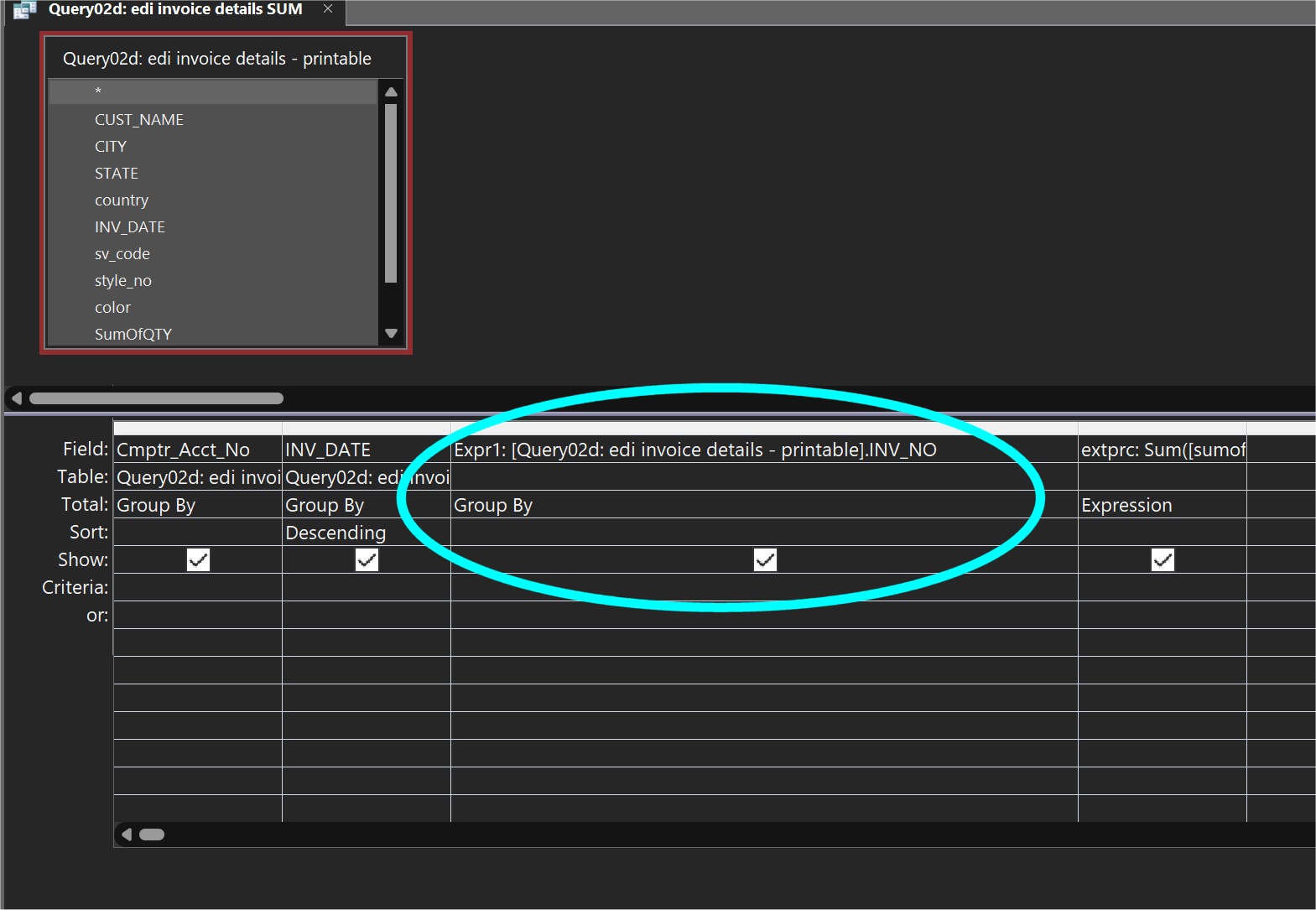
Queries can change "silently." Queries have dependencies, and if those dependencies change (such as table structural changes), the queries will change too without your knowing. This may be a possibility in your case. I've seen instances of this in my own experiences. See the picture below as an example. This query hasn't been opened or edited for years, but its dependency has been changed: the third column used to be [Inv_no], but it has been changed to "Expr: .... Inv_no" because the field of the dependent data source has been removed. You don't see this change until you open the query again, when you find out it isn't working. Access won't tell you if anything has been changed, and you just have to spot the change yourself; and good luck if you haven't seen the query in a long time and don't even remember what it looks like. Therefore, this change, when it happens, is completely silent. The only tell-tale sign is that when you close the query, a pop-up will ask you: do you want to save the query because a change has been made.
Kevin Yip
@Reply 3 years ago
Sorry, only students may add comments.
Click here for more
information on how you can set up an account.
If you are a Visitor, go ahead and post your reply as a
new comment, and we'll move it here for you
once it's approved. Be sure to use the same name and email address.
This thread is now CLOSED. If you wish to comment, start a NEW discussion in
Access SQL Server Lessons.