Free Lessons
Courses
Seminars
TechHelp
Fast Tips
Templates
Topic Index
Forum
ABCD
 
Home   Courses   TechHelp   Help   Contact   Merch   Join   Order   Logon   Forums   
 
Home > Forums > Access Forum > tier pricing by Carol Kerr
Back to Access Forum    Comments List
Upload Images | @Reply | Bookmark | Link | Email | Next Unseen |
tier pricing
Carol Kerr 
    
3 years ago
I sell products that have a lower price each as the buyer purchases larger quantities. What is the best approach?
Kevin Robertson  @Reply  
          
3 years ago
The Extended Cut of Order Discount covers tiered discounts.
Carol Kerr OP  @Reply  
    
3 years ago
It is more of different prices for larger quantities than a % discount - here is an example link -
https://mailthings.com/circle_tabs.php
Adam Schwanz  @Reply  
           
3 years ago
If you don't want to use a percentage and I'm assuming they cant all be like 2$ off, you might need to make multiple prices in your product table. ProductPrice, Discount1ProductPrice, Discount2ProductPrice etc. Then just dlookup which price to put depending on the quantity they bought.
Kevin Robertson  @Reply  
          
3 years ago
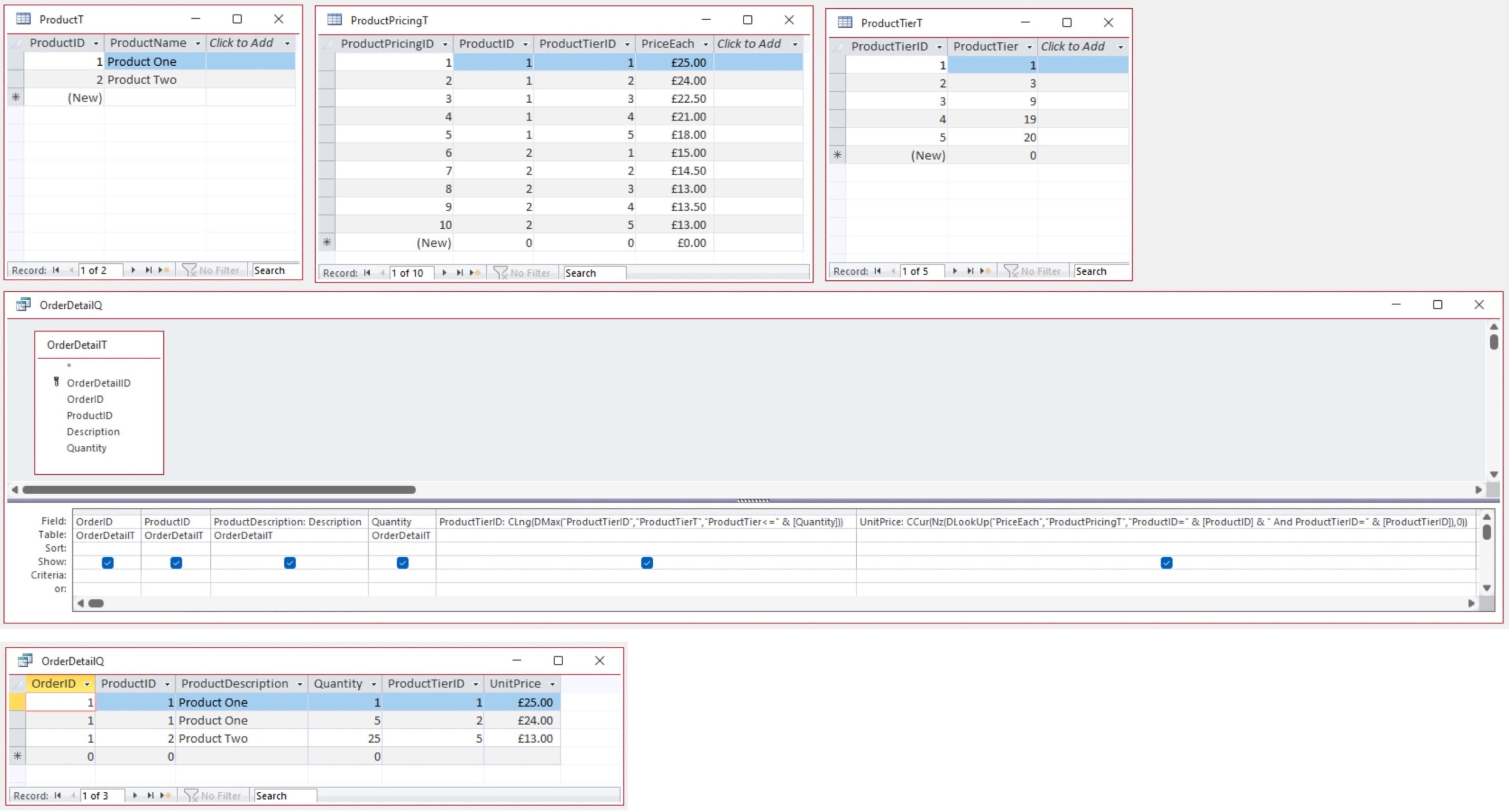
I would set this up similar to my example (see screenshot).
Kevin Robertson  @Reply  
          
3 years ago

Kevin Yip  @Reply  
     
3 years ago
HI Carol, I would suggest some kind of lookup table.  If a fixed discount isn't used, or if the rules of the discounts are irregular in general, and if those rules and prices are subject to change, then I would consider setting a price for each individual unit so you would be able to modify them however you like, when necessary.  The lookup table would look something like, using your example from mailthings.com:

ProductID    OrderUnits    DiscountUnitPrice
P1000        1             $22.50
P1000        2             $21.50
P1000        3             $21.50
P1000        4             $20.50
P1000        5             $20.50
P1000        6             $20.50
P1000        7             $20.50
P1000        8             $20.50
P1000        9             $20.50
P1000        10             $19.50
P1000        11             $19.50
P1000        12             $19.50
P1000        13             $19.50
P1000        14             $19.50
P1000        15             $19.50
P1000        16             $19.50
P1000        17             $19.50
P1000        18            $19.50
P1000        19            $19.50
P1000        20            $17.00
P2000        1             $29.50
P2000        2             $28.50
...
and so on.

During order entry, it would be straightforward to use DLookup() to look up the unit price for the units ordered:

   =DLookup("[DiscountUnitPrice]", "PriceLookupT", "[OrderUnits]=" & IIf(OrderUnits > 20, 20, OrderUnits))
  
Note that the lookup table above only has prices for up to 20 units (which you can change to whatever you want).  That is why I use the IIf() function above.  If OrderUnits is greater than 20 units, treat it as 20 units and return the price for 20 units.

Carol Kerr OP  @Reply  
    
3 years ago
The database is currently in Filemaker Pro ' when I enter the stock number and then the quantity, the correct price for that quantity automatically comes up on the entry form. I am just trying to duplicate that simplicity for my employees. Problem with Filemaker is the database I have is 15 years old and the software won't load on new computers ' updated version is expensive. Hoping I can re-do it myself in Access.

This thread is now CLOSED. If you wish to comment, start a NEW discussion in Access Forum.
 

Next Unseen


What's This?


The following is a paid advertisement
Computer Learning Zone is not responsible for any content shown or offers made by these ads.
 

Learn
 
Access - index
Excel - index
Word - index
Windows - index
PowerPoint - index
Photoshop - index
Visual Basic - index
ASP - index
Seminars
More...
Customers
 
Login
My Account
My Courses
Lost Password
Memberships
Student Databases
Change Email
Info
 
Latest News
New Releases
User Forums
Topic Glossary
Tips & Tricks
Search The Site
Code Vault
Collapse Menus
Help
 
Customer Support
Web Site Tour
FAQs
TechHelp
Consulting Services
About
 
Background
Testimonials
Jobs
Affiliate Program
Richard Rost
Free Lessons
Mailing List
PCResale.NET
Order
 
Video Tutorials
Handbooks
Memberships
Learning Connection
Idiot's Guide to Excel
Volume Discounts
Payment Info
Shipping
Terms of Sale
Contact
 
Contact Info
Support Policy
Mailing Address
Phone Number
Fax Number
Course Survey
Email Richard
[email protected]
Blog RSS Feed    YouTube Channel

LinkedIn
Copyright 2026 by Computer Learning Zone, Amicron, and Richard Rost. All Rights Reserved. Current Time: 11/15/2026 8:33:13 AM. PLT: 1s