Free Lessons
Courses
Seminars
TechHelp
Fast Tips
Templates
Topic Index
Forum
ABCD
 
Home   Courses   TechHelp   Forums   Help   Contact   Merch   Join   Order   Logon  
 
Back to Access Forum    Comments List
Upload Images   @Reply   Bookmark    Link   Email   Next Unseen 
FormatConditions Limit
Ricky Houtris 
    
3 years ago
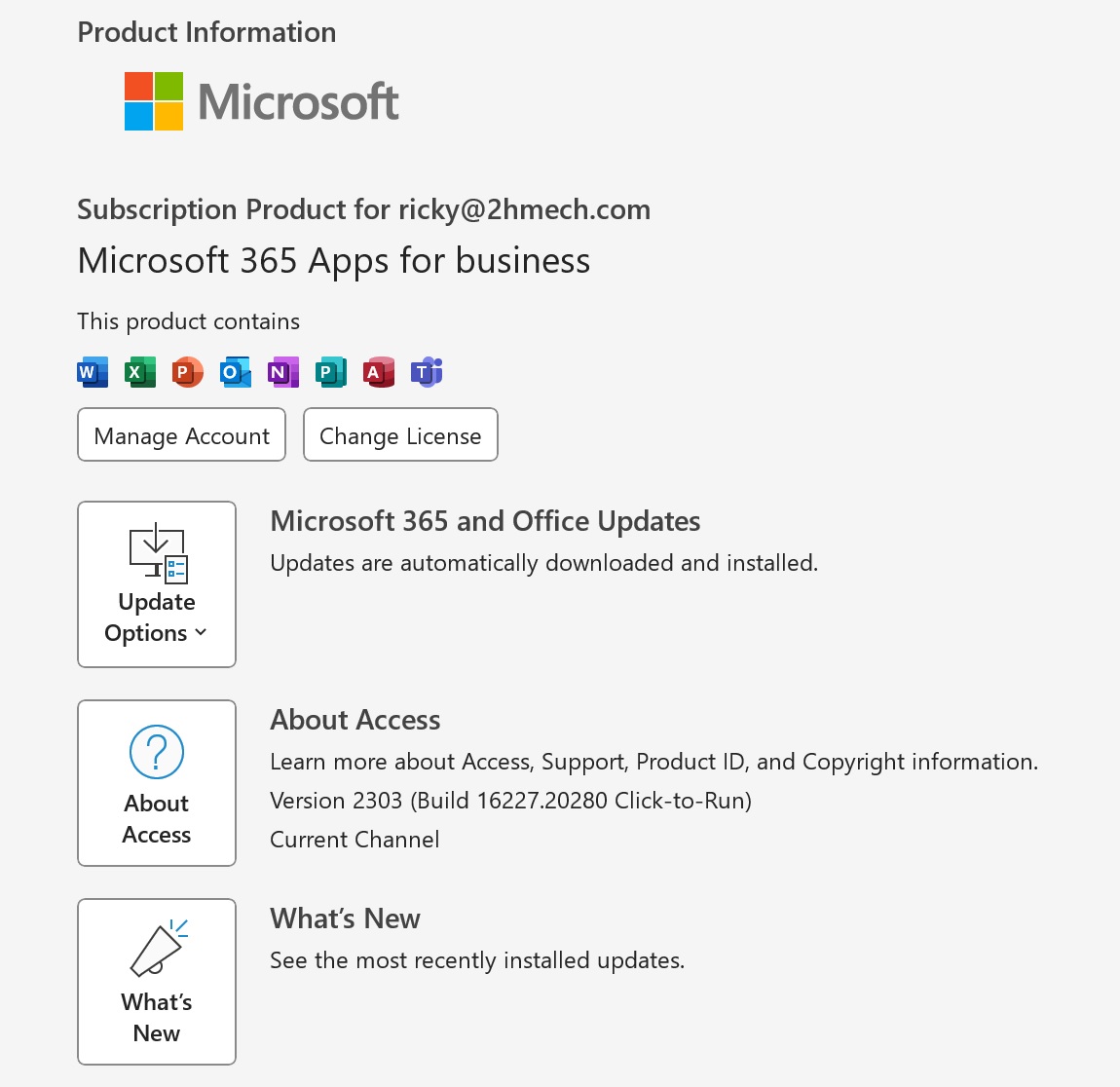
Watching Lesson 40, I assume that I could make more than 3 x=2 formatconditions. Unfortunately, I seem to be hitting the limit. What am I missing? I believe that my office 356 is fully up to ate.

Ricky
Ricky Houtris OP  @Reply  
    
3 years ago

Ricky Houtris OP  @Reply  
    
3 years ago

Kevin Yip  @Reply  
     
3 years ago
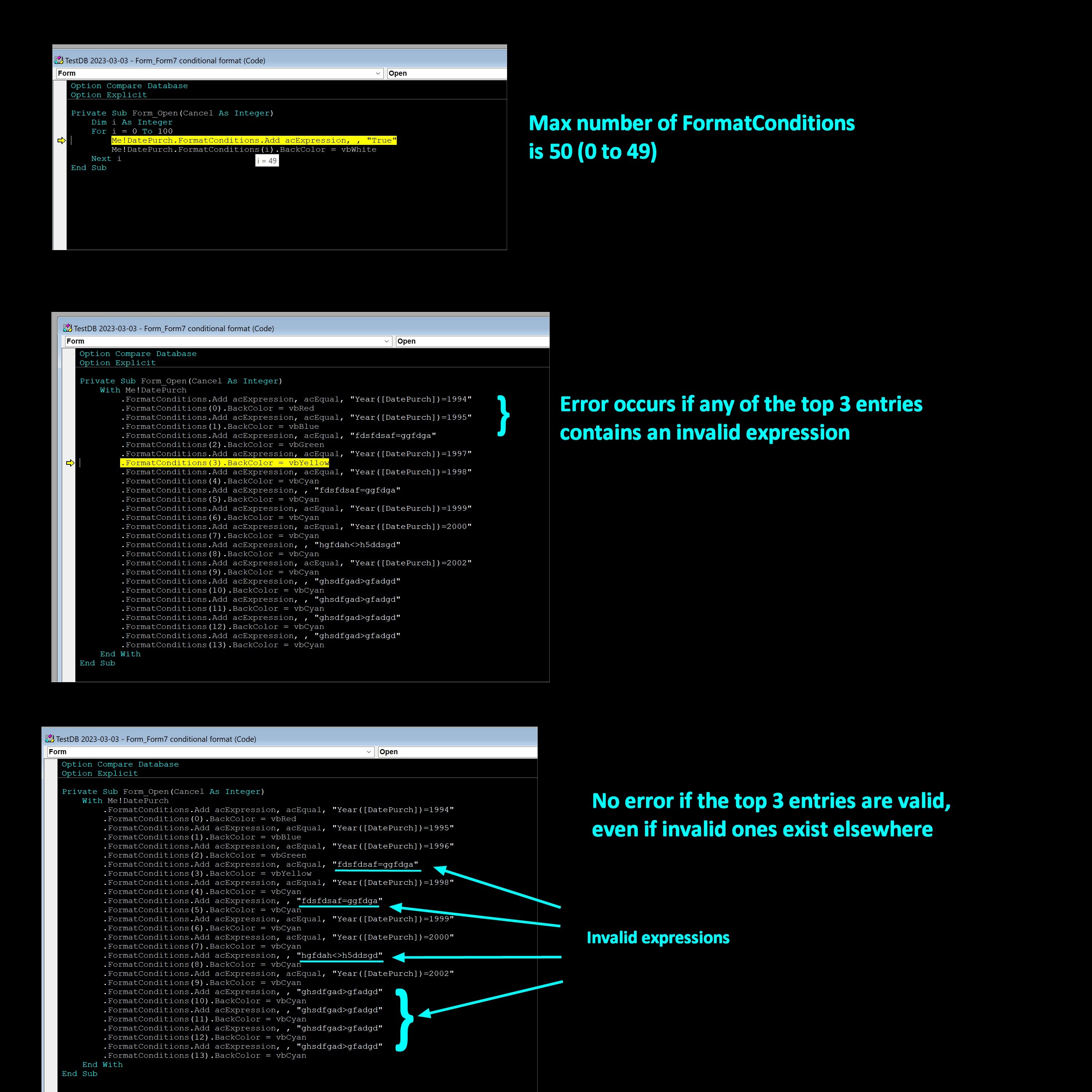
The max number of FormatConditions is 50, as the test in my first picture below shows.  It doesn't matter which 365 version.

But for reasons unknown to me, if any of the first 3 FormatConditions contains an invalid expression, it will give you the runtime error you are seeing.  You may have an invalid expression (cropped off in your picture) in one of the top 3 conditions.  The error occurs at FormatConditions(3) because (3) isn't created and doesn't exist, and that's why it says "the format condition number is greater than" what you have.

My testing, shown in my next two pictures below, shows this.  I entered some gibberish expression in the second condition, and it caused an error (and the same would happen if it was entered in the first and 3rd).  But if I entered the invalid expression in the fourth condition, nothing happened, even when invalid expressions existed elsewhere.  I have no idea why this happens.  You just have to make sure your top three entries are valid.
Kevin Yip  @Reply  
     
3 years ago

Ricky Houtris OP  @Reply  
    
3 years ago
Sub BuildGantt()
Dim x As Long, y As Long, z As Long
Dim BoxName As String
Dim BoxStart As Date, BoxEnd As Date
Dim BoxLength As Double
Dim FC As FormatCondition
    
    z = 51 ' The number of boxes
    BoxLength = (GEnd - GStart) / z
    For x = 0 To z 'loop through the Gantt boxes and set the conditional formatting
        BoxName = "Gantt" & x + 1
        BoxStart = GStart + BoxLength * x
        BoxEnd = BoxStart + BoxLength
        Me.Controls(BoxName).FormatConditions.Delete
        Set FC = Me.Controls(BoxName).FormatConditions.Add(acExpression, acEqual, "[Dept] = 'Plumbing' And [StartDate] <= #" & Format(BoxStart, "MM/DD/YYYY") & "# And #" & Format(BoxEnd, "MM/DD/YYYY") & "# <= [EndDate]")
        Me.Controls(BoxName).FormatConditions(0).BackColor = RGB(70, 0, 135)
        Me.Controls(BoxName).FormatConditions(0).ForeColor = RGB(255, 255, 255)
        Me.Controls(BoxName).FormatConditions(0).FontBold = True
        Me.Controls(BoxName).FormatConditions(0).Enabled = True
        Set FC = Me.Controls(BoxName).FormatConditions.Add(acExpression, acEqual, "[Dept] = 'Mechanical' And [StartDate] <= #" & Format(BoxStart, "MM/DD/YYYY") & "# And #" & Format(BoxEnd, "MM/DD/YYYY") & "# <= [EndDate]")
        Me.Controls(BoxName).FormatConditions(1).BackColor = RGB(70, 100, 135)
        Me.Controls(BoxName).FormatConditions(1).ForeColor = RGB(255, 255, 255)
        Me.Controls(BoxName).FormatConditions(1).FontBold = True
        Me.Controls(BoxName).FormatConditions(1).Enabled = True
        Set FC = Me.Controls(BoxName).FormatConditions.Add(acExpression, acEqual, "[Dept] = 'Shop' And [StartDate] <= #" & Format(BoxStart, "MM/DD/YYYY") & "# And #" & Format(BoxEnd, "MM/DD/YYYY") & "# <= [EndDate]")
        Me.Controls(BoxName).FormatConditions(2).BackColor = RGB(150, 20, 1)
        Me.Controls(BoxName).FormatConditions(2).ForeColor = RGB(255, 255, 255)
        Me.Controls(BoxName).FormatConditions(2).FontBold = True
        Me.Controls(BoxName).FormatConditions(2).Enabled = True
    Next x
End Sub
Ricky Houtris OP  @Reply  
    
3 years ago

Ricky Houtris OP  @Reply  
    
3 years ago
Thanks, Kevin,

I cannot see an error, and it appears to be working fine, but I will keep looking. I attached the sub, in case you can see what I am missing.

Ricky
Kevin Yip  @Reply  
     
3 years ago
You don't have an error because you don't have a 4th condition, i.e. FormatConditions(3).  This error (bug?) only occurs if you have 4 or more conditions and any of the top 3 conditions has an invalid expression.  In your code above, even if all 3 of your conditions contain gibberish expressions, it still won't cause an error.  There needs to be a 4th condition for that to cause an error.  The code you posted earlier did have 4 conditions, so an error occurred.
Ricky Houtris OP  @Reply  
    
3 years ago
z = 51 ' The number of boxes
    BoxLength = (GEnd - GStart) / z
    For x = 0 To z 'loop through the Gantt boxes and set the conditional formatting
        BoxName = "Gantt" & x + 1
        BoxStart = GStart + BoxLength * x
        BoxEnd = BoxStart + BoxLength
        Me.Controls(BoxName).FormatConditions.Delete
        Set FC = Me.Controls(BoxName).FormatConditions.Add(acExpression, acEqual, "[Dept] = 'Plumbing' And [StartDate] <= #" & Format(BoxStart, "MM/DD/YYYY") & "# And #" & Format(BoxEnd, "MM/DD/YYYY") & "# <= [EndDate]")
        Me.Controls(BoxName).FormatConditions(0).BackColor = RGB(70, 0, 135)
        Me.Controls(BoxName).FormatConditions(0).ForeColor = RGB(155, 155, 155)
        Me.Controls(BoxName).FormatConditions(0).FontBold = True
        Me.Controls(BoxName).FormatConditions(0).Enabled = True
        Set FC = Me.Controls(BoxName).FormatConditions.Add(acExpression, acEqual, "[Dept] = 'Mechanical' And [StartDate] <= #" & Format(BoxStart, "MM/DD/YYYY") & "# And #" & Format(BoxEnd, "MM/DD/YYYY") & "# <= [EndDate]")
        Me.Controls(BoxName).FormatConditions(1).BackColor = RGB(70, 100, 135)
        Me.Controls(BoxName).FormatConditions(1).ForeColor = RGB(155, 155, 155)
        Me.Controls(BoxName).FormatConditions(1).FontBold = True
        Me.Controls(BoxName).FormatConditions(1).Enabled = True
        Set FC = Me.Controls(BoxName).FormatConditions.Add(acExpression, acEqual, "[Dept] = 'Shop' And [StartDate] <= #" & Format(BoxStart, "MM/DD/YYYY") & "# And #" & Format(BoxEnd, "MM/DD/YYYY") & "# <= [EndDate]")
        Me.Controls(BoxName).FormatConditions(2).BackColor = RGB(150, 20, 1)
        Me.Controls(BoxName).FormatConditions(2).ForeColor = RGB(155, 155, 155)
        Me.Controls(BoxName).FormatConditions(2).FontBold = True
        Me.Controls(BoxName).FormatConditions(2).Enabled = True
        Set FC = Me.Controls(BoxName).FormatConditions.Add(acExpression, acEqual, "[Dept] = 'Operations' And [StartDate] <= #" & Format(BoxStart, "MM/DD/YYYY") & "# And #" & Format(BoxEnd, "MM/DD/YYYY") & "# <= [EndDate]")
        Me.Controls(BoxName).FormatConditions(3).BackColor = RGB(50, 20, 1)
        Me.Controls(BoxName).FormatConditions(3).ForeColor = RGB(155, 155, 155)
        Me.Controls(BoxName).FormatConditions(3).FontBold = True
        Me.Controls(BoxName).FormatConditions(3).Enabled = True
    Next x
Ricky Houtris OP  @Reply  
    
3 years ago
All I am doing is adding other departments.
Ricky Houtris OP  @Reply  
    
3 years ago
As I said before, the three conditions seem to work perfectly. I am not displaying values in the boxes yet, so I remove the FOreColor and FontBold lines to see if that changed anything. It didn't:(
Ricky Houtris OP  @Reply  
    
3 years ago
This works!

    z = 51 ' The number of boxes
    BoxLength = (GEnd - GStart) / z
    For x = 0 To z 'loop through the Gantt boxes and set the conditional formatting
        BoxName = "Gantt" & x + 1
        BoxStart = GStart + BoxLength * x
        BoxEnd = BoxStart + BoxLength
        Me.Controls(BoxName).FormatConditions.Delete
        Set FC = Me.Controls(BoxName).FormatConditions.Add(acFieldValue, acEqual, 1000)
        Set FC = Me.Controls(BoxName).FormatConditions.Add(acFieldValue, acEqual, 1001)
        Set FC = Me.Controls(BoxName).FormatConditions.Add(acFieldValue, acEqual, 1002)
        Set FC = Me.Controls(BoxName).FormatConditions.Add(acExpression, acEqual, "[Dept] = 'Plumbing' And [StartDate] <= #" & Format(BoxStart, "MM/DD/YYYY") & "# And #" & Format(BoxEnd, "MM/DD/YYYY") & "# <= [EndDate]")
        Me.Controls(BoxName).FormatConditions(3).BackColor = RGB(70, 0, 135)
        Me.Controls(BoxName).FormatConditions(3).ForeColor = RGB(155, 155, 155)
        Me.Controls(BoxName).FormatConditions(3).FontBold = True
        Me.Controls(BoxName).FormatConditions(3).Enabled = True
        Set FC = Me.Controls(BoxName).FormatConditions.Add(acExpression, acEqual, "[Dept] = 'Mechanical' And [StartDate] <= #" & Format(BoxStart, "MM/DD/YYYY") & "# And #" & Format(BoxEnd, "MM/DD/YYYY") & "# <= [EndDate]")
        Me.Controls(BoxName).FormatConditions(4).BackColor = RGB(70, 100, 135)
        Me.Controls(BoxName).FormatConditions(4).ForeColor = RGB(155, 155, 155)
        Me.Controls(BoxName).FormatConditions(4).FontBold = True
        Me.Controls(BoxName).FormatConditions(4).Enabled = True
        Set FC = Me.Controls(BoxName).FormatConditions.Add(acExpression, acEqual, "[Dept] = 'Shop' And [StartDate] <= #" & Format(BoxStart, "MM/DD/YYYY") & "# And #" & Format(BoxEnd, "MM/DD/YYYY") & "# <= [EndDate]")
        Me.Controls(BoxName).FormatConditions(5).BackColor = RGB(150, 20, 1)
        Me.Controls(BoxName).FormatConditions(5).ForeColor = RGB(155, 155, 155)
        Me.Controls(BoxName).FormatConditions(5).FontBold = True
        Me.Controls(BoxName).FormatConditions(5).Enabled = True
        Set FC = Me.Controls(BoxName).FormatConditions.Add(acExpression, acEqual, "[Dept] = 'Operations' And [StartDate] <= #" & Format(BoxStart, "MM/DD/YYYY") & "# And #" & Format(BoxEnd, "MM/DD/YYYY") & "# <= [EndDate]")
        Me.Controls(BoxName).FormatConditions(6).BackColor = RGB(50, 20, 1)
        Me.Controls(BoxName).FormatConditions(6).ForeColor = RGB(155, 155, 155)
        Me.Controls(BoxName).FormatConditions(6).FontBold = True
        Me.Controls(BoxName).FormatConditions(6).Enabled = True
    Next x

This thread is now CLOSED. If you wish to comment, start a NEW discussion in Access Forum.
 

Next Unseen

 
New Feature: Comment Live View


The following is a paid advertisement
Computer Learning Zone is not responsible for any content shown or offers made by these ads.
 

Learn
 
Access - index
Excel - index
Word - index
Windows - index
PowerPoint - index
Photoshop - index
Visual Basic - index
ASP - index
Seminars
More...
Customers
 
Login
My Account
My Courses
Lost Password
Memberships
Student Databases
Change Email
Info
 
Latest News
New Releases
User Forums
Topic Glossary
Tips & Tricks
Search The Site
Code Vault
Collapse Menus
Help
 
Customer Support
Web Site Tour
FAQs
TechHelp
Consulting Services
About
 
Background
Testimonials
Jobs
Affiliate Program
Richard Rost
Free Lessons
Mailing List
PCResale.NET
Order
 
Video Tutorials
Handbooks
Memberships
Learning Connection
Idiot's Guide to Excel
Volume Discounts
Payment Info
Shipping
Terms of Sale
Contact
 
Contact Info
Support Policy
Mailing Address
Phone Number
Fax Number
Course Survey
Email Richard
[email protected]
Blog RSS Feed    YouTube Channel

LinkedIn
Copyright 2026 by Computer Learning Zone, Amicron, and Richard Rost. All Rights Reserved. Current Time: 5/6/2026 3:41:13 PM. PLT: 2s