Free Lessons
Courses
Seminars
TechHelp
Fast Tips
Templates
Topic Index
Forum
ABCD
 
Home   Courses   TechHelp   Forums   Help   Contact   Merch   Join   Order   Logon  
 
Back to Access Forum    Comments List
Upload Images   @Reply   Bookmark    Link   Email   Next Unseen 
Locking fields
Mark Desens 
      
3 years ago
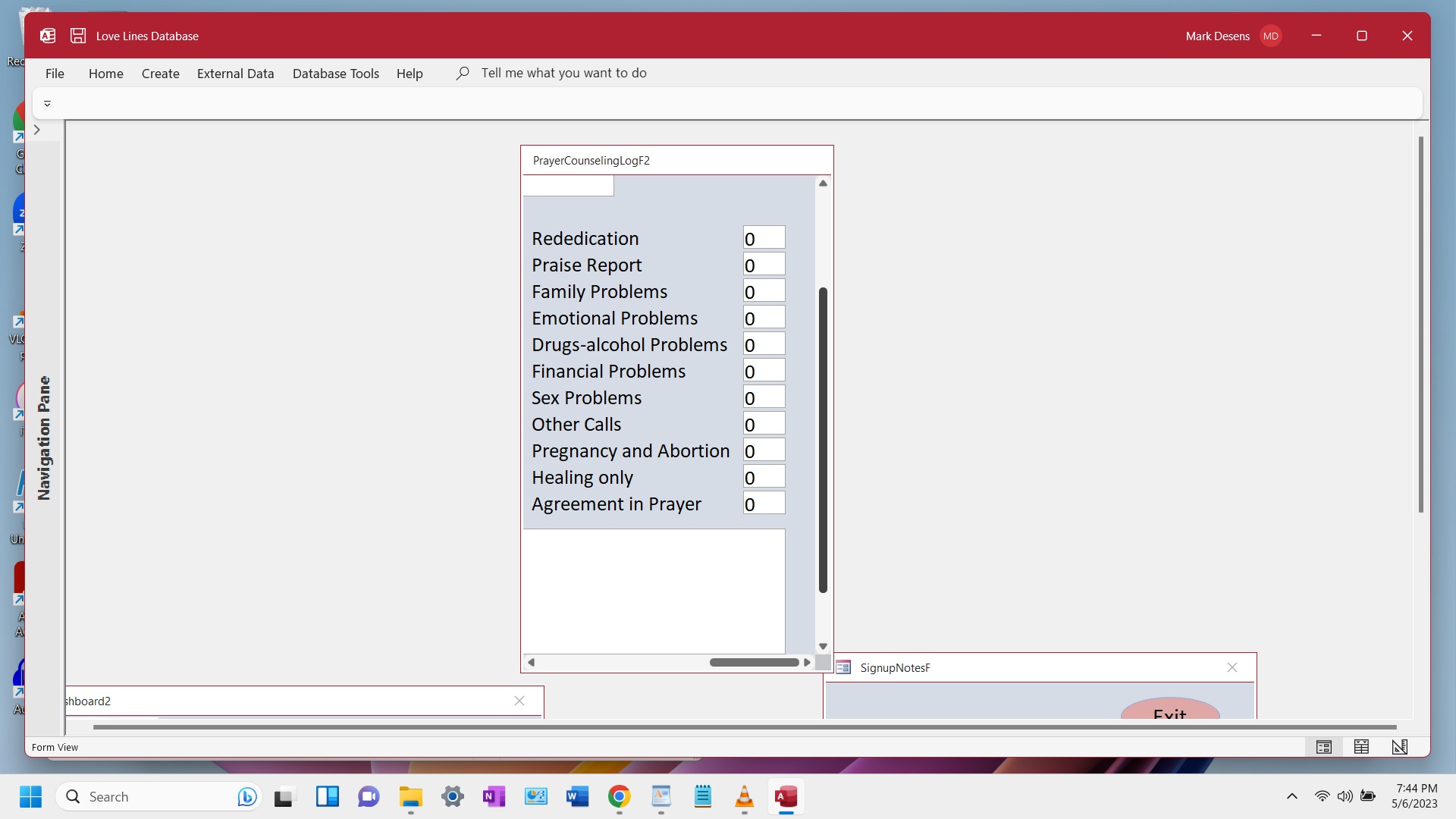
Hi Richard and guys, I need help locking certain fields in one of my forms in a particular way. We have 8 fields on our form that our employees have, those 8 fields are set up for us to only choose one that fits for the customer. Whichever one of the 8 we choose we would like to lock the other 7 but keep the one we chose open in case we made a mistake, then we can take the 1 off put back to 0(zero) and it would open them all up again until we choose the one that fits. I hope that makes sense. Also I would like to do the loop code. I saw you do one that has the public_sub. I cannot remember the video that you did it in. Thanks
Scott Axton  @Reply  
        
3 years ago
I think the video you may be thinking about is the Gray Out Fields.

Also check out the Click to Sort.  Richard shows how to set everything "off" then only select the one chosen.


It's just up to you to determine how you want to put the Legos together.
Mark Desens OP  @Reply  
      
3 years ago

Mark Desens OP  @Reply  
      
3 years ago
Hi Scott and thanks for returning and showing me that video. It only deals with the checkbox. I put a picture up to show the fields that we need to choose from. After choosing one of them then the rest needs to be greyed out like the grey out video shows, but not the one we chose. Thanks, I hope this picture helps.
Scott Axton  @Reply  
        
3 years ago
Based on the first post, one and only one choice,  the first thing I would suggest is to put the choices in a helper table.
Then turn the choice into a combo box or a list box.  That way you can choose an issue and still be able to change it.  You wouldn't have to be worrying about locking or unlocking any thing.

If you want to be able to view all of them at once use the Single Select List Box.
If you think you might need multiple choices to be selected in the future I would go with a Multi Select List Box.

Second, True the gray out shows a check box, but the lesson is there.  Part of learning isn't just copying what Richard has done but to think out side the box and say "OK, how can I apply or modify that teaching do do what I need / want to do?"

So in this case your critical thinking would be:
I changed my mind on x choice so now I need to mark all of them as 0 and unlock them all.
When you put in a 1 in y choice all the 0s need to be locked. (The Click to Sort video I pointed you to.)

See what I mean?  This stuff doesn't come over night for most (myself included) but I have learned to apply things to different scenarios.
Mark Desens OP  @Reply  
      
3 years ago
Hi Scott and yes i read your second reply and I do see what you mean. I also look at other websites to get other information and help with VBA coding. That video worked out good now. One other website showed the same thing so I went with it. Thanks again for the help.

This thread is now CLOSED. If you wish to comment, start a NEW discussion in Access Forum.
 

Next Unseen

 
New Feature: Comment Live View


The following is a paid advertisement
Computer Learning Zone is not responsible for any content shown or offers made by these ads.
 

Learn
 
Access - index
Excel - index
Word - index
Windows - index
PowerPoint - index
Photoshop - index
Visual Basic - index
ASP - index
Seminars
More...
Customers
 
Login
My Account
My Courses
Lost Password
Memberships
Student Databases
Change Email
Info
 
Latest News
New Releases
User Forums
Topic Glossary
Tips & Tricks
Search The Site
Code Vault
Collapse Menus
Help
 
Customer Support
Web Site Tour
FAQs
TechHelp
Consulting Services
About
 
Background
Testimonials
Jobs
Affiliate Program
Richard Rost
Free Lessons
Mailing List
PCResale.NET
Order
 
Video Tutorials
Handbooks
Memberships
Learning Connection
Idiot's Guide to Excel
Volume Discounts
Payment Info
Shipping
Terms of Sale
Contact
 
Contact Info
Support Policy
Mailing Address
Phone Number
Fax Number
Course Survey
Email Richard
[email protected]
Blog RSS Feed    YouTube Channel

LinkedIn
Copyright 2026 by Computer Learning Zone, Amicron, and Richard Rost. All Rights Reserved. Current Time: 5/7/2026 1:10:09 AM. PLT: 1s